
Skip to content
DevMeme
4569 of 7435
GUI lover panics at Patrick's terrifying Git branch cleanup pipeline
CLI Post #5011, on Nov 20, 2022 in TG

GUI lover panics at Patrick's terrifying Git branch cleanup pipeline

Why is this CLI meme funny?

Level 1: Magic Words Are Scary

Imagine two friends cleaning up a messy room. One friend likes to do things the simple way – picking up toys one by one and putting them back on the shelf. The other friend pulls out a wizard hat and starts chanting a magic spell to make all the toys fly into the toy box at once. The magic works and the room gets clean super fast, but the friend who’s never seen this kind of trick is absolutely terrified! In this scenario, the friend who prefers doing things the normal, visual way (using easy-to-understand steps) is like a person who loves using pictures and buttons on a computer. The other friend uses “magic words” – a special string of instructions – to get the job done quickly, and it freaks out the first friend because it’s so unfamiliar and powerful. It’s funny because to the “wizard” friend, these magic words are nothing special (they do this all the time to tidy up), but to the other friend, it’s like watching some scary sorcery happen. Basically, one friend yells, “Abracadabra, all done!” and the other friend is hiding under the covers saying, “Stop it! Those magic words are scaring me!”

Level 2: Scared of the Terminal

This meme is highlighting a simple idea: some developers are scared of the command line. A GUI (Graphical User Interface) is the kind of interface where you click buttons and menus (like in Visual Studio, GitHub Desktop, or any friendly app with windows). In contrast, a CLI (Command Line Interface) is the text-only screen where you have to type commands (the classic black or white terminal window). A lot of beginners stick to GUIs because they’re more visual and intuitive – you can see what you’re doing, and the software often asks “Are you sure?” before a big action. The command line, on the other hand, can feel like a magic spell book: if you don’t know the language, it’s intimidating, and if you type something wrong, it might do something you didn’t expect without much warning. So when Patrick says “I prefer GUIs,” it implies he feels safer with point-and-click tools and is uneasy about typing cryptic commands into a terminal. SpongeBob clarifies that in plain terms: it basically means Patrick is afraid of using the terminal.

Now, what about that giant scary command in the meme? It’s an actual example of a one-liner that an experienced person might use to clean up old Git branches. Let’s break down git branch --merged | egrep -v "^(...)" | xargs git branch -D in newbie-friendly terms:

  • git branch --merged – List all branches in your Git repository that have already been merged. Think of it as “show me branches that are no longer needed because their work is already merged into another branch (like main).”
  • | (pipe) – The pipe symbol takes the output of the first command and pipes it into the next command. It’s like connecting a hose from one command to another, so the list of branches flows into the next step.
  • egrep -v "^(...)" – This part filters the list. egrep is like a search tool (an extended version of grep for pattern matching). The -v option means “invert the match,” so instead of finding things that match the pattern, it will exclude them. The pattern ^(\*|MASTER|MAIN|DEV) might look like gibberish, but it’s saying: “if a line starts with * or the word MASTER or MAIN or DEV, skip it.” In Git’s branch list, an * at the start marks the current branch you’re on, and branches named “master”, “main”, or “dev” are typically important default branches. So this is removing those from the list, leaving only the less important branches that we probably want to delete.
  • xargs git branch -D – The final part. xargs takes whatever text comes into it (in this case, the remaining branch names) and appends each one to the git branch -D command. git branch -D <name> will delete the branch named <name> from your local repository, and the -D (capital D) forces the deletion (even if the branch hasn’t been pushed or merged; it’s a "force delete"). So if there were, say, three branch names left after the filter, xargs will run git branch -D on each of them one by one.

Put together, this command finds all merged branches, filters out the main branches (like master, main, dev, or whatever primary branches you use, plus it avoids the branch you’re currently on), and then deletes every other merged branch in one swoop. It’s a quick way to tidy up your Git repo by removing branches that have already been merged (and presumably aren’t needed anymore). Pretty neat and efficient! But if you’ve never seen these commands before, it looks super intimidating – almost like someone typed a random string of symbols. For a junior developer who maybe only uses Git through a GUI (for example, creating pull requests on GitHub’s website or clicking “Delete branch” in a tool), seeing egrep -v and xargs in a pipeline can be scary. It’s like hearing someone speak a foreign language fluently; you catch a familiar word here or there (maybe you recognize “git” and “branch”), but the rest might as well be magic words. You worry that if you tried to run this, you could accidentally delete the wrong thing, because you don’t yet fully understand how it works.

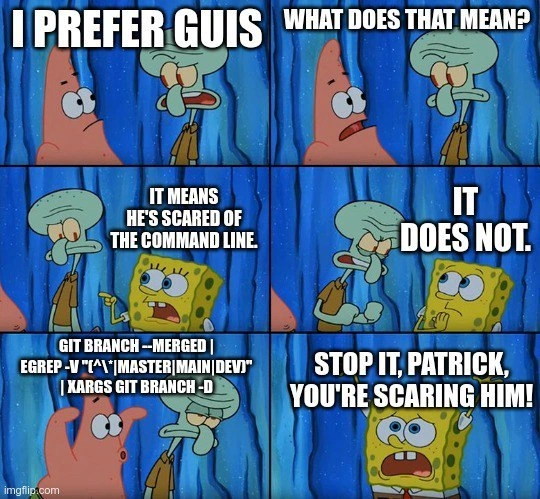
The SpongeBob meme format really plays this up. Patrick says he likes GUIs, Squidward asks what that means, and SpongeBob answers, “It means he’s scared of the command line.” That’s the setup: one character is basically calling the other a fraidy-cat about terminals. Patrick denies it (“It does not!”), and to prove the point, either Squidward or Patrick then spouts that long git branch --merged | ... | xargs git branch -D command. It’s shown as this big block of text, like some kind of forbidden chant. In the last panel, SpongeBob yells, “STOP IT, PATRICK, YOU’RE SCARING HIM!” – which is exactly how it feels when you’re new and someone starts typing a scary-looking command. It’s like one friend just told a really spooky ghost story, and the other friend is covering their ears.

For many of us early in our careers, GUIs are a comfort zone. You might learn Git by using a visual client or your IDE’s built-in source control tools. These GUIs show you branch names, have buttons for commit and merge, and maybe a trash-can icon to delete a branch. Using them, you don’t have to remember commands or worry you’ll typo something disastrously. There’s absolutely nothing wrong with preferring that. But as you gain experience, you eventually run into tasks that the GUI can’t do easily, or you discover that some things are much faster with a quick command. The first few times using the command line can be unnerving. You might double-check every word you type, or hesitate to press Enter. A complex command like the one in the meme – which chains three tools (git, grep, and xargs) and uses a regex (a pattern for matching text) – is definitely not where a beginner would start. It’s the kind of thing you copy-paste from Stack Overflow or a team wiki, hoping it works. And when you see a colleague casually run something like this, it can give you a jolt: “Wow, they really know some serious stuff!” or “Yikes, I’m not touching that!”

In summary, the meme humorously exaggerates the situation of a GUI-loving developer getting spooked by a powerful command-line trick. It’s taking a real sensation – the intimidation of seeing a scary-looking terminal command – and blowing it up for comic effect. The truth is, once you break down what that command is doing step by step, it makes sense and isn’t so scary. It’s actually doing a useful cleanup! But until you learn those details, it absolutely feels like someone reciting a magic spell. The laugh comes from recognizing this gap in familiarity: for one person it’s a simple routine, and for another it’s practically a horror story.

Level 3: Arcane Pipeline Magic

This meme spotlights a classic developer culture clash: CLI vs GUI. One developer proudly proclaims "I prefer GUIs," meaning they favor Graphical User Interfaces for tasks like Git, while the others interpret this as “he’s scared of the command line.” It's a tongue-in-cheek way of saying if you aren’t comfortable in a text-only terminal, you must be intimidated by it. And then, to drive the point home, someone unleashes a formidable shell one-liner: git branch --merged | egrep -v "^(\*|MASTER|MAIN|DEV)" | xargs git branch -D. This is basically a Git branch cleanup pipeline condensed into one line – short, powerful, and absolutely frightening to a GUI-dependent developer.

To a seasoned terminal user, each part of that pipeline is straightforward, but strung together it looks like a conjuration from the Book of Unix. Let’s decode this incantation piece by piece:

  • git branch --merged is a Git command that lists all branches that have been fully merged into the current HEAD (usually your main development branch). This is a common way to identify old feature branches that are safe to delete.
  • This output gets piped (with |) into egrep -v "^(...)". Here egrep (equivalent to grep -E) filters out lines matching a pattern, and the -v flag inverts the match to exclude those lines. The pattern ^(\*|MASTER|MAIN|DEV) looks cryptic: ^ means "beginning of line" and the alternation (\*|MASTER|MAIN|DEV) matches any line that starts with an asterisk (*) or the words "MASTER", "MAIN", or "DEV". In Git’s branch list output, an * marks the current branch, and "master", "main", "dev" are usually important branches. So this regex is a safeguard to skip deleting the current branch or primary branches.
  • After filtering, the remaining branch names (the ones that are merged and aren’t main branches) get passed to xargs git branch -D. The xargs command takes the list of branch names from the previous output and feeds them as arguments to git branch -D. The -D flag forces deletion of each branch. Essentially, this final step will delete every branch in the list, in one fell swoop.

So the whole pipeline says: "List merged branches, ignore the main ones like master/main/dev (and the currently checked-out branch), and delete everything else." It’s a powerful housekeeping trick to nuke dozens of stale branches in one go. This kind of command is incredibly handy after, say, a big project where lots of feature branches have been merged and you want to clean up your repo. But to someone who has only ever deleted branches one-by-one with a mouse click (confirming a pop-up that says “Are you sure?”), this one-liner looks like black magic. No menus, no dialogs — just a few symbols and words that, if misused, could delete the wrong thing. It feels risky and hardcore.

The SpongeBob panels exaggerate this for humor. Patrick (the pink starfish) saying "I PREFER GUIS" casts him as the developer who sticks to graphical tools out of comfort. Squidward asks “WHAT DOES THAT MEAN?” and SpongeBob answers, “IT MEANS HE’S SCARED OF THE COMMAND LINE.” This is the meme’s blunt joke: preferring a GUI basically equals being afraid of the terminal. Patrick defensively protests, “IT DOES NOT.” And that’s when the menacing command is dropped like a jump-scare: git branch --merged | ... | xargs git branch -D appears in big, scary text. Whether it’s Squidward or Patrick reciting it (the meme mixes up the dialogue a bit), the effect is clear – it’s like someone reading a terrifying spell out loud. In the final panel SpongeBob shouts, “STOP IT, PATRICK, YOU’RE SCARING HIM!” meaning that throwing around such a scary Git command is freaking out the poor GUI-preferer.

From a Developer Experience (DX) perspective, this scenario is relatable. Many new developers start with user-friendly interfaces and only gradually learn the command-line tools beneath them. Git, a cornerstone of modern version control, can be operated entirely via GUI in apps like GitHub Desktop, SourceTree, or inside IDEs. But sooner or later, there’s that one task or one bug that pushes you to crack open the terminal. And when you do, it’s normal to feel a bit lost. Command-line aficionados sometimes tease those who haven’t learned it yet – hence the joke about being “scared.” The truth is, the command line can be intimidating: there’s no undo button, and it often expects you to remember arcane syntax like --merged or regex patterns. This meme humorously captures that intimidation factor by showing a worst-case example: a pipeline with multiple commands chained together. It’s poking fun at how something perfectly routine for an experienced engineer can look like a nightmare to someone else.

Seasoned engineers might chuckle at this because they remember being on the other side. Perhaps the first time they saw an rm -rf or a find . -exec command, they thought “yikes, that looks dangerous.” Over time, though, you learn that each piece is logical. The pipeline in question is actually built from simple building blocks: git branch --merged (list things), grep/egrep (filter things), and xargs (apply a command to each thing). Unix-like systems encourage this chaining of small tools – it's a powerful technique once you know it. But to the uninitiated, it’s indistinguishable from someone mashing random symbols on a keyboard. The meme gets a laugh by showing that exact reaction: Patrick’s big command is effectively him showing off some CLI wizardry, and SpongeBob reacts like the friend who’s easily spooked, saying “Whoa, too far, that’s scary.”

All in all, the humor comes from this dramatic contrast in comfort zones. It’s an exaggerated version of a real coding-life moment: one developer’s everyday shortcut is another developer’s worst nightmare.

Description

Six SpongeBob SquarePants panels form the meme, showing Patrick, Squidward, and SpongeBob inside their blue-walled underwater neighborhood. Panel texts, in loud white capital letters, read: (1) “I PREFER GUIS,” spoken by Patrick; (2) Squidward asks, “WHAT DOES THAT MEAN?”; (3) SpongeBob replies, “IT MEANS HE’S SCARED OF THE COMMAND LINE.”; (4) Patrick retorts, “IT DOES NOT.”; (5) Squidward menacingly states, “GIT BRANCH --MERGED | EGREP -v "^(*|MASTER|MAIN|DEV)" | XARGS GIT BRANCH -D”; (6) SpongeBob shouts, “STOP IT, PATRICK, YOU’RE SCARING HIM!” The characters’ expressions escalate from casual to horrified as the command-line incantation appears. Technically, the meme highlights the divide between developers who prefer graphical interfaces and those comfortable chaining Unix pipes, regex filters, and xargs to delete merged Git branches, satirizing command-line intimidation in version-control workflows

Comments

6
Anonymous ★ Top Pick I alias `git branch --merged | egrep -v '^(\\*|main|prod)' | xargs -r git branch -D` to `cleanup`, because nothing calms the GUI crowd like hiding the chainsaw behind a cute button
  1. Anonymous ★ Top Pick

    I alias `git branch --merged | egrep -v '^(\\*|main|prod)' | xargs -r git branch -D` to `cleanup`, because nothing calms the GUI crowd like hiding the chainsaw behind a cute button

  2. Anonymous

    The real horror isn't the command line itself - it's explaining to the junior dev why their 'helpful' GUI auto-merged 47 feature branches into production while you were at lunch, and now you need that exact Git command to clean up the mess before the CEO's demo in 10 minutes

  3. Anonymous

    The real horror isn't the command itself - it's realizing you forgot to exclude 'staging' from that regex and just nuked your deployment branch five minutes before the release window

  4. Anonymous

    GUI bravery is clicking delete; CLI bravery is running git branch --merged | egrep -v "^\\*|master|main|dev" | xargs git branch -d and trusting your regex more than your job security

  5. Anonymous

    It’s not fear of the CLI - it’s blast-radius control; one misquoted egrep and an overeager xargs turns “cleanup” into a blameless postmortem

  6. Anonymous

    That one-liner nukes stale branches faster than any GUI tree view - because real seniors prune repos in their sleep, not via point-and-click

Use J and K for navigation

