Summoning Elder Gods Through Google's Frontend
Why is this Frontend meme funny?
Level 1: Pretend Spell on a Website
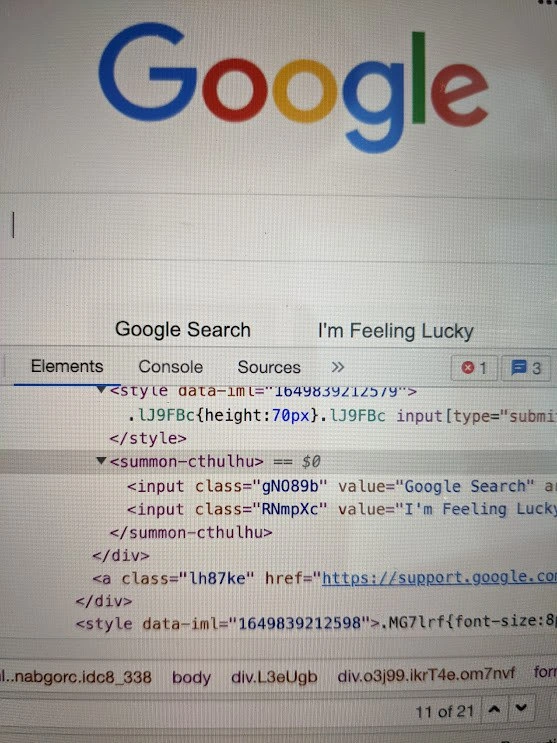
Imagine you’re looking at the simple Google search page, and you decide to play a little prank that only you can see. It’s like putting a silly sticky note on a famous painting – it doesn’t damage the painting, but it adds something funny for you to look at. In this case, a developer wrote a make-believe magic spell into Google’s webpage using the browser’s editing tools. They made a pretend HTML tag named “summon-cthulhu” and wrapped it around Google’s search buttons, as if that tag were a secret ritual to call a monster.
Now, Cthulhu is just a big imaginary monster from a story – think of it like a giant octopus-dragon creature from a fantasy tale. By typing <summon-cthulhu> in the page’s code (only on their own computer), the developer is joking that they’re casting a spell on the Google page to summon this monster. Of course, nothing really happens – Google won’t actually sprout tentacles! – but seeing that funny <summon-cthulhu> label in the list of page elements is like a little Easter egg or prank. It’s as if someone wrote “(Insert Monster Here)” around the buttons as a joke.
The reason this is funny is because Google’s site is normally very serious and clean. Sneaking a playful, spooky-sounding tag into it is like doodling a tiny dragon in the corner of a textbook when the teacher isn’t looking. It doesn’t change the real content, but it gives the person who did it a good laugh. It also shows how developers can peek behind the curtain of websites and even toy around with what’s there. In plain terms: the developer is pretending to do magic on a webpage – casting a fake spell called “summon Cthulhu” – just to amuse themselves and fellow developers. It’s a reminder that even in serious tech, there’s room for playful make-believe.
Level 2: DevTools Magic Trick
So, what exactly are we looking at here? This image shows the Google homepage (you know, that simple Google search page we all see) with Chrome’s Developer Tools open in the “Elements” tab. Developer Tools (or DevTools) is a panel that lets you inspect and even live-edit the code of any webpage in your own browser. It’s an essential tool in frontend web development and debugging/troubleshooting issues on web pages.
In the Elements panel, we can see the structure of Google’s page in HTML. Normally, Google’s search page has a form with two buttons: the “Google Search” button and the “I’m Feeling Lucky” button (those are the two <input> elements with those values visible). In the screenshot, however, the developer has done a little trick: they inserted a custom HTML tag called <summon-cthulhu> around those button inputs. This is not something Google put there – it’s something the developer added manually as a prank or experiment using the DevTools editor.
Let’s break it down in simple terms:
HTML and Tags: HTML pages are made of elements denoted by tags like
<div>,<p>,<button>, etc. Each tag usually has a specific purpose. Browsers know how to display standard tags (for example,<input type="submit">makes a button). But here the tag is<summon-cthulhu>, which is not a standard HTML tag at all! The browser doesn’t have a built-in meaning for<summon-cthulhu>– it’s just an arbitrary name the developer invented. Surprisingly, browsers don’t mind if you invent a tag; they will still show its content. Think of tags as just nodes in a tree – if a tag is unknown, the browser just treats it as a generic node with no special style or behavior.Custom Tag (Unknown Element): Because
<summon-cthulhu>isn’t a recognized element, Chrome treats it as a plain container. In the DOM (Document Object Model), it appears as a parent element wrapping the two input buttons. The DevTools view even shows== $0next to it, which is a little Chrome feature telling us that this element is selected (and can be referenced as$0in the Console). The developer basically wrapped Google’s search buttons inside this new tag. This doesn’t make the buttons stop working (if we pressed them, they’d likely still function) – but it does change the page’s structure. It’s like putting those buttons inside a new box that nobody expected to be there.“Hijacking” the DOM: The phrase sounds dramatic, but it just means the developer manually altered the page’s DOM structure. The DOM is the live representation of the page’s HTML that JavaScript and the browser use. By adding
<summon-cthulhu>, the dev changed the hierarchy: originally, the buttons might have been direct children of a form or div; now they are children of this<summon-cthulhu>element. In a live-edit like this, only the developer sees the change – it’s not uploaded to Google or anything. As soon as you refresh the page, Google will send down the original HTML again and the funny tag will be gone. So it’s a temporary, local change, often done for testing or, as in this case, for humor.Chrome DevTools Inspector: The image shows multiple tabs – “Elements”, “Console”, “Sources”, etc. The Elements tab is where you inspect and modify HTML/CSS. The Console tab (with that little red badge showing a “1”) is where messages, errors, or logs appear. The presence of “1” in red likely means there is at least one error or message in the console (maybe caused by our new
<summon-cthulhu>tag confusing some script). We also see a snippet of CSS styles: something like.LJ9FBc { height:70px }. Google’s page uses generated class names (likeLJ9FBc) for styling. That CSS snippet is just part of Google’s normal code – DevTools often shows some relevant styles alongside the HTML. It’s not directly related to the Cthulhu gag, but it shows the context (we’re looking at part of the styling for the search page, maybe the container around the logo or buttons).Cthulhu Reference: Now, what’s with the name “summon-cthulhu”? Cthulhu is a fictional cosmic monster/ancient deity from horror literature (H.P. Lovecraft’s stories). In developer humor, Cthulhu is sometimes referenced as a metaphor for something huge, complex, and a bit terrifying. By naming the tag
<summon-cthulhu>, the dev is basically making a joke: it’s like saying “I’m wrapping these elements in a summon spell for a mythic monster.” It’s a playful way to label the custom element, purely for laughs. They could have named the tag anything (<div>or<my-wrapper>would be a normal choice to wrap elements), but choosing “summon-cthulhu” gives it a funny, nerdy twist. It implies that adding this tag is akin to performing a dark ritual on the page (in reality it’s benign, but the metaphor is humorous).Why this is done: Developers often use DevTools to test changes. For example, you might add a temporary
<div>around something to see how it affects layout, or change text to see how a longer label looks. In this case, the person likely did it as a joke – to screenshot the Google homepage with a spooky-sounding element in it. It demonstrates that live DOM editing is possible. You can, for instance, click on an element in the Elements panel, press F2 or right-click and choose “Edit as HTML”, then insert or change tags. That’s probably how they inserted<summon-cthulhu>. It’s done on the fly, and immediately the DOM updates and the page might reflow or change accordingly.Semantic Havoc (meaning chaos in structure): Using a non-standard tag like this is described as wreaking semantic havoc because it breaks the normal meaningful structure of the page. “Semantic” refers to meaning in HTML – for example, a
<header>tag means “this is a header section”. An unknown tag doesn’t convey any meaning (neither to the browser, nor to other tools like screen readers). If this were a real change in a website’s code, it would be odd and likely problematic. But done in DevTools, it’s more like a prank. The phrase indicates the dev is knowingly doing something that makes no sense in proper HTML, purely for fun. It’s like scribbling a nonsense word in an otherwise perfectly written document – you’re introducing a bit of chaos.Harmless Experiment: It’s important to note, nothing malicious is happening here. The word “hijack” in the title might sound like hacking, but it’s not hacker activity in the sense of breaching security. The developer simply inspected and edited the DOM locally. This doesn’t affect anyone else using Google. It’s analogous to editing a copy of a public document that’s in your hands – you can mark it up, but the official document on the server remains unchanged. Developers do this all the time to test layout tweaks or debug issues (for instance, trying out a different CSS style or modifying HTML to see how an idea would work, before actually coding it in the source code). In fact, if you open DevTools on any site, you have the freedom to add whatever HTML you want. Want to put
<unicorn>elements all over a news site? You can – and your browser will dutifully treat them as generic containers. It won’t persist or do anything functional, but visually you’ll see them in the DOM tree.
In summary, what we see is a developer playing “mad scientist” with front-end code: using Chrome’s inspector to wrap Google’s search buttons in a completely out-of-place, humorous <summon-cthulhu> tag. It’s a combination of nerdy humor (the Lovecraft reference) and web dev know-how (using the inspector, custom tags) that creates a screenshot worth a chuckle among developers. After all, not every day do you see an ancient god’s summoning circle hidden in the Google homepage’s code!
Level 3: Eldritch HTML Shenanigans
From a senior developer’s perspective, this meme perfectly captures that mix of web development mischief and dark humor we all love. The Google homepage is one of the most iconic, carefully curated pieces of front-end out there – clean, minimal, and not meant to be tampered with (at least by users). Yet here we have a dev casually popping open Chrome DevTools and hijacking Google’s DOM structure, wrapping the search buttons in a <summon-cthulhu> tag. It’s the ultimate inside joke: taking something so polished and injecting an absurd, monstrous element, just because we can. It resonates with developers because it’s a reminder that under the hood of any slick web page, we have the power to tweak, twist, and even troll the content live in our browser.
Why is this combination funny? For one, there’s the stark contrast: Google’s interface is all purity and primary colors – the cute multicolor logo, the simple search box – and then our dev goes and performs a dark ritual in the code by summoning Cthulhu of all things. Cthulhu, a tentacled ancient god from H.P. Lovecraft’s fiction, is a symbol for immense, unfathomable complexity or horror. In developer lore, invoking Cthulhu is a tongue-in-cheek metaphor for doing something extreme or recklessly powerful with code. It’s like saying, “I’m so desperate to fix this bug or spice things up, I’ll call upon eldritch forces.” We’ve all had those debugging sessions where nothing works and you half-jokingly consider sacrificing something to the programming gods. Here, the dev literally wrote a forbidden incantation into the HTML. It’s a funny exaggeration of a desperate debugging hack – when all else fails, open DevTools and try some HTML voodoo! 🐙
Another layer of humor is the notion of “semantic havoc”. In web development, we’re taught to use semantic HTML – meaning using the right tags for the right purpose (e.g., <button> for a clickable button). We strive for clean, meaningful markup for accessibility and maintainability. But this meme says, “To heck with semantics, let’s summon a god in our markup!” By wrapping important UI elements in a completely made-up <summon-cthulhu> tag, the dev is essentially throwing semantic rules out the window. It’s a playful jab at how developers sometimes do crazy, non-best-practice things in the heat of debugging or experimentation. We know writing non-standard HTML is naughty – it could confuse screen readers or break scripts – but in the safe sandbox of DevTools, it’s our playground. It’s chaos without consequence (at least, not beyond a console error or two). That little red “1” on the Console tab? It hints that Google’s own JavaScript might be side-eyeing this eldritch wrapper and going “Uh, what is that?” Possibly some script tried to find the parent form or expected the inputs at a certain DOM depth, and now our occult tag interfered. The screenshot captures that delicious moment where the dev’s prank causes a tiny blip in the otherwise perfect page – a single console error, like a startled yelp from the web app: “Ph’nglui? What now?”
Seasoned devs also recognize the scenario of live-editing markup during front-end debugging. It’s a common workflow: open the Elements panel to inspect why some element isn’t positioned correctly, maybe add a quick <div> or change a <span> to a <p> to test a layout fix. We typically do this with serious intent. But there’s a shared amusement in the fact that we could just as easily do nonsensical edits – like turning the Google Doodle into <marquee> text or wrapping the search buttons in a mythical summoning tag – simply because nobody is stopping us on our local browser. It’s a harmless form of DOM trolling. We’re not defacing the real website (only we see the changes), but we get a kick out of the possibility. In developer culture, screenshots of such shenanigans get passed around for laughs, almost like digital graffiti art. It demonstrates both a mastery of the tools (knowing you can alter the DOM on the fly) and a cheeky sense of humor.
There’s also a bit of historical irony at play. Older devs remember the wild west of the 1990s web, when browser vendors introduced all sorts of proprietary HTML tags – <blink> in Netscape to make text flash annoyingly, <marquee> in IE to scroll text, etc. Using those felt like summoning chaos back then – sometimes they only worked in one browser, breaking in others. Standards were loose and HTML could get pretty monstrous. Fast forward to today: the web is more standardized, but here we are intentionally injecting a completely non-standard tag. It’s like a throwback prank, but this time the browsers have evolved to handle it gracefully. In fact, the tag name <summon-cthulhu> with its hyphen almost looks legit, as if it were a real custom component (imagine some developer library for Halloween that actually defines a <summon-cthulhu> element to rain chaos on your page!). The humor is that it’s purely decorative in this meme – it doesn’t do anything except exist and amuse. It’s a developer flexing creative muscles in the debugging tool, not in production code (hopefully!).
From a Developer Experience (DX) standpoint, the meme highlights how empowering modern browser dev tools are. Chrome’s DevTools (and similar tools in Firefox, Safari, etc.) let developers pause time and manipulate the very structure of a page in-memory. That empowerment can be used for good (fixing layout issues on the fly) or for goofing off (adding secret tags, swapping images, editing text on any site just for a joke). The DX is so good that even the world’s most heavily guarded homepage (Google’s) is an open canvas once it’s rendered in your browser. The phrase “Developer hijacks Google DOM” sounds dramatic, but it’s really hinting at this democratization of control in the browser. Any dev with knowledge of the DOM inspector can become an temporary god of the page’s DOM, bending it to their will locally. Usually, we use that power to debug CSS; in this case it’s used to role-play a dark sorcerer in the realm of HTML. And let’s be honest, after long hours of coding or fighting a bug, doing something zany like this is cathartic. It’s a reminder not to take things too seriously – even the Google front page can be a source of WTF humor if you have DevTools open.
Finally, the cultural reference of Cthulhu itself is a wink to the shared geekiness among developers. Lovecraft’s Cthulhu mythos is niche but hugely popular in gaming, literature, and nerd humor. There’s a common trope in programming jokes: when code becomes incomprehensibly complex or buggy, we jests that it’s “powered by dark magic” or we need to “summon eldritch gods” to understand or fix it. This meme manifests that trope literally in the browser. It’s the same energy as jokingly adding // TODO: summon Cthulhu in a code comment when you’re out of ideas. So experienced devs see this and chuckle—yep, been there, feeling like I might need a demonic ritual to get my code working. It’s funny because it’s a hyperbole of real frustration and creativity in development. And hey, as far as debugging techniques go, at least this one only scares project managers when they see the screenshot, not actual end-users!
Level 4: Arcane Tag Handling
At the deepest technical level, this meme pokes at how forgiving and extensible the HTML specification is. Web browsers like Chrome implement an HTML parsing algorithm that can handle unexpected tags without breaking. In the screenshot, the developer introduced a custom tag <summon-cthulhu> into Google’s DOM. According to the HTML5 spec, any tag that isn’t a known standard element is simply treated as an “unknown element” (in the DOM it becomes an HTMLUnknownElement). The browser doesn’t crash or throw a fit; it just shrugs and includes <summon-cthulhu> in the DOM tree as a generic container, preserving any children inside. This tolerance for unknown tags dates back to the web’s SGML roots – browsers learned to be resilient by munching through malformed or unrecognized markup (often called tag soup). It’s a survival trait of the web: if the browser encounters <magic-pony> or <summon-cthulhu>, it will dutifully create a DOM node for it, even if it has no clue what “magic-pony” or ancient gods are supposed to do.
What’s especially delightful here is that the made-up tag actually follows the modern Custom Elements naming conventions. In Web Components (an advanced web dev technology), developers can define their own HTML tags, but custom tag names must include a hyphen (e.g. <my-element>). This prevents clashes with future standard tags. Our humorous <summon-cthulhu> tag contains a hyphen, so ironically it could be a legit custom element name. If the developer wanted, they could even bind functionality to this eldritch element using the Custom Elements API. For example, they might write JavaScript like:
customElements.define('summon-cthulhu', class extends HTMLElement {
connectedCallback() {
console.log("🌑 Cthulhu has been summoned into the DOM!");
// Perhaps unleash some tentacle animations or chaos here
}
});
By doing this, the <summon-cthulhu> element would gain life: as soon as it appears in the DOM, the connectedCallback would fire and log a spooky message (or perform any scripted behavior – maybe change the page styling as if a Great Old One truly arrived!). In the screenshot, however, there’s no such script – the tag is purely decorative. It means no actual Cthulhu was harmed (or summoned) in the making of this meme. Still, Chrome DevTools shows a red “1” badge on the Console tab, indicating some script on the page did react (likely a harmless error). Google’s frontend might have run a query like document.querySelectorAll('input') or tried to find the parent node of those buttons – and our unexpected <summon-cthulhu> wrapper possibly confounded that logic, producing an error or warning. In essence, the developer’s sneaky custom tag is a foreign object in Google’s carefully engineered DOM – an arcane sigil that the page’s JavaScript wasn’t prepared to comprehend.
This playful hacking underscores an important point in web architecture: the DOM (Document Object Model) is dynamic and scriptable after initial load. The browser builds the DOM from HTML, but developers (or mischievous users) can modify it on the fly via DevTools or JavaScript. Browsers enforce rules (like nesting and tag semantics) during parsing, but once the DOM is built, you can rearrange nodes arbitrarily. Adding a <summon-cthulhu> tag after the fact doesn’t break the DOM parser because parsing is done – we’re now just manipulating the live DOM tree. The DOM API (e.g. document.createElement(), appendChild()) is powerful: it’s designed to allow injection, removal, and wrapping of nodes at runtime. That’s how frameworks and extensions operate – and here it’s how a developer manually injects an eldritch twist into a live page.
From a standards perspective, using a completely made-up tag does create semantic ambiguity. Standard HTML tags carry meaning (e.g. <button> signals a clickable button, <nav> indicates navigation content). A tag named <summon-cthulhu> has no defined meaning in any HTML spec (unless our cultist coder wrote documentation in some forbidden manual!). By introducing it, the developer has effectively created a semantic void – a black box – around the search buttons. Web accessibility tools or parsers encountering this might be puzzled: “What on earth is a <summon-cthulhu> supposed to be?” If this were actual production code, it’d raise eyebrows in code reviews and likely anger the elder gods of web standards (and the accessibility folks!). But browsers, being pragmatic, just treat unknown tags like anonymous <div>s by default – they are displayed as inline or block elements depending on context, with no special styling or behavior. In modern Chrome, a custom tag with a hyphen gets an HTMLElement subclass (so that it can be upgraded to a defined custom element if a definition is provided). If no definition is ever provided (as in our case), it just stays inert – a hollow vessel in the DOM.
Historically, not all browsers were so accommodating. Old versions of IE (pre-HTML5 era) wouldn’t apply CSS styles to unknown tags unless you explicitly called document.createElement('some-tag') in JavaScript first – a quirk that spawned the famous HTML5Shiv script to make new HTML5 tags like <article> work in IE8. Those were truly eldritch times for front-end devs! By contrast, today’s browsers handle novel tags gracefully. So our developer’s DOM trolling here – wrapping Google’s buttons in a creature from Lovecraftian lore – is made possible by years of browser evolution toward flexibility. The HTML parser and DOM engine say, “Summon Cthulhu? Sure, I’ve seen stranger tags in my nightmares, go ahead.” The result: the page doesn’t crash; it just contains a bit of whimsical, non-standard markup.
Description
The image is a screen capture of the Google search homepage with the browser's developer tools opened. The 'Elements' tab is active, revealing the underlying HTML structure of the page. A developer has humorously inserted a custom, non-standard HTML tag: `<summon-cthulhu>`. This tag is highlighted in the inspector, showing that it wraps the two search buttons ('Google Search' and 'I'm Feeling Lucky'). This is an inside joke for web developers who often use the 'Inspect Element' feature to play with or debug live websites. The humor lies in the absurdity of embedding a reference to Cthulhu, a cosmic entity from H.P. Lovecraft's horror fiction, into the clean, corporate code of Google. It playfully suggests that behind the simple facade of the search engine lies the potential for invoking ancient, incomprehensible chaos, a feeling sometimes relatable when debugging complex web applications

Comments
8Comment deleted
The fastest way to summon an elder god is to write an HTML tag for it. The second fastest is trying to vertically align a div with CSS
Fun fact: <summon-cthulhu> is perfectly valid HTML5 - as long as your eldritch deity’s tag has a hyphen, the validator stays silent; it’s the accessibility audit that starts screaming
Looking at Google's homepage source: two buttons, 10,000 lines of JavaScript, and a class naming convention that suggests someone's cat walked across the keyboard during a production deploy
Of course the buttons live inside <summon-cthulhu> - anyone who's read minified production DOM knows the Old Ones wrote the build pipeline
Ah yes, the ancient ritual: right-click → Inspect Element on Google's homepage to discover they've been summoning Cthulhu this whole time. Turns out 'I'm Feeling Lucky' wasn't about search results - it was about your sanity surviving the encounter with their minified class names. At least now we know why production bugs feel like eldritch horrors: they literally wrapped their buttons in '<summon-cthulhu>' tags. The real horror isn't the Old Ones awakening; it's trying to debug CSS specificity when every class is named like a password manager suggestion
Web components: as long as your eldritch horror has a hyphen, <summon-cthulhu> is spec-compliant - finally making “I’m Feeling Lucky” deterministic
Inspecting 'I'm Feeling Lucky': even Google ships class names that require DevTools archaeology
Because it has a hyphen, the parser accepts summon-cthulhu as a legit Custom Element - perfect for a demo and terrifying for governance, right up until your 3am DevTools hotfix vanishes on reload