
The Duality of Git: Team Tool vs. Personal Save Point
Why is this VersionControl meme funny?
Level 1: Saving Your Game
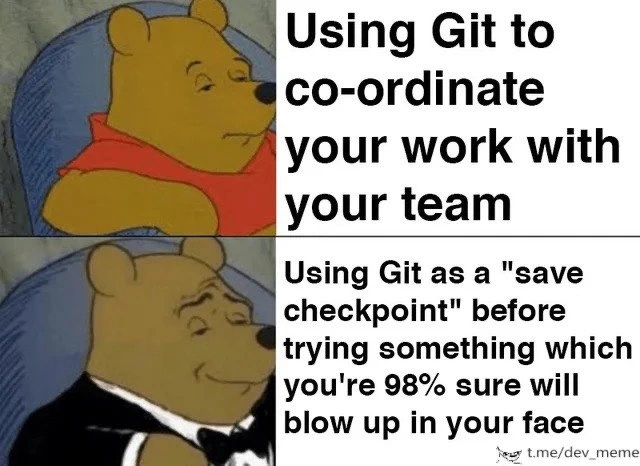
Imagine you’re playing a video game and you're about to fight a really tough boss or try a crazy move. What do you do first? You save your game, of course! That way, if things go wrong, you can always reload and try again. This meme is funny because the programmer is basically doing exactly that, but with their code. Git is a tool that everyone is supposed to use to share and organize code with others (kind of like a big shared workbook for a group project). However, in the second part of the meme, the programmer is using Git more like a personal save button. They know the next thing they try will probably mess everything up (they’re “98% sure” it will blow up in their face, just like a game character might get defeated by that boss). So, just like saving a game, they make a special save of their code right before trying the risky thing. If the code breaks or “dies” during the experiment, no worries – they can go back to the safe saved version and everything will be okay again.
Why is this humorous? Because it’s a bit like if your teacher gave you a group notebook to work together with classmates, and instead you secretly used it to copy your homework before doing something silly that might ruin your work. It’s a sneaky, relatable move. Everyone wants a safety net when they’re unsure. The meme shows a cartoon bear (Winnie-the-Pooh) looking normal for the boring proper use (sharing with the team), and then the same bear dressed in a fancy tuxedo looking all proud when he’s using that tool as his own little safety checkpoint. In simple terms, the joke is: using the tool the normal way is fine, but using it to save your butt is extra fancy. It makes us laugh because every developer (even though they know what the tool is really for) has felt that nervousness and thought, “Oops, this might go wrong… better save first!” It’s a fun way to say "better safe than sorry" with code.
Level 2: Quick-Save Commits
Git is a tool programmers use for version control – basically keeping track of changes in code and helping multiple developers work together without overwriting each other's work. Normally, using Git involves coordinating with your team: you make a change, commit it (which means saving a snapshot of your code with a message describing the change), and then push it to a shared repository so everyone can pull the updates. This is how Git is intended to improve Developer Productivity: everyone can see who changed what and merge their contributions. The first part of the meme (“Using Git to co-ordinate your work with your team”) refers to this standard Git workflow. It’s the everyday use of Git where, say, Alice and Bob are working on the same app; they use branches (separate tracks of work), commit their changes, and then merge those changes so the software progresses smoothly. That’s team collaboration in a nutshell – Git acts like the central library of code where each change is recorded with an ID and message.
Now, the meme contrasts that with a second scenario: “Using Git as a 'save checkpoint' before trying something which you're 98% sure will blow up in your face.” Here the developer isn’t really thinking about the team at all. Instead, they're treating Git like a personal safety net. A “save checkpoint” is a term borrowed from video games (and it literally means a save game point) – it’s where you save your progress so you can reload if things go wrong. In coding, a similar concept would be making a commit purely so you can restore your code to that point later if needed. It’s like saying: “I’m about to attempt a change that might completely break the project, so let me quickly commit everything in its working state right now. If (or rather, when) this experiment fails, I'll still have this good state recorded and I can get back to it.” This kind of commit is often informally called a checkpoint commit or panic commit. It might come with a message like “WIP (Work In Progress) – trying something out” or even just “temp save.” Developers also joke about this as git_save_checkpoint mode. It’s not an official feature of Git per se, just a clever (if slightly sneaky) way of using it.
In practice, this looks like: you have your code working, and you want to try a big change (for example, upgrading a library or doing a major refactor of a function). You suspect this might break things (that’s the “98% sure will blow up in your face” feeling). So before you even begin, you do:
- Commit your current code – essentially telling Git “remember this state”. All your files at this moment are saved in Git’s database with a new commit ID. For example, you might run
git add .(to stage all changes) andgit commit -m "Checkpoint before trying X"(to save with a message). Now Git has a snapshot of your code pre-experiment. - Do the risky experiment – you start modifying code, refactoring, or trying that new approach. Maybe you switch a major algorithm or re-structure a module. As you feared, things start to go wrong: tests are failing or the app won’t even run. Uh-oh, the face-blow up is happening.
- Restore from the checkpoint – since you made that commit earlier, you have a safety harness. If the experiment fails miserably, you can tell Git to bring your project back to the state of that last commit. This could be done with commands like
git checkoutorgit reset --hardusing the commit you saved. Essentially, you undo all the changes made after the checkpoint, reverting the code to how it was. It’s like hitting an undo button that covers possibly hundreds of lines of changes. You breathe a sigh of relief because everything is back to the known good state.
So what’s the meme’s joke? It’s that the second approach is depicted as the fancier, superior one (hence Pooh in a tuxedo looking proud). It’s poking fun at how developers often actually use Git. Officially, Git is a teamwork tool – teams create branches, review each other’s commits, and maintain a clean commit history. Unofficially, a lot of us also use Git like a personal code backup or “time machine.” For example, a junior developer might not yet know advanced Git commands, but they learn quickly that “commit early, commit often” can save them from disaster. Even though those commits might have silly messages or contain half-done work, having them means if they mess up the code, they haven’t lost everything; they can recover.
To break down the meme panels: the Winnie-the-Pooh meme format is a popular one where the first image (Pooh in his red shirt, looking indifferent) labels the ordinary thing, and the second image (Pooh in a tuxedo with a smug expression, often called Fancy Pooh) labels a more refined or exaggerated version of that thing. Here, “Using Git to coordinate with your team” is the normal, expected behavior – important but not exciting. “Using Git as a save checkpoint when you’re 98% sure of disaster” is the exaggerated, humorous behavior – it's portrayed as classy even though it's really a bit of a hack. The humor comes from recognition: anyone who’s worked on code has likely done that second thing in a moment of doubt. The text “98% sure will blow up in your face” is hyperbole to emphasize just how risky the upcoming changes feel. It’s practically a commit_before_experiment ritual. Instead of carefully planning or writing tests first, the developer is bracing for the explosion by hitting save on everything.
For a newer developer (or someone learning Git), there are some terms to clarify here:
- Commit: In Git, a commit is like a snapshot of your project at a point in time. Think of it as hitting save on a folder of files – it records all current file versions along with a message. Commits are usually meant to capture a meaningful change or update in the code.
- Branch: This is a parallel version of the repository where you can make changes without affecting the main line of development (often called
mainormaster). Teams often use branches to isolate feature development or bug fixes. In a healthy team workflow, you'd try your risky changes on a separate branch so you don't mess up the team’s main code. That branch can later be merged if things go well. In the meme’s scenario, the developer could be committing on a separate branch (or even on the same branch locally) as a checkpoint. The meme doesn’t explicitly mention branches, but experienced folks will implicitly understand that this quick-save commit might live on a throwaway branch or be amended later. - WIP: Stands for "Work In Progress." A WIP commit is a commit made when your work isn't finished or stable yet. It's like a midpoint save. Many developers prepend commit messages with "WIP" to signal "this is not final, just saving my place."
- Stash (alternative concept): Git has a feature called
git stashwhich temporarily shelves changes without making a permanent commit. It's often used to save work-in-progress in a hurry. However, stash is ephemeral (hidden and not part of history), whereas a commit marks the history. Some devs prefer a quick commit over a stash because the commit is more visible and permanent (and can even be pushed to a remote repository as a backup). The meme focuses on committing as the safety method, which is very common.
So essentially, the meme resonates with developers because Git frequently ends up serving as both a collaborative tool and our personal code backup system. The DeveloperHumor here is that everyone publicly promotes good Git practices (clean commit history, coordinated teamwork, following a structured workflow), but privately we all have those “I have no confidence in what I’m about to do, so let me save everything first” moments. It's a lighthearted jab at ourselves: we know using Git like this isn’t the textbook way, but when you’re sweating over code that might break, Git gives you that comforting ability to create a restore point. And judging by Pooh’s smug face in the second panel, that ability makes us feel just a bit clever and sophisticated — even if our teammates would roll their eyes at those extra commits later!
Level 3: GitFlow vs PanicFlow
Git is a distributed version control system originally designed to help teams coordinate changes to code. Under an organized Git workflow (like the famous GitFlow branching model), developers create feature branches, write clean commit messages, and merge code via pull requests so the whole team stays in sync. That's the first panel of the meme: regular Winnie-the-Pooh looking unimpressed while “Using Git to co-ordinate your work with your team.” It's portrayed as the plain, expected usage. Now enter the second panel: fancy Tuxedo Pooh smugly endorsing a far more relatable practice — “Using Git as a 'save checkpoint' before trying something which you're 98% sure will blow up in your face.” This is the satirical PanicFlow technique every seasoned engineer secretly knows. Instead of prim and proper branch strategies, it's fear-driven development: you commit your code right before a risky experiment, treating Git like a personal quick-save in a video game.
What's so funny (and painfully true) is that this VersionControlHumor flips the script: the "fancy" Pooh approves the less professional behavior. In real life, even senior developers have done that panicked commit – a.k.a. the panic_commit – just before a massive refactor or a production hotfix hail-mary. We know we should use Git for team collaboration, but when you're 98% sure your next change will break everything, hitting git commit feels like strapping on a parachute before jumping. It's an insurance policy: if the code blows up in your face, you can calmly git reset back to the last known good state. The meme strikes a chord because it humorously acknowledges this gap between textbook Git usage and Developer Productivity hacks we actually use to stay sane. The first panel is the ideal (teamwork and clean history), the second panel is the reality (personal safety net) – and the extra joke is that we’re proud of this sneaky tactic, as indicated by Pooh’s smug tuxedo look.
From a senior perspective, there's an underlying commentary on commit history hygiene. Ideally, each commit should be a logical, tested unit of work, and your repository's history should read like a sensible narrative of the project. In practice, though, panic commits pepper our history with messages like "WIP: hope this works" or "checkpoint before trying X". These speculative_changes commits clutter the timeline with unsquashed WIP checkpoints, but they do preserve our sanity. A veteran engineer will chuckle at this because they've seen commit logs where half the entries are basically save points before some hairy experiment. It’s a trade-off between disciplined branching strategies and real-world “oops I better save first” moments. Distributed version control like Git makes this possible – unlike old centralized VCS (e.g. Subversion) where committing half-baked changes to the shared repo was a big no-no, with Git you can commit locally (or on a throwaway branch) without immediately impacting others. That empowerment is a double-edged sword: it enables proper collaboration and enables our sneaky quick-save habit.
Let's be honest, using Git as a personal time machine is practically a rite of passage in software development. Imagine you're about to refactor a core module that could bring the whole app down. Your team is not around (or doesn't need to see your half-working code yet), but you want a safety net. So you create a commit as a snapshot of the last known good state. If the experiment fails spectacularly, you have a point in history to return to with a simple Git command. In pseudocode, the panic_save routine might look like this:
# Step 1: Stage and checkpoint current working state
git add -A
git commit -m "WIP: checkpoint before refactor"
# Step 2: Attempt the risky changes (speculative experiment)
# ... edit lots of code, possibly introduce chaos ...
# Step 3: If it blows up as feared, revert back to the safe checkpoint
git reset --hard HEAD # discards uncommitted changes, back to last commit
In this little script, the developer boldly commits (with a not-so-formal message) right before the chaos. If the new changes crash and burn, git reset --hard HEAD acts like hitting "undo" back to the checkpoint commit. It's essentially using Git's version control features as a quick-save/quick-load mechanism. This feels incredibly reassuring when you're deep in the trenches of a hairy bug fix or a speculative refactor. Sure, it’s not the pristine collaborative workflow the VersionControl tools were meant for, but when things get dicey, every engineer knows that one commit could save hours of trying to reconstruct what you just broke. Better a messy Git history than an irrecoverable codebase meltdown, right?
The meme’s humor is sharpened by how DeveloperHumor often exposes these unspoken truths. The contrast in the text highlights an industry inside-joke: everyone preaches good Git etiquette, but DeveloperMemes like this remind us that behind the scenes, even the best of us sometimes embrace “Git Save Scumming” (as gamers might say). The Winnie-the-Pooh format drives it home: normally you'd expect the fancy tuxedo Pooh to represent the proper sophisticated practice. Here it's inverted—Fancy Pooh smugly approves of our cheeky misuse of Git. It’s basically saying, “Using Git for team coordination is fine, but using Git to save your own hide? Now that's classy.” The senior engineers reading this are nodding and smirking because it’s a gentle roast of our own habits. We’ve all justified a commit that’s just for ourselves with the thought, “future me will thank me for this backup.” The meme is a fun, ironic pat on the back for every coder who’s treated version control like their personal continue button in the game of coding.
Description
A two-panel meme using the 'Tuxedo Winnie the Pooh' format to contrast different uses of Git. The top panel features a standard, slightly bored-looking Winnie the Pooh in his red shirt, with the caption: 'Using Git to co-ordinate your work with your team'. This represents the conventional, intended use of the version control system. The bottom panel shows a sophisticated Winnie the Pooh dressed in a tuxedo, looking smug and pleased. The caption reads: 'Using Git as a "save checkpoint" before trying something which you're 98% sure will blow up in your face'. This meme humorously highlights a common, practical workflow among experienced developers: making a quick, local commit as a safety net before attempting a risky refactoring or change, allowing for an easy reset if things go wrong. The format implies that this latter use, while less formal, is a more savvy and essential survival skill

Comments
7Comment deleted
The most important Git command isn't `push` or `pull`, it's `git commit -m 'dear god, please let this work'` right before you try to merge two branches that haven't spoken to each other in six months
My disaster-recovery plan: feature flags for prod, DB snapshots for data, and a reflexive ‘git commit -m “pre-disaster savepoint”’ before every 2 AM “hold my beer” refactor - because reflog has a better RTO than our official backups
After 20 years in the industry, I've learned that Git's killer feature isn't distributed version control - it's the ability to create a quantum superposition where your code both works and doesn't work until someone else observes your pull request
The real Git workflow: 'git commit -m "works on my machine, probably"' followed by 'git commit -m "YOLO refactor"' and then 'git reset --hard HEAD~1' when the blast radius exceeds expectations. We all pretend Git is for collaboration, but let's be honest - it's really just Ctrl+S with extra steps and the ability to time-travel away from our mistakes. The tuxedo is earned when you realize that 'git stash' before a risky merge is the developer equivalent of putting on a seatbelt before attempting a U-turn on the highway
Git: collaboration tool by day, disaster recovery by night - WIP commit, detached HEAD, unleash chaos, then reflog back to sanity
Git: collaborative by design, save-game by practice - until “quick rebase” detonates and your incident response is a detached HEAD and a reflog pilgrimage
Git: Where architects commit before that 'simple' monolith-to-microservices pivot, because reverts beat explaining outages to CTOs

