
Skip to content
DevMeme
1366 of 7435
Checking In on Your Favorite Git Branch
VersionControl Post #1539, on May 8, 2020 in TG

Checking In on Your Favorite Git Branch

Why is this VersionControl meme funny?

Level 1: Checking on a Friend

Imagine you have a favorite toy or a pet that you check on every morning. You might peek into your room and say, “Hi there, how are you doing today?” just to make sure everything is okay. If your favorite toy is right where you left it and in one piece, or your pet is happy and calm, you feel relieved and cheerful. This meme is showing a programmer doing the same thing, but instead of a toy or pet, it’s their code. The programmer opens up their computer and “greets” their project by asking, “How’s my favorite branch doing?” (that’s a playful way to say hello to the part of the code they’re working on). They do this by running a command on the computer that checks the code’s status. When the computer replies with something like “Everything’s clean and up to date” (meaning nothing has changed or broken overnight), the programmer feels as happy and reassured as if a friend just told them all is well. It’s funny because we don’t usually think of people saying good morning to their work tools, but developers care about their code so much that they treat it like a friend. Seeing that everything is fine with their code is a great way to start their day, just like getting a smile from your best friend.

Level 2: Morning Repo Greeting

If you’re a newer developer, you might notice colleagues always popping open a terminal and typing git status as soon as they sit down to work. What’s going on? They’re essentially saying “Good morning” to their code! In software development we use Git (a popular version control system) to manage changes in code. A branch in Git is like an alternative timeline for your project – for example, you might have a main branch where working code lives, and separate branches for new features or experiments. You can imagine a branch as a parallel universe of your code where you’re making specific changes. Developers often have a branch they’re focused on (say, a feature they’ve been working on all week), and they get a bit attached to it. It’s not literally a person, but when you spend days with a piece of code, it can feel like a trusty sidekick.

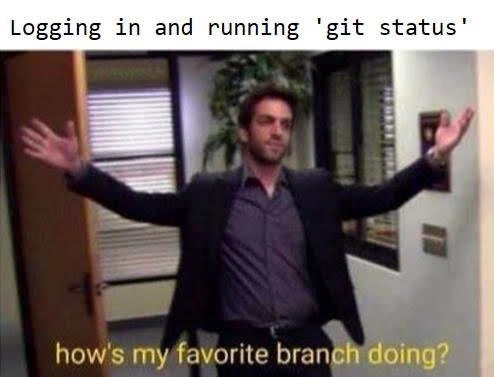
Now, the command git status is a quick way to ask, “Hey Git, what’s the situation with my code right now?” Running this command will tell you a few key things at a glance: which branch you’re on, and whether there are any changes that haven’t been saved (committed) yet or sent to the server. It’s like checking a to-do list of code changes. The meme’s caption "Logging in and running 'git status'" describes this habit of doing a status check first thing. The punchline text "how's my favorite branch doing?" perfectly captures the DeveloperExperience_DX of it — treating your current branch like a friend you’re excited to see.

Let’s break down a typical output of git status to see why it’s so reassuring:

$ git status  
On branch **main**  
nothing to commit, working tree clean  

In the example above, Git responds with: “On branch main” – meaning you’re currently working on the branch named “main”. Then it says “nothing to commit, working tree clean.” This is Git’s way of saying “Everything is saved, and your project folder has no stray changes. All clear!” If there had been any unsaved work, git status would list those files or changes. For instance, if you edited a file and didn’t save those changes into Git yet, it might say “modified: filename.py” under a Changes not staged for commit section. But seeing “working tree clean” means you ended your last session in a tidy state – no loose ends.

Why do developers care so much? Because it’s easy to forget what you were last doing, especially if you step away from a project or log off for lunch or overnight. Running git status is like checking the pulse of your project: it reminds you what branch you’re on (so you don’t accidentally start coding in the wrong place) and whether there’s any unfinished business (like uncommitted changes or incoming updates from teammates). It’s a simple habit that prevents mistakes. No one wants to start writing new code only to realize they were on the wrong branch, or commit something and find out they had unstaged changes that didn’t go in.

The humor here also comes from a bit of hyperbole – the image shows someone greeting their branch with open arms, as if the branch is a dear friend. Developers really do get a little burst of happiness from a clean git status. It might seem silly, but when you work with code every day, your tools and your project start to feel personal. There’s even a hint of a pop culture joke: the phrasing “how’s my favorite branch doing?” sounds like something a ridiculously cheerful boss or friend would say, maybe referencing that parks_and_rec_reference where a character greets someone as their “favorite”. Combining that with a Git command is the kind of mashup that makes programmer memes uniquely funny. Essentially, the meme is saying a developer’s idea of a warm greeting is checking their branch’s status. And honestly, for a lot of us, that’s true!

Level 3: Working Tree Clean

Logging into a development environment and immediately running git status is practically a reflex in modern software development. The meme shows a developer bursting through a door with arms wide, exclaiming "how's my favorite branch doing?" This dramatic greeting humorously anthropomorphizes a Git branch as if it were a beloved colleague or pet. Why is this so funny to experienced devs? Because version control habits on the CLI (Command Line Interface) are so ingrained that they become daily rituals – ones we actually get emotional about!

In technical terms, git status is our go-to morning health check for a codebase. It's akin to a doctor’s quick vitals check, but for your project’s repository. The command performs a flurry of checks in a fraction of a second, giving developers instant feedback on their project's state. Under the hood, here's what happens when you cheerfully ask Git for status:

  • Branch check: Git reads the HEAD pointer to see which branch you're on, printing something like On branch feature/login-page. It’s as if the branch waves back, saying "I'm here, and my name is feature/login-page today!"
  • Uncommitted changes: Git compares the latest commit (HEAD) with the staging index (where files go when you git add them). If there are differences, it will list files that are staged but not yet committed. Think of this as Git hinting, "You have some gifts in wrapping paper (staged changes) not delivered to history yet."
  • Unstaged modifications: It also checks your working directory (the actual files in your project folder) against the staging index. Any edited files you haven't git added yet show up as modified. Essentially, Git is tattling on files that have changed but haven’t been saved to a snapshot: "These files changed and you haven’t told me to remember them yet."
  • Up-to-date with remote: If your branch is tracking a remote branch (e.g., origin/main), git status will even tell you if you're ahead (new commits to push) or behind (commits you need to pull) relative to the team’s version on the server. It's like your branch mentioning, "By the way, I've got news from our remote counterpart!"

All this information is condensed into a friendly summary. The sweetest phrase a developer can see is “nothing to commit, working tree clean.” That line means everything is committed, and your local copy matches the last known commit – pure Zen in the version control world. It’s the code equivalent of a doctor saying “You’re in perfect health!” No merge conflicts, no untracked files, no outgoing or incoming surprises. For a seasoned dev, that clean bill of health sparks joy and maybe even a bit of pride in their disciplined workflow.

The humor lands because this scenario is so relatable. Many of us have literally done a happy little :tada: inside when our favorite branch is in good shape. We greet our code in the morning like an old friend, half-jokingly asking if anything crazy happened overnight. (Pro tip: if you’ve ever sleepily typed git status in the wrong directory and gotten “Not a git repository”, you know your muscle memory is strong – and you might chuckle, then cd to the project and try again!) This meme takes that everyday Developer Experience (DX) and dials it up to sitcom-level enthusiasm. It even nods to pop culture: the line “how’s my favorite branch doing?” riffs on the over-the-top friendliness seen in shows like Parks and Recreation or The Office. In those shows, an overly excited character might burst in and say, “How’s my favorite team doing?” — here, it’s a developer doing it to their code. The juxtaposition of sterile tech (git status) with warm human cheer is what makes it developer humor gold. Every experienced coder knows the codebase won’t actually hug you back… but hey, it doesn’t hurt to check!

Description

This meme features a still from the TV show 'The Office,' showing the character Ryan Howard walking into the office with his arms spread wide in a gesture of grand arrival. A caption at the top of the image reads, 'Logging in and running 'git status''. A yellow subtitle at the bottom, from the show's dialogue, says, 'how's my favorite branch doing?'. The joke perfectly captures the feeling many developers have when returning to work after a break. They treat their personal feature branch with a sense of ownership and affection, and the first order of business is to check its status. Ryan's smug and self-important demeanor comically reflects how a developer might feel about their own carefully crafted branch amidst the chaos of a larger project


Comments

7
Anonymous ★ Top Pick My favorite branch is always the one I haven't tried to rebase onto main yet
  1. Anonymous ★ Top Pick

    My favorite branch is always the one I haven't tried to rebase onto main yet

  2. Anonymous

    I start every morning with git status - if my “favorite branch” answers “detached HEAD,” I know the repo and I are both uncommitted to today’s architecture decisions

  3. Anonymous

    That warm feeling when you check on your feature branch after the weekend, only to discover it's now 47 commits behind main and has three merge conflicts with code that didn't even exist when you started it

  4. Anonymous

    Every senior engineer knows that 'git status' is less about checking what changed and more about confirming your feature branch hasn't spontaneously combusted overnight - or worse, that someone force-pushed to main while you were asleep. The real anxiety isn't the merge conflicts you'll find; it's the existential dread of discovering your carefully crafted branch has been orphaned by a rebase you didn't authorize

  5. Anonymous

    Git status: where 'clean working tree' feels like a win against overnight CI sabotage

  6. Anonymous

    At 9am, git status is my observability dashboard - hoping for “working tree clean,” bracing for “detached HEAD after someone force‑pushed the rebase queue.”

  7. Anonymous

    git status: “ahead by 27, behind by 43.” Love checking in on my favorite branch - too long‑lived to rebase, too cursed to merge; it’s basically a microservice now

Use J and K for navigation
