
Skip to content
DevMeme
6156 of 7435
Git Typo Workflows: Reactive vs. Proactive Solutions
VersionControl Post #6751, on May 16, 2025 in TG

Git Typo Workflows: Reactive vs. Proactive Solutions

Why is this VersionControl meme funny?

Level 1: Work Smarter, Not Harder

Imagine you have a door that you always pull when you’re supposed to push. Every morning, you yank the door the wrong way and get stuck for a second. A simple fix would be to remember “push, don’t pull,” but you keep forgetting. Now, what if instead you changed the door so that pulling on it also opens it? Then it wouldn’t matter if you forget – pulling or pushing, you’d get through every time. This meme’s joke is just like that! The first person is struggling because they pulled the “door” the wrong way (typed the command wrong) and had to try again. The second person is a clever cookie: they quietly adjusted the “door” (the computer’s settings) so that even when they pull by mistake, it works. It’s funny and satisfying because the smart solution isn’t to try harder at remembering the right way, but to tweak things so even the “wrong way” becomes right. In other words, the senior developer isn’t fighting his habit, he’s finding a crafty way to make his habit work for him. It’s a cute techie take on “if you can’t fix the person, fix the tool” – a perfect example of working smarter, not harder.

Level 2: Alias to the Rescue

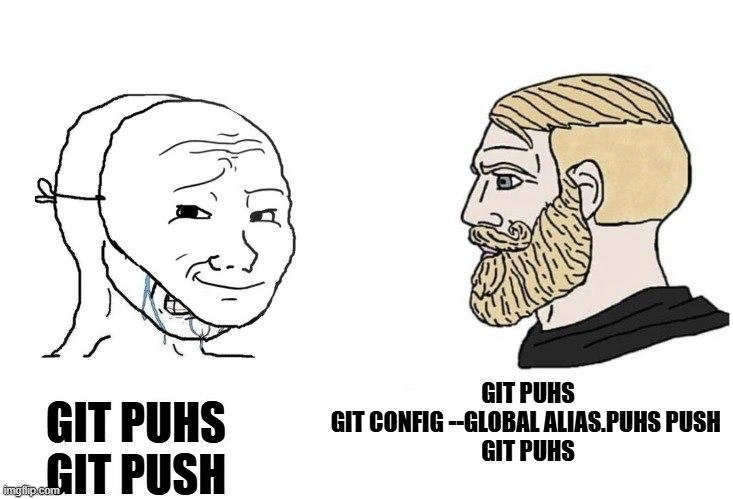
Let’s break down what’s happening in this meme in simpler terms. On the left side, the unhappy cartoon face (Wojak) is a stand-in for a frustrated programmer who mistyped a Git command. He wanted to run git push – which is the command to push (upload) his code changes to a remote repository (like sending your commits up to GitHub). But he accidentally typed git puhs (notice the letters h and s are swapped). In Git (which is a version control tool used in the command line), even a small typo means the command won’t be recognized. The result? An error message like:

$ git puhs  
git: 'puhs' is not a git command. See 'git --help'.

This kind of error is super common for newcomers and veterans alike — we call them fat-finger mistakes, basically hitting the wrong keys or mixing up the order of letters due to muscle memory or rushing. It’s the same vibe as misspelling words when typing fast. The left panel shows “GIT PUHS” (the wrong command) followed by “GIT PUSH” (the correction) in big bold letters, capturing that oops moment and the immediate fix by retyping it correctly. Wojak’s tear-streaked, anxious expression dramatizes how a developer might feel after encountering yet another silly typo error: annoyed, tired, maybe a bit panicked if it’s a critical moment.

Now, the right side introduces a cooler character, Chad (the blond bearded guy with a confident profile). He represents an experienced or “senior” developer. He faces the same situation – the text under him also starts with “GIT PUHS”, meaning he too typed the wrong command. But instead of just correcting the typo once and moving on, he does something clever: he enters a Git configuration command: git config --global alias.puhs push. This is shown on the second line under Chad. Let’s decode that command piece by piece, because it’s the key to the joke:

  • git config: This is the Git command used to view or set configurations (settings) for Git behavior. You can change how Git works by adjusting its config.
  • --global: This flag means “apply this configuration globally for the user,” as opposed to just one repository. In other words, save it in my main .gitconfig file so it’s active in all my projects on this machine.
  • alias.puhs push: This part is specifying a new alias. In Git’s config, aliases are like shortcuts or nicknames for commands. Here, we’re defining an alias named “puhs” and telling Git that “puhs” should execute the push command.

So, when Chad runs git config --global alias.puhs push, he is effectively editing his Git settings to include: “Whenever I type git puhs, interpret it as git push.” If you looked inside his ~/.gitconfig (the global config file in his home directory), you would now find something like:

[alias]  
    puhs = push

This means under the [alias] section, there’s an entry mapping “puhs” to the “push” command.

After setting that up, the meme shows a third line under Chad: “GIT PUHS” again. This time, when he types git puhs, guess what – it will work! Thanks to the alias, Git will see “puhs” and know it’s an alias for the real push command. In practical terms, Chad has taught Git to understand his typo. The next time his fingers accidentally type puhs, Git will automatically do a push as if nothing was wrong. No error message will appear; it will proceed to push his code. It’s like he programmed a custom auto-correct directly into his command-line tools.

For a junior developer or someone newer to Git, a few things might be new here:

  • Git: a widely-used version control system that tracks changes in code. Developers use Git via commands in a terminal (text interface). For example, git commit saves a snapshot of your changes, and git push sends those snapshots to a server.

  • Command Line Interface (CLI): a way to interact with your computer by typing text commands. It’s powerful but picky – commands must be exact. git push does something, but git puhs will just confuse the computer.

  • Alias: think of an alias as a nickname or shortcut for a longer command. Many command-line tools (and shells) let you set an alias. Commonly, developers create aliases to save keystrokes (like typing gp to mean git push, for speed). In Git’s case, adding an alias in the config lets you create new pseudo-commands. For example, if you set alias.co = checkout, then typing git co would run git checkout. In this meme, the alias isn’t for saving keystrokes but for catching a mistake. It’s like saying, “If I ever type this wrong word, assume I meant the correct one.”

  • Global config: Git actually has multiple levels of configuration (system, global, local). Global config (with --global) applies to you, the user, no matter what project folder you’re in. That’s why Chad uses --global – he wants this typo fix everywhere, permanently (he must typo “push” as “puhs” often enough that it’s worth adding a universal rule!). If he only added the alias to a local config (just one repository), he might forget to add it elsewhere and still hit the problem in other projects.

The meme’s humor also comes from the Chad vs. Wojak format, which is popular in online developer humor. Wojak (left) is drawn as the sad, overwhelmed guy – which fits the newbie who’s annoyed by the repeated mistake. Chad (right) is drawn as the confident, problem-solver type – fitting the senior dev who comes up with a smart solution. The side-by-side panels basically say: Rather than simply correcting the typo each time (and crying about it), you can configure your tools so the typo becomes the correct command. The senior developer’s approach feels like a “big brain” move – it shows experience by proactively preventing the same error from happening again. It’s also a bit funny because it’s an unexpected use of a feature: typically aliases are used for convenience shortcuts, but here it’s used to accommodate a mistake.

For a less experienced programmer, this meme is also educational. It reveals that Git has this alias capability at all. Many beginners don’t realize you can customize Git commands! But indeed, you can run commands like git config --global alias.st status to make git st do the same as git status. In general, customizing your development environment is a big part of becoming more efficient. Seasoned developers often have a personal setup – like a special .bashrc or .zshrc file with shell aliases, or a .gitconfig with dozens of handy shortcuts. Here are some common examples:

  • Aliasing git co to git checkout (because typing checkout frequently can be tedious).
  • Aliasing git br to git branch to list branches quickly.
  • Even fixing habitual typos: someone might set alias.pull puul if they frequently invert letters in pull (silly, but if it happens often, why not?).

The meme exaggerates this habit by showing a very senior dev who has no shame in aliasing even “puhs”. It implies he’s perhaps done this for a lot of things — his environment totally bends to his will. This highlights a concept in DeveloperExperience (DX): reducing friction. Every time Wojak mistypes, it interrupts his flow and causes frustration (bad DX). Chad invests a minute to configure an alias once, and avoids that frustration forever (good DX). The joke is that the senior developer approach to a DeveloperShortcuts problem is sometimes just, “Eh, let me script it away,” even if the problem is as trivial as a two-letter swap. It’s a form of self-made tooling improvement.

Also, notice that Chad does git config --global ... in the meme text, meaning he’s editing the config via command. This is the same as opening your global .gitconfig file in an editor and writing the alias in, but doing it through the command ensures it’s added correctly without typos (ironically important here!). After that, Chad typing git puhs one more time shows that it now works seamlessly. We don’t see the output, but presumably the code gets pushed without error. Wojak on the other hand had to manually correct himself to git push each time.

In summary, the meme is saying: “If you keep making the same little mistake, you can be like a senior dev and configure your tools to forgive that mistake.” It’s both a practical tip (use Git aliases to customize commands) and a joke about the DeveloperHumor of being a bit lazy in a smart way. The tags like GitCommands, mistyped_commands, git_alias, and DeveloperErgonomics all point to this idea of making the command-line friendlier to the human using it. It resonates with any coder who has spent long hours in the terminal, because who hasn’t yelled at a computer for not guessing what we meant? Chad’s solution is basically telling the computer, “Next time, guess better – here’s what I mean when I type that.” It’s a lighthearted reminder that our tools are configurable, and sometimes the shortcut to success is literally creating a shortcut for your common mistakes.

Level 3: Not a Typo, a Feature

In the world of VersionControl via the CLI, one stray keystroke can derail your workflow. This meme nails a scenario every developer recognizes: you meant to run git push to upload your code, but your fingers fumbled and typed git puhs instead. On the left, the Wojak character (the shaky, crying figure) represents the frazzled developer who keeps fat-fingering the command. He’s frustrated because the terminal is unforgiving — Git responds with an error since “puhs” isn’t a valid command. On the right, we have the ultra-confident Chad character (the blond bearded figure) embodying a senior engineer’s mindset. Chad types git puhs and doesn’t even flinch when it fails; instead, he calmly pulls off a power move: git config --global alias.puhs push. By doing so, he teaches Git a new trick – literally telling Git, “Whenever I type git puhs, I actually mean git push.”

This contrast is hilarious because it highlights two very different approaches to the same problem. The novice Wojak keeps correcting himself manually, feeling the pain of each mistake. The seasoned Chad, however, anticipates that this typo will happen again and chooses to eliminate the problem at the source (the source being his tool, not his hands). It’s a classic work smarter, not harder moment. Rather than retraining years of muscle memory, the senior developer quietly alters the tool to fit his habits. This is a subtle dig at how senior engineers often deal with developer ergonomics: why fight human nature (and tired fingers) when you can configure your tooling to absorb the error? After decades in a terminal, pros know that small frictions like mistyped commands add up. So, they instrument their environment to be more forgiving – turning personal bugs into features.

Under the hood, Git’s alias system is being used as a form of custom auto-correct. The meme’s right panel text “GIT PUHS -> GIT CONFIG --GLOBAL ALIAS.PUHS PUSH -> GIT PUHS” is like a mini story:

  1. Step 1: Chad makes the same typo (“git puhs”), but he’s not panicking.
  2. Step 2: Instead of backspacing in shame, he runs the config command to create a permanent alias. This is a one-time fix that will live in his ~/.gitconfig (global Git settings).
  3. Step 3: He confidently types “git puhs” again. Now, thanks to the alias, Git treats it as “git push” and the command succeeds. No error, no hassle – the typo just works.

The humor here also taps into shared developer experiences. Many of us have a Swiss army knife of GitCommands and aliases in our dotfiles that outsiders never see. Ever worked with a guru who never seems to mistype a command? Chances are they’ve scripted away their common mistakes. For example, it’s not uncommon to alias git st to git status or even gti to git (because swapping letters is a classic muscle-memory slip). We chuckle at Chad’s solution because it’s surprisingly relatable: Yes, you can actually do that! It’s a tongue-in-cheek portrayal of DeveloperExperience_DX optimization – the senior developer isn’t “better at typing,” he’s just better at bending the computer to his way of doing things. This flips the usual narrative: instead of the user adapting to the software, the software is adapted to the user. Seasoned devs know that the command-line interface is highly customizable, and this meme exaggerates it in a brilliant way.

Another layer to this joke is the Wojak vs. Chad meme format itself, which the dev community often uses to contrast novice vs. expert behavior. Here, Wojak’s pain is the all-too-familiar frustration of tiny mistakes in a critical moment (“Why won’t this push? Oh, I misspelled it again!”). Chad’s smug solution represents that almost superhuman calm seniors have – not because they never make mistakes, but because they’ve seen it all and have a fix for everything (even their own typos). It implies a bit of satirical wisdom: a truly 10x developer isn’t the one who never errs, but the one who rigs the system so the errors don’t matter. By formally aliasing a typo in his config, Chad basically said, “It’s not a typo; it’s an alternate spelling.” He’s turning an obvious CodingMistake into just another accepted command. This resonates with the classic phrase in tech, “It’s not a bug, it’s a feature.” Here, the typo literally becomes a feature of his Git setup.

From an industry perspective, this highlights how experienced engineers value automation and shortcuts. It’s a mini-lesson in productivity: if you catch yourself doing something wrong repeatedly, don’t just repeat the pain — invest time once to automate a remedy. The trade-off is effort now (one config command) for payoff later (less frustration forever). Senior devs apply this philosophy everywhere: writing scripts to handle tedious tasks, setting up linters or formatters to catch mistakes, and yes, even aliasing clumsy commands. The meme is funny because it’s a bit extreme (aliasing “puhs” feels almost like cheating), but it’s rooted in truth. It’s poking fun at the DeveloperHumor of how we cope with our own fallibility. Why did this joke land so well? Because anyone who’s used Git extensively has definitely groaned at a “command not found” or “unknown command” error after a long day, and the thought of outsmarting the computer like this is both cathartic and comical.

One might ask, “Is this really a thing senior devs do?” Absolutely – maybe not always for every typo, but customizing the command line is second nature to heavy terminal users. They’ll shorten long commands to two-letter aliases, create safe shortcuts, and yes, occasionally map a frequent typo to the correct command. It’s a quiet productivity flex. In fact, whole frameworks like Oh-My-Zsh and tools like alias managers exist to help manage these DeveloperShortcuts. The meme just distills it to a simple example that’s instantly recognizable. The genius of Chad’s approach is that next time he’s in a high-stakes situation (like an urgent deploy on Friday evening), typing git puhs won’t induce panic or waste precious seconds – his system has his back. On the flipside, this also winks at a subtle truth: senior devs get comfortable with their customized environments. Take them out of their finely tuned shell setup, and they might actually stumble! (Imagine Chad using a fresh laptop without his aliases – suddenly “git puhs” is an error again and the cool façade might crack). That scenario isn’t shown, of course; the meme sticks to the triumphant narrative.

In summary, the humor works on multiple levels: it’s a ToolingFrustration story with a twist, a portrayal of newbie vs. pro habits, and a nod to the power of configuring your tools. It reminds us that DeveloperExperience often comes down to these little quality-of-life tweaks. The senior developer’s “muscle memory” might be set in stone, but instead of painfully rebuilding that muscle, he wrote a tiny rule so the computer flexes around it. That’s both clever and absurd in the best way, which is exactly what makes us laugh and think, “Huh, I should probably do that too.” This is developer humor at its finest: it educates (hey, you can alias commands!) while it entertains. After seeing this, you might just find yourself adding a cheeky alias or two in your own config – joining Chad in the enlightened state of letting the computer accommodate your quirks.

Description

This is a two-panel 'Wojak vs. Chad' meme comparing two different developer approaches to a common problem. On the left, the 'Soyjak' or 'Wojak' character, depicted with a smiling mask hiding a crying face, is shown above the text 'GIT PUHS' followed by 'GIT PUSH'. This represents a developer who frequently makes a typo and must manually correct it each time, hiding their frustration. On the right, the stoic, bearded 'Chad' character is shown. Below him, the sequence of commands is: 'GIT PUHS', 'GIT CONFIG --GLOBAL ALIAS.PUHS PUSH', and then 'GIT PUHS' again. This illustrates a superior workflow: upon making the typo, the Chad developer immediately creates a global Git alias, so the typo 'puhs' will forever work as 'push'. The meme humorously contrasts the inefficient, repetitive cycle of a junior or less savvy developer with the proactive, problem-solving mindset of a senior engineer who invests a small amount of time to create a permanent, automated solution


Comments

24
Anonymous ★ Top Pick The junior developer spends 5 seconds fixing the 'git puhs' typo every time. The senior spends 5 minutes creating the alias so they never have to think about it again. The principal writes a pre-commit hook to block any future typos from reaching the team's shell history
  1. Anonymous ★ Top Pick

    The junior developer spends 5 seconds fixing the 'git puhs' typo every time. The senior spends 5 minutes creating the alias so they never have to think about it again. The principal writes a pre-commit hook to block any future typos from reaching the team's shell history

  2. Anonymous

    Real seniority is when you optimize Git for your fingers’ entropy budget instead of refactoring your neural net

  3. Anonymous

    The real senior move isn't creating an alias for 'puhs' - it's having already aliased 'yolo' to 'git add . && git commit -m "WIP" && git push --force' for those Friday afternoon deployments

  4. Anonymous

    The real senior move is creating a git alias for your typo instead of learning to type correctly - because why fix your muscle memory when you can just configure your way around it? Bonus points if your .gitconfig has more aliases than actual commits, and you've aliased 'git status' to 's' but still type 'git st' out of habit from your SVN days

  5. Anonymous

    True senior move: stop retraining your thumbs and make the interface adapt - git config --global alias.puhs push is SRE-grade toil reduction for keystrokes

  6. Anonymous

    Senior move: codify muscle memory with `git config --global alias.puhs push` - until you’re on a vanilla jump box and “puhs” ships nothing but embarrassment

  7. Anonymous

    Senior dev flex: aliasing 'push' to 'push' for that enterprise-grade config indirection and zero keystroke savings

  8. @gegechin 1y

    https://guthib.com/

  9. @OKomarov 1y

    git config --global alias.🔥 commit -am "fixed 💩" reminds me of the time I forked Python to accept emojis as variables

    1. @sysoevyarik 1y

      Python if it was good

    2. @itsTyrion 1y

      git config --global alias.YOLO1 commit -am "fixed 💩" git config --global alias.YOLO2 push -f origin master

  10. @mrYakov 1y

    git puhs fuck //real command btw

    1. @Vlasoov 1y

      git reabse fuck

  11. @SamsonovAnton 1y

    Git Poohs

    1. @phoetik 1y

      Why they look mutable

      1. @SamsonovAnton 1y

        Because they do hardcore asm, not functional programming!

  12. @pyrothefuck 1y

    there is a cli tool called thefuck

  13. @LapkiProch 1y

    пше

  14. @yanisalwayslies 1y

    gaa; gcmsg 'feat: nothing'; gp

    1. @NaNmber 1y

      you can't commit without message anyway, so gcmsg seems excessive

      1. @yanisalwayslies 1y

        yeah but i provided the message

        1. @NaNmber 1y

          I mean the short command itself, gc would be sufficient

  15. @qwnick 1y

    why do you need to push 2 times?

    1. dev_meme 1y

      Twice in a lifetime?

Use J and K for navigation
