Skip to content
DevMeme
1190 of 7435
A Tale of Two Git Repositories
VersionControl Post #1328, on Apr 18, 2020 in TG

A Tale of Two Git Repositories

Why is this VersionControl meme funny?

Level 1: A Bigger Mess

Imagine you and your friend each have a bunch of colored strings. You try to weave them together and end up with a small tangled knot of red, green, blue, and purple threads. It looks pretty messy to you, and you laugh, “Wow, I really made a knot out of these!” But then your friend shows you their strings – and it’s an even bigger tangle, a giant rainbow snarl of threads going every which way. Your little knot suddenly looks simple by comparison. You both can’t help but laugh because you thought your mess was bad, but clearly your friend’s mess is on a whole different level. That’s exactly the feeling this meme gives: one person’s code work got all tangled up (so much that it looked like a crazy colorful game), and then someone else says “Pathetic” and reveals an even crazier tangle. It’s funny in the way that seeing an even bigger mess can make you feel a bit better (and amazed) about your own mess.

Level 2: Branch Spaghetti

Let’s break down what’s happening here in simpler terms. Git is a popular tool developers use for version control, which means tracking changes in code over time. Think of Git as a timeline for your code, where each save point is called a commit. Developers often create branches, which are like alternate timelines where you can add new features or fixes without disturbing the main code. Eventually, you bring those branches back together by merging them. A Git graph is a visual way to show all these timelines (branches) and how they join up with merges. Usually, one branch (often called master or main) is the straight line down the graph. Other feature branches start off that line and later merge back in, which shows up as colorful lines connecting back to the main line.

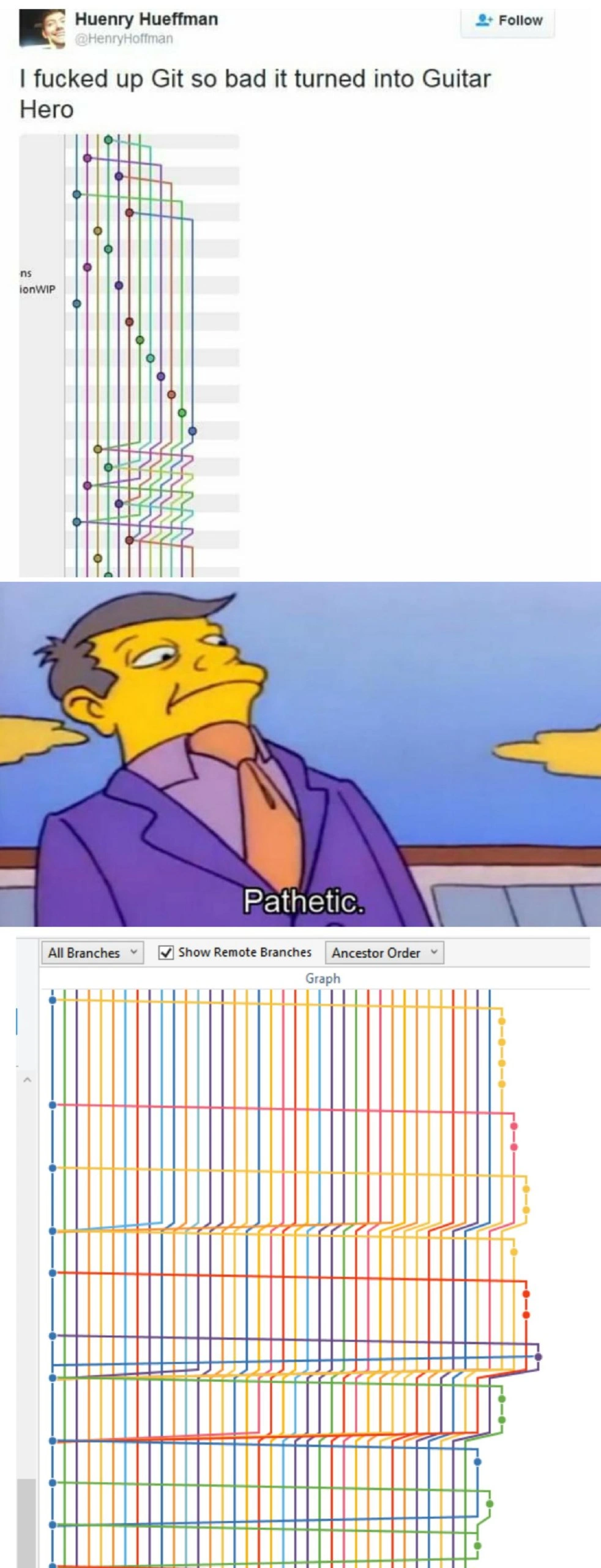
In the first panel of the meme, someone tweeted that their Git history “turned into Guitar Hero.” Guitar Hero is a music rhythm video game where colored notes slide down on vertical lanes, and you have to hit them in time like playing a guitar. In Git visualization tools, each branch is often shown in a different color. So if you have a lot of branches and merges, you’ll see a bunch of colored lines weaving around – kind of looking like a Guitar Hero screen with multiple colored note tracks. In the tweet’s image, we see a Git graph with many colored lines crossing and merging. This tells us the person’s repository has a lot of branching and merging going on. It’s pretty messy; all those criss-cross lines mean at some point, code from one branch was merged into another and vice versa, multiple times. Developers sometimes jokingly call this kind of tangle “branch spaghetti,” because it looks as tangled as a bowl of noodles. It can happen if you’re not careful with your Git workflow – for example, if everyone is merging their changes in a chaotic way or if a single feature branch keeps pulling in updates from the main branch repeatedly (instead of perhaps using a cleaner method like rebasing).

Now, the second panel shows a character from The Simpsons, Principal Skinner, looking on and saying “Pathetic.” This is a meme way of saying “that’s nothing, I’ve seen worse.” The meme sets us up for an even bigger mess in the third panel. And indeed, panel 3 shows an even more complicated Git graph. The interface at the top (“All Branches” selected, “Show Remote Branches” checked) suggests this is from a Git GUI (graphical user interface) like TortoiseGit. By selecting "Show Remote Branches," the view isn’t just showing the branches on your computer, but also every branch that’s on the server (the shared remote repository). Each of those branches gets its own column of colored dots and lines. In that third image, there are dozens of parallel colorful lines, all neatly aligned like a grid, with occasional connectors. This implies a scenario where maybe every developer’s branch was long-lived and never fully merged, or perhaps they were all kept in sync in a very structured way. It’s an extreme case of a messy Git history – even more over-the-top than the first panel’s “Guitar Hero” graph. The humor here comes from the contrast: the first developer thought their Git repo was a disaster, but the second graph is so much worse that it makes the first one look simple. It’s like a friendly competition of who has the craziest Git story. And as many programmers know, no matter how confusing your first encounter with Git branching is, there’s always a project out there with an even more confounding history. The meme is poking fun at these situations that every coder finds frustrating, by comparing it to something visually and culturally familiar (a video game) and using a bit of Simpsons snark to say “heh, newbie, that’s not even the worst of it.”

Some key terms and concepts involved: Merge conflicts (not explicitly shown, but often a result of such tangled histories) happen when two branches change the same part of the code and Git doesn’t know which change to keep; with so many merges, you can imagine conflicts were likely. Branching strategy refers to how a team decides to use branches and merges – a good strategy (like keeping a tidy main branch and short-lived feature branches) helps avoid this chaos, whereas a poor strategy (say, long-lived branches that constantly merge into each other) results in these crazy graphs. This meme falls under developer humor because it takes a stressful developer experience – seeing an insane commit log – and makes it funny by using exaggeration and pop culture. It’s a way to commiserate: if you’ve ever struggled with Git, you can laugh at this because you understand the pain behind those rainbow lines.

Level 3: Git Hero - Expert Mode

In this meme, we’re looking at a Git commit history so chaotic it resembles a Guitar Hero track on expert difficulty. The first panel even quotes:

"I fucked up Git so bad it turned into Guitar Hero."

It’s both a confession and a punchline — the developer’s branch graph is so tangled and multi-colored that it looks like the five-lane highway of falling notes in Guitar Hero. Each colored line in that Git graph represents a different branch of development, and they’re all criss-crossing or merging in a wild sequence. To experienced developers, this image screams branch spaghetti: a convoluted tangle of feature branches and merge commits going every which way. It’s the kind of version control nightmare you get when a team’s branching strategy has completely fallen apart (or maybe when someone panics and runs git merge more times than they can remember). The tweet is basically a dev flagging how badly their repository history got out of hand – a humblebrag wrapped in self-deprecation, instantly relatable to anyone who’s untangled a messed-up commit log at 3 AM.

The humor kicks into overdrive with the next two panels. In panel 2, we see Principal Skinner from The Simpsons smirking with the caption “Pathetic.” This is a popular meme format used to mock someone’s effort by showing an even more extreme example. Here it implies, “You call that a messed-up Git history? Pathetic.” It’s the seasoned engineer side-eyeing the newbie’s little git fiasco. By Simpsons standards, Skinner’s condescending smirk sets us up for the ultimate one-up: the third panel’s graph. And oh boy, panel 3 delivers a Git graph so dense and organized in parallel lines that it makes the first graph look positively quaint. This final image (which looks like a TortoiseGit or similar GUI with “Show Remote Branches” enabled) is an absolute rainbow grid of branches. Dozens of perfectly parallel colored lines run down the screen, occasionally zig-zagging or converging like some abstract art piece. It’s a branching strategy gone completely off the rails – possibly a corporate repo where every developer, feature, and hotfix had its own branch, all being merged and pushed without any cleanup. The result is a commit history that resembles a barcode or an over-engineered Guitar Hero level where every fret is lit up. The second graph essentially says, “This is how you really screw up a Git history,” as an answer to the first developer’s tweet.

From a senior developer’s perspective, the meme is hilariously on-point because we’ve seen this in real life. It satirizes common Git workflow anti-patterns. One culprit is excessive merging – for example, constantly merging master into feature branches (instead of rebasing) and then merging those features back into master, over and over. Each merge creates an additional parent commit and another crossing line on the graph. Do that with enough parallel features and you’ve got a bowl of multicolored spaghetti. Another factor is enabling remote branches in the view, which shows every colleague’s branch alongside yours. In a large team, that list of branches can span months of work and dozens of contributors. Visualizing all of them at once turns the commit history into an impenetrable jungle. The developer experience (DX) of navigating such a repo is dreadful: git blame becomes a detective mission, and figuring out which branch has the latest changes is like finding the proverbial needle in a haystack of noodles. The meme cleverly exaggerates this pain. The first graph alone would give any sane developer pause — it looks like a confused timeline where perhaps feature branches were merging into each other in a panic. But then the second graph ups the ante, looking almost too perfectly parallel, as if someone scripted the “ideal spaghetti graph” just to flex. It’s both horrifying and artful. Seasoned devs chuckle because they know there’s a kernel of truth: no matter how bad you think your Git history is, there’s always a legacy project or an overzealous GitFlow adopter that did it worse. In the end, the joke lands as a form of one-upmanship therapy — we laugh so we don’t cry when facing our own unwieldy commit histories.

Description

A three-panel meme about the escalating complexity of Git version history. The top panel shows a tweet by Huenry Hueffman, who jokes, 'I fucked up Git so bad it turned into Guitar Hero,' accompanied by a screenshot of a fairly tangled, multi-colored Git branch graph. The middle panel features Principal Skinner from The Simpsons looking down disdainfully and saying, 'Pathetic.' The bottom panel reveals an immensely more complex and chaotic Git graph, with dozens of parallel branches and cross-merges, making the first graph look trivial in comparison. The humor lies in the one-upmanship common in developer culture; what one person considers a version control nightmare, another, more experienced or battle-hardened developer sees as a simple Tuesday. It's a relatable scenario for anyone who has worked on large-scale, long-lived projects with many contributors

Comments

7
Anonymous ★ Top Pick The first repo belongs to a startup that just discovered feature branches. The second one is the 'develop' branch of a legacy enterprise monolith that has seen three different ticketing systems and five generations of interns
  1. Anonymous ★ Top Pick

    The first repo belongs to a startup that just discovered feature branches. The second one is the 'develop' branch of a legacy enterprise monolith that has seen three different ticketing systems and five generations of interns

  2. Anonymous

    Opened git log --graph and realized we didn’t adopt Git; we just rebuilt ClearCase with the Guitar Hero expansion pack

  3. Anonymous

    That bottom graph is what happens when you let every developer pick their own branching strategy and the only code review comment anyone ever leaves is "LGTM."

  4. Anonymous

    When your Git history looks like a Guitar Hero expert mode chart, you know you've achieved the rare feat of turning distributed version control into distributed version chaos. The real tragedy isn't the merge conflicts - it's that unlike Guitar Hero, there's no 'restart song' button, just a growing sense of dread as you realize your only options are an interactive rebase that'll take three days or explaining to the team why we're all working from a fresh clone now

  5. Anonymous

    If toggling Show Remote Branches turns your git DAG into a MIDI piano roll, you didn’t adopt GitFlow - you adopted Conway’s Law at 120 BPM

  6. Anonymous

    If your git graph needs VSync, you’re not doing trunk-based dev - you’re playing Merge Hero with --no-ff and unpruned remotes

  7. Anonymous

    Git 'hero' branches birth guitar solos in --graph; trunk-based devs hear only silence

Use J and K for navigation