
The Git Blame Game: A Self-Sabotage Story
Why is this VersionControl meme funny?
Level 1: Don’t Blame the Bike
Imagine you have a big LEGO set to build a cool spaceship. The box comes with an instruction booklet, but you decide not to read it. Instead, you go online and find random steps from different LEGO sets because someone said, “This will make it easier.” You mix those random steps into your build. Suddenly, your spaceship is all wrong – pieces are in the wrong place and it falls apart. You get upset and shout, “These LEGO pieces are stupid!” But in reality, the LEGO pieces were fine. The real problem was that you didn’t follow the proper instructions. You tried a random idea that wasn’t meant for your spaceship, and it caused the crash. In the same way, the meme is saying: if you don’t use the tool correctly (or don’t read the directions) and things break, it’s not the tool’s fault. It’s like sticking a stick in your bike’s wheel and then getting mad at the bike when you fall.
Level 2: Should’ve Read the Docs
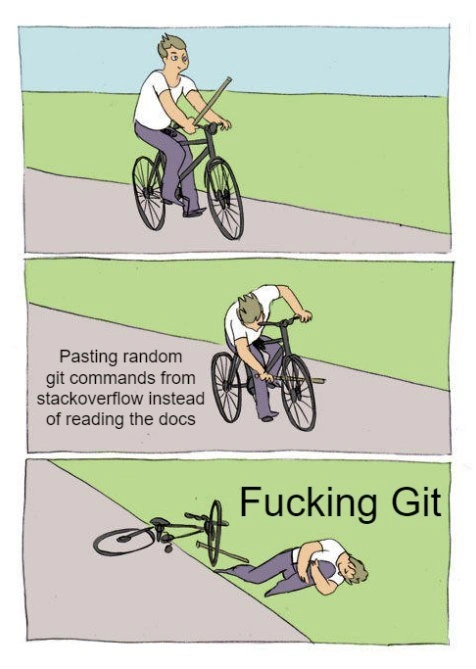
This comic highlights a common developer mistake: using Git commands found online without really understanding them, and then blaming Git when things break. Let’s break down the scene in simpler terms. In the first panel, the developer is happily riding a bicycle – things are going fine with his code/project. In the second panel, he shoves a stick into his own bike wheel. That stick represents a random Git command he copied from StackOverflow (an online Q&A forum for programmers) instead of using the official instructions. Just like the stick causes the bike to flip, that bad command wrecks his project (maybe it messed up his code history or created a huge merge mess). In the third panel, he’s on the ground hurt from the crash, and he’s angrily blaming the tool, saying “Fucking Git.” In other words, he caused the problem himself, but he’s yelling at Git as if Git is the one at fault.
So why is this so relatable in software development? First, Git is a version control system – a tool that helps developers track changes in code and collaborate with others. It’s super powerful, but it can also be confusing if you’re new to it. There are a lot of commands and concepts to learn (branches, merges, resets, rebases, etc.), and it’s easy to get in trouble if you use a command without knowing what it does. That’s where documentation (the “docs”) comes in. The official Git docs (and tutorials) explain how each command works and the right way to do things. However, reading the manual can be time-consuming or intimidating, especially when you’re stressed and just want a quick fix. That’s why many developers turn to Stack Overflow or other community forums when they’re stuck. You can often find a question similar to yours and an answer with a snippet of code or command that promises to solve the problem.
But here’s the catch: those answers on the internet might be context-specific. They solved someone’s problem, but your situation might be a bit different. If you copy-paste a solution without understanding it, you might end up running a command that doesn’t do exactly what you expect. In the meme, the caption explicitly says the guy was “pasting random git commands from StackOverflow instead of reading the docs.” That means he found some Git commands online that looked like a fix and ran them without double-checking. This is often called copy-paste coding – where someone uses code or commands from elsewhere verbatim, hoping it works, with no further insight. It’s a risky way to solve problems, kind of like taking a medicine without reading the label or dosage instructions.
Let’s talk about what could go wrong with random Git commands (the “merge disaster” mentioned in the title). Imagine our developer had a problem: say a merge conflict or some error pushing code. He quickly searches online and finds an answer saying “run git reset --hard HEAD~1” or “try git push --force”. Those commands are real and might solve specific issues, but they have side effects:
git reset --hard HEAD~1– This command will delete your latest commit from the current branch, throwing away any changes in that commit as if they never happened. If your problem was something trivial like wanting to undo a small change, this might be overkill (and you’d better have that commit saved somewhere else or it’s gone). Without realizing, you could lose work.git push --force– This forces Git to push your local changes to the remote repository even if it would normally be rejected (like if your history has diverged from the remote’s history). A force push can overwrite others’ work on the remote. It’s useful in the right scenario (for example, after cleaning up commit history), but if used carelessly, suddenly your teammates’ commits on GitHub or GitLab vanish, and everyone is very unhappy.
If our developer in the meme ran one of those because “StackOverflow said so,” he might find that yes, the error message is gone, but now half a day’s work disappeared or the team’s branch history got messed up. In other words, the bike has crashed to the ground. This is the self-inflicted disaster part: the tools did exactly what they were told to do, but the commands were dangerous in that context.
Now, why does he blame Git and curse at it (“F-ing Git” as the meme shows)? This reflects a pretty human reaction. When something goes wrong with our code or our tools, we often get frustrated and externalize the blame. Git is complicated, so it’s an easy target to say “ugh, Git messed up my project!” It’s almost a running joke in programming that when in doubt, we say “Git is trash” or “computers are stupid” out of annoyance. But usually, the real issue is user error (we did something we shouldn’t have). Git, in fact, was being very literal: it obeyed the command given. It doesn’t know if the person typing it misunderstood what it would do. Think of Git as a very diligent but unsmarter helper – it will do exactly what you instruct. If you said “delete this commit and force others to accept that,” it will do it, even if you actually didn’t mean to delete so much. So yelling at Git after the fact is a bit like yelling at your car because you drove it into a ditch.
The meme is funny to developers because we’ve all been there (or seen someone go through it). Maybe as a beginner you Googled “how to fix XYZ in Git” and without fully reading, you ran the first commands you found. Sometimes you get lucky and it works out; other times you end up in an even worse situation, feeling helpless. It’s a very relatable developer experience to panic and copy-paste from the internet, and later realize you should’ve taken a breath and read the official guide or at least understood what the command did. Senior developers often advise, “Read the docs!” for this very reason. The docs might be dry, but they’ll tell you, for example, that git reset --hard will permanently throw away changes, or that git push --force should be used with extreme caution.
Another thing shown here is the idea of “blaming the tool”. There’s a common saying: “Don’t blame the tools, learn to use them properly.” In the comic, the developer did something silly (put a stick in the wheel = used Git incorrectly) and then blamed Git. In real life, it’s like if I pressed the wrong button in an app and it deleted my file – I might shout “Stupid app!” in frustration. But the truth is, the app did what that button was meant to do; I just pressed it without meaning to. With Git, because it’s complicated, it feels like it betrays us sometimes. But 9 out of 10 times, it’s because we pressed the wrong “button” (command).
The lesson (and humor) of the meme is essentially: be careful with copy-paste fixes. It’s not saying Stack Overflow or community help is bad – it’s actually great to have those resources. The key is to understand the solution you’re applying. If our cyclist developer had taken a minute to find out what that mysterious Git command actually does (maybe by checking Git’s documentation or trusted tutorials), he might have realized it was the wrong fix or a risky move. Instead, he skipped straight to execution and paid the price, then swore at Git to vent. It’s a lighthearted warning that if you skip the “read and learn” part and jump to the “just do it” part, you might end up on the ground with a banged-up project (and ego).
In summary, for a junior developer or someone still getting comfortable with Git:
- Use community solutions wisely – by all means search for answers, but don’t just run commands blindly. Try to find out what they do.
- Know that Git is deterministic – it does what you ask. Mistakes usually come from misunderstanding the command, not because Git decided to be mean.
- When things go wrong – instead of instantly blaming Git (or any tool), take a step back and figure out what happened. That’s how you learn and avoid the same pain next time.
This meme is a funny reminder of these points, wrapped in a situation we find painfully familiar. It basically says, “Hey, I know reading docs is boring compared to a quick copy-paste, but see what can happen if you don’t take the time to learn? Ouch!”
Level 3: Cargo Cult Commands
Seasoned engineers recognize this scenario instantly: a developer runs into a Git problem, scours Stack Overflow for a quick fix, and ends up copying some arcane command sequence as a solution. In the meme’s first panel, our dev is biking along happily (everything’s fine with their project). In the second panel, they literally jam a stick into their own wheel – which represents pasting in a random git command they found online without understanding it. Cue the inevitable crash in panel three, where the developer is on the ground clutching their knee, cursing “Fucking Git” as if the tool betrayed them. This visual gag perfectly captures a familiar developer reality: blindly applying a fix from the internet can be just as self-sabotaging as the cyclist’s stick maneuver, yet the initial reaction is often to blame the tool rather than the user’s actions.
This is a classic case of RTFM avoidance – “Read The Freaking Manual” (putting it politely) – gone wrong. Instead of digging into official documentation to truly understand the problem, the developer reached for a snippet of StackOverflow sorcery. In software circles we call this cargo-cult programming, or in this context cargo-cult committing: copying commands or code patterns blindly because “it worked for someone on the internet,” without grasping why it works or whether it’s appropriate for your situation. Here, the cargo-culting involves Git commands: powerful ones that, used out-of-context, can wreak havoc on a code repository. The meme humorously mirrors countless real-life post-mortems where an innocuous-looking command turned into a destructive force because it was run in the wrong context. The self-inflicted merge disaster in the comic is no exaggeration – many of us have witnessed (or caused) changes getting nuked or tangled up by a misguided Git incantation.
Let’s talk about Git – the distributed version control system at the heart of this meme. Git is an amazing tool for collaboration, tracking changes, and managing code versions (hence the VersionControl tag). But its learning curve is notorious. Under the hood, Git isn’t just saving snapshots of files; it’s managing a whole DAG (directed acyclic graph) of commits, pointers like HEAD and branch refs, and remote tracking branches. There’s a lot of Git jargon and concepts: commits, branches, merges, rebases, HEAD, origin, etc. Newcomers often find Git confusing, which leads to a kind of superstition: “I don’t know why this command fixes things, but it has a lot of upvotes so I’ll try it.” It’s essentially treating complex commands as magical spells. And Git does have some seemingly magical commands – for example, git reset --hard or a force-push can drastically change your repository state in one go. Used properly, they solve specific problems; used improperly, they can ruin your day.
To seasoned devs, certain Git commands are known footguns (tools so powerful they can shoot you in the foot if misused). The meme highlights a few usual suspects: git reflog, git reset --hard, and the infamous force-push. Let’s unpack those:
git reflog– This one’s actually a lifesaver if you know how to use it. It logs where your HEAD has been, allowing you to recover commits you thought were lost. But note the irony: novices pastinggit reflogfrom a forum might not realize it’s for recovery purposes, or they might see some scary output and freak out. It’s not destructive by itself, but blindly using it means you’re already in deep waters.git reset --hard– This command is the real wheel stick. It moves your HEAD to a specified commit and throws away any changes in the working directory and index. If someone on Stack Overflow says “just rungit reset --hard origin/masterto fix a sync issue,” a cautious developer’s eyes widen – because that will force your local branch to exactly match the remoteorigin/master, discarding everything you haven’t pushed. Without reading the docs or understanding the--hardflag, a newbie might think this is a harmless refresh, when in fact it’s a one-way trip to losing uncommitted work.- Force push (
git push --force) – The name alone gives experienced folks chills. It’s useful when you intend to overwrite the remote history (like after rewriting commits), but it’s dangerous on shared branches. A reckless force-push can delete teammates’ commits or unravel a carefully orchestrated merge. There’s a reason many teams outright ban--forceon main branches – that force_push_fear is born from real disasters. Running a force-push because an answer recommended it, without understanding the repercussions, is like smelling gas and deciding to light a match because a stranger said it fixed their stove once.
In a nutshell, these StackOverflow “solutions” are heavy artillery for specific battles. Use them at the wrong time or without aiming properly, and you end up shelling your own camp. A veteran developer sees “pasting random git commands from StackOverflow” and immediately cringes: they’ve seen juniors turn a minor version control issue into a full-blown catastrophe by doing exactly that. It’s the kind of mistake that prompts an immediate senior_dev_facepalm.
The humor here also comes from the all-too-familiar blame game. The final panel’s “Fucking Git” caption is a tongue-in-cheek reference to how developers often react under stress. Git’s complex, yes, and it’s evolved its own reputation in DevCommunities as something of a beast. There are endless memes and t-shirts that read “Git happens” or “I hate Git” because everyone remembers their first head-scratching encounter with a detached HEAD or an enigmatic merge conflict. Shouting at Git is cathartic; it’s practically a rite of passage in DeveloperExperience (DX). But as the old proverb says, “a poor craftsman blames his tools.” Here the craftsman (the developer) literally caused the problem by misusing the tool, yet still blames the tool. It’s funny because it’s true: we’ve all been that frustrated developer cursing the very thing we misused. We know, deep down, the tool did exactly what we told it to do, but admitting “I messed up” is harder than raging at inanimate Git.
The meme’s format (the classic cyclist self-sabotage) brilliantly drives the point home. It’s a well-known meme template for illustrating self-inflicted problems: the cyclist is both the culprit and the victim. In this context, the stick labeled “pasting random git commands from StackOverflow” is pure self-sabotage. The resulting crash symbolizes the tangled repo or lost progress. And the concluding blame on Git… that’s the punchline flipping the responsibility. It’s a scenario so relatable it hurts (quite literally for the cyclist-dev on the ground). The developer humor here lands because it reflects real life: how many times have we seen a root cause analysis or retrospective where human error (often from not reading instructions) was the true cause, yet our initial instinct was “Ugh, this tool sucks!”?
Importantly, the meme also hints at a valuable lesson shared among experienced developers: understand your tools. Taking a moment to read the official docs or a reputable guide can save you from these disasters. Git’s documentation can be dense, but it’s comprehensive – and often the answers on StackOverflow are quoting those very docs with added context. The difference is, official docs usually explain why and how, whereas a quick StackOverflow blurb might just say “do X to fix problem Y” without warning of side effects in scenario Z. The developer in the meme skipped the homework, executed the mysterious solution, and paid the price.
In real-world developer culture, there’s a balance to strike. We all use community-driven solutions (StackOverflow is practically in every programmer’s toolkit), but blind StackOverflow dependence is risky. The DeveloperExperience of Git, especially when learning, can indeed be frustrating enough to tempt anyone into copy-paste mode. The meme exaggerates it to comedic effect, but it resonates because any seasoned dev can recall a war story of a “simple copy-paste fix” spiraling into a night-long debugging session. It’s both a facepalm and a chuckle when we see this comic: we’re laughing at the mistake, but also nodding because we’ve either done it ourselves or had to help untangle the mess afterward.
To sum up the advanced perspective: Git isn’t evil – it’s a powerful tool with sharp edges. The meme is poking fun at the tendency to grab those sharp tools from an online toolbox without reading the safety manual, and then yelp in pain when we get cut. It’s a gentle (okay, sarcastic) reminder that maybe next time, before executing some mysterious command you found on the internet, you should pause and RTFM… or risk ending up like our cyclist friend, on the ground, blaming “this darn version control” for a wound that was 100% self-inflicted.
Description
A three-panel comic meme, known as the 'Bicycle Fall' format, illustrating a common developer anti-pattern. In the first panel, a person is riding a bicycle on a paved path. In the second panel, the person leans forward and intentionally shoves a stick into the front wheel spokes of their own bike; this panel is labeled with the text 'Pasting random git commands from stackoverflow instead of reading the docs'. The final panel shows the person crashed on the ground, clutching their knee in pain next to the overturned bicycle, with the exasperated caption 'Fucking Git'. The meme humorously depicts the act of self-sabotage where a developer, trying to solve a complex version control problem, blindly uses a powerful command from the internet without understanding its consequences. When their repository is inevitably messed up, they blame the tool (Git) rather than their own reckless shortcut, perfectly capturing the theme of user error and the danger of ignoring documentation

Comments
20Comment deleted
The fastest way to become a Git historian is by pasting a Stack Overflow command with '--force'. Suddenly you're an archeologist digging through the reflog for artifacts of a feature branch that existed 30 seconds ago
Copy-pasting random `git` incantations is basically running `rm -rf` on your repo’s trust perimeter
The real tragedy isn't the crash - it's explaining to your team lead why the entire commit history now looks like a Jackson Pollock painting after you tried that 'git filter-branch' command with 847 upvotes from 2011
This perfectly captures the Git learning journey: you start confident, then sabotage yourself by treating Stack Overflow as a random command generator instead of understanding the DAG, and finally end up in detached HEAD state wondering why `git reflog` is now your most-used command. Pro tip: reading 'Pro Git' once would have saved you from that force push to main that made your entire team's morning standup about you
Treating Git like StackOverflow‑driven shell scripting works great - right up until branch protections reject your push --force and you discover reflog is your actual disaster‑recovery plan
Not 'fucking Git' - it's that 2015 SO answer promising 'quick fix' via unescaped git filter-branch on your prod branch
Git isn’t hostile - paste a random 'git reset --hard' and it dutifully rewrites history; reflog is the seatbelt you refused to read about
Have you even seen git docs? I'm not surprised people give up on it so quickly. Comment deleted
>> git --help xD Comment deleted
or "man git" Comment deleted
I don’t even use CLI nowadays… The GUI of IDE/Editor is good enough for most the case Comment deleted
Chukcha am not reader, Chukcha am writer Comment deleted
https://git-man-page-generator.lokaltog.net/ Comment deleted
git bless Comment deleted
git curse Comment deleted
If you can't git, just use GitHub Desktop Comment deleted
Git from IDE (not bad for simple tasks) Comment deleted
TortoiseGit... I think I'm addicted since SVN. Comment deleted
Try https://gitfluence.com Comment deleted
Git is fucking awful. The new github desktop helps a bit though. And for a github specific issue I hate authenticating. Comment deleted

