
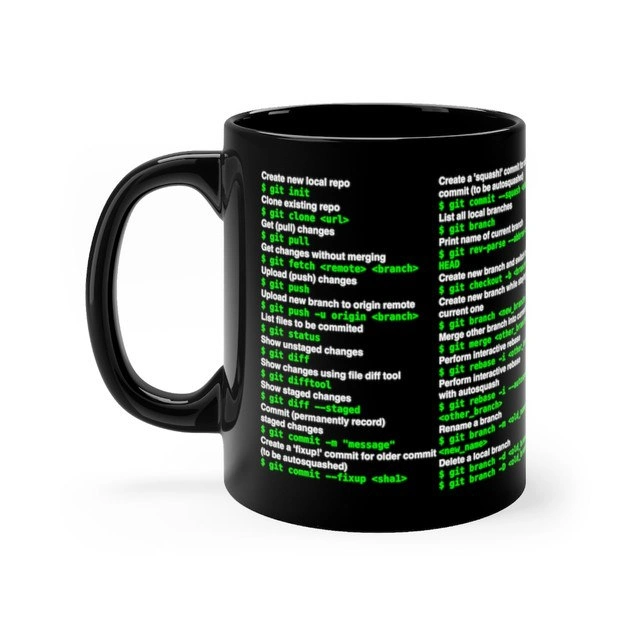
Git Cheat Sheet As Coffeeware
Why is this VersionControl meme funny?
Level 1: Instructions On A Cup
This is like giving a new employee a coffee cup with all the office rules printed on it. It helps because they can look down when they forget what to do, but it is also funny because the rules are complicated enough that they apparently need to drink from the manual every morning.
Level 2: Caffeine And Commits
Version control is how developers track changes to code over time. Git lets a team see what changed, who changed it, and how to move between different versions of a project. It also lets developers work on separate branches so one person can build a feature while another fixes a bug.
The mug lists common Git commands because those commands are part of daily developer life. git status tells you what changed. git diff shows the exact edits. git add stages changes for the next commit, even though that command is not the main visible focus here. git commit saves a snapshot. git push uploads your commits to a remote repository. git pull brings down changes from others.
For an intern, this is useful because Git is often one of the first tools that feels unforgiving. The code might be correct, but if the branch is wrong or the commit is missing, the team cannot review it properly. The mug is a joke gift because it pretends the solution is just memorizing commands, when the real lesson is understanding how the project history moves.
Level 3: Porcelain Version Control
The mug is funny because it turns Git into survival equipment. The visible commands include git init, git clone <url>, git pull, git fetch <remote> <branch>, git push, git status, git diff, git commit -m 'message', and branch operations wrapped around the side. That is not decoration; that is a compact emergency manual printed on the one object many developers reach for before they are emotionally ready to touch source control.
The post calls it “The best gift for an intern,” which is both kind and slightly threatening. New developers usually learn Git through the happy path first: clone a repository, make a change, commit it, push it. Then reality arrives wearing the names merge, rebase, detached HEAD, origin/main, and “why does Git say I am behind and ahead at the same time?” A mug can list commands, but it cannot explain the mental model behind the object database, commit graph, working tree, index, local branches, remote-tracking branches, and the tiny haunted museum known as the reflog.
The senior-level joke is that Git’s command-line interface exposes a lot of power through verbs that sound similar but operate at different layers. fetch updates remote-tracking refs without touching your working branch. pull is usually fetch plus an integration step. commit records the staged snapshot, not whatever happens to be open in your editor. push -u origin <branch> publishes a branch and sets upstream tracking. These distinctions matter, because the wrong command at the wrong moment turns “quick fix” into a Slack message beginning with “small Git question.”
The mug also captures a real tooling truth: Git won because it is fast, distributed, scriptable, and excellent at preserving history, but its UX often assumes users already understand the graph. Cheat sheets help because Git is precise; they hurt when people treat commands as spells. The moment a merge conflict appears, the intern does not need a mug as much as a teammate who can calmly explain what changed, what must be kept, and why force-pushing shared branches is how trust leaves a room.
Description
A product-style image shows a glossy black coffee mug on a white background, printed with green terminal-style Git commands and white explanations. Readable left-side text includes "Create new local repo $ git init," "Clone existing repo $ git clone <url>," "Get (pull) changes $ git pull," "Get changes without merging $ git fetch <remote> <branch>," "Upload (push) changes $ git push," "Upload new branch to origin remote $ git push -u origin <branch>," "List files to be committed $ git status," "Show unstaged changes $ git diff," "Show changes using file diff tool $ git difftool," "Show staged changes $ git diff --staged," "Commit (permanently record) staged changes $ git commit -m 'message'," and "Create 'fixup' commit for older commit (to be autosquashed) $ git commit --fixup <sha1>." The right side is partially wrapped around the mug but shows branch and merge operations such as "List all local branches $ git branch," "Print name of current branch $ git rev-parse --abbrev-ref HEAD," "Create new branch," "Merge other branch," "Perform interactive merge $ git mergetool," "Perform interactive rebase with autosquashing," "Rename a branch," and "Delete a local branch." The humor is that Git's everyday survival commands are treated as something developers need literally attached to their caffeine source.

Comments
1Comment deleted
The mug covers the happy path; the back probably needs a fold-out section for reflog archaeology after the third espresso.

