Android Studio Challenges Chrome For RAM
Why is this MobileDev meme funny?
Level 1: Two Big Kids On One Couch
This is like one big kid already taking up most of the couch, and then another big kid walks in and sits down too. The couch is the computer’s memory. Chrome was comfortable until Android Studio arrived, and now both are fighting for space while the poor computer struggles underneath them.
Level 2: Hungry Developer Tools
Android Studio is the main IDE for building Android apps. It helps with writing code, previewing layouts, running builds, managing dependencies, and launching apps on devices or emulators. It is powerful, but that power uses CPU, memory, disk, and background indexing.
Chrome is a browser, but modern browsers are also large application platforms. Each tab, extension, and web app may use its own process. That design helps keep one bad tab from crashing everything, but it also means memory usage can grow quickly.
The meme shows Chrome acting threatened when Android Studio opens because both tools are known for heavy resource management demands. For a developer, this usually means fans spinning up, battery dropping, keyboard input lagging, and builds taking longer than expected. The funny part is that Chrome is normally the app people blame for using too much RAM, but Android Studio is strong enough to make Chrome say, “finally, competition.”
Level 3: RAM Cage Match
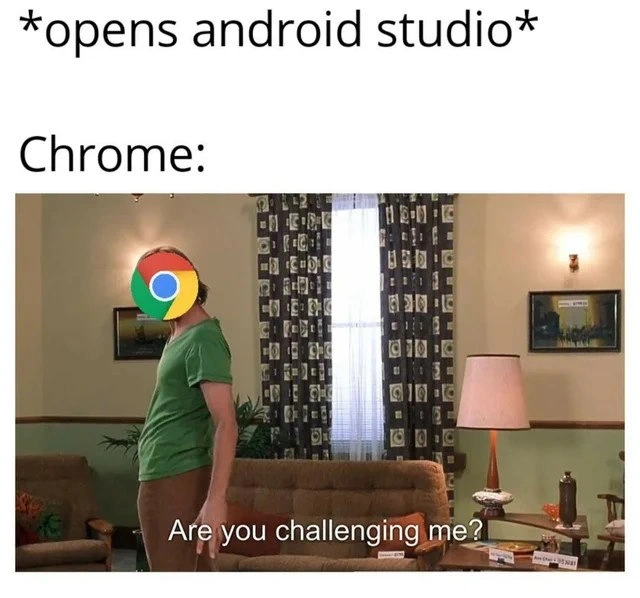
opens android studio
Chrome:
Are you challenging me?
The meme turns a normal developer action into a duel between two famously hungry applications. Android Studio enters the scene, and Chrome, represented by the logo pasted over the character’s face, reacts like another heavyweight has walked into its territory. The subtitle “Are you challenging me?” is funny because Chrome already has a reputation for consuming memory through many tabs and processes, but Android Studio is one of the few tools that can make it look over its shoulder.
The senior pain point is that mobile development stacks pile resource costs on top of each other. Android Studio is based on the IntelliJ platform, runs on the JVM, indexes large projects, drives Gradle builds, performs code analysis, syncs dependencies, and often coordinates an emulator. Add Chrome with documentation tabs, Stack Overflow searches, design specs, localhost testing, and five “temporary” tabs from last week, and the laptop stops being a workstation and becomes a negotiation with the swap file.
This is not just whining about big apps. The architectural tradeoff is real: modern tooling buys productivity by keeping more context hot. IDEs precompute indexes so navigation is instant. Browsers isolate tabs and extensions into separate processes for stability and security. Emulators simulate another device because testing on real hardware is not always enough. Each decision is defensible in isolation. Together, they turn 16 GB RAM from “plenty” into “adorable optimism.”
The image also captures the emotional side of developer experience. Slow tools do not merely waste seconds; they interrupt flow. A Gradle sync that stalls while Chrome pages reload and the emulator crawls can make debugging feel like pair programming with a thermostat. The joke lands because every mobile developer has watched Activity Monitor or Task Manager and wondered which sacred process must be sacrificed so the build can finish.
Description
The meme text reads "*opens android studio*" and then "Chrome:" above a sitcom-like scene of a person standing in a living room. The person's face is covered by the Google Chrome logo, and the subtitle at the bottom says "Are you challenging me?" The joke is that opening Android Studio creates a direct contest with Chrome over which developer tool can consume more memory and system resources, a familiar pain point on mobile development machines.
Comments
1Comment deleted
The real emulator is the laptop pretending it still has headroom after Android Studio and Chrome agree on a shared memory budget.