The Allure of Pushing Directly to Master
Why is this VersionControl meme funny?
Level 1: Comfort Over Change
Imagine you have a brand new, fancy tool that everyone says is amazing – like a shiny new bicycle with all the latest gadgets. You yourself even say, “Wow, this new bike is brilliant!” But then, when it’s time to actually ride, you hop on your old familiar bicycle instead, the one you’ve been using for years. You hug it and say, “I just like this one.” It’s funny because we all do this in life sometimes: we get excited about a new, better way of doing things, but deep down we stick with the old way we’re comfortable with. The meme shows exactly that feeling – praising the new thing, but clinging lovingly to the old thing – and that’s why it makes people smile.
Level 2: Default to Master
Let’s break down the joke in simpler terms. Git is a popular version control system that developers use to track changes in code. One of Git’s key features is the ability to create branches. A branch in Git is like a separate workspace or timeline for your code where you can make changes without affecting the main code immediately. Think of it like saving a copy of a document to experiment on it while keeping the original safe. The main branch in most repositories is historically called master (nowadays often named “main”) – this is the default branch where the “official” version of the code lives.
Now, in good practice, when developers want to add a new feature or fix a bug, they branch off from master. For example, they’ll create a new branch (let’s call it new-feature), do all their coding there, and only merge those changes back into master when the feature is finished and tested. This workflow is often considered professional and safe. It means multiple developers can work on different features simultaneously in isolation. It also means the master branch (the main line) stays stable because you’re not directly coding on it until your work is reviewed and ready. You might hear terms like “feature branch” or “Git workflow” – that’s what they’re talking about: using branches for each piece of work.
The meme text “This is brilliant” refers to those fancy branching workflows. Indeed, it is brilliant in theory – it’s organized and prevents a lot of chaos. In many teams, there’s an agreed process: “Thou shalt not commit directly to master.” Instead, you open a Pull Request from your feature branch, someone reviews your code, and then it gets merged into master. This helps catch mistakes early and keeps the main codebase clean. Following such a process is a sign of a disciplined developer experience (DX) and good collaboration.
However, despite knowing this, a lot of developers (especially when working alone or under pressure) still end up coding on master directly. The second panel of the meme – “But I like this” – is highlighting that comfort. Why would someone do that if branching is so great? Well, creating and managing branches can feel like extra overhead when you’re in a hurry or if you’re new and working on a small project. For a newcomer, the concept of branching might be confusing at first (“Wait, I have multiple versions of my code?”). It might seem easier to just work on the one main branch you already have. Also, when you’re coding solo (like on your personal project), you might think, “Eh, I’ll just commit everything to master – no one else is working on it anyway.” It’s like skipping an extra step to save time.
Let’s say you’re a junior developer who just learned Git. You’ve read that you should do git checkout -b my-fix to create a branch for your bug fix. But you’re a bit unsure and you need to get the fix out quick. So instead, you just make changes on master and do git push. It works… until maybe it causes a problem and you realize you bypassed the code review. Oops! Many of us have had that first “Uh-oh” moment of accidentally committing directly to the main branch and then scrambling to fix something in production. It’s a rite of passage in learning proper Git workflow. The meme is funny because it exaggerates this habit: the developer KNOWS the proper way (and even calls it brilliant) but still reverts to the old habit of pushing to master, perhaps with a satisfied grin. It’s poking fun at the relatable developer behavior of sticking to what’s familiar.
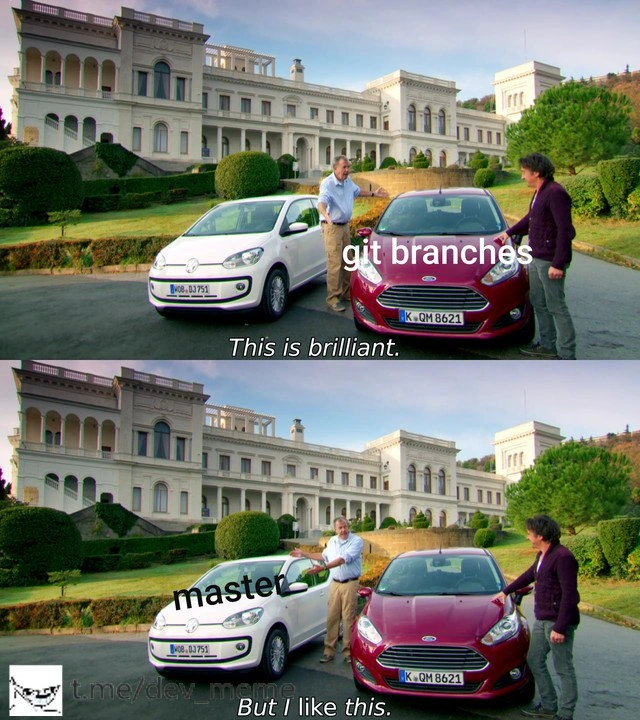
In the image, Jeremy Clarkson (the TV host) acts like the developer. The red car labeled “git branches” symbolizes all those cool new branching techniques everyone talks about. The white car labeled “master” symbolizes the old straightforward way: just one main branch. Clarkson first praises the red car – just as a developer might say, “Using separate branches for everything is such a good idea.” Then he literally turns and hugs the white car, showing his true love for it – just like a developer who keeps working on master because they secretly (or not so secretly) find it simpler or more comfortable. The meme is essentially saying: we admire the new workflow, but we still love our old default branch. This is a form of coding humor because anyone who’s used Git for a while can chuckle and say, “Yeah… I’ve done that.” It highlights how human nature (choosing the comfortable path) often wins even in the face of better tools or processes.
To put it plainly: developers often preach, “Don’t commit to master, use a branch!” but when they’re in a rush or feeling lazy, they might think, “I’ll just put this in master real quick, it’ll be fine.” The meme takes that common scenario and makes it visual and funny using the Top Gear format. And because this scenario is so common in software teams, it’s instantly recognizable and gets a laugh of recognition. It’s a light-hearted reminder that knowing the right way doesn’t always mean we do it, especially when the pressure is on.
Level 3: GitFlow vs Reality
In this meme, a developer (played by Top Gear’s Jeremy Clarkson in the images) marvels at a shiny new car labeled “git branches” saying “This is brilliant,” then turns around and hugs an old reliable car labeled “master” with “But I like this.” It’s a cheeky commentary on modern Git workflow ideals versus actual developer habits. On paper, complex branching strategies like GitFlow (with separate feature branches, a develop branch, release branches, etc.) are considered brilliant – they promise organized code, safer merges, and clean release cycles. Many experienced devs evangelize these workflows in conference talks and blog posts, praising how feature branches and pull requests improve code quality.
But here’s the reality check: even those same developers often cling to the master branch (the main code line) when nobody’s looking. The humor hits because it’s too real: we applaud disciplined branching strategy in theory, yet we frequently default to committing everything on one branch in practice. Why? Sometimes deadlines are tight or the team is small, and creating a bunch of short-lived branches feels like overkill. Other times it’s pure muscle memory – an old habit from years of coding on a central “trunk.” The meme captures this contradiction perfectly. The red Ford car (labeled “git branches”) represents the fancy, brilliant workflow – imagine a well-structured Git process where every feature, bugfix, and release has its own branch. The white Volkswagen (labeled “master”) stands for the trusty old approach – just working directly on the default branch – which Clarkson (the developer avatar) likes and can’t let go of.
From a senior developer’s perspective, this is poking fun at a classic industry pattern. We’ve seen elaborate Git processes set up in organizations – multiple branches, mandatory code reviews, CI pipelines gating each merge – only for panicked engineers to bypass it all with a quick commit to master when production is on fire. It’s a satire of Developer Experience (DX) versus best practice: the ideal DX is having orderly feature branches (so nothing breaks in master), but the actual DX is that sometimes you just need to fix something “real quick” and you pray 👉 direct push to master doesn’t trigger a meltdown. The meme format “This is brilliant – but I like this” nails this irony: publicly, teams say “We follow GitFlow with strict pull requests” (the brilliant strategy) while privately many devs think “Screw it, I’ll just commit to master, it’s fine” (the comfortable shortcut).
There’s also a historical undercurrent. In older version control systems (like Subversion), everyone committed to a single trunk by default, because branching was heavy and merging was painful. Git made branching super cheap and easy – in theory, enabling that brilliant multi-branch workflow – yet old habits die hard. The master branch (which is Git’s historical default, now often named “main”) is like that familiar old car: it might lack the bells and whistles of a full GitFlow, but developers know how it handles in every situation. Some organizations even advocate trunk-based development, a legitimate strategy where you commit straight to a single main branch frequently and integrate continuously. When done right (with lots of tests and feature flags), trunk-based development can keep software delivery fast and actually be brilliant. But often individual devs hug the master branch not as an intentional strategy, but out of convenience or impatience – skipping the ceremony of branching because “it works for now.”
The humorous truth in this meme resonates with anyone who’s managed real-world codebases. We’ve all heard teammates say “let’s adopt this great new workflow” during the retro, and then see a flurry of commits on master at 5 PM Friday. It’s the gap between best practices and actual practices. The meme’s subtitle could just as well read: “Formal process? Brilliant. Quick and dirty commit? I like this.” It’s a gentle roast of our developer culture: no matter how fancy our tools or processes get, we often stick with what’s simple and familiar – for better or worse.
For example, compare the ideal vs. reality in Git commands:
# "This is brilliant": the recommended feature branch workflow
git checkout -b feature/amazing-new-thing # create and switch to a new branch
# ...work on code for the amazing new feature...
git commit -m "Add amazing new feature"
git push origin feature/amazing-new-thing
# (Next step: open a Pull Request to merge this feature branch into master after review)
# "But I like this": the quick direct commit to master
git checkout master # (you stayed on master; no new branch created)
# ...make some urgent changes directly on master...
git commit -m "Hotfix: quick tweak on production"
git push origin master # pushes immediately to the master branch (YOLO!)
In the first case, you’ve isolated your work on a separate branch, following the brilliant plan. In the second, you bypassed all that – hugging the master branch tightly. Seasoned devs chuckle (or cringe) at this because they’ve lived it. Version control humor like this is funny precisely due to how relatable it is: it’s a mirror held up to our actual behavior. No matter how many fancy cars (or branching models) we admire, sometimes we just love our reliable old ride (the master branch) too much to give it up.
Description
A two-panel meme using the 'This is brilliant, but I like this' format from the TV show Top Gear. In the top panel, presenter Jeremy Clarkson gestures towards a modern red car, labeled 'git branches', with the caption 'This is brilliant.' below. In the bottom panel, he turns his attention to a smaller, simpler white car, labeled 'master', with the caption 'But I like this.' A small watermark for 't.me/dev_meme' is visible in the bottom left corner. This meme humorously illustrates the internal conflict of a developer who acknowledges the best practice of using feature branches in Git for isolated development, yet is tempted by the simplicity and immediacy of committing and pushing directly to the master branch. It's a relatable scenario for developers who know the rules but sometimes choose a riskier, more direct path, especially on smaller projects

Comments
7Comment deleted
Using git branches is like using a proper ORM; pushing to master is like writing raw SQL queries at 3 AM. Both can get the job done, but one is far more likely to get you paged
Whiteboard GitFlow: feature/* ➜ develop ➜ release/* ➜ main. Terminal GitFlow at 5 p.m.: git commit -m "prod hotfix" && git push --force origin master - because Jenkins only watches master and the CEO only watches uptime
After 15 years of muscle memory typing 'git checkout master', watching junior devs effortlessly adapt to 'main' while you still create aliases in your .gitconfig because 'it's about efficiency, not resistance to change'... right?
Ah yes, the eternal struggle: intellectually appreciating the elegance of feature branches, pull requests, and proper CI/CD integration, while secretly yearning for the dopamine hit of pushing directly to master at 4:47 PM on a Friday. It's the version control equivalent of knowing you should eat vegetables but reaching for the pizza anyway - except when you reach for master, the entire team gets food poisoning
Git branches are brilliant - a beautiful DAG; master is the only vertex with blast radius and a pager, and yet somehow it’s everyone’s favorite staging environment
GitFlow in the wiki, trunk-based in production: CI as QA, feature flags replaced by “merge to master and hope the canary squawks.”
Git branches: brilliant until you're the one pruning a graveyard of stale feature branches while master deploys flawlessly every sprint