
Git Branching Explained with Botany
Why is this VersionControl meme funny?
Level 1: Going in Circles
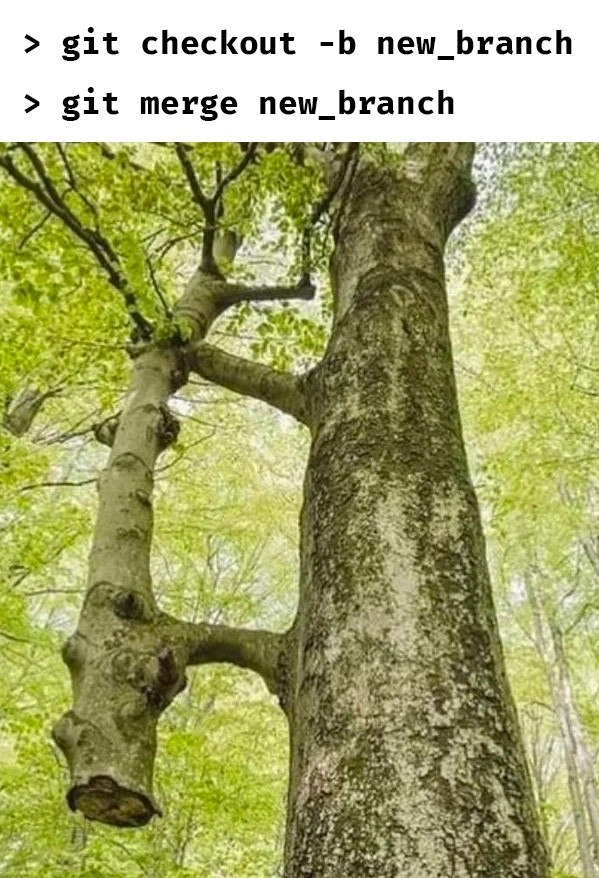
Imagine you’re walking on a path in a forest and there’s a tiny side trail that immediately loops around and connects right back to the main path. If you take that little loop, you leave the main path for just a moment and then you’re right back where you started. You didn’t really go anywhere new – you just took a detour for no reason. This meme is joking about doing exactly that, but with coding. The big tree trunk is like the main path (the main code), and the little branch curving back is that silly detour. In simple terms, the developer in the joke made a little side road for their code (that’s the “branch”), then hopped right back onto the main road (that’s the “merge”) almost immediately. It’s as if someone said, “Always take a side road before joining the highway,” so the person does it even when the side road is just a useless circle. It feels a bit silly, right? Exactly! The meme’s humor comes from realizing that the poor tree grew a branch that went in a circle and reattached, just like a coder who followed a rule without it really doing anything. It makes us laugh because we see how unnecessary that little loop was.
Level 2: Why Did We Branch?
Let’s break down what’s happening in this meme in simpler terms. Git is a popular version control tool that helps developers track changes in code and collaborate. In Git (and other version control systems), a branch is essentially a separate line of development – imagine it as a copy of your code where you can make changes without affecting the main code (often called the main or master branch). The first command shown, git checkout -b new_branch, is a CLI (command-line interface) instruction to create a new branch named “new_branch” and switch to it. So at that moment, the developer has made a new line of work to possibly add a feature or fix a bug. Normally, you’d do some work on this new branch, like writing code or making commits, before you consider merging it back.
The second command, git merge new_branch, is used to take the changes from the “new_branch” and merge them into your current branch (which in a typical scenario would be the main branch). Merging is how Git combines the history of two branches together. In practice, after doing git checkout -b new_branch, the developer would usually switch back to main (the primary branch) and then run git merge new_branch to bring in the new branch’s work. When you merge, Git tries to integrate all the new code; if two branches changed the same parts of a file in different ways, you might get a merge conflict (which is when Git needs you to manually decide which change to keep). However, in the case depicted by the meme, there were no changes made on the new branch at all (or perhaps just a tiny trivial change). The branch was created and then merged almost instantly. This means there was no opportunity for the branch to diverge from main in any significant way. As a result, the merge is very straightforward – likely a fast-forward merge, where Git simply moves the main branch pointer forward because nothing conflictive happened on the side branch. In some cases, Git might even respond with “Already up to date,” indicating that merging was effectively a no-op (no operation) because there was nothing new to merge.
The tree picture is a visual metaphor for this whole situation. The main trunk of the tree can be thought of as the main code line. The little branch that comes out and then fuses right back into the trunk represents “new_branch” being created and then immediately merged back in. In the real world of development, teams often create feature branches to isolate their work and then open a pull request (PR) for others to review the changes before merging into main. This is generally good for collaboration and catching mistakes. But sometimes, especially in a very fast-paced fix or a very minor change, a developer might create a branch just because the rules say “no direct commits to main,” do almost nothing on that branch, and then merge it right away. It’s a bit like over-branching for no gain. Over-branching culture refers to when a team uses a lot of branches and process even when it might not be necessary – it can slow things down or just add steps that don’t always add value. The meme humorously points out an extreme case: a branch that existed for mere seconds.
For a newer developer (or anyone learning Git), this scenario might be puzzling. You might ask, “Why bother creating a new branch if you’re going to merge it immediately without doing anything?” And that’s exactly the point of the joke. The text commands at the top and the image together highlight a silly practice. It’s poking fun at the sometimes pointless-seeming procedures in developer workflows. In terms of Developer Experience (DX), if you were the developer here, you probably didn’t benefit from making that branch – it was just done to satisfy a rule or habit. In a healthy workflow, you create branches for a reason: to develop features, to safely test changes, or to have your code reviewed. When you merge, it should be because the work on the branch is completed and ready. Doing it in one breathless sequence (branch -> merge) means nothing substantial happened in between. So the meme is a lighthearted way to say, “Maybe that was overkill, wasn’t it?” It educates by exaggeration: Git branching is powerful, but you should use it meaningfully, not as empty ceremony. And thankfully, merging a branch that has no changes is harmless – it’s just funny that it happened at all!
Level 3: Feature Branch Follies
At first glance, this meme is a tongue-in-cheek jab at Git branching practices taken to a ridiculous extreme. The terminal commands git checkout -b new_branch followed immediately by git merge new_branch illustrate a comically trivial Git workflow: creating a feature branch only to merge it back into the main line moments later. In the photo below those commands, a tree has a looping branch that curves out from the trunk and merges right back into the main trunk. This visual metaphor perfectly captures the joke: a branch that goes nowhere independent – it just returns to the source. In a proper commit history, this would be the equivalent of a pointless merge commit with no real divergent work, or even a fast-forward merge that makes the branch’s existence virtually invisible. It’s a bit of version control humor highlighting how some development workflows become ceremonial.
Why is this funny to seasoned developers? Because it satirizes an all-too-common anti-pattern: performing a full Git branching ritual for a change so small (or so urgent) that the branch lives for mere seconds. Many of us have seen or done this – for example, an urgent one-line fix where team policy forbids direct commits to main. You end up dutifully running the CLI commands to create a new branch and then merging it right away, sometimes even without any additional commits. It’s like going through the motions of a formal pull request process, but with no substance in between. The humor lies in that over-the-top formality: the developer has technically followed the prescribed Git workflow (no committing straight to main, oh no!), yet in practice they’ve gained nothing except perhaps a few extra lines in the git log. It’s a developer experience (DX) caricature of process-over-productivity.
This meme also hints at the culture of over-branching in some teams. Certain organizations adopt extremely strict branching strategies (think Git Flow on steroids) where every change, no matter how trivial, must be on its own branch with a separate merge. The original intent is noble – isolation of work, code review via pull requests, avoiding directly committing to stable branches, etc. – but taken to an absurd level it leads to scenarios like this instant merge. The phrase “trivial pull-request habits” in the description nails it: sometimes developers spin up a feature branch and open a PR just to change a typo or bump a version number, and then immediately approve and merge it themselves. There’s a shared eye-roll among experienced devs: all that Git branching ceremony with essentially zero risk of merge conflicts (because, come on, what could conflict in the 30 seconds you were alone on that branch?). We’ve effectively created a paper trail of process (a branch, a merge, maybe a PR link) for something that could have been a single direct commit.
From an architectural standpoint, Git makes branching so lightweight and cheap that it’s easy – perhaps too easy – to create new branches. In older version control systems (like SVN or CVS), branching was heavyweight and discouraged for tiny changes; you might have just committed directly to trunk (main) for a quick fix. But Git’s distributed nature and cheap branches have fostered workflows where even the smallest change often goes through a separate branch. This is generally good practice for collaboration, but the meme pokes fun at when it’s taken to an absurd conclusion. The commit graph resulting from an immediate branch-and-merge might have an unnecessary merge commit (if not fast-forwarded) that adds noise to history. In fact, if the developer didn't even make any additional commits on new_branch, Git would likely say “Already up to date” or perform a fast-forward merge, meaning the branch was effectively pointless – the main branch pointer just moves to the same commit the new branch was on. It’s a funny illustration of process for process’ sake. The tree’s looped branch is nature’s way of saying “that was pointless, wasn’t it?”.
Ultimately, the humor resonates because it’s relatable and a touch cynical: many of us operate under policies or habits that can feel like a box-checking exercise. The meme gently ribs those engineer teams where someone might proudly announce, “Don’t worry, I followed the workflow exactly,” even though the entire workflow took 10 seconds and achieved nothing a direct commit wouldn’t. It highlights the gap between the intended best practice (use branches for organized development, get code review, avoid reckless changes) and the reality (sometimes we create bureaucracy for even the simplest tasks). In a way, it’s also poking at Developer eXperience by showing how an optimal process can become overkill. And of course, every experienced dev knows the unwritten rule: if it’s Friday at 5 PM and production is on fire, you’ll abandon all branching etiquette – but here, our meme’s protagonist still dutifully made that branch… only to merge it immediately. That’s both dedication and comedic gold in the world of Git.
Description
A two-part meme. The top part displays two lines of text representing terminal commands on a white background: '> git checkout -b new_branch' followed by '> git merge new_branch'. The bottom part is a photograph of a large tree in a lush green forest. A smaller, but still significant, tree trunk grows out horizontally from the main trunk, then curves upwards and merges back into the main trunk higher up, forming a complete loop or handle shape. The bottom of this smaller, looping trunk is severed. The meme creates a visual pun, comically illustrating a nonsensical Git workflow. Creating a new branch and immediately merging it back into its parent is a redundant action, perfectly mirrored by the tree branch that grows out of the trunk only to fuse back with it. For experienced developers, this is a relatable joke about seeing convoluted or pointless branching strategies in the wild, sometimes done just to satisfy a process requirement

Comments
11Comment deleted
This must be the 'feature branch' for fixing a typo in a comment that the project lead insisted must go through a full PR process
Creating a branch just to merge it instantly - because nothing proves “segregation of duties” to auditors like a 30-second detour through seven mandatory pipelines and two rubber-stamp reviews for a one-character typo
After 15 years of explaining Git branching strategies to junior devs, you realize nature had already implemented the perfect visual documentation - though thankfully real trees don't have merge conflicts that require three senior engineers and a whiteboard session to resolve
Decades to branch, decades to merge, zero conflicts - nature runs the only trunk-based development with infinite sprint length
This is the Git equivalent of creating a feature branch, immediately merging it back without a single commit, and then wondering why your team lead is questioning your understanding of branching strategies. It's like calling a meeting to announce you're about to call a meeting - technically valid commands, but the workflow suggests someone either fat-fingered their terminal or is still operating under the 'branch early, merge often' philosophy taken to its most literal and useless extreme. The real kicker? This actually executes successfully, creating a fast-forward merge of nothing into itself, which is somehow both philosophically profound and professionally embarrassing
When the team says “no‑ff, just merge,” your git log --graph stops being history and starts being dendrology
Pro tip: if the merge looks this clean, you either fast‑forwarded - or you merged new_branch into new_branch and Git politely replied, “Already up to date.”
When your feature branch diverges for months and you skip rebase: the merge topology that makes git log --graph weep
merge was with --no-ff Comment deleted
This is re-based. Comment deleted
rm git Comment deleted

