
The Futile Self-Investigation of a Solo Developer
Why is this VersionControl meme funny?
Level 1: The Missing Cookies Mystery
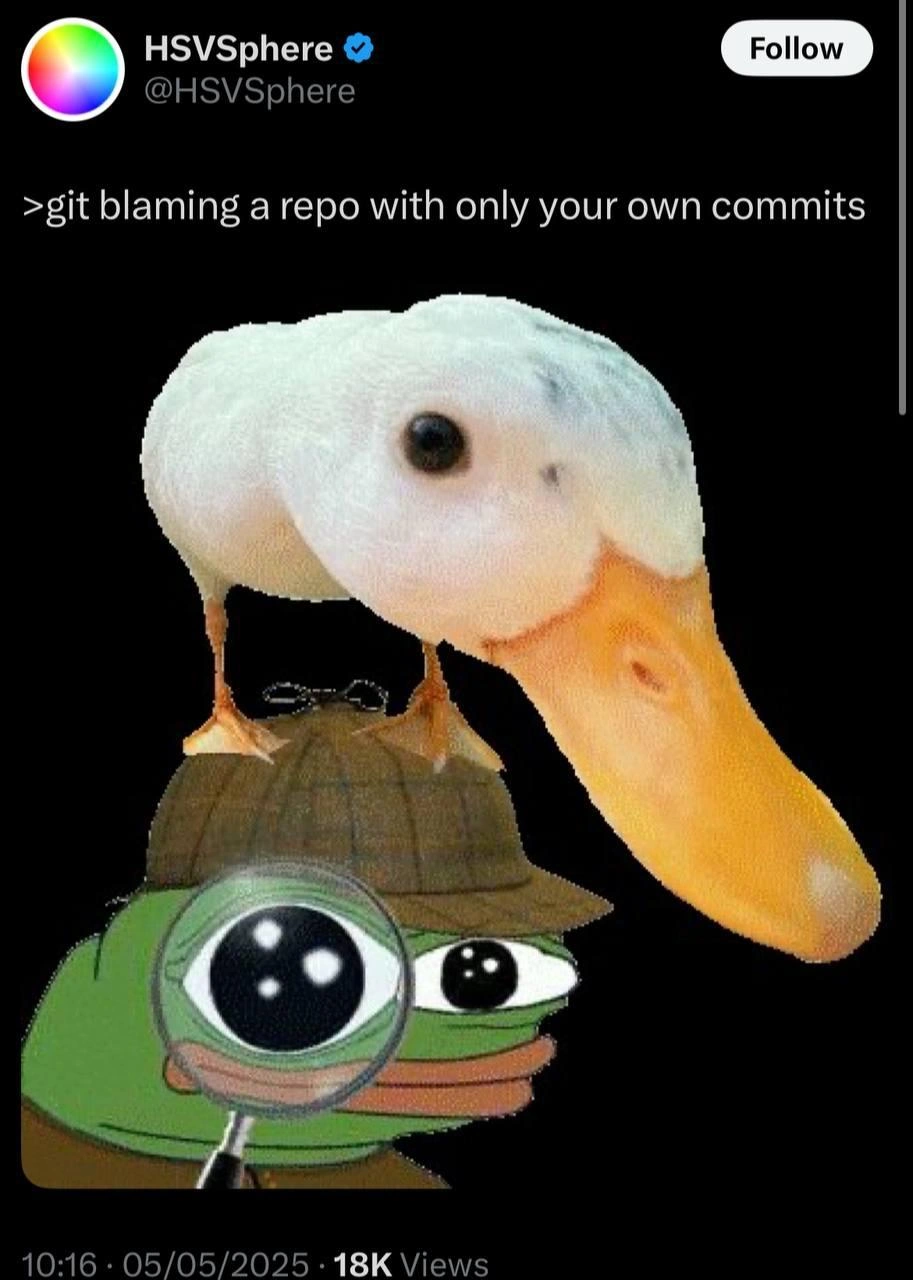
Imagine you’re the only kid at home and someone ate all the cookies from the cookie jar. You put on your detective hat and grab a magnifying glass, determined to find out who stole the cookies. You search for clues around the kitchen, maybe even question a stuffed animal or a pet duck sitting nearby as your “assistant.” But in the end, you realize something obvious: you ate the cookies yourself last night and forgot! You were investigating a mystery where you turned out to be the culprit all along. That’s exactly what’s happening in this meme. A programmer tries to find out who wrote a piece of messy or buggy code (like searching for the cookie thief), using a special tool (like a magnifying glass) to trace the code’s history. But since they’re the only one who ever worked on that code, the “blame” can only point to them. It’s funny and a bit like a cartoon: the detective frog looking for the bad guy, with a silly duck on his head, only to discover the bad guy was the frog himself. In simple terms, the joke is that the developer was pointing a finger, only to find they were pointing into a mirror. It makes us laugh because we’ve all blamed something or someone for a problem, then realized we were responsible for it ourselves.
Level 2: All Evidence Points to Self
Let’s break down the joke for those newer to Git and debugging. A repository (repo) is basically a project’s folder tracked by Git, a version control system that logs every change. A commit is one of those logged changes – like a save point that records which lines were added, removed, or modified, along with who did it and when. The command git blame is a handy tool that annotates each line of a file with the last commit that touched it. In practice, developers use git blame when they stumble upon a puzzling piece of code and wonder, “Who wrote this and what were they thinking?” It literally shows the author’s name and commit info next to each line, so you can find the owner of the code in question.
Now, here’s where the humor kicks in: imagine running git blame on a project where you are the only contributor. Every line of every file was last modified by you, because, well, you wrote all the code. There’s no mystery co-author to discover, no ancient developer alias to curse. It’s just your name, over and over. It’s effectively git blaming yourself. The tweet says “git blaming a repo with only your own commits” as if it’s a step-by-step action, and the punchline is implied: the output will point to you for every line. It’s like asking “Alright, who’s responsible for this bug?!” and the universe answering, “Look in the mirror.” In a group project, git blame might direct you to Alice, Bob, or Carol as the one who last changed a buggy line. In a solo project, it’s only pointing back at the sole suspect: you, the developer.
The meme image illustrates this scenario in a goofy way. Pepe the Frog is dressed as a detective (a nod to Sherlock Holmes with the classic hat and magnifying glass). Think of Pepe as representing the programmer — inquisitively examining the codebase for clues. The giant magnifying glass is just like using git blame to zoom in on each line’s history. And then there’s that duck sitting squarely on Pepe’s head, staring off into the void with a vacant look. Why a duck? This could be a playful reference to rubber duck debugging – a well-known technique where you explain your code or problem to a rubber duck (or any object) as if it were listening, which often helps you find the solution on your own. Usually, the duck is just a silent listener to your explanation. Here, the duck isn’t offering any insight; it’s simply there, almost mocking the situation. It’s as if the duck is the only “other” being in this investigation, and it’s silently judging you or saying, “Don’t ask me, I’m just a duck.” The absurdity of a duck on the detective’s head adds to the comedy, emphasizing how silly this investigation gets when you realize you’re the sole guilty party.
Key terms to know from this humorous scenario: “solo_repo” means a repository where only one person commits code. “Code ownership” or “commit history” refers to who wrote what in the code’s past. When you run git blame on such a repo, you experience “self incrimination” – a fancy way of saying you’re effectively accusing yourself. Developers often feel a mix of embarrassment and amusement in this case, something the meme tags as “commit_history_shame.” We’ve all looked back at old code we wrote and groaned, “What was I thinking?!” This meme is a light-hearted take on that universal developer experience. It’s highlighting the moment when debugging and troubleshooting turn into a self-reflective trip: you set out to find the problem-maker, only to discover it’s been you all along. In short, the joke lands because every developer eventually realizes that sometimes the only person to blame for a coding blunder is the one in the mirror (and it’s a little funny and humbling when that happens).
Level 3: Single-Player Blame Game
In a one-developer codebase, running git blame feels like a detective investigating a crime where every fingerprint belongs to you. Seasoned developers recognize the dark comedy here: Git’s infamous blame tool is meant to identify which commit and which author last touched each line of code, usually to track down why a bug exists or who wrote a suspicious snippet. But in a solo repository, every line comes back to the same author – you. It’s the programming equivalent of shouting, “Alright, who wrote this bug?!” into an empty room and hearing only your own echo. The meme’s tweet text >git blaming a repo with only your own commits perfectly sets the scene: you’re essentially using a forensic tool to accuse yourself, line by line. Talk about a painful session of self-reflection.
Senior engineers have been in this exact spot. Perhaps you open a file, see some bizarre workaround or messy code comment, and instinctively reach for git blame – the trusty magnifying glass for code history. The expectation is comfortingly human: maybe this mess was left by some other developer, some “Someone Else” whose choices you can now question. Instead, the terminal spits out your own name on every line, often next to a timestamp from a late-night coding session. Oof. It’s a humbling moment when the culprit you’re hunting in the codebase turns out to be Past You. You might even scroll through the commit message thinking, “Surely I had a reason for this nonsense,” only to find a commit message like “Temporary fix – will refactor later.” There’s no one else to interrogate; you’re both the detective and the guilty party.
This humorous predicament highlights a shared developer pain: the uneasy mix of debugging frustration and commit history shame. The meme’s image nails this feeling. Pepe the Frog is decked out as Sherlock Holmes – deerstalker hat, oversized magnifying glass – embodying the developer as a determined detective. On Pepe’s head perches a white duck, staring blankly into space. This absurd sidekick isn’t just random surreal humor; it winks at the idea of rubber duck debugging. That’s the practice of explaining your problem out loud to an inanimate object (like a rubber duck) to help you solve it. Here, though, even the rubber duck looks a bit dumbfounded, as if to say, “Mate, the evidence all points to you.” The duck on his head also emphasizes how upside-down this investigation is – the detective looks silly because the case itself is silly. In a multi-developer project, git blame can lead you to an actual colleague (for better or worse). In a solo project, it’s like reading a detective novel where on the last page you discover the detective was the thief all along. It’s both funny and mildly agonizing.
On a deeper level, every experienced coder knows this is a rite of passage. We’ve all written code we later regret or don’t recognize. Version control tools like Git give us a perfect memory – every line’s history is preserved. That’s powerful for accountability and debugging but also means you can’t hide from your past self. The command name git blame itself feels accusatory (enough that some teams prefer the less-judgmental alias git annotate). But here the blame is literally on you, and there’s a kind of poetic justice in that. The industry pushes for “blameless post-mortems” in incidents – focusing on the process rather than the person – but our tools still say blame. This meme playfully reminds us that in software, sometimes the only person to blame is ourselves, and confronting that is both comically absurd and technically enlightening. It’s a senior-level inside joke: you wanted answers, and you got them, along with a healthy side of personal accountability.
Description
A screenshot of a tweet from the user HSVSphere. The text reads '>git blaming a repo with only your own commits'. Below the text is a popular meme image featuring Pepe the Frog, illustrated as a detective wearing a brown deerstalker hat and holding a large magnifying glass to one eye. Perched on top of his head is a white duck, looking down with an equally intense and curious expression. The image humorously visualizes the absurd situation described in the text. 'git blame' is a command used to identify which developer last modified a line of code, typically to understand the history of a bug. When a developer is the sole contributor to a project, running this command is a futile exercise in self-investigation, as the answer is always 'I did it'. The meme captures this moment of dawning, comical self-realization familiar to anyone who has worked on a personal project

Comments
8Comment deleted
Running 'git blame' on your own repo is the fastest way to schedule a performance review with your own imposter syndrome
Some days `git blame` isn’t version control - it’s version regret; time to alias it to `git therapy --hard`
After 15 years in the industry, you realize git blame on your solo projects is just an elaborate way to document your journey through the five stages of grief - from 'what idiot wrote this?' to 'oh right, that was me during the microservices phase.'
Running git blame on your solo project is the software engineering equivalent of checking your browser history to figure out who's been using your computer - technically thorough, emotionally devastating, and ultimately a journey of self-discovery you didn't ask for. At least when you find the bug introduced six months ago, you can't throw anyone else under the bus during the post-mortem
Ran git blame on a solo repo - still 100% me after .git-blame-ignore-revs; turns out the postmortem is just me arguing with past me
git blame on a bus-factor-1 repo: RCA = me; mitigation: git rebase -i --autosquash my past decisions
Solo git blame: the architect's mirror, reflecting every 'temporary' hack you swore was production-ready
It’s a wonderful feeling when you search on google how to use some API/library and you find your own code on GitHub doing exactly what you need. Comment deleted

