Skip to content
DevMeme
356 of 7435
The Recursive Fear of 'git blame'
VersionControl Post #418, on Jun 2, 2019 in TG

The Recursive Fear of 'git blame'

Why is this VersionControl meme funny?

Level 1: It Wasn’t Me

Imagine you and your friend painted on the wall when you weren’t supposed to. Suddenly, the teacher comes in and says, “Who made this mess? I have a camera that shows exactly who did it.” You gulp and your eyes go wide. You glance sideways, hoping they don’t look at the footage – because you know it’ll show you holding the brush! In this meme, the senior developer is like that teacher checking the camera, except the camera is a computer command that shows who wrote the code. The junior developer is like the kid who did the painting, feeling nervous and guilty. The funny orange monkey puppet looking awkward is basically saying, “Uh oh… please don’t find out it was me.” It’s a simple joke: someone might get caught red-handed, and their face (even if it’s a puppet) gives away the “it wasn’t me… or was it?” feeling. Even if you’re not a programmer, you know that feeling when an adult or boss is about to find out you’re responsible for something messy. It’s a playful way to show that moment of panic when you know you might get in trouble, and it makes us laugh because we’ve all been that wide-eyed monkey at some point!

Level 2: Who Wrote This?

Let’s break down what’s happening for those newer to Git or working in a coding team. Git is a popular version control system – think of it as a save-and-track system for code. It keeps a history of every change, and each change (called a commit) has an author and timestamp. Teams use Git so multiple developers can work on the same codebase, tracking who changed what. Now, git blame is a command you can run in a Git repository to find out who last edited each line of a file. The word “blame” is actually in the command, which is why this meme is funny. When a senior developer runs git blame, they’re essentially asking “Who wrote this particular piece of code?” in a very direct way. It’s like checking the git history to see the name next to that suspicious line of code that might be causing a bug or seems odd. For example, if they run:

$ git blame App.js -L 120,130  

they might see output that looks like:

ae24f2c1 (Alice 2021-05-10 14:32:05 +0200 120)    result = calculateTotal();  
f5d1e8b9 (Bob   2021-05-12 09:11:47 +0200 121)    // TODO: optimize this later  
f5d1e8b9 (Bob   2021-05-12 09:11:47 +0200 122)    return result;

This tells the senior dev that Alice last edited line 120 and Bob edited lines 121-122. In a real scenario, if line 121 is the troubling one (maybe that TODO comment is a red flag), the senior now knows Bob was the last to touch it. Junior developers, like Bob in this scenario, can feel panic when they realize the history points to them. Maybe Bob is new and that “optimize later” comment was a shortcut he took. Seeing a senior run git blame on code that you suspect might not be your best work can make your stomach drop. It’s not that the tool is evil – actually, git blame (sometimes called git annotate in more polite terms) is super useful for tracking changes and understanding why code is the way it is. But the social dynamic is the key: a Junior Dev often worries that the senior might literally blame them for a mistake, since their name is now spotlighted.

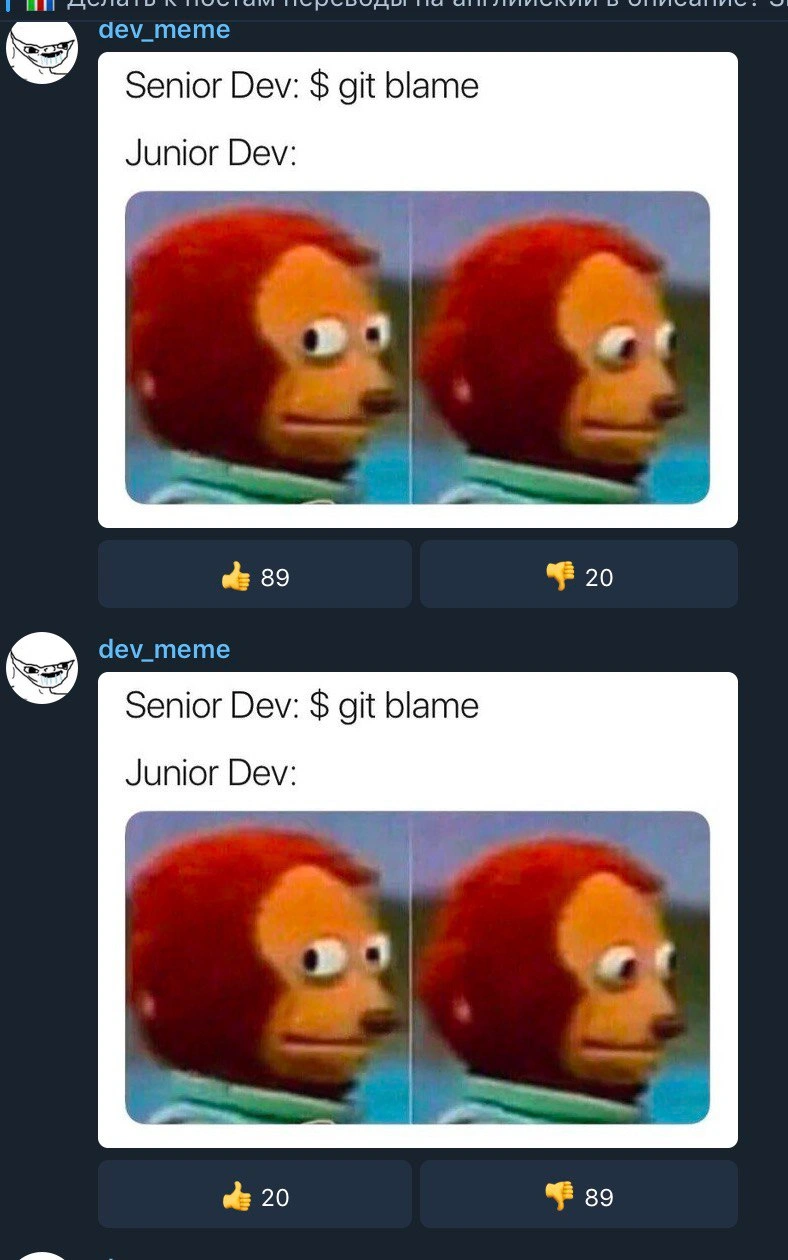
The meme captures this with the side_eye_monkey_meme image representing the Junior Dev. That monkey puppet with the side-eye glance is a famous meme used to wordlessly say, “Oops, that might be my fault… I’ll just look away and act casual.” On the top of the meme, the text says:

Senior Dev: $ git blame
Junior Dev: (nervously looks away)

No words from the junior, just that picture of the monkey with a frozen, guilty expression. The junior developer in the meme is basically thinking, “Please don’t find out I wrote that code…” This is a super relatable junior_dev_reaction. If you’re a new developer, you might recall the first time you broke something or wrote a bug, and a teammate started examining the history. Even if the senior isn’t actually angry, you feel embarrassed and scared you’ll look incompetent. It’s an experience a lot of us share: your heart skips a beat as your line in the git history shame spotlight comes up.

Now, about those two identical posts in the screenshot: it looks like the meme was posted twice in a chat, with opposite reactions. The first time, people gave it a lot of 👍 thumbs up (they liked it), and the second time it got a bunch of 👎 thumbs down. This is likely showing how the community reacted. Possibly the second was a mistaken double-post and everyone playfully “blamed” the duplicate by downvoting it. It’s a bit like posting the same joke twice – the first time it’s funny, the second time people groan, “We’ve seen that already.” For a junior developer, that’s another lesson: repeating something (or copy-pasting code in real life!) can make the audience unhappy. In context of our meme, it’s a cheeky add-on: even the act of reposting got blamed! But the core idea remains clear even without that detail: Senior runs git blame, Junior freaks out. It’s a little story that plays out in tech teams everywhere.

To sum up the tech: Git = a system tracking code changes; git blame = command to see who last edited each line of a file; Senior Dev = experienced programmer likely doing code review or debugging; Junior Dev = new programmer who might have written something questionable. Combine these with a popular meme image, and you get a joke that pokes fun at the anxiety of being responsible for code. It’s lighthearted VersionControlHumor about the sometimes scary feeling of owning up to your code in front of teammates. Remember, good teams don’t actually “blame” in a mean way – they use these tools to learn and fix issues. But the feeling of being caught? That’s real, and that’s why this meme is both funny and painfully relatable for junior devs.

Level 3: The Git Blame Game

In the world of version control, git blame is like a spotlight that exposes every developer’s fingerprints on the code. When a Senior Dev types $ git blame in the terminal, it’s essentially a forensic exam of the codebase – a line-by-line interrogation: “Who wrote this line, and when?” Seasoned engineers recognize this scenario instantly. It’s a VersionControl rite of passage: a bug is found or some odd code triggers suspicion, and the senior engineer pulls up the commit history to pinpoint the culprit. The humor here comes from that shared pang of panic many of us (especially in our junior days) have felt upon hearing git’s most accusatory-sounding command. The command name itself – blame – makes the situation ripe for comedy. It implies fault-finding, even though in practice git blame is often used to understand context or history rather than literally assign guilt. But try telling that to a nervous junior developer!

In this meme, the Junior Dev’s silent, side-eyed reaction is captured by the famous orange Monkey Puppet image – a puppet with bulging eyes looking forward, then awkwardly away. For programmers, that puppet’s face is the embodiment of “I hope no one notices it was me.” It’s a perfect visual metaphor for a junior developer’s internal alarm bells when their senior vs junior dynamics take a turn toward accountability. The senior’s line reads Senior Dev: $ git blame, styled like a command run in a dark-mode terminal (the $ prompt gives it an authentic hacker feel). The junior’s line is just “Junior Dev:” followed by silence – because the image says it all. Those wide puppet eyes scream developer_blaming anxiety: “Oh no, did I break something? Are they about to see my name in the code history?!” Anyone who’s been a junior developer on a team immediately cringes and chuckles because they’ve lived that exact moment. It’s DeveloperExperience_DX humor at its finest: taking a stressful workplace moment and turning it into a cartoonish scene we can laugh at.

The meme even has an extra layer for eagle-eyed viewers: it appears as a chat screenshot with the same meme posted twice by user “dev_meme.” The first post has a 👍 89 and a 👎 20, while the second (identical) post is ratioed with 👍 20 and 👎 89. This inversion is likely a meta-joke. Perhaps the community blamed the second post as a duplicate – downvoting it into oblivion – which itself is ironic versionControlHumor. It’s like the git_history_shame concept played out in real life: the first commit (post) is celebrated, the second commit (repost) is shamed for repeating history. In a way, the audience is enacting the blame culture that the meme mocks, side_eye_monkey_meme and all. This clever detail reinforces the meme’s core joke: in programming, doing something twice (especially a mistake) often gets you “blamed.” Even the meme’s format is winking at us: one version popular with a senior’s perspective, and the duplicate scorned as if the juniors collectively groaned, “We’ve seen this; you’re not getting away with it!”

Beyond the humor, there’s an undercurrent of truth seasoned devs appreciate. Modern teams preach blameless post-mortems and collaborative debugging, yet the tools we use (hello, git blame) literally name names. The tension between blame culture and learning culture is very real. Senior developers know that identifying who wrote a bug isn’t about personal blame (ideally) but about understanding context – maybe the junior was following an outdated spec or inherited crappy code. Still, the emotion of being on the hook is universal. That awkward Monkey Puppet is basically a junior dev internally screaming while trying to maintain a calm facade in the meeting. This meme lands so well with experienced engineers because it satirizes both the technical practice of digging through Git history and the human quirks of software team life. We laugh because we’ve all been the monkey – eyes forward, hoping the blame passes over us – and we’ve also been the one holding the magnifying glass to the commit log. In short, the combination of a simple Git command and an infamous guilty-look puppet creates comedic gold, highlighting the senior vs junior dynamics and the anxious developer experience around accountability in code.

Description

This image is a screenshot of a social media platform, displaying two identical posts from the user 'dev_meme'. Each post features a meme about the 'git blame' command. The text says 'Senior Dev: $ git blame' followed by 'Junior Dev:'. Below this, the 'Awkward Look Monkey Puppet' meme is used, showing the puppet looking straight ahead and then nervously to the side. The image humorously captures the intense anxiety a junior developer experiences when a senior developer investigates the history of a file, potentially exposing their mistakes. The fact that the meme is posted twice adds another layer of humor, suggesting a meta-level mistake, much like a bug a junior might introduce

Comments

7
Anonymous ★ Top Pick I see the 'post twice' bug is still in production. The first 'git blame' on that component will be... educational
  1. Anonymous ★ Top Pick

    I see the 'post twice' bug is still in production. The first 'git blame' on that component will be... educational

  2. Anonymous

    When the senior fires off “git blame -w -M -C” and you realize even the rename-whitespace-move obfuscation combo can’t hide the 2008 bug you just re-platformed into a microservice

  3. Anonymous

    The real plot twist is when git blame shows your own name from 3 years ago with the commit message "temporary fix, will refactor later."

  4. Anonymous

    The beauty of `git blame` is that it's the only archaeological tool that makes junior devs wish they could `git rebase -i` their entire career history. Senior devs run it with the confidence of someone who knows their commits are either ancient enough to be forgotten or well-documented enough to be defensible - meanwhile, juniors experience that special kind of dread reserved for finding out your 'quick fix' from three months ago is now the root cause of a production incident

  5. Anonymous

    Nothing says blameless culture like telling the new hire to run git blame - especially after the monorepo was auto‑formatted and nobody added .git-blame-ignore-revs

  6. Anonymous

    Git blame: where seniors discover their 'LGTM' approved the outage

  7. Anonymous

    Senior Dev: git blame; Junior Dev: add the Prettier sweep to .git-blame-ignore-revs or it’ll look like I authored the entire monorepo

Use J and K for navigation