
Skip to content
DevMeme
354 of 7435
The Meta-Mistake of a Duplicate Post
VersionControl Post #415, on Jun 2, 2019 in TG

The Meta-Mistake of a Duplicate Post

Why is this VersionControl meme funny?

Level 1: Caught Red-Handed

Imagine you secretly doodled a silly picture on the classroom whiteboard when no one was looking. Later, the teacher starts investigating to see who did it – maybe checking the security camera or just asking the class. You sit there nervously with a guilty grin, eyes darting to the side, hoping nobody figures out it was you. That's exactly the kind of uh-oh feeling this meme is poking fun at. The “senior dev using git blame” is like the teacher checking the record, and the junior developer is like the kid who knows they left their signature on the board and is bracing for the fallout.

Now imagine you try to tell the exact same joke to your friends that you already told them this morning. The first time, everyone laughed. The second time, they all groan and give you an unimpressed look, saying, “We’ve heard that one already.” You’d feel pretty embarrassed, right? That’s what happened with posting the same meme twice – the first time got laughs (likes), the second time got eye-rolls (dislikes).

Whether it’s getting caught for doing something you shouldn’t have or repeating yourself when everyone’s already heard it, the humor here comes from that very human reaction: caught red-handed! It’s the face you make when you realize everyone knows you’re the one responsible, and you wish you could just disappear for a moment. The monkey puppet’s side-eye look perfectly shows that feeling, which is why this meme is both funny and easy to relate to, even if you’re not a programmer.

Level 2: Git Blame & Meme Etiquette

If you’re a bit newer to coding or online dev circles, let’s break down what’s going on. Git is a very popular tool programmers use for version control – basically, it tracks changes in code and keeps a history of who made each change and when. The command git blame is a way to look at a file and see, line by line, who last modified that line and in which commit. So if a senior developer types $ git blame someFile.js, the output will list each line of code with information like “Alice – modified 2 months ago – commit 7a8b9c…” next to it. This is super useful for debugging or understanding code: it tells you who might know more about that line. The word “blame” sounds negative (and indeed, it’s often used humorously or pointedly), but in practice git blame is just a tool to trace code history. Still, you can imagine that as a Junior Developer, if your team runs git blame on a broken piece of code and your name pops up, you might feel a jolt of panic. It’s that uh-oh, I touched that last moment. In reality, a good team won’t automatically scold you – they’ll usually just ask you about the code – but the meme exaggerates the junior’s fear that they’re about to get in trouble.

The image of the side-eye monkey puppet is a famous internet meme used to wordlessly express guilt or awkwardness. It’s from an old children’s TV show puppet (with big eyes and orange fur) turning its face aside as if to say “I’m just going to look away and pretend I didn’t hear that.” In the meme’s text, we have:

Senior Dev: $ git blame
Junior Dev: (side-eye monkey puppet glance)

No actual dialogue from the junior – just that image – which perfectly conveys the junior developer internally thinking, “Please don’t let it be my code... oh no, it is my code.” This is a lighthearted take on a common junior experience: feeling exposed when your mistake is revealed.

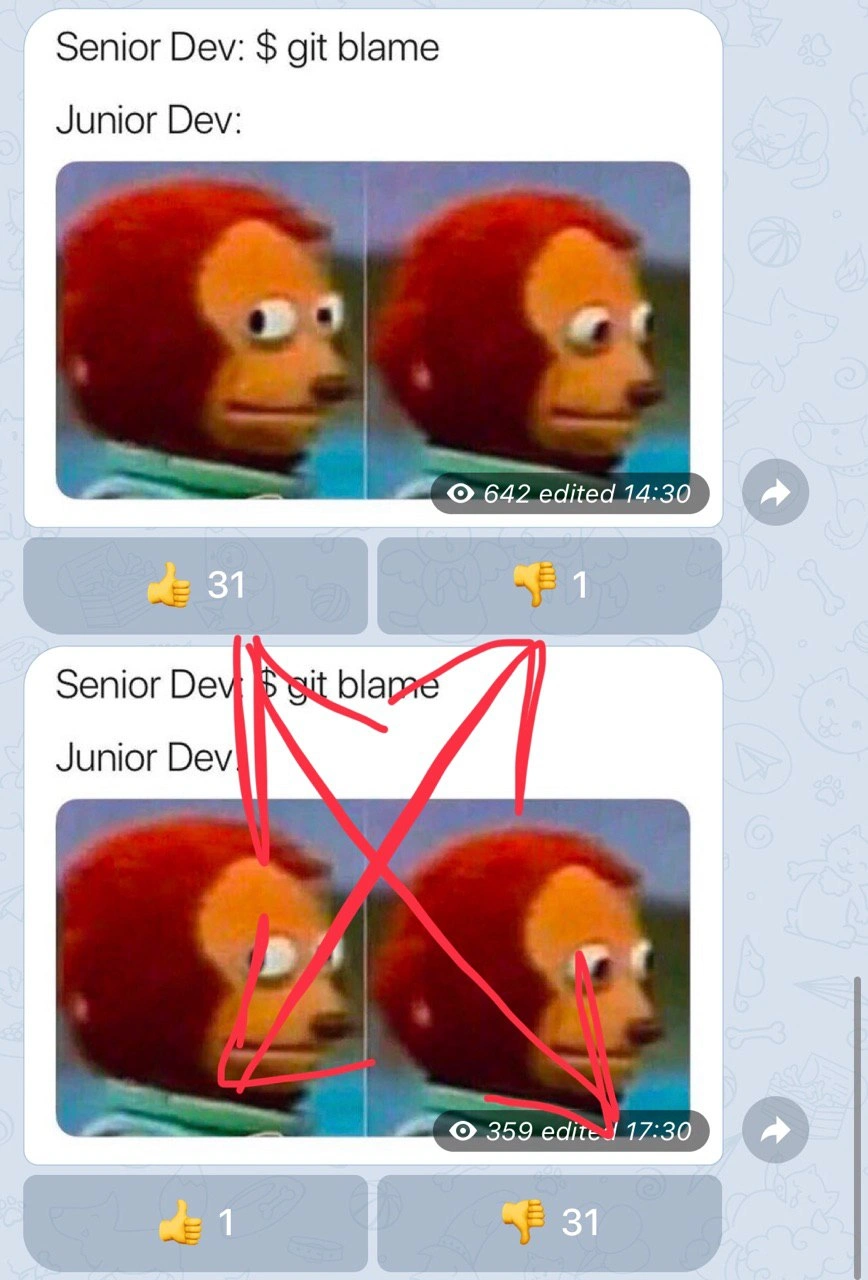
The second aspect of the meme is about developer community etiquette regarding reposting content. The screenshot looks like it’s from a Telegram channel (Telegram is a chat app, similar to Slack or Discord, where people can share messages and images in groups). In many such developer meme groups, users can react to a post with emoji. Here we see thumbs-up 👍 and thumbs-down 👎 reactions with counts. The top post (the first time the meme was shared) got a lot of thumbs-ups (31) and almost no thumbs-downs (just 1), meaning people liked it. The exact same meme was posted again later (you can even see the view count and edit timestamp on the image: 642 views at 14:30 vs 359 views at 17:30). On this second go, the community responded with the opposite sentiment: only one 👍 and a ton of 👎 (31 of them!), and someone even drew a big red X over the repeated post. In online dev communities (or really any meme-sharing group), posting a duplicate meme is like telling a joke that everyone already knows – it usually falls flat. People might downvote or react negatively not because the joke itself suddenly isn’t funny, but because they’ve seen it already and expect new content or a new twist.

For someone new in such a community, the takeaway is: check the recent history before posting a meme that’s making the rounds. It’s a bit like in programming where you check if a question has been asked before on Stack Overflow, or if there’s already a utility function written before writing a new one. Posting the same meme twice in the same group is considered a faux pas. The strong reaction (lots of 👎) is the community’s friendly (if a bit snarky) way of saying, “We love your enthusiasm, but this meme was already shared – got anything else?” It’s public feedback that feels very direct. In the meme, the red X and the reversed thumbs ratio dramatize this rule. The poor soul who reposted it likely felt a bit embarrassed, much like the junior dev whose code is being singled out. In both cases, you learn something: for code, maybe double-check and test your changes (so you won’t be the one blamed next time), and for community sharing, double-check recent posts (so you don’t accidentally repost and get the side-eye from the group). It’s a humorous way to remember both Git etiquette and meme etiquette in the developer world!

Level 3: The Blame Game

This meme captures a mini-drama in software development: a Senior Developer runs the infamous git blame, and a Junior Dev suddenly has that wide-eyed, oh-no-it’s-me expression – just like that classic side-eye monkey puppet. In a team setting, git blame is a powerful version control tool that reveals who last modified each line of code. It's often used by experienced devs tracking down a bug or questionable snippet. Here, the senior is essentially asking “Who wrote this?” and Git dutifully points the finger. The humor comes from the junior’s immediate discomfort – they recognize that awkward moment when the commit history is about to expose their name. The side-eye monkey meme (a red-haired puppet glancing away nervously) perfectly embodies that caught-in-the-act feeling. Every seasoned engineer remembers the first time they saw their name pop up in a git blame for a bug in production – it's both funny and terrifying.

$ git blame auth.js -L 75,77
^7a8b9c (Alice Senior 2022-12-01 10:05:00 -0400 75)   authenticateRequest(user);
^3d4e5f (Bob Junior 2023-06-15 14:22:10 -0400 76)   bypassAuthCheck(user); // TODO: remove hack
^3d4e5f (Bob Junior 2023-06-15 14:22:10 -0400 77)   return grantAccess(user);

Above, we see a (fictional) git blame snippet: the senior Alice wrote a proper security check on line 75, while junior Bob later introduced a cheeky shortcut on lines 76–77. If something broke (or security was bypassed), this command immediately blames Bob Junior for that change – complete with the exact commit and timestamp. We've all seen or written a “// TODO: remove hack” in code and then prayed nobody notices. When that hack inevitably causes trouble, git blame is like a neon sign above your head identifying you as the culprit. The tool literally has “blame” in its name, so the situation invites a tongue-in-cheek jab at our industry’s tendency to pinpoint who wrote what. (Ironically, many teams preach blameless post-mortems and a no-blame culture in theory, yet the go-to Git command for investigating issues unabashedly labels someone as the guilty party!)

Now, the meme goes meta by showing this joke posted twice in a developer Telegram channel. The screenshot reveals two identical posts stacked on top of each other. The first got 👍 31 likes and 👎 1 dislike – clearly the community enjoyed the original joke. But the duplicate meme post right below it is scribbled over with a big red X, and its reactions are the reverse: just 👍 1 like and a whopping 👎 31 dislikes. Developers have a strong sense of déjà vu humor: reposting the same meme in the same group is a quick way to get publicly “blamed” by your peers. The large red X and the flood of thumbs-down are basically the channel collectively saying, “We’ve seen this already, not cool.” It’s as if the community ran their own social git blame on the meme itself – tracing it back to the earlier post and calling out the poster for the repeat. In DevCommunities, originality (or at least timing and proper credit) is king. Posting the identical joke again, especially so soon, is treated like committing the same code twice or plagiarizing a commit message – you’re bound to get a loud, negative code review. Here, that review comes in the form of immediate developer culture feedback: lots of 👎 reactions and a red X of disapproval.

What makes this layered meme so relatable is the intersection of technical accountability and social accountability. On the technical side, git blame can make a newbie engineer sweat bullets when a bug surfaces (“Uh oh, the logs point to my code!”). On the social side, a meme repost triggers a similar spotlight of shame in a developer community (“Oops, everyone noticed I didn’t bring anything new to the table.”). The classic Senior vs Junior dynamic is being played out both in the codebase and in the chat room. In both cases, someone is looking over your shoulder at what you did – whether it’s the senior dev inspecting code history or fellow devs remembering a meme’s history. The result? That exact same side-eye monkey look: please don’t find out it was me… oh no, everyone knows! The meme brilliantly ties together the fear of being singled out in your code and the embarrassment of being called out in front of your peers online.

Description

This is a screenshot of a chat application, likely Telegram, showing two identical meme posts back-to-back. The meme itself displays text 'Senior Dev: $ git blame' and 'Junior Dev:', followed by the two-panel 'Awkward Look Monkey Puppet' image, which humorously depicts a junior developer's anxiety. The second of the two identical posts is aggressively crossed out with a large red 'X'. The like/dislike counters are reversed between the two posts: the first has 31 likes and 1 dislike, while the second has 1 like and 31 dislikes. The user's caption, 'When posted same meme twice', confirms the context. The humor is layered: first, the relatable fear of 'git blame', and second, the meta-joke of making a simple, public mistake (a duplicate post) while memeing about the fear of having one's mistakes discovered


Comments

7
Anonymous ★ Top Pick This is the UI equivalent of a race condition leading to a double-insert. The community's response is the manual rollback
  1. Anonymous ★ Top Pick

    This is the UI equivalent of a race condition leading to a double-insert. The community's response is the manual rollback

  2. Anonymous

    Reposting a meme is the chat-ops equivalent of copy-pasting util.java into every microservice - CI runs git blame, the channel runs 👎, and you’ve just broken DRY at social scale

  3. Anonymous

    The real horror isn't finding your name in git blame - it's realizing the senior dev who ran it wrote the original code and is just checking if anyone noticed they quietly reassigned the Jira ticket to you six months ago

  4. Anonymous

    The real senior move isn't running `git blame` without flinching - it's knowing exactly when to use `git blame -w` to ignore whitespace changes, `--since` to scope the investigation, and most importantly, having already set up `.git-blame-ignore-revs` to skip that massive formatting commit from three years ago. Junior devs panic at git blame; senior devs have already architected their commit history to make future archaeology painless

  5. Anonymous

    The real senior move is git bisect and a blameless postmortem; git blame just identifies the culprit as “chore: squash + Prettier.”

  6. Anonymous

    Git blame: crowning whoever ran Prettier as the author of the outage - use --ignore-rev-file

  7. Anonymous

    Git blame: seniors wield it like Excalibur on juniors, until it unearths their own 'temp fix' from the 2015 monolith refactor

Use J and K for navigation
