Git Blame Won't Show Copilot as the Author of Your Code
Why is this VersionControl meme funny?
Level 1: Can’t Blame the Robot
Imagine you have a helpful robot friend who tells you answers during a homework assignment. You write down everything the robot says. Now, if those answers turn out to be wrong, and the teacher asks, “Why did you write this?” – you can’t just point at the robot, right? The teacher will say you are responsible because it’s your homework. This meme is basically saying the same thing, but for computer code. Developers have a smart assistant (kind of like a robot helper) that suggests code to them. It’s called Copilot. But when the code is saved and shared, it has the developer’s name on it, not the robot’s. If there's a mistake in that code, everyone will look at the person’s name and know who wrote it. The funny part is some people might wish they could say, “Oh, it wasn’t me, it was the AI!” – but the system doesn’t work that way. In the end, using an AI helper doesn’t let you escape the blame if something goes wrong. The computer will still show that you were the one who wrote the code, just like a homework paper with your name on it.
Level 2: The Blame Game
Let’s break this down in simpler terms. First, Git is a popular tool used by developers to track and manage changes in code, known broadly as version control. Think of it like a timeline of a project, where every change is a snapshot on that timeline. Each snapshot (called a commit) has information attached: what changed, when it changed, and who made the change. This “who” is taken from your Git configuration (your name and email you set up with Git). In a team, this is super useful — it’s transparent, so everyone knows who contributed which part of the code and when. This is what we mean by commit history transparency: the history is an open record.
Now, git blame is actually the name of a specific command in Git. Despite its name sounding negative, it’s a tool that shows you, line by line, who last modified each line of a file and in which commit. Developers often use git blame when they are trying to understand code or debug an issue. For example, if a developer is curious “who wrote this function? It’s causing a bug,” they might run git blame on the file to see the author and date for each line of that function. The output will list each line alongside something like an author’s initials or name, a commit ID, and a date. It literally attributes authorship for every line. Many IDEs or repository browsers call this feature “Annotate” or “Line history” (because calling your teammate to blame them is a bit harsh!), but the idea is the same.
On the other side of this meme’s equation, we have GitHub Copilot. Copilot is an AI pair-programmer assistant. It uses machine learning (trained on tons of publicly available code and natural language) to suggest lines or blocks of code as you type. For instance, you might start writing a function and Copilot will try to finish the line or even write multiple lines for you. It’s like autocomplete on steroids, or having a super-advanced AIAssistants sitting over your shoulder whispering suggestions. Copilot lives inside your code editor (such as VS Code, JetBrains IDEs, etc.) and makes suggestions, but it does NOT directly interface with Git. It doesn’t run git commands, and it doesn’t make commits on your behalf. You, the developer, always remain in control: you decide whether to accept a suggestion, edit it, or ignore it.
Now, what happens when you do accept Copilot’s suggestion and include it in your code? You’ll eventually commit those changes to your repository (perhaps with git commit -m "Add new feature" or via a UI). When you make that commit, your name (from your Git config) is stamped on it as the author. There’s no special tag saying “Copilot was involved” unless you explicitly add one in the commit message (which typically people don’t). Even though the code content might have been written with AI help, the version control system only knows about the human who saved and committed the file. It’s similar to how a chef might use a fancy recipe suggestion, but the cookbook of record lists the chef who made the dish, not the source of the recipe.
So, if later someone uses git blame on that AI-crafted code, the result will implicate the human developer. The meme’s caption “it won’t say Copilot” means that in the blame output, you will see the Git username of the person who committed the code, not anything like “GitHub Copilot”. For example: if Alice is the developer and she relied on Copilot for a tricky bit of code, running git blame on those lines will show Alice’s name next to them. Copilot is completely invisible in that history. Here’s a tiny imagined example of what a blame line might look like, to paint the picture:
$ git blame helper.py -L 10,10
a1b2c3d (Alice 2025-09-21 14:05:10 -0400 10) result = calculateMagicValue(x, y)
This tells us that line 10 of helper.py was last changed by Alice on that date. If Copilot suggested the calculateMagicValue(x, y) line, there’s no sign of that in this output. It’s attributed to Alice because she was the one who accepted the suggestion and committed it. That’s what we mean by code attribution in practice.
Why is this funny or important? Well, there’s a bit of DeveloperHumor here that plays on the phrase “the blame game.” In workplaces, when something goes wrong, people sometimes try to pass blame around (“It wasn’t me, it was X!”). In software, git blame sort of cuts through any debate by pinpointing exactly who wrote what. The meme jokes that no developer can point at GitHub Copilot and say “the AI did it, not me!” because the tools we use for accountability will literally show your name. It’s humor with a lesson: no matter how much help you get from an AI, you’re still responsible for the code you commit. In a way, Copilot is like a co-pilot in a plane: it can help fly, but the pilot (you) is ultimately in charge and accountable for the flight. If the plane (code) goes down, the pilot can’t just blame the autopilot. Similarly, you can’t fully blame Copilot if the code goes awry. It’s right there in the name — “Copilot” helps, but it’s not the captain. 🚀✈️
For newer developers (and even experienced ones), this meme is also a gentle poke at how we integrate new tools into our workflow. It’s exciting and tempting to use AI suggestions everywhere because it can save time and sometimes even write code you’re not sure how to write yourself. But you have to remain vigilant. If Copilot suggests code that has a bug, a security flaw, or even uses an outdated approach, and you accept it without understanding, you will be the one held accountable in the code review or when the code is running in production. There have been real discussions in the community about things like AI accidentally suggesting code that is copied from open-source projects (raising licensing issues). If that happens and it’s in your commit, guess who might face the questions or legal headaches? The developer (i.e., you), not the AI. This is why many developers treat Copilot suggestions like any other piece of code: they test it, review it, and ensure it meets the team’s standards before committing. It’s a smart DeveloperExperience_DX habit: use the modern tools, but also uphold the old responsibility.
In day-to-day terms, after you’ve used Copilot, if a colleague does git log or git blame to see history, they might tease, “I see you wrote that fancy function last week.” You might laugh nervously and reply, “Well, Copilot helped,” but the record shows it as your work. Some developers jokingly add comments like // Suggested by Copilot in their code, almost like giving the AI a nod. But ultimately, there’s no official marker unless you put something in the commit message like Co-authored-by: GitHub Copilot. (Yes, there is actually a feature where you can mark co-authors in a commit, but people usually reserve that for human collaborators. It’d be quite unusual to credit an AI this way!). The fact that this isn’t standard underscores the meme’s point: AI isn’t a scapegoat you can pin your code on.
So, the “blame game” here is double-edged: it’s about the Git command, and it’s about the human tendency to want to dodge blame. The meme humorously reminds developers—especially those eager to rely on AI—that you can’t dodge this one. Your GitHub repository’s history will rat you out! It keeps you honest. In a positive light, this pushes a culture of ownership: if you commit something, own it, learn from it, maintain it. Copilot can speed up your coding, but it won’t take the fall if something breaks. That’s still on us as developers. And honestly, that’s fair – after all, we wouldn’t want it any other way when working in a team. Trust in a codebase comes from knowing changes are attributable and reviewable. This meme just captures that lesson with a chuckle, using very straightforward Git wisdom.
Level 3: Git Logs Never Forget
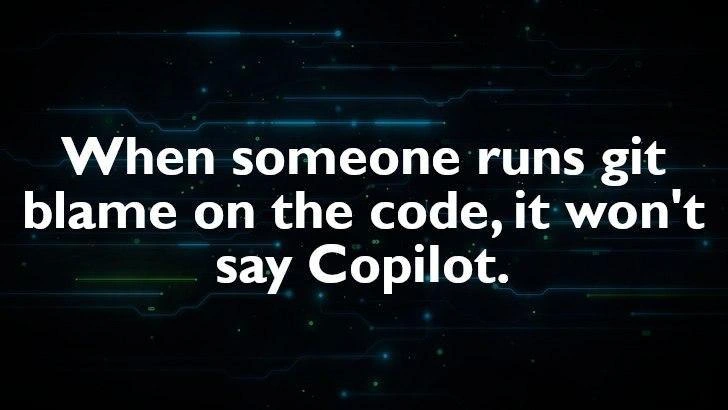
The meme’s futuristic neon backdrop sets the stage: we’re in a world of advanced AI assistants helping with code. Yet front-and-center is a blunt reminder of an old truth in VersionControl: Git’s metadata doesn’t lie. Every time you commit code, Git records an author name and email in the project’s history. So when a seasoned engineer runs git blame on that suspicious line in production, the output will expose the real author — and it’s not going to say “GitHub Copilot”. Instead, it’ll show the human who accepted and committed that code. This juxtaposition is what makes the meme funny: no matter how futuristic our tools (hello, AI_ML-powered coding assistants), the accountability mechanisms remain decidedly human and old-school.
In practice, git blame is like a high-tech forensic tool for code. It combs through the commit history transparency of your repository and lists, for each line of a file, which commit last modified it and who made that commit. Git is a distributed version control system that creates an immutable trail of changes (a DAG of commits). Each commit is an object that includes the author’s name, email, timestamp, and of course the code changes. Once you’ve made a commit, that record is virtually etched in stone (or rather, in the Git object database 😅). Because of this, authorship attribution is baked into your codebase at a fundamental level. Even if an AI like GitHub Copilot generated the code snippet, you are the one who pressed the button to add it to the repository. Git treats you as the author, full stop.
Let’s imagine a real senior-dev scenario: A critical bug hits production at 3 AM (because of course it does). The on-call engineer scrambles to debug and finds a strange piece of logic causing the crash. They pull up git blame on that section of code to see who wrote it and when. The terminal blinks out something like:
$ git blame server.js -L 120,120
7cfa942e (AliceDev 2025-09-20 21:17:42 +0000 120) handleMagicEdgeCase();
# 'git blame' shows AliceDev as the author of line 120. No mention of Copilot.
The output might as well be a giant neon arrow pointing at Alice. There’s no line that says “Copilot” or “AI” — only Alice’s username attached to that commit hash. In that delirious 3 AM moment, Alice can’t really protest, “Hey, GPT-4 wrote that code, not me!” 😅. The blame-driven debugging flow has zero sympathy for ghostwriters. It’s a blame game we all know: the log says Alice did it, so guess who gets the support ticket assigned? Alice does.
This highlights a key nuance in modern software development: tools like Copilot massively assist in writing code, but commit attribution and responsibility remain with the developer. For staff engineers and architects, this is a wry reminder that all our fancy AI helpers don’t change governance and auditing fundamentals. Code_attribution is still tied to a person. If compliance or a code audit comes up, you can’t excuse a security hole by saying “the AI suggested it” – the paper trail ends at the human committer. In fact, many organizations enforce policies (like requiring code reviews or even commit signing) to ensure accountability. Git’s design, since its creation by Linus Torvalds in 2005, intentionally makes each commit traceable to an individual (or at least to a configured identity). Commits are even cryptographically hashed, meaning any alteration in history is detectable, reinforcing that you can’t just magically erase or reassign blame.
The humor also touches on the notion of AI-generated code authorship. There’s been debate: if an AI writes some code, who is the author, legally or logically? This meme cuts through that intellectual knot with a practical answer: the person who committed the code is the author in the repo’s eyes. Period. It’s a bit of a reality-check for those of us embracing AI in our IDEs. No matter how advanced Copilot becomes, it’s not an autonomous developer with its own Git identity. (At least not yet — imagine a future where Copilot does get its own commit signature? Unlikely, and a bit dystopian, because that’d complicate accountability even more!). So far, GitHub hasn’t given Copilot any feature to automatically attribute itself on commits; it’s purely a coding assistant, not a version-control agent.
For veteran devs, there’s an extra layer of chuckle here. We’ve seen waves of “productivity boosters” come and go — from Stack Overflow copy-paste culture to code generation tools — and junior devs sometimes try to blame those tools when things go awry. But as the saying goes, “A poor craftsman blames his tools.” Whether you grabbed a snippet from Stack Overflow in 2010 or accepted an AI suggestion in 2025, the commit log pins the change on you. The meme’s caption “it won’t say Copilot” is basically mocking any false hope that we could offload our developer accountability onto a robot. It’s as if the industry is collectively nudging us and saying, “Nice try, but you’re not off the hook!”
Importantly, this isn’t just about avoiding embarrassment when someone checks the logs. It’s also about quality and code review. Knowing that your name will be on that code tends to make conscientious devs review AI-suggested changes more carefully. If Copilot proposes a clever-looking but convoluted solution, you might think twice: “Do I really want to be the one known for writing this?” 😅 In a way, git blame encourages a form of personal code stewardship — you’re more likely to maintain standards and double-check logic if you know the history will point back to you. So the meme humorously underscores a serious best practice: AI can assist, but you must audit.
And let’s not forget the cultural aspect: DeveloperHumor often revolves around the friction between our shiny new tools and the harsh realities of legacy processes. Here, the legacy process is the venerable version control system and its habit of preserving history. The meme gets a laugh because any experienced programmer has felt that slight panic or chagrin seeing their name pop up in git blame on a bug. It’s a universal dev experience — no matter how the code was produced, the “blame” finds a person. That’s both slightly terrifying and oddly comforting (at least you know who to ask about the code!). In the end, Git logs never forget, and that truth transcends any AI magic that happens in your editor.
Description
A dark technology-themed background with circuit board traces in green and blue, featuring white text that reads: 'When someone runs git blame on the code, it won't say Copilot.' The meme highlights the accountability gap in AI-assisted coding -- while GitHub Copilot generates code, the human developer's name appears in git blame, making them solely responsible for whatever the AI produced. This captures the tension between using AI coding assistants and taking ownership of generated code
Comments
14Comment deleted
Copilot writes the code, you take the blame -- literally. The 'Co' in Copilot stands for 'Conveniently absent from git log.'
My commit message: 'Implement feature X.' The git blame reality: 'Authored by me, architected by a stochastic parrot who dreamed of deprecated libraries.'
Remember: compliance auditors don't review token probabilities - they review `git log`, and the AI isn't the one getting paged at 3 a.m
The real horror isn't that Copilot wrote half your codebase - it's explaining to the CTO why the git history shows you personally committed a regex that somehow achieved O(n!) complexity while trying to validate email addresses
The modern developer's dilemma: when your commit history shows you wrote 10,000 lines of perfectly idiomatic code at 3 AM, but git blame can't reveal your true pair programming partner was a large language model. It's the ultimate plausible deniability - until someone asks you to explain the algorithm you 'wrote' and you realize Copilot didn't leave any comments either
Copilot can autocomplete the bug, but CODEOWNERS, DCO sign-off, and PagerDuty still resolve to your LDAP
Copilot autocompletes your code, git blame autocompletes your blame - AI assists, you atone
Copilot can autocomplete the diff, but it can’t autocomplete the RACI - git blame still resolves to whoever hit Merge at 2am
Fkin saved Comment deleted
nothing stops git from actually saying "copilot" in blame $ cd `mktemp -d` && git init && echo meow >README.md && git add * && TZ=UTC git commit --author='Copilot <>' -m. >/dev/null && git blame * && cd && rm -Ifr $OLDPWD Initialized empty Git repository in /tmp/tmp.yvLx3M6g6R/.git/ ^2f1bd1a (Copilot 2025-09-21 06:59:49 +0000 1) meow no ai was involved in writing this oneliner and also please do not override author/committer to shift blame onto others Comment deleted
ok Comment deleted
Using gpg could save one from getting falsely blamed Comment deleted
...or ssh signatures, which are much easier to set up and also supported by git Comment deleted
Ya, so who approved and who merged? 🌚😁 Comment deleted