Skip to content
DevMeme
6206 of 7435
Proof of Work: The 3D Artist's Clapback
DevCommunities Post #6804, on May 23, 2025 in TG

Proof of Work: The 3D Artist's Clapback

Why is this DevCommunities meme funny?

Level 1: Messy Puppet Show

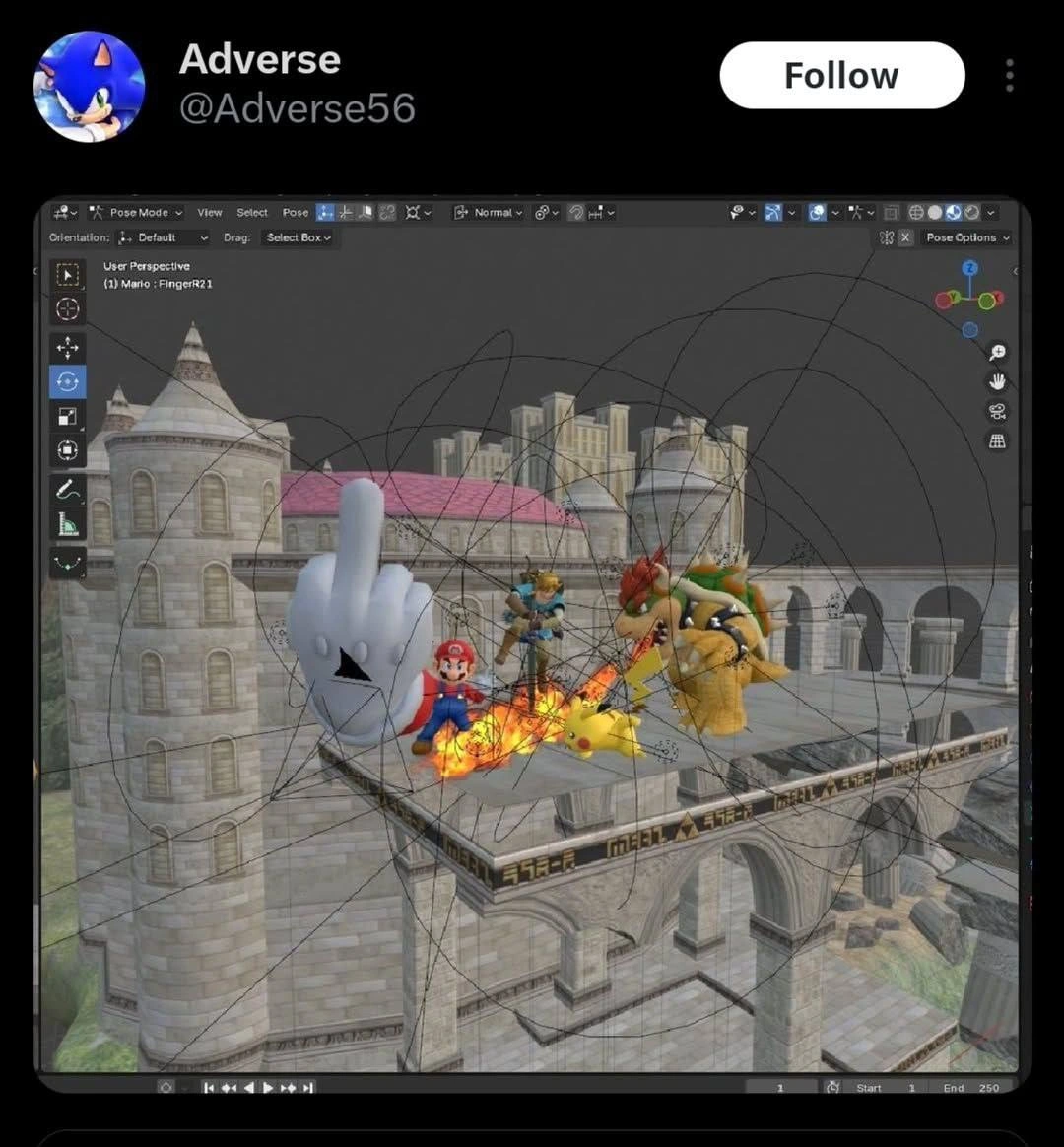
Imagine you’re putting on a puppet show with lots of puppets on stage. You have Mario, Pikachu, Link, and Bowser as toy figures, and you even have a big glove puppet (that’s Master Hand) as the big villain. Now, each of these puppets is controlled by strings (like how puppets are moved in real life with string mechanisms). If you only had one puppet, you’d have a few strings and it’d be fine. But you have five characters, each with many strings attached to their arms, legs, heads, and so on. That’s a LOT of strings!

Now picture that all those strings got tangled together into a giant knot above the stage. It’s so tangled that you can hardly see the puppets because strings are crisscrossing everywhere, like a huge spiderweb of thread. Mario’s strings are tangled with Pikachu’s, Pikachu’s with Bowser’s, and so on. Everything works – you tug a string and a character’s arm still moves – but boy, it looks incredibly messy and confusing.

In the middle of this chaotic tangle, the big glove puppet (Master Hand) is sticking up one finger – the middle finger. That’s a very rude gesture, kind of like the puppet is angrily saying “forget all this!” or "I’m done with this nonsense!" to the other toys (or maybe to the puppet master!). It’s as if the Master Hand puppet itself is fed up with how messy the stage is and is expressing some attitude.

So, the whole scene is funny because it’s like a puppet show gone wrong: too many strings everywhere making a mess, and one naughty puppet comically showing frustration. Even if you don’t know the game characters, you can laugh because everyone understands what a tangled mess of strings looks like, and the glove making a crude gesture is a cheeky way to say “this is chaotic and silly!” It’s a mix of childhood play (puppets and toys) with a bit of grown-up humor (the rude finger), showing how crazy things can get behind the scenes of a performance.

Level 2: Untangling the Viewport

Let’s break down what we’re seeing for someone newer to this. Blender is a popular open-source program for 3D modeling and animation (used a lot in indie GameDevelopment and graphics work). In Blender, each character (like Mario or Pikachu) is a 3D mesh that can be rigged with an armature – basically a virtual skeleton made of bones. Rigging is the process of creating that skeleton and setting it up so that when you move a bone, the 3D model moves with it (just like how our skeleton moves our body parts).

Now, Blender’s interface has different modes. Pose Mode is a mode where you can move/rotate the bones of a rigged character to pose them or animate them. In the screenshot, the program is in Pose Mode, meaning the person is actively manipulating the skeleton(s) of the characters. We can even see text at the top that says Pose Mode and something like (1) Mario : FingerR2.1 – which likely indicates a specific bone named "FingerR2.1" on Mario is currently selected. So, perhaps the user was adjusting Mario’s finger, while Master Hand’s finger is… well, doing its own thing!

All those black curves and loops all over the scene are Blender’s viewport overlays that help visualize relationships in the scene. By default, if you have an armature, Blender can draw a line from each bone to its parent bone (to show the hierarchy). For example, a hand bone is connected to a forearm bone, which connects to an upper arm bone, etc., forming a chain. If you show those relationship lines for every bone of every character at once, it quickly becomes a huge mess – like a big bowl of spaghetti noodles thrown on top of your characters. There are also little axes drawn on bones (showing each bone’s local X, Y, Z orientation) which appear as tiny crossed lines – those can clutter things up further. And if the user turned on motion paths (trails that show where an object or bone moves over time), those appear as curves too. The screenshot is basically everything turned on.

Let’s identify the characters and setting: Mario (red hat, can’t miss him), Pikachu (the little yellow electric mouse), Link (green tunic, sword guy from Zelda), and Bowser (big spiky turtle-dragon) are standing on a stone platform that looks like a stage from Smash Bros (the castle background suggests it’s the Hyrule Temple stage or something similar). The big floating white glove is Master Hand, a boss from the Super Smash Bros games known for being a giant hand fighting the player. Here Master Hand is posed with the middle finger up – a universally recognized rude gesture. So it’s a bit of visual comedy inserted into the scene.

For someone new to Blender or 3D, seeing this viewport would be super confusing. You might wonder: are those black loops part of the castle or some kind of force-field? In reality, they’re just guides. Think of them like scaffolding or strings that the software shows to tell the animator “this bone is connected to that bone” or “this object is following that target”. In a clean simple scene, you might only see a few lines (like a character’s root bone to the floor, or a camera’s target). But here we have multiple characters and a complex character (Master Hand) all in one view. Each of them has dozens of bones. So the lines overlap like crazy. If you look closely, some lines probably go from each character down to the stage (maybe each character rig is parented to the stage so they move with it), and other lines connect Master Hand’s armature to something (maybe an invisible root or the scene’s origin). It’s literally a web of connections.

This is why the term “spaghetti rig” is used – it’s like a spaghetti bowl where each noodle is one relationship line. For a junior dev or artist, encountering this is a rite of passage. The first time you open a complex game asset file and see this, your reaction is usually “Uh… what did I do wrong?!” In truth, nothing’s wrong with Blender. It’s just showing how complex the setup is. Think about a big video game boss: to make Master Hand move realistically (or cartoonishly), riggers might have added extra bones for each finger, plus controllers for special motions, maybe constraints so the hand can point or face the characters dynamically. All those extras mean more visual aids in Blender.

Let’s demystify a few interface bits mentioned:

  • User Perspective: That indicates the 3D view is in user-controlled perspective mode (you can rotate around).
  • Start “1” End “250” in the timeline: that’s the animation frame range. By default Blender sets up 1 to 250 frames for animation. So the user might be setting up an animation of, say, Master Hand giving the finger between frame 1 and 250 (a little animation clip).
  • The toolbar icons and such (on the left and right) are just Blender’s usual UI – nothing magical, though it contributes to the screenshot looking like a real working environment rather than a staged joke. This is a GraphicsAndMultimediaProcessing playground in action – a lot of tools visible simultaneously.

So, for a newcomer: the picture is funny because it shows a GameDev scenario where a beloved game’s characters are in a 3D editor, and everything that’s normally behind-the-scenes (all the “puppet strings” and rig controls) are visible and making the image super chaotic. Yet despite the chaos, the main focus – that flipping Master Hand – comes through clearly. It’s like finding an Easter egg in a program: you see Mario and friends and then “Whoa! The boss is flipping them off AND the rig is a mess!” It combines a gaming reference with an inside joke about how messy 3D production can get. Once you understand that those curves are just Blender’s way of showing the bones and connections, you can appreciate why an expert might laugh: they’ve been in that exact situation of trying to manipulate a character while drowning in on-screen helper lines. And now here it is, turned into a gag.

Level 3: Pose Mode Pandemonium

For experienced developers and artists, this image triggers instant recognition and a bit of PTSD. It’s a Blender viewport in Pose Mode showing a scene that’s equal parts epic gamer tribute and nightmare fuel for riggers. We see Mario, Pikachu, Link, and Bowser on a familiar castle stage (a nod to Super Smash Bros – a classic GamingReference). Looming over them is Master Hand (the Smash Bros boss) performing the ultimate rude gesture: the middle-finger flip. The caption might as well be, “When the rigging is so bad, even the final boss has had enough.”

What really sells the humor is the forest of splines and axes entangled around the characters. Those black loops and lines are Blender’s way of showing bone relationships and motion paths. In a complex scene, especially one imported or built without cleanup, you get exactly this: spaghetti rigging. Everything is connected to everything, at least visually. It’s like opening someone’s 10-year-old legacy code base where global variables and weird dependencies run rampant – but here it’s in 3D space. As the meme description cleverly puts it, everything technically works, but the visual dependency graph is pure spaghetti. Been there, done that, got the t-shirt.

Why is this so funny (and painful) to a seasoned dev? Because we’ve all struggled with a “working” system that is virtually unmaintainable. In game development and 3D animation, the rig is the skeleton and control setup that lets characters move. A clean rig is organized in layers: primary bones, secondary controllers, maybe separate invisible bones for IK targets, etc. But when you toggle viewport_overlays to show everything, or when a rig is poorly organized, you get an explosion of wires. Here, presumably every bone’s relationship line is visible, the motion trajectories might be on, and even bone axis markers are drawn. The viewport has basically turned into a developer’s debug mode for rigs. It’s Pose Mode Pandemonium, where trying to select one bone is like playing Operation in a bowl of noodles.

This scenario likely arose from cramming multiple character rigs and maybe props into one Blender file. Perhaps the Smash Bros characters were imported with their full rigs (each character could easily have 50-100 bones for body, face, fingers). Blender’s default behavior draws a line from each bone to its parent (to visualize hierarchy) and additional lines for constraints (like IK targets or object tracking). Now, imagine Bowser’s shell spikes having constraint controllers, or Link’s sword being a separate object attached to his hand bone, or Pikachu’s lightning effect linked to a bone – each adds yet another curve or line in the view. Suddenly the scene looks like an insane wiring diagram. A senior developer might chuckle because it reminds them of the times they’ve had to untangle such setups. For instance, debugging why Pikachu’s ears wiggle might involve sifting through dozens of bone constraints and drivers, akin to debugging an old Fortran program with GOTOs everywhere.

There’s also a meta-joke here: Master Hand (essentially the “boss” of the game) is flipping off the Smash roster, but one could imagine it’s also flipping off the developer who has to clean up this mess. The giant hand with a single finger raised becomes the embodiment of the rig saying “screw you” to anyone who dares to understand it. And let’s be honest, when a project’s complexity explodes, it often feels like the code or the tools are personally attacking us.

In terms of industry practice, this highlights the gap between best practices and reality. Best practice: keep your scenes modular (each character in its own file, only bring them together for final assembly), use naming conventions and hide unnecessary rig controls when animating. Reality: tight deadlines and hacky imports mean everything ends up in one file, named whatever the export spit out (hello FingerR2.1 bone name!), and all layers visible because “why is Mario’s mustache not moving? let’s turn on all bones to find out.” The technical debt in rigs is real – just like code, rigs get quick fixes and experimental changes that never get cleaned up. Over time you get extra bones, half-functional constraints, and weird naming (did I mention FingerR2.1? There’s probably a FingerR2 and FingerR2.001 floating somewhere too – the Blender hallmark of duplicated names).

For those of us in GameDevelopment, this chaotic scene is also a reminder of engine import woes. Bringing characters from a game into Blender (or vice versa) can create monstrous armatures. Different coordinate systems, scaling adjustments, and engine-specific bones (like physics or attachment points) all come through. The Blender viewport will earnestly show you everything – even things the original game hid. It’s funny because it’s true: many game developers have opened a supposedly “finished” asset only to see a wall of bone influence lines and thought, “How does this not crash the game?”

Ultimately, the humor resonates because it’s a shared experience: whether you’re debugging a GameEngine scene graph or a Blender rig, there are times when the underlying complexity becomes so absurd that all you can do is laugh… and maybe throw in a cheeky middle finger right back at the problem.

Level 4: Graphical Gordian Knot

At the deepest technical level, this chaotic Blender scene represents a complex dependency graph gone haywire. In 3D graphics software like Blender, every character’s skeleton (or armature) is a hierarchy of bones – essentially a tree (or directed acyclic graph) of transformations. Each bone has a local transformation matrix that gets multiplied by its parent's matrix, all the way up the chain. Normally this graph stays behind the scenes, but here all the relationships are explicitly drawn in the viewport. The result is a tangled web of splines reminiscent of a graph theory nightmare. We have nodes (Mario’s bones, Pikachu’s bones, Master Hand’s bones, etc.) and edges (parent-child links and constraints) forming a visual hairball.

In a well-structured rig, these connections are carefully organized. But when you import multiple characters and a boss character into one scene – each with dozens of bones and possibly constraint relationships – the scene graph becomes unbelievably dense. The lines criss-cross every which way because some bones might be targeting others via Inverse Kinematics (IK) or other constraints. For example, if Master Hand’s finger bone is constrained to point at something (or if Mario’s hand is IK-controlled to grab or punch), Blender draws a line from the bone to its target. Multiply that by every limb or appendage, and you have spaghetti.

Under the hood, Blender’s animation system solves all these constraints and updates the pose through its Dependency Graph (Depsgraph). This system figures out the correct order to evaluate all bones and drivers so that, despite the apparent chaos, Mario’s arms move correctly and Master Hand’s finger ends up exactly where it’s supposed to be (flipping the bird, in this case). The math involves solving joint angles for IK (often using iterative algorithms like CCD or Jacobian solvers) and concatenating transformation matrices for each bone in the hierarchy. It’s a marvel of computational GraphicsProgramming and GameEngine design that it works at all. However, when you visualize every single relationship and motion path, you essentially see the Graphical Gordian Knot behind the magic. The humor (and horror) here is that the beautiful abstraction of a smoothly animated scene is stripped away, revealing the raw, tangled complexity that a computer diligently crunches through every frame. It’s as if the normally invisible puppet strings were not only made visible, but drawn as an incomprehensible scribble. Any veteran of GameDev tools knows that technically everything might be correct, yet the debugging viewport resembles a wonky circuit diagram of an entire game level. This meme shines light on that hidden complexity: the rigging equivalent of reading assembly code – accurate but almost impossible to interpret at a glance.

Description

This image is a screenshot of a tweet from the user 'Adverse', responding to criticism that their previous artwork was AI-generated. The screenshot displays a 3D modeling software interface, likely Blender, revealing the 'behind-the-scenes' of the Super Smash Bros. artwork. It shows the character models (Mario, Bowser, Pikachu, Link) positioned on a castle stage, complete with wireframes, rigging lines, and the application's user interface. The most prominent and aggressive element is a large, white, cartoonish 3D model of a hand giving the middle finger, positioned centrally in the scene. This serves as a direct, non-verbal retort to the accusers, effectively using the source file of the artwork to both prove their manual effort and express their frustration. The scene file is even labeled 'Mario:FingerR21' in the hierarchy view, adding a layer of technical detail to the insult

Comments

7
Anonymous ★ Top Pick The best way to resolve an argument about whether you used a generative model is to show the source file. The second best way is to model a giant middle finger, rig it, and place it in the scene's origin, which also doubles as a fantastic commit message
  1. Anonymous ★ Top Pick

    The best way to resolve an argument about whether you used a generative model is to show the source file. The second best way is to model a giant middle finger, rig it, and place it in the scene's origin, which also doubles as a fantastic commit message

  2. Anonymous

    When your architecture diagram renders like this, you don’t need a post-mortem - your dependency graph is already giving you the finger

  3. Anonymous

    When you've been optimizing collision detection for 15 years and the junior dev asks 'Why don't we just use sphere colliders for everything?' - this is the PTSD flashback you get while explaining why pixel-perfect hitboxes exist and O(n²) collision checks aren't always the answer

  4. Anonymous

    When stakeholders see the polished game demo versus when they accidentally open the project file and witness the eldritch horror of 10,000 bezier curves, inverse kinematics chains, and bone hierarchies that would make a necromancer weep. This is why we never let product managers peek behind the render layer - they think Mario just 'moves naturally' without realizing he's being puppeteered by a skeletal rig more complex than actual human anatomy

  5. Anonymous

    Bowser's glow-up: PBR textures and ray-traced flames, because N64 fog was just premature optimization

  6. Anonymous

    When your IK solver, motion paths, and drivers mirror the microservices map: touch FingerR.21 and the constraint propagation reaches eventual consistency - delivering a highly available middle finger

  7. Anonymous

    When your IK/FK switchboard and motion paths look like a Zipkin trace, the only clear signal - “Mario: Finger.R21” - is the rig literally flipping off whoever has to retarget this to Unreal by Friday

Use J and K for navigation