Skip to content
DevMeme
429 of 7435
When the Backend API Contract is... a 500 Error
Backend Post #497, on Jul 30, 2019 in TG

When the Backend API Contract is... a 500 Error

Why is this Backend meme funny?

Level 1: Broken Vending Machine

Imagine you put a coin into a vending machine (like a server) to get a candy bar you really want (that’s the data the frontend asked for). You press the button, expecting yummy candy to drop down. But instead, the machine makes a weird noise and nothing comes out. Then you notice on the little screen it just says, “Out of Order” or “Error – candy not available.” You’d probably feel pretty upset or angry, right? You wanted a treat, but all you got was a useless message. In this meme, the frontend is like a kid expecting candy (information) from the machine, and the backend is the broken machine giving an error. The front-end student’s furious face is just like your face when the vending machine took your money and returned nothing useful. It’s funny in the comic, because we’ve all been there – left hanging with an error note instead of the thing we asked for.

Level 2: Error Sheet 101

Let’s break down what’s happening in simpler terms. We have two roles here: Frontend and Backend. The frontend is the part of a website or application that runs in your browser – basically the user interface that people see and interact with (buttons, forms, displays of information). The backend is the server side – it’s like the kitchen of a restaurant, where data is stored and processed, and where requests are handled out of sight. The frontend (customer-facing side) asks the backend (kitchen) for something (data or an action) through an API call. An API (Application Programming Interface) is essentially a structured request that the frontend sends to the backend to get data or perform some operation, often over HTTP for web apps.

Now, HTTP (HyperText Transfer Protocol) uses numeric status codes to tell us if a request was successful or if something went wrong. You might be familiar with 404 Not Found (when a page or resource isn’t found) or 200 OK (everything went fine). The code 500 Internal Server Error is part of the 5xx family of codes, which mean “the server failed to do what was asked.” It’s a very general error message indicating that “I, the server, screwed up or crashed while trying to process that request.” The meme literally shows the backend handing the frontend a paper that says this, which is exactly what happens digitally: the backend returns an HTTP 500 response instead of the data the frontend wanted.

To a newer developer, a 500 error might be a bit abstract, so think of it this way: the frontend sent a request like “Hey server, can I get the list of students for this class?” and instead of a nice list of students, it got back a response that basically says “500 – Internal Server Error: I can’t give you anything.” The frontend code now just knows “the request failed”, often with no further detail. This is an unexpected_response because the frontend was expecting useful information (maybe JSON or HTML content), but got a failure notice. In a developer’s debugging console or network log, it would literally appear as a response with status 500. Sometimes the server might include an error message or HTML page along with that status, but often it’s not something the frontend can nicely use.

Here’s a quick comparison of some HTTP status codes to clarify:

Status Code Meaning Who’s at Fault?
200 OK Success – request handled, here’s your data. Nobody at fault (it worked!)
404 Not Found The resource wasn’t found – maybe the URL is wrong or doesn’t exist. Client side issue (requesting something that isn’t there).
500 Internal Server Error The server encountered an error while processing. Server side issue (something broke on the backend).
502 Bad Gateway One server got an invalid response from another server. Server or network issue (often upstream server failed).
403 Forbidden You aren’t allowed to access this. Client issue (lack permission).

In our meme’s case, the server_side_failure is squarely a 500 – an internal error. For a junior developer, it’s important to know this usually indicates a bug or oversight in the backend. The code might have thrown an exception (an error in code execution) that wasn’t caught. For example, if the backend tried to read from a database and the database was down, or it tried to divide by zero or access a null value, it would throw an error. If the backend code doesn’t catch that error and handle it, the web framework will automatically send back a 500 Internal Server Error response to the frontend. It’s like the server saying “Oops, I broke while doing that.”

The meme perfectly illustrates frontend_vs_backend tension. The Frontend character’s fury is something many of us have felt when working on the UI and seeing a mysterious 500 error pop up. As a junior dev, you might initially think, "Did I do something wrong?" But a 500 implies BugsInSoftware on the server side. The front end can’t really fix a 500 directly because the problem lives in the backend code. The best a frontend can do in that moment is show an error message to the user like “Sorry, something went wrong” (which is basically passing the disappointment on to the user). But for the development team, a 500 means DebuggingFrustration: you’ll likely need to check the backend logs, reproduce the issue, and figure out which part of the server code caused the exception. In practice, a backend developer might see a stack trace (a detailed error report) on their server logs corresponding to that 500, which gives clues to what failed.

So, the sequence is: the frontend asked for something via an API call, the backend encountered a problem and sent back a 500 error code. The front end is now effectively holding a slip of paper that just reads “Internal Server Error” (like in the cartoon) – not very helpful! This is funny to developers because we’ve all had those "Oh no, the API just gave me a 500!" moments. It often leads to a bit of good-natured ribbing and inter-team jokes. The backend might say, “My bad, found the bug, pushing a fix,” while the frontend updates their code to handle errors more gracefully next time. The meme exaggerates it in a school setting, making the situation easy to visualize: the expectation of getting the “answer” from your teammate, and instead getting a note that says “I messed up.” Classic.

To sum up, HTTP status code 500 is the computer world’s way of saying “Something went wrong on the server.” The frontend developer is mad because they expected data to work with, but now they have to stop and deal with this error. It’s a shared lesson in teams: anticipate failures. Good APIs will not only avoid crashes but also return more info (like an error message or a specific error code in JSON) so the frontend can handle it or show a meaningful message. When that doesn’t happen, you get the scenario shown in the meme. It’s both humorous and a little painful because it’s a day-to-day reality of building software: sometimes, things just break, and you have to scramble to figure out why.

Level 3: Unhandled Exception Exchange

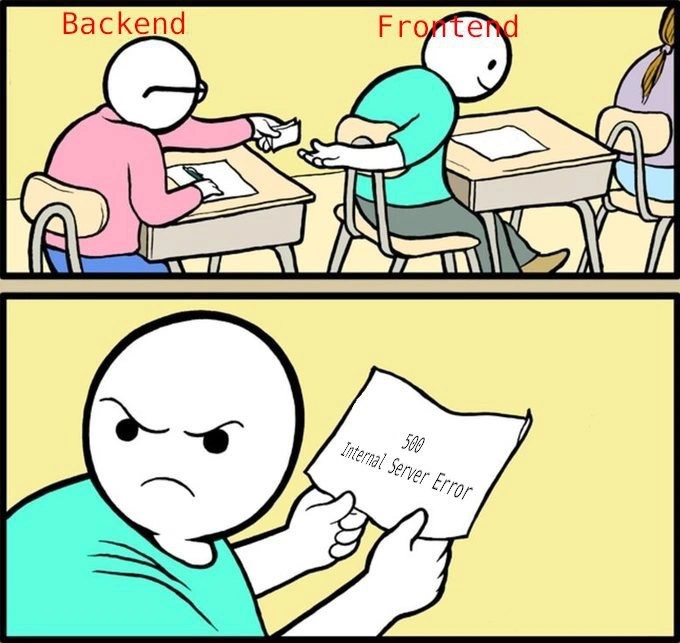
In this meme’s classroom scene, the Backend student slyly passes a note to the Frontend student, much like a server returning an API response. But instead of the expected answers (useful data), that crumpled paper just says 500 Internal Server Error. This is a status code that practically shouts, “Something broke on my end, and I have no useful info for you!” It’s the HTTP equivalent of a shrug and a server-side failure.

Every experienced developer recognizes this frustrating hand-off. The front-end code makes a request to an API (perhaps via fetch or Axios, expecting JSON data), and the back-end unexpectedly blows up, returning the dreaded 500. The humor (and pain) here comes from the all-too-familiar scenario: the UI is ready to display content, but got handed an error instead. The Frontend’s angry glare in the bottom panel is basically every UI developer’s face upon seeing a "HTTP 500" in their console or network logs. It’s a mix of “Why now?” and “Not again!”.

Technically, a 500 Internal Server Error means the server encountered an unhandled exception or an unexpected condition that prevented it from fulfilling the request. In real life, this could happen because:

  • A bug in the backend code (like a null pointer or unhandled promise rejection) crashed the request handler.
  • A database query failed or timed out, and the error wasn’t caught.
  • Some misconfiguration or unforeseen input caused the server to barf (perhaps an edge case not covered by tests).

The result? The server, having no better error-handling in place, sends back a generic 500 status. From the frontend’s perspective, this note might as well be blank – it doesn’t say why things failed, just that it did. As a senior dev knows, this scenario often leads to frantic Slack messages: “Hey backend team, the user profile API is just returning 500s!” followed by back-and-forth blame or urgent debugging sessions. It’s a classic Frontend vs Backend standoff born of a ProductionBugs nightmare: the UI can’t proceed and the fault lies buried in server logs.

This meme nails an inside joke: the BackendHumor of handing off a useless error and the FrontendHumor of being the one left holding that useless response. Seasoned engineers nod (or groan) in recognition because they’ve been on one or both sides of this exchange. It highlights a gap in error handling—when backends don’t gracefully handle failures or provide helpful messages, frontends are left frustrated. We’ve all learned (the hard way) that “Works on my machine” isn’t enough; if the backend isn’t rock-solid, the frontend’s fancy UI can’t do squat except maybe show a sad error message.

The subtle brilliance here is comparing a backend throwing a 500 to a classmate passing a failed cheat sheet. It’s a conspiratorial scenario: backend and frontend are supposed to be collaborating (like students cheating together), but the backend’s cheat sheet is just an error. DebuggingFrustration ensues. The senior perspective also sees a lesson: invest in better error handling and communication between services. Maybe if the backend anticipated this error, it could have returned a useful JSON error object or at least a specific error code. But nope – our backend friend basically slid over a note saying, “I messed up, good luck.”

For veteran developers, this meme might also trigger war stories of late-night on-call incidents: that 3 AM alert where the UI is blank and all logs show are HTTP 500s. It’s funny because it’s true – the joke lands on a shared understanding that integration between front and back can fail spectacularly. And of course, these failures tend to happen at the worst times (like right after everyone said “deploy looks good!”). As a wise cynic once said about web services, “If something can go wrong between client and server, eventually it will – and it’ll be a 500.” The result is captured perfectly by that enraged Frontend character. We’ve all been there, buddy, holding that cryptic error payload, wishing it were real data.

Description

A two-panel comic strip depicting the relationship between frontend and backend development. In the first panel, two cartoon figures are sitting at desks in a classroom. The one on the left, labeled 'Backend' in red text, is passing a folded note to the figure on the right, labeled 'Frontend' in red text. In the second panel, the 'Frontend' figure is shown up close, now with an angry and frustrated expression, holding the unfolded note which reads '500 Internal Server Error'. The meme humorously illustrates the dependency of the frontend on the backend. The frontend expects data from the backend (the note), but instead receives a critical server-side error, rendering its own work impossible and leading to frustration

Comments

7
Anonymous ★ Top Pick The frontend is just the pretty face you put on a 500 Internal Server Error
  1. Anonymous ★ Top Pick

    The frontend is just the pretty face you put on a 500 Internal Server Error

  2. Anonymous

    Backend just rolled out their latest resilience pattern: 500-as-a-Service - fully stateless, infinitely scalable, and rendered pixel-perfect by an angry React error boundary

  3. Anonymous

    Frontend dev explaining to the CEO why the demo failed: "Well, the backend team's definition of 'eventually consistent' apparently includes the heat death of the universe as a valid timeframe."

  4. Anonymous

    When Backend hands Frontend a 500 error, it's the technical equivalent of 'it's not you, it's me' - except Frontend still has to explain it to the user, write the error handling, implement retry logic, and somehow make a generic server failure look graceful in the UI. Meanwhile, Backend's stack trace is 47 levels deep in a microservice three teams removed from anyone who remembers why that endpoint exists

  5. Anonymous

    Frontend: GET /answers → 500; backend hands over a traceId and the PM files it as a UI bug

  6. Anonymous

    Frontend reused backend’s answers; the only shared component was a 500 - should’ve shipped contract tests, not hope

  7. Anonymous

    Backend's ultimate loose coupling: any exception becomes frontend's generic 500 - detailed traces optional, blame included

Use J and K for navigation