Physical Authentication: When MFA is a Keychain
Why is this Hardware meme funny?
Level 1: High-Tech Key Rack
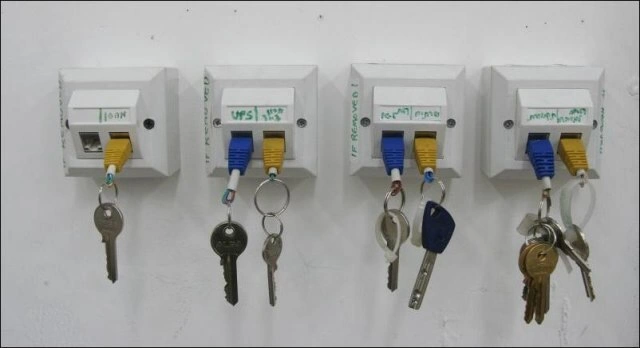
Imagine you have a fancy plug on the wall that’s meant for computers to talk to each other. Now, instead of using that plug for your computer, someone stuck a little cable in it and is using it to hang their keys – just like a hook! 😃 It’s like if you took a phone charger, plugged it into the wall, and then hung your house keys on the end of it. It’s funny because that plug’s real job is something serious (connecting computers or giving power), but we’re using it for something super simple and unexpected (holding keys).
This picture makes people laugh because it shows creative problem-solving in a silly way. The team needed a place to put their keys so they don’t get lost, and instead of buying a normal key hanger, they used the computer network plug on the wall. It’s a bit like using a very high-tech gadget as a coat hook – you just don’t see that every day! The humor comes from seeing a high-tech object doing a very ordinary job. Even if you don’t know much about computers, you can tell those wall sockets were not designed to be key hangers. But hey, it works! The keys are all neatly hanging, and nobody’s going to misplace them now. It goes to show that sometimes the best solution is the one you have right in front of you, even if it’s a little unconventional.
Level 2: Jack of All Trades
Alright, let’s break down what’s happening here in simpler terms. In the photo, we have four wall-mounted Ethernet ports (the kind of jacks you’d plug a network cable into when setting up a computer in an office). Each port has a short Ethernet patch cable plugged in – those are the blue and yellow cables dangling down. Normally, these cables would connect your PC or a device to the company network, carrying data. But here the loose end of each cable isn’t going into a computer at all. Instead, each cable’s free end is acting like a hook, and on those hooks hang some ordinary keys (like house keys and car keys on keyrings). Essentially, the network team turned unused network ports into a key hanger!
Let’s clarify a few things for newer techs: an RJ45 jack is the technical name for that rectangular Ethernet plug interface – it’s the standard connector for wired networking (the one that looks like an oversized phone plug). Offices have these jacks on wall plates so you can easily hook up your computer to the local network (this network wall jack plus the cable running behind it to a switch is often called a network drop). Typically, each jack is labeled (like we see “104”, “UPS1”, “PC1” written above them) so you know what it connects to on the other end or which device it’s meant for. For example, “UPS1” might have been the network connection for a Uninterruptible Power Supply or some equipment, and “PC1” for a computer. It looks like at the time of this photo, those devices either aren’t in use or the ports were spare – so the team got inventive. They likely had spare patch cables plugged in just to keep dust out or mark the port, and someone realized, “hey, this could hold our keyrings!” and went for it.
For a junior sysadmin or network technician, stumbling on this would be pretty hilarious and oddly educational. 😀 You learn that Layer 1 (the physical stuff like cables and jacks) isn’t usually where you solve organizational problems like key storage – but hey, these folks did! Usually, “key management” in IT refers to handling security keys (like passwords or encryption keys) with software tools or lockboxes. Here it literally meant managing door keys by hanging them on the network hardware. It’s a classic example of an office or workplace humor moment: using what’s available in a creative (if not exactly by-the-manual) way. And trust me, this kind of thing happens – server rooms and IT offices are full of odd DIY solutions. You might find a dead server being used as a doorstop, or old CD-ROM trays used as coffee cup holders (yes, people really did that!). It’s all part of sysadmin humor and the resourceful culture in tech – we like to tinker and repurpose.
From a hardware perspective, nothing too horrible is happening to the network here. The cables are likely not connected to any live network switch, so no actual data is flowing. The Ethernet port isn’t electrically active when just a cable is plugged in and not attached to a device on the other end. The team basically treated the port like a sturdy peg in the wall. Ethernet cables have a little plastic latch that keeps them clicked in, so they can support a bit of weight like a set of keys without immediately falling out. (Though hanging a heavy bunch of keys might eventually tug it loose – so this is a light-duty key rack at best.) Still, it’s a harmless and pretty effective makeshift solution: the keys are all in one known place, sorted by cable color perhaps, and the wall plate is probably near the IT desk where those keys might be needed. It’s the kind of office hack that makes newbie IT staff chuckle and veterans nod knowingly. After all, being in IT isn’t just about high-tech work; sometimes it’s about quick fixes and a bit of fun with the hardware at hand!
Level 3: Layer 1 Lifehack
At this level, we peel back the humor to its nerdy core. The meme riffs on the OSI model in a tongue-in-cheek way: solving a “key management” problem at Layer 1 (the Physical layer). In networking theory, Layer 1 is all about electrical signals, cables, and connectors – basically the raw hardware. Here, the networking team quite literally used that physical infrastructure to manage actual keys. It’s a brilliant subversion of roles: normally “key management” means handling cryptographic keys or security credentials at higher layers (application/security layers, far above physical). But these sysadmins said, “Nah, we’ll handle keys with copper and plastic!” – turning a digital-security term into a physical-world pun.
Think about the elegance (and absurdity) here. Ethernet wall jacks – designed for streaming binary data at gigabit speeds – have been repurposed as a low-tech key-value store (with actual keys as the “values” 😊). It’s a form of layer violation in the best possible way. Networking pros are taught to keep layers separate (don’t solve an application problem at the physical layer!), yet in this server-room sight gag, the strict rules of the OSI stack get bent for comedic effect. This is a cross-layer solution: a “Key Exchange” happening not via Diffie-Hellman or PKI, but by literally exchanging keys on a patch cable hook. It’s essentially an out-of-band key management protocol – the keys never traverse the network at all, they just hang there waiting for the next human to grab them.
From a hardware perspective, there’s also a bit of creative misappropriation. The RJ45 jacks on these wall plates are meant to hold RJ45 plugs snugly for data transfer. Here they’re holding something else snugly: the metal keyrings looped over the free end of each patch cable. These blue and yellow patch leads are likely Cat5e/Cat6 cables, known for twisting pairs to reduce crosstalk – yet now they’re twisted around keyrings instead. 😅 The small handwritten labels above each port ("104", "UPS1", "PC1", etc.) hint that once upon a time those ports connected to real devices (like a PC or a UPS monitoring link). Now those scribbles are like archeological traces of intended use, while the reality is an improvised key rack. For seasoned network engineers, the humor cuts deep: we spend days fussing over structured cabling standards, neat patch panels, and cable management, only to see a pristine RJ45 wall outlet doubling as a hook for car keys. It’s an ironic reminder that no matter how advanced or formalized our infrastructure is, there’s always room (and apparently a hook) for practical hacks.
Beyond the chuckle, there’s an almost wholesome message about sysadmin ingenuity. This photo encapsulates that “if it works, it ain’t stupid” mentality. The keys are secure (in a literal sense) and easy to find – arguably a successful Layer-1 solution to a Layer-8 problem (the human issue of misplacing keys). Sure, it’s improper use of equipment – a purist might cringe at the thought of straining the jack or bending the cable. But every veteran IT person has at least one story of repurposing tech in a MacGyver way when budgets are thin or time is short. This meme resonates because it’s too real: that mixture of corporate culture and hardware humor, where expensive network infrastructure becomes an impromptu office convenience. It’s funny, it’s resourceful, and it slyly celebrates the grizzled sysadmin ethos of bending the rules (or cables) to get the job done.
Description
A photograph shows a DIY key holder system made from networking hardware. Four white wall-mounted RJ45 Ethernet faceplates are installed in a row on a plain wall. Various sets of keys are attached to keychains, which are in turn connected to short blue and yellow Ethernet cables. These cables are plugged into the jacks, creating a clever, physical key rack. The faceplates have handwritten labels in green marker, some of which are difficult to decipher but seem to be for organizing different sets of keys. For instance, the second jack from the left is labeled 'UPS'. This setup is a humorous, low-tech solution created from high-tech parts, appealing to engineers who enjoy repurposing hardware for everyday problems
Comments
7Comment deleted
Rate my new physical access control system. It's not federated, but at least you can't brute-force it unless you bring actual bolt cutters
Security wanted hardware-backed key rotation, so NetOps hung everyone’s car keys on the RJ-45 wall drops - now our secrets dangle on Layer 1 and rotate every 5 p.m
The evolution of network access: intern gets one key, senior engineer gets five, and by the time you're principal architect, you just carry around the entire data center's key ring wondering why we still haven't virtualized physical security yet
When the infrastructure team said they needed better 'port management' and 'physical access control,' this wasn't quite what the security architect had in mind. But hey, at least these keys are properly labeled, versioned by keyring size, and have zero latency - which is more than we can say for that Kubernetes cluster migration that's been 'almost done' for three sprints
Behold the physical key - value store: O(1) lookup on Layer 1, SPOF at the RJ45 tab, and a stellar postmortem when Facilities needs their keys
Layer 1 security: ethernet cables holding the keys since badge readers were too 'enterprise'
Ops rolled out a Layer‑1 key‑value store: keys hung on keystone jacks by VLAN - air‑gapped secrets with O(1) lookup, and the ports finally do something reliable