
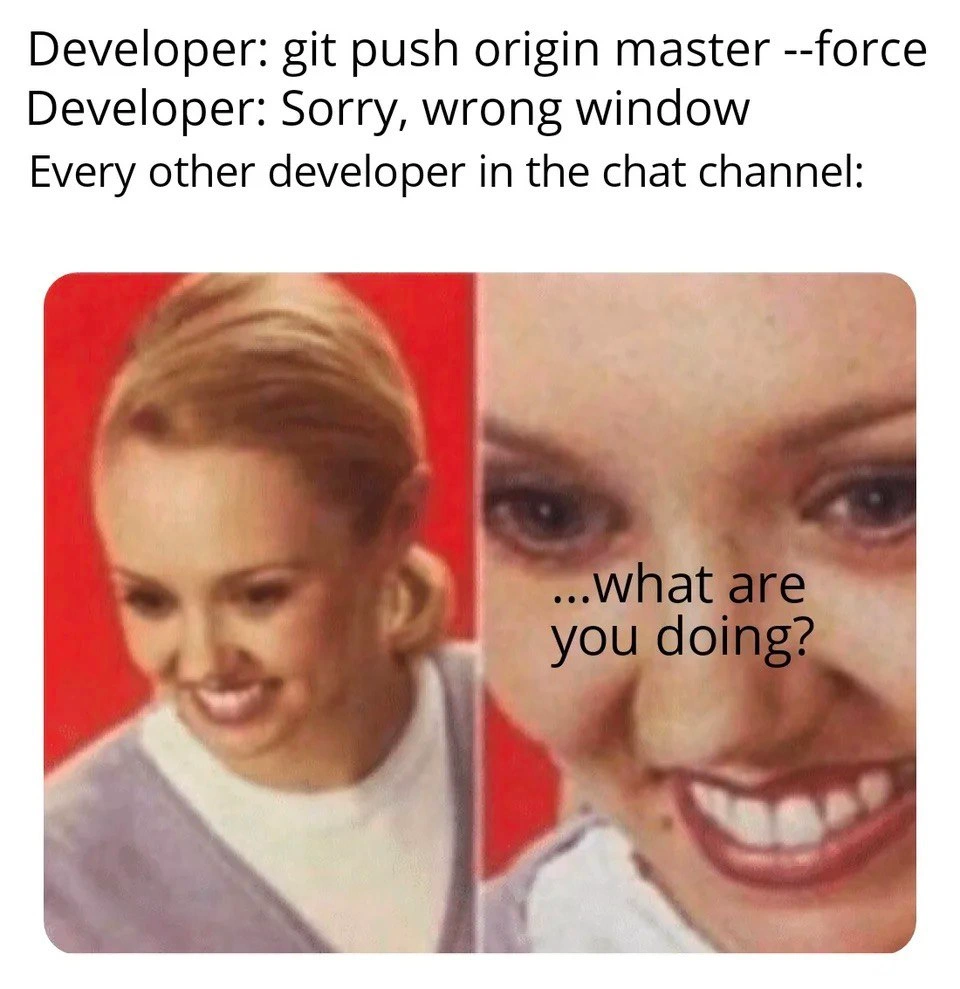
The Unforgivable Sin: A Git Force Push to Master
Why is this VersionControl meme funny?
Level 1: The Big Oops
Imagine you and your friends are all working together on writing a big story in a shared notebook. Each friend writes a few pages and the story grows. The master branch in Git is like that main shared notebook where everyone’s final story pages go. Now, think of pushing like adding your own new pages into the notebook. Normally, you carefully put your new pages at the end of the story so everything stays in order.
Now picture this: one friend accidentally grabs the wrong notebook (the shared story notebook instead of their personal draft notebook) and erases a bunch of pages and writes something else. This is what a force-push to master is like. It’s as if they said, “Oops, I thought I was working in my own draft, but I was actually scribbling over our one official story!” All the other friends suddenly look up in horror: their contributions to the story that were on those pages might be gone or messed up. They’re all shouting, “What are you doing?!” because one accidental move just caused a big problem for everyone.
In simple terms, the meme is joking about a big accident where a programmer did something in the wrong place and it made all their teammates panic. It’s funny (and scary) because it’s a mistake that can happen in real life: just like accidentally deleting part of a group project, but in the coding world. The picture of the wide-eyed, shocked child with the caption “...what are you doing?” perfectly captures how everyone feels in that moment — a mix of surprise, fear, and “oh no!” all at once. Even if you’re not a programmer, you can relate to that feeling: it’s the classic “uh-oh, I really messed up and everyone noticed” moment.
Level 2: Terminal Tab Tragedy
Now, let’s break down what’s happening in this meme in simpler technical terms. The scenario is about Git, which is a popular version control system that developers use to keep track of code changes. In Git, you have the concept of branches – these are like parallel storylines or timelines of your code. The main branch (historically called master, now often called “main”) is the primary timeline where the stable code lives.
The meme’s text says a developer ran the command git push origin master --force. Here’s what that means step by step:
git push: This command sends your local changes (commits) to a remote repository (usually a server or a service like GitHub). Think of “pushing” as publishing your local work to the team’s shared codebase.origin: This is the default name Git gives to the remote repository you cloned from. So “origin” usually refers to the central repo that everyone else also uses.master: This specifies the branch you are pushing to on the remote. In this case, master (the main branch).--force: This flag is the dangerous part. Normally, if your copy of the branch is behind (or has different history than) the remote’s copy, Git will stop you from pushing those changes because it doesn’t want to lose anything.--forcetells Git, “Ignore the usual safety check and just make the remote branch exactly like my local branch.” It’s like forcing an update even if it means overwriting changes.
Why would anyone use --force? Sometimes developers use git push --force on purpose when they’re cleaning up history on a feature branch that only they are working on. For example, if Alice is working on her own branch and decides to rewrite her last few commits (maybe using git rebase to squash them or edit messages), her local branch history will differ from the remote’s history. To update the remote branch to match her local changes, she must force push. This can be okay on a personal branch that others haven’t based work on yet. But doing this on master is almost always a bad idea because master is a shared branch. Other developers are pulling from it, and they might have work based on the old commits.
In the meme, the developer says, “Sorry, wrong window.” This hints that the force-push was an accident – likely they intended to run that command in a different context. “Wrong window” could mean:
- They had multiple terminal windows open, each connected to different Git repositories or different branches. They accidentally executed the destructive command in the terminal that was pointed at the team’s main repository instead of, say, a personal fork or a test repository.
- It could also imply they were on the wrong branch when pushing (less likely given the text, but the main idea is the command went to the wrong target).
The result of git push --force to master is that the shared repository’s master branch now exactly matches whatever the developer had locally. If that local state was missing commits that were previously on origin/master, those commits get removed from the remote branch history. Every other developer on the team now sees something alarming when they sync with the remote: commits that were there before have disappeared or the history has changed.
Every other developer’s reaction: The meme shows everyone else in panic with the caption “Every other developer in the chat channel: ...what are you doing?” This is because all the other developers immediately recognize a force-push to master as a potentially catastrophic event:
- If they had code changes pending or branches based off the old master, those might not apply cleanly anymore.
- If someone’s work wasn’t yet pushed or was in review, the base they were targeting has now changed under their feet.
- They might have to resolve merge conflicts or even lose work if they’re not careful. For instance, if Bob had a commit on master that Alice accidentally overwrote with the force push, Bob’s commit is no longer on the remote. If Bob doesn’t have it saved locally, it might be gone.
- The continuous integration pipeline or deployment might also go haywire. Force-pushing could trigger builds or deployments with a weird state (maybe an older version of code becoming “new” again, etc.).
This scenario also touches on the idea of social fallout and best practices: In a professional team, doing something like this usually prompts a serious discussion. It’s often written in team guidelines never to force-push to shared branches like master. Many tools (like GitHub, GitLab or enterprise Git servers) allow admins to protect branches. Protected branches can reject force pushes or direct pushes entirely, requiring all changes to go through pull requests or at least have certain approvals. If an accidental force push to master happened, it might mean those protections were off, or the person had override permissions. Either way, you can bet that right after fixing the immediate issue, the team would institute safeguards to prevent it from ever happening again (for example: enabling branch protection, or even removing force-push rights except for emergencies).
Finally, the tags like MergeConflicts and PullRequest give context:
- Merge conflicts are likely because once the history is rewritten, anyone who hasn’t updated their local copy will get conflicts when they try to push or pull the next time. They have to reconcile the differences between their view of history and the new one.
- Emphasizing Pull Request workflow: The whole fiasco could be avoided if changes to master only happen via reviewed pull requests (which typically merge rather than rewrite history). Pull requests also usually don’t allow history rewrites on master – they create merge commits or fast-forward, both of which preserve existing commits.
In summary, for a junior developer or someone new to Git, the meme is a cautionary tale: accidentally using --force on the main branch is like dropping a table in a shared database or pressing a big red “reset” button on your project. It’s the kind of mistake you learn never to make (and why you double-check commands before you run them). The humor comes from the shock value and immediacy: one second of inattention (“wrong window”) and you’ve caused a collective panic among your teammates. It’s funny after the fact (or to observers) because it’s a well-known rookie mistake with disproportionate consequences, and every dev team dreads that it could happen to them.
Level 3: Master Branch Meltdown
At the highest level of technical insight, this meme spotlights a nightmare scenario in version control: an accidental git push origin master --force to the main repository. In Git (a distributed version control system), force-pushing to the master branch is colloquially known as hitting the “nuclear option” on your project’s history. Here’s why it’s so horrifying to experienced developers:
Rewriting Shared History: Git normally prevents you from overwriting commits on a remote branch if your local history has diverged. The
--forceflag overrides this safety. It tells Git: “I know what I’m doing — replace the remote history with my local history, no matter what.” This effectively deletes or “orphans” existing commits onmasterthat others might have, because the branch’s HEAD is moved to point at a different commit. All the work that was pushed before (and not in your local copy) is now invisible on the remote. It still exists in someone’s local clone or the Git reflog for a short time, but from the central repo’s perspective those commits just vanished.Teamwide Fallout: In a collaborative setting,
master(sometimes called main now) is the base where everyone’s changes eventually converge. It’s often protected as an immutable history — meaning once commits are on master, they shouldn’t be changed or rewritten. An unexpected force-push shatters that rule. Every other developer’s repository is now out of sync with origin. Colleagues who pulled the old commits have a timeline that no longer exists on the server. This triggers instant panic: “What happened to our commits? Why is Git telling me my branch is behind or has conflicts with origin/master?” The chat fills with wide-eyed horror because everyone knows this isn’t a normal situation — it’s a mini version-control crisis.Wrong Window, Real Damage: The text “Sorry, wrong window” hints that the developer executed this destructive command in the wrong terminal or context. Perhaps they had multiple terminals open (one pointed to a personal fork or a test repo, and one to the team’s main repo) and tragically typed in the wrong one. It’s a classic high-stakes slip-up: like typing a production database drop command instead of against a test database. Seasoned developers have learned (often the hard way) to double-check their command prompt context (
PWDor the Git remote URL) before running anything with--forceor other dangerous flags. In this meme’s imagined scenario, that quick mistake in context instantly catalyzes chaos.Immutable Until It’s Not: Under the hood, Git’s model is all about immutable commits linked in a graph (each commit has a SHA hash and pointers to parent commits). Normally, once a commit is shared, it’s like a published record: you append new commits on top of it. Force-pushing breaks the append-only rule by replacing the tip of the branch. The reason this is such a big deal is tied to Git’s distributed nature. Everyone’s local clone assumes that history is stable. By rewriting it, you’ve introduced a fork in reality — your new history vs others’ history. Resolving this requires every developer to coordinate: they might have to manually fetch the new state, possibly stash or reset their local changes, or cherry-pick commits from the reflog. In short, you’ve created extra work and risk for the whole team.
Culture and Safeguards: In modern workflows, direct pushes to
masterare often disallowed or require special privileges. Teams use Pull Requests and protected branches to ensure history is modified in controlled ways (through merges or fast-forwards after review). The fact this accidental force-push succeeded implies either branch protections were not in place (an oversight) or this user had the power to override them (perhaps an admin or a misconfiguration). Senior engineers see the humor here tinted with PTSD: this is the kind of calamity that prompts an emergency meeting and a new policy by end of day. It’s funny in hindsight because it’s so absurdly catastrophic for such a small mistyped command — basically the worst-case scenario of Git misuse.
In summary, at the senior engineering level, this meme lands because it references a collective horror story: the moment one developer’s slip-up with a --force push obliterates the team’s shared reality. It combines technical insight (Git’s handling of history) with the social dynamic (the “OH NO” reaction everyone has in the chat). Every experienced dev understands how painful and memorable such an incident can be, even if they’ve only heard cautionary tales. It’s a darkly comedic reminder that with great power (in Git) comes great responsibility — and one wrong keystroke can send shivers down every developer’s spine.
Description
A meme depicting the sheer terror induced by a developer accidentally force-pushing to the master branch. The top section consists of text on a white background, simulating a chat conversation. The first line reads, "Developer: git push origin master --force". The second line is a weak apology: "Developer: Sorry, wrong window". The third line sets the scene: "Every other developer in the chat channel:". Below this text is a two-panel image macro. The left panel shows a blonde woman with a polite, generic smile against a red background. The right panel is an extreme, distorted close-up of her face, with a wide, toothy, and unsettling grin, accompanied by the text "...what are you doing?". The meme perfectly captures the sudden shift from normalcy to abject horror that a development team experiences upon witnessing this command. A force push to a shared branch like 'master' can overwrite the project's history, wiping out other developers' work and causing chaos, making the excuse "wrong window" both terrifying and absurdly funny to experienced engineers

Comments
7Comment deleted
The `git push --force` command is the only thing that can make a team unanimously agree to revoke someone's write access and schedule a mandatory 'Intro to Git Reflog' meeting at the same time
The instant someone `git push --force` to master, the team abandons Scrum and spontaneously switches to RAFT - scrambling to elect a new history before the cluster loses quorum
The beautiful moment when you realize someone just turned your carefully orchestrated git history into a choose-your-own-adventure novel where every path leads to git reflog
The '--force' flag: Git's way of asking 'Are you absolutely sure you want to ruin everyone's day?' and developers responding 'Sorry, I thought this was my personal branch terminal.' Nothing unites a distributed team faster than watching someone force push to master in real-time - suddenly everyone's a Git historian frantically checking reflog timestamps
Nothing reveals your SDLC maturity like a wrong-window 'git push -f' to master - either branch protection and pre-receive hooks make it a non-event, or your org learns what blast radius means in real time
Force-pushing master in chat: because nothing says 'team player' like rewriting everyone's weekend recovery plans
git push origin master --force; “sorry, wrong window” - the quarterly reminder that reflog isn’t a DR plan and branch protection is cheaper than the postmortem

