
The gentle art of force pushing to master
Why is this VersionControl meme funny?
Level 1: Forcing It In
Imagine you and your friends are working on a big puzzle together, and there’s one last puzzle piece that just doesn’t quite fit in the spot it’s supposed to go. Instead of figuring out why it doesn’t fit, you take your fist and smash that piece into place as hard as you can. The piece goes in, kind of… but you’ve bent the piece and cracked the puzzle board. Sure, the puzzle looks “fixed” quickly, but now the whole thing is a bit messed up, and your friends are looking at you like, “What did you just do?!”.
That’s essentially what this meme is joking about, but with coding. “Forcing” your code into the repository (the project) is like forcing that puzzle piece to fit by brute strength. It’s a funny way to show a not-so-great idea. The pink blobby character in the picture is like that puzzle piece (or a toy or anything you might cram into a space it doesn’t fit) making an “Ouch!” face. And the big fist labeled “git” is like the hand pushing it in mercilessly. We laugh because it’s a silly cartoon and we know it’s a bad way to solve a problem – whether it’s a puzzle or a coding issue – by just shoving it in. It captures the feeling of a quick fix that’s rough and likely to cause other problems, in a simple visual way anyone can understand.
Level 2: Overwriting History
Let’s break down what’s happening in this meme in simpler terms. The text at the top says: git push --force origin master. This is a Git command. Git is a popular tool programmers use for version control – basically tracking changes in code over time and collaborating with others. In Git, you have repositories (repos) which are like project folders that also keep a history of changes (commits). “origin” usually refers to the main place the code is hosted (like a GitHub repository), and “master” is the name of the primary branch (the main line of code development). So normally, git push origin master means “upload my latest code commits to the master branch on the origin server.”
Now, the important (and scary) part here is the --force flag. By default, Git is pretty careful: it won’t let you push changes to the shared repo if it sees that the remote has some commits that you don’t have. That’s a safety feature, meant to stop you from accidentally wiping out someone else’s work. A forced push (git push --force) overrides that safety. It’s like saying, “I know something doesn’t match up, but do it anyway.” In practice, this will overwrite the remote history to match exactly what you have locally. If there were commits on the remote that you hadn’t incorporated, those commits will basically be removed from the master branch. This is what we mean by “rewriting history” – you’re changing the record of what commits exist on that branch.
Why would anyone use --force then? One legitimate use is if you’ve rewritten your own local commits (say, you did an interactive rebase to clean up your commit log) and now want to push the cleaned-up history to the remote. In such a case, you intend to replace the old history with the new one (and usually you’re careful that no one else is working on that branch, or you coordinate with them). But using --force on a shared branch like master is generally considered dangerous because it’s easy to accidentally delete work that others have pushed. It’s the kind of power command you use rarely and with caution. Many teams even set up branch protection settings to disallow force pushes on important branches so that no one does this by accident.
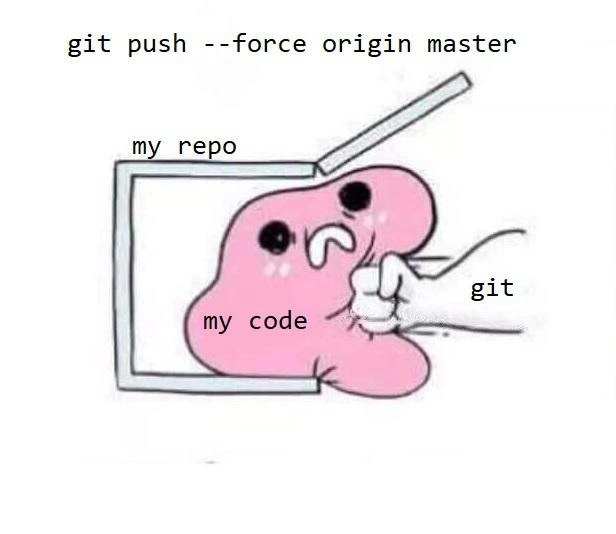
Now look at the cartoon imagery: We have a little box labeled “my repo” – that represents the repository, basically the project container where code lives. Inside it, there’s a pink blobby character labeled “my code.” The code here is personified as a cute blob, but it’s clearly distressed. From the right, a big fist labeled “git” is punching the blob, trying to cram it into the box. This is a direct illustration of what git push --force feels like: instead of carefully placing the code into the repo (which would be like a normal push or a proper merge), Git is forcing it in. The blob’s face looks panicked and pained because, well, this action is harsh! Essentially, Git (the tool) is taking “my code” and ungracefully shoving it into “my repo,” even if it doesn’t fit cleanly. It’s a visual way to show that force pushing is a blunt, forceful way to put your code into the repository, disregarding the normal constraints.
The caption of the meme says, “When you fix prod by spamming git push --force origin master.” “Prod” here is short for production – the live system or application that end-users are using. Fixing prod implies there was some urgent bug or problem in the live system that needed a immediate remedy. By saying you fix prod by spamming force pushes, it suggests a scenario where someone keeps making quick changes and force-pushing them directly to the main branch to patch the live site on the fly. The word “spamming” suggests this isn’t a one-time careful use of --force, but rather rapid-fire, maybe multiple force pushes (perhaps trying different quick fixes in succession). This is, to put it mildly, not a best practice! It’s depicted humorously because it’s a very chaotic way to manage a crisis. Instead of methodically debugging or rolling back, the developer is just editing code and force pushing repeatedly, essentially hammering changes into production through the repository. It’s like trial-and-error with a big hammer: didn’t work the first time? push --force again with another change!
For a newcomer to Git or programming, what’s the consequence of this? When you force push to a branch, anyone else who has cloned that repo and pulls the latest changes is going to get confusing messages. Their Git might say that their local master and the remote master “have diverged” or it might not even let them pull without manual steps. Essentially, their copy of the code has commits that the “official” origin/master doesn’t have anymore (because the force push erased those commits). They’ll likely have to do a git fetch and then perhaps a git reset --hard origin/master (which throws away their local changes to match the remote) or some tricky rebasing. If they had local work in progress based off the old history, it’s now as if the ground moved under their feet. They might even need to manually merge or cherry-pick their work onto the new history. It’s a headache and can lead to confusion or even lost work if not handled carefully. That’s why everyone jokes (half-seriously) that force pushing to master is how you make your coworkers hate you. The meme is taking that serious issue and exaggerating it into a silly cartoon for comedic effect.
In short, at this level, the meme is highlighting a risky Git command in a funny way. Git is like the strong-armed enforcer here, and your poor code (and repository) are feeling the impact. It’s a cautionary tale wrapped in humor: you can force push to fix an emergency, but be aware you’re essentially cramming your code in and squashing whatever was there before. Just as the picture implies, it might work, but it’s not gentle and things (or feelings) might get hurt in the process.
Level 3: Push Comes to Shove
This meme gets an immediate “oh no, they didn’t!” reaction from experienced developers. The command git push --force origin master is infamous in the world of Version Control – it’s basically the big red button that says “rewrite shared history”. The top text of the meme spells out that dangerous command, setting the stage. We see a little pink blob character (labeled "my code") being brutally rammed into a box labeled "my repo" by a clenched fist named Git. The poor blob’s panicked face is every developer’s code (and soul) when someone force-pushes to the main branch. It’s a comically violent visualization of what a force push does: instead of carefully merging or integrating changes, you’re shoving your code in by brute force.
Why is this so funny (and frightening) to those in the know? Because it hits on a shared experience of developer horror. In a healthy Git workflow, especially on a team, you’d never overwrite the history of the master (now often called main) branch on a whim. Commits on master are supposed to be sacrosanct in terms of history – once pushed, they remain for posterity, so everyone’s clones stay in sync. But here comes the cowboy fix: “Production is on fire, my last deploy didn’t stick, nothing else is working… just force push the darn thing!” It’s the epitome of a YOLO deployment strategy: bypass code review, bypass CI, ignore the fact that others might have pushed something – just cram your fix into prod and hope it solves the issue. The meme’s caption “When you fix prod by spamming git push --force origin master” tells a story of repeated desperation moves. The word spamming suggests they’re not just doing this once – they might be iterating, force-pushing multiple times in rapid succession until the bug is hammered down. Each push is another heavy blow of that Git fist, smushing code into place, no matter what it squashes in the process.
For those of us who’ve been around the block, this image is equal parts humorous and PTSD-inducing. It recalls that one late night when a teammate (or let’s be honest, maybe ourselves) did the unthinkable. Perhaps a critical hotfix was needed and someone bypassed all branch protection rules (if any were even in place) and did a force push to the main branch. Sure, it deployed the fix, but the next morning the entire team woke up to a git nightmare: everyone’s local repositories were out of whack. Pulling from origin resulted in scary messages about divergence; colleagues were pinging, “Uh, guys, I think the repo is messed up – I can’t find my commit from yesterday?!” The commit history on GitHub looked like a jump cut in a movie – an abrupt rewrite with no trace of the missing scenes. This is the havoc the meme is pointing to. It’s riffing on Developer Humor around Git screw-ups and the universal “WTF” moment when you realize someone rewrote shared history.
The visual metaphor nails it: Git is not gently helping your code into the repository; it’s literally punching it in. That’s what a force push feels like to your project and teammates. Normally, using Git is like a careful negotiation – you make a commit, merge with others, maybe resolve a conflict gracefully. --force is when negotiation fails and you bring out a hammer. The pink blob’s face (our poor code) is saying, “This is not fine!” Developers know that feeling – it’s the code screaming as it’s being forced into a place it doesn’t quite fit (maybe overriding other code that was there). The humor also comes from the implicit truth that we know it’s wrong but sometimes you’re so frantic to “just make it work now” that you reach for this dangerous command. It’s the “break glass in case of emergency” solution – except the glass was the shared sanctity of the git history, now shattered.
From a Developer Experience (DX) perspective, this scenario is a nightmare. Version control is supposed to make collaboration easier, but a force push on a shared branch flips it on its head. Suddenly, everyone else’s experience becomes painful: they might have to clone the repo fresh or do tricky resets. The meme playfully exaggerates that pain. It’s basically saying: Remember the trauma of that time someone force-pushed to master? Here it is, in picture form. And we laugh (maybe with a groan) because it’s true – we’ve seen the “fist of Git” hit our codebase before, and it’s both funny and cringeworthy in hindsight.
In summary, at this level the meme is a sardonic nod to a well-known version control anti-pattern. It satirizes the idea of “fixing production” by any means necessary, even if it means breaking all the proper rules of software development. It’s funny because it’s an exaggerated truth: yes, you can fix prod by spamming git push --force, and the image imagines exactly how that would look and feel. And if you listen carefully, you can hear every DevOps engineer who sees this meme let out a pained chuckle, and say, “Please… never again.”
Level 4: Non-Fast-Forward Fisticuffs
At the most granular level, this meme hints at the Git internals and what a --force push really does. Under the hood, Git stores commits in a directed acyclic graph (DAG). Each commit points to its parent commit (or commits, in a merge), forming a chronological chain. Normally, when you git push, Git requires your chain of commits to fast-forward the remote branch – meaning your latest commit is a direct descendant of the remote’s latest commit. If it’s not (for example, if the remote has a commit you don’t have), Git will reject the push with a “non-fast-forward” error. This is Git’s safety net to prevent divergent histories.
Using git push --force origin master is like telling Git: “I know my commit history is not a descendant of origin/master. Push it anyway and make it the new history.” Essentially, --force overrides the consistency check and makes the remote branch point to your commit, even if that means orphaning existing commits. It’s a bit of time-travel in version control: you rewrite the project’s public history. Those previously committed changes on master (that you didn’t have locally) get kicked out of the timeline. In Git’s object database, the old commits don’t immediately vanish – they linger unreferenced (like ghosts in the machine) until garbage collection cleans them up. But from the perspective of collaborators pulling the branch, those commits effectively never happened. You’ve created a temporal paradox in the repo.
To visualize the chaos: imagine the master branch history as a straight line of commits A → B → C. You make a new commit D based on B (ignoring C). A regular push fails because C is on the remote and your D can’t fast-forward past it. A --force push says “replace C with D on the remote.” Now the official master history is A → B → D, and commit C is stranded off to the side:
Remote (before force): A --- B --- C (C was the latest commit on origin/master)
Local (before force): A --- B --- D (D is your commit; you don't have C)
After `git push --force`:
Remote (new master): A --- B --- D (origin/master now points to D; commit C is orphaned)
In academic terms, you’ve performed a non-linear history rewrite on a distributed system. Every other clone of the repo now has a different DAG: their origin/master moved, creating a discrepancy. Those with the old C commit will get an error or confusion on next pull because their local history has a commit that the remote’s history doesn’t. They’ll have to manually reconcile, often by fetching and resetting or re-cloning – essentially reconciling two divergent timelines. This is why force-pushing shared branches is almost always discouraged: it violates the append-only immutability that keeps distributed version control sane. While Git is flexible enough to let you rewrite history (it’s a core feature for cleaning up commits or maintaining project hygiene), using that power on a shared branch is akin to dropping a nuclear option on collaboration consistency. The meme portrays this with a literal punch: Git (the fist) isn’t politely appending commits, it’s smashing history into shape, consequences be damned. It’s a deep-cut joke about how Git’s elegant DAG can be manhandled by a blunt force command.
Description
A cartoon meme that humorously illustrates the destructive nature of a specific Git command. The image depicts a cute but distressed-looking pink blob, labeled 'my code,' being violently shoved into a square box, labeled 'my repo,' by a disembodied fist labeled 'git.' Above this scene is the infamous command: 'git push --force origin master.' The meme powerfully conveys the feeling of using a force push, which overwrites the remote repository's history with one's local version. It's not a careful merge but a brute-force replacement, an act that can erase teammates' contributions and corrupt the main branch. The blob's pained expression perfectly captures the inherent violence of the command and the anxiety it should (and does) cause in experienced developers who know the potential for catastrophic data loss

Comments
9Comment deleted
'git push --force' is the developer equivalent of saying 'I don't care about your reality and would like to substitute my own.'
Need more cross-team collaboration? Just `git push --force origin master` - in under five minutes compliance is quoting SOX, SRE is grepping reflog, and the interns finally understand why backups have a budget line
The only time 'git push --force' is acceptable is when you're the sole developer, and even then, your future self will file a bug report against your past self for crimes against version control history
Force pushing to master is the Git equivalent of 'I'm not locked in here with you, you're locked in here with me' - except your teammates are the ones trapped with your rewritten history, and the post-incident retrospective will be legendary
Force-pushing to master is rewriting shared history without a migration plan - wait for the non-fast-forward errors and Slack archaeology
Force push: because --force-with-lease is for devs who still believe in pull requests
git push --force origin master: converting immutable history to last-write-wins - see you in the reflog
Bruh, did you know that under stress coding you start losing your memory Comment deleted
Sir, It's 8th time you've told me this Comment deleted

