Skip to content
DevMeme
4679 of 7435
The special hell of following an outdated Java framework tutorial
Learning Post #5129, on Apr 13, 2023 in TG

The special hell of following an outdated Java framework tutorial

Why is this Learning meme funny?

Level 1: Recipe Gone Wrong

Imagine you found a recipe video for a new cake and followed it exactly. You measured all the ingredients just like the chef, mixed everything step by step, and put it in the oven for the recommended time. But when the timer dings and you open the oven… uh-oh! The cake has exploded into a gooey mess, the layers are collapsed, and there are strange burnt bits everywhere. You’re left staring blankly at this disaster, thinking, “I did everything they said! Why does my kitchen look like a war zone?”

That’s essentially what’s happening in this meme. The developer followed a coding tutorial like it was a recipe, but instead of a nice working program, they got a big mess of errors (67 of them!) on their screen. The statue’s blank stare is just like you looking at that ruined cake: confused, frustrated, and a little bit in shock. It’s funny because we can all picture that feeling. Sometimes, even when we do everything “by the book,” things don’t turn out as expected, and all we can do is gape at the result and maybe let out a little nervous laugh.

Level 2: Tutorial vs Reality

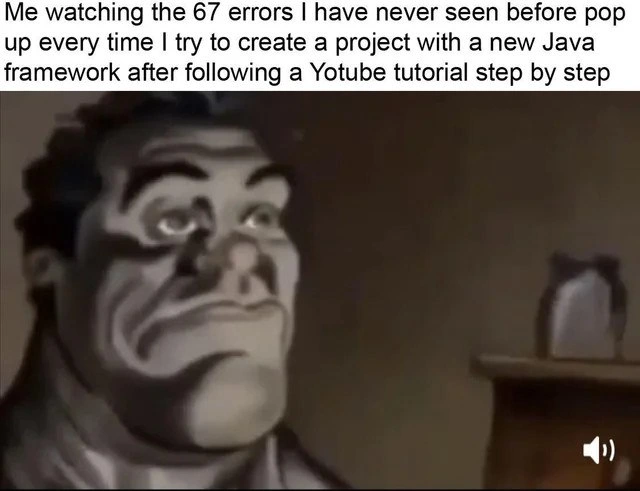
When you see this meme, you see a developer’s frustration in clear view. The text describes someone following a YouTube programming tutorial step by step to use a new Java framework, yet ending up with "67 errors" they’ve never seen before. In simpler terms: they did everything the instructor told them to do, but their computer still threw a tantrum. The image of the statue with a blank, almost numb expression perfectly captures that “...what? why?” feeling you get when your code breaks in a way you don’t understand. It’s developer humor about the learning curve we face whenever we pick up new tools.

Let’s unpack the scenario for a junior developer or someone new to Java:

  • Java Framework: This is basically a large collection of pre-written Java code that provides a structure for your own code. Think of a framework as a set of power tools for building applications – for example, Spring or JavaFX or Android SDK. It saves you from writing everything from scratch. However, using a framework often means you have to set up your project in a very specific way. There are configuration files, specific versions of Java required, and additional libraries (called dependencies) that you need to include. A framework is supposed to make your life easier in the long run, but getting started with one can be tricky if you miss a setup step.

  • Following a Tutorial: The person in the meme did exactly what a video tutorial said. Many of us do this when learning: find a YouTube video or blog post titled "How to create your first app with [Shiny New Java Framework]" and follow along. The instructor probably went through creating a new project, writing some example code, and then running it to show a result (like a webpage or a printed message). In the tutorial, everything likely seemed to work smoothly. But on the learner’s own computer, running the exact same steps resulted in a flood of errors. This contrast is the tutorial vs reality moment. It often happens because development environments can differ in subtle ways. Maybe the tutorial was using an older version of the framework, or maybe their IDE (Integrated Development Environment) auto-fixed something silently that the viewer’s IDE did not. It could even be a simple spelling mistake or a missing download that wasn’t obvious in the video.

  • 67 Mysterious Errors: This number is probably exaggerated for comedic effect, but it’s not far-fetched! In programming, one mistake can cause a lot of errors at once. For example, if you forget to include one library that a framework needs, your code might have dozens of places that now don’t make sense to the computer. The compiler (the tool that turns your Java code into an app) will complain for each of those places. It might say things like “Cannot find symbol XYZ” or “Package ABC does not exist” repeatedly. To a newcomer, these messages are mysterious because they reference classes or packages you’ve never heard of – often classes inside the framework itself. Imagine seeing an error like:

    error: cannot find symbol class InternalConfigProcessor  
    

    If you followed a tutorial, you might not even know what an InternalConfigProcessor is – it’s something the framework uses internally. So it’s very confusing because you’re thinking, “I didn’t even write anything about this InternalConfig thing... why am I getting an error about it?” This is a sign that some piece of the framework didn’t get set up correctly, and the framework’s own code is failing.

  • Build Tools (Maven/Gradle): Often Java projects use tools like Maven or Gradle to manage dependencies and build the project. These tools use configuration files (pom.xml for Maven or build.gradle for Gradle) to know which external libraries to download and include. If the tutorial assumed something about these files that you missed, the build tool might not grab the right stuff. The result is a bunch of red error messages when you try to compile or run the project. A beginner might not realize they need to update a version number or add a plugin. For example, if you have the wrong version of Java set in your build file, you could get dozens of compiler errors because the code uses features not available in your version.

In summary, at Level 2 we see that this meme is about learning to code with a new framework and things going horribly wrong despite doing everything that was instructed. It highlights a big reality check for beginners: programming tutorials can sometimes be oversimplified or leave out important details, and when you try it yourself you run into unexpected problems. The feeling of “I did exactly what they said, so why is it broken?!” is very common. It’s both frustrating and, in hindsight, a little funny because it happens to everyone. This meme is a lighthearted way to say: “Don’t worry, we’ve all been there, staring at our screen with 67 errors, wondering what we did to deserve this.” The key takeaway for a new dev is that running into errors doesn’t mean you’re bad at this – it’s a normal part of the learning process. Debugging those errors (as painful as it is) is how you get better. And one day, you’ll encounter a meme like this and laugh, remembering that time a simple tutorial blew up in your face and taught you something new.

Level 3: Hydra of Build Errors

That blank, stone-faced stare in the meme is instantly recognizable to any senior developer. It’s the look of DebuggingFrustration after a new Java framework project spews an avalanche of errors despite following a tutorial to the letter. The meme text describes "67 errors I have never seen before" popping up when creating a project with a new framework. Seasoned devs know this scenario all too well: you run a fresh project build hoping for a clean start, and instead the console explodes with dozens of mysterious compiler errors and exceptions. It’s like fighting a mythical Hydra – fix one error, and two more take its place. No wonder the developer (and the stoic statue) are staring blankly as if to say, “What on earth just happened?”

Why is this funny? Because it’s painfully true. In the world of Java frameworks, an introductory YouTube tutorial can make things look straightforward (“Just add these dependencies and run!”), but reality often strikes with a wall of red text. This meme captures the gap between tutorial expectations and real-world setup – a classic Tutorial vs Reality situation. The misspelling "Yotube" in the meme’s text even hints at the chaos: it’s as if the author is so flustered by the errors that they can’t even spell YouTube correctly. Every experienced developer has been there, laughing in hindsight at the times a "simple" step-by-step guide led straight into build failure purgatory. It’s a form of shared DeveloperHumor: we’ve all wrestled with framework onboarding nightmares, and seeing it meme-ified is both hilarious and cathartic.

On a technical level, what’s going on when 67 errors erupt from a new project? Usually, it’s a chain reaction triggered by one underlying misconfiguration or missing piece. For example, imagine you’re trying a popular Java framework like Spring Boot for the first time. The tutorial said “add this spring-boot-starter dependency and you’re good to go.” But maybe you accidentally used the wrong version, or your build tool (like Maven) didn’t download one of the libraries correctly. The result? The Java compiler can’t find critical classes, and it reports an error every single time your code references something from that missing library. If you have many references (say in multiple files or multiple annotations), you’ll get dozens of errors cascading down the screen. It feels like a new project fiasco – the code that was supposed to be a starting template is now littered with cryptic messages you’ve never seen. FrameworkFatigue sets in quickly when your "Hello World" turns into "Hello 67 Errors."

Let’s break down the typical causes behind this compilation_error_overload:

  • Dependency Hell: New Java frameworks often require a bunch of external libraries (packed as JAR files) to work. If any one of those isn’t present or is the wrong version, you get errors. For example, if the tutorial uses a different version of a framework than you, your pom.xml (Maven config) or build.gradle might not pull in the same transitive dependencies. Suddenly the code from the video references classes that aren’t on your classpath. The compiler then complains 67 times about unknown symbols and missing packages.
    Example:

    $ mvn compile  
    ...  
    error: package org.springframework.boot does not exist  
    error: cannot find symbol class SpringApplication  
    error: cannot find symbol class SpringBootConfiguration  
    error: package com.yourapp.demo.model does not exist  
    ... (and on and on, dozens of similar errors) ...  
    

    Each line is basically the compiler waving a red flag saying "I have no idea what this thing is." A single root problem (like a missing Spring Boot library) manifests as countless errors across every file that uses that library. This dependency hell hydra is a rite of passage in Java development.

  • Build Tool Configuration: The humor of "following a tutorial step by step" is that sometimes the tutorial leaves out environment setup steps that are “obvious” to the author but not to a newcomer. Maybe the YouTube presenter had an IDE plugin or a global environment variable configured that they never mentioned. For instance, if you don’t have the Java SDK set up properly (JAVA_HOME environment variable, Maven installed, the right Java version), you might get a flood of weird build errors. BuildFailures often cascade: one thing wrong in pom.xml or a version mismatch can produce a torrent of failure messages. The meme nails this with 67 – it’s an absurdly specific number that humorously conveys “so many errors, I lost count.”

  • Framework Magic (and its pitfalls): Modern frameworks like Spring do a lot behind the scenes (auto-configuration, annotation processing, dependency injection). This “magic” is great when it works, but when something is missing, the errors can be mysterious. A beginner might see UnsatisfiedDependencyException or BeanCreationException and have no clue it's because they missed a single annotation or dependency. The LearningCurve for these frameworks is steep: you not only have to write the code, but also understand the framework’s initialization process. If you follow a tutorial blindly, you might not realize you skipped a step that the framework requires (like enabling an annotation processor or including an application properties file). The result? A console full of intimidating stack traces and error logs, while you stare like that statue, wondering why the exact same code from the video isn’t working on your machine. It’s the classic “works on my machine” conundrum — except in this case, it worked in the tutorial but not on your setup.

From a senior dev perspective, the meme also pokes fun at framework hype versus reality. Every few months there’s a “hot new Java framework” that promises to make development a breeze. You think, “I’ll try this and level up my DeveloperExperience_DX.” But the first encounter is often rough. There’s framework documentation with a quickstart, or perhaps a community-made YouTube tutorial, and it looks so simple as they walk through it. Yet, when you try it, you encounter version conflicts, deprecated methods, and error messages that send you down StackOverflow rabbit holes. This leads to FrameworkFatigue: that exhausted feeling of “ugh, not another whole ecosystem to learn from scratch.” The meme’s exaggerated scenario (67 errors at once!) highlights how even a “step-by-step” guide can turn into a head-scratching debug session. It’s both comforting and comical to realize you’re not alone – even the best of us have been utterly defeated by a fresh Java project setup on the first try.

In essence, Level 3 thinking reveals the deeper truth behind the humor: there are systemic reasons why a new Java framework might explode with errors. The combination of complex build tools, numerous moving parts (libraries, configs, environment settings), and the implicit knowledge gap between tutorial creators and followers creates a perfect storm. The comedy comes from recognition: we’ve all had that exact face when the build fails spectacularly. The next time it happens, remember this meme – it’s basically a club every programmer joins eventually, where membership is earned by battling a hydra of build errors and living to tell the tale.

Description

A meme that captures the frustration of setting up a new project. The top text reads: 'Me watching the 67 errors I have never seen before pop up every time I try to create a project with a new Java framework after following a Yotube tutorial step by step'. Note the intentional or unintentional misspelling of 'YouTube' as 'Yotube'. The image below the text is a still, likely from an animation, showing a close-up of a man's face. He has dark, thick eyebrows and a furrowed brow, with a grim, weary, and utterly defeated expression, staring blankly into the middle distance. This meme perfectly illustrates 'tutorial hell,' a common developer experience where following instructions precisely still results in a cascade of errors. The humor is rooted in the shared pain of dealing with outdated content, mismatched dependencies, and the fragile, complex nature of modern development environments, especially within the Java ecosystem

Comments

8
Anonymous ★ Top Pick A six-month-old Java tutorial on YouTube has the same practical relevance as a Betamax tape on quantum computing. The 67 errors are just the dependency resolver's way of asking if you've tried turning it off and on again, but for your entire career choice
  1. Anonymous ★ Top Pick

    A six-month-old Java tutorial on YouTube has the same practical relevance as a Betamax tape on quantum computing. The 67 errors are just the dependency resolver's way of asking if you've tried turning it off and on again, but for your entire career choice

  2. Anonymous

    Nothing like a ‘5-minute Spring Boot clone’ video to spawn 67 compile errors - apparently my JDK, Gradle wrapper, Lombok, and three transitive loggers need a quorum before main() can even exist

  3. Anonymous

    The tutorial was recorded 6 months ago, which in Spring Boot years is basically the Jurassic period

  4. Anonymous

    Ah yes, the classic Java framework onboarding experience: Tutorial says 'just add this dependency,' but somehow you've awakened an ancient Maven conflict that requires a PhD in transitive dependency resolution and a blood sacrifice to the JVM gods. The 67 errors are actually a rite of passage - each one teaching you that the tutorial was recorded on JDK 11, you're on 17, the framework expects 8, and somewhere in your dependency tree, Log4j is having an existential crisis about which SLF4J binding to use

  5. Anonymous

    Watching 67 errors after a “step-by-step” Java tutorial - turns out the video was on Java 8 + Spring Boot 2.x; I’m on 21 + 3.x. Nothing like the javax->jakarta migration to remind you semver is performance art

  6. Anonymous

    Nothing says “modern Java” like a step‑by‑step tutorial ending in arbitration between Gradle, the dependencyManagement BOM, and the javax→jakarta rename - yield: 67 red squiggles before main() exists

  7. Anonymous

    YouTube Java tutorials: the only 'step-by-step' where Step 0 is cloning the tutor's invisible .m2 repository

  8. @yoyatayo 3y

    😀

Use J and K for navigation