Ultrawide Monitor for Verbose G++ Compiler Commands
Why is this BuildSystems CICD meme funny?
Level 1: A Bigger Paper
Imagine you have a really long sentence to write – so long that it doesn’t fit on a regular sheet of paper. What would you do? One silly solution: tape a bunch of papers together or get a huge piece of poster paper so you can see the whole sentence in one line without wrapping to the next line. This meme is doing the same thing, but with a computer screen and a computer command. The joke is that the instruction to build a C++ program (kind of like a recipe with many steps and ingredients) has gotten so long that a normal screen can’t show it all at once. The developer is happy because they found an extra-wide monitor (like a very long paper) that can finally show the entire long line of text in one go. It’s funny in a cartoonish way: instead of trying to make the sentence shorter, they just got a bigger tool to display it. The feeling it gives is similar to having a huge list of chores that wouldn’t fit on a sticky note, so you bring out a big poster to write them all out. It’s an exaggerated solution to emphasize how overly long that list (or command) is. Even if you don’t know C++ or compilers, you can laugh at the idea of someone buying an enormous screen just to avoid scrolling sideways – it’s a goofy fix for a comically large problem.
Level 2: So Many Flags
If you’re newer to C++ or compiling code, let’s break down what’s going on. g++ is the command for the GNU C++ compiler, the tool that turns C++ source code into an executable program. When you compile a program, especially a big one, you don’t just run g++ main.cpp – you often have to provide a bunch of options or compiler flags (also called switches). These flags tell the compiler how to do the compilation: things like where to find other code your code depends on, what language standard to follow, what optimizations or warnings to enable, etc. In a simple project you might only need a couple of flags, but in a large project you can end up with a monster command line full of them. This meme jokes that the command got so long that a normal monitor (screen) couldn’t display it on one line, so the person got an ultra-wide monitor to see it all at once!
Let’s identify some common flags mentioned:
-I(Include Path): This option is followed by a directory path. It tells the compiler “when you see an#includein the code, also look in this directory for the file.” Large projects use many libraries, each possibly provided in different folders, so they accumulate lots of-Iflags. For example,-Iinclude/might add a folder named “include” to the search list. If a project uses library X and Y, you might have-I/path/to/X/include -I/path/to/Y/includeand so on.-D(Define Macro): This flag defines a preprocessor macro. It’s like setting a little variable or switch that the code can check. For instance,-DDEBUGmight turn on debug-mode code (as if you wrote#define DEBUGat the top of every file), or-DVERSION=3might set a constant for the version number. Big compile commands often list many-Dflags to configure the build.-std=(Language Standard): C++ has evolved over time (C++98, C++11, C++14, C++17, etc.), and-std=c++17is an example flag telling the compiler to use the C++17 standard’s features and rules. Without it, the compiler might default to an older standard. Projects explicitly set this so everyone’s compiling with the same language version.- Optimization and Warning flags: You’ll see things like
-O2(capital O, not zero) which enables a level of optimization (making the program faster, but it might make compiling take a bit longer), and-Wallwhich turns on a lot of warnings (so-called “all warnings,” even though it’s not truly all warnings, it’s a common set). There are many of these, and they make the command longer but help ensure the program runs efficiently and with fewer bugs. - Linker options: If the command is also linking the final program (combining all parts together), you might see flags like
-L/usr/local/libwhich says “look in this directory for library files to link,” and-lsomelibwhich means “link with the library named somelib.” Linking brings in outside code (like the C++ standard library or other libraries you use). For big projects, you list a lot of libraries, so this part can also be lengthy.
When you compile a large project, a build tool will generate a command including all these flags and more, and it can become one very long line. For example, a compile command might look like this (don’t worry about understanding every part, just see how long it gets):
# A long g++ command might include many flags and files:
g++ -Iinclude -Ilib/include -I/usr/local/include \
-DDEBUG=1 -DVERSION=3 -std=c++17 -O2 -Wall \
main.cpp other.cpp utils.cpp third_party/libA.a \
-L/usr/local/lib -lsomeLibrary -o myProgram
# Notice: we used '\' to break it into multiple lines for readability here.
# In the real output, it would be one super long line scrolling to the right!
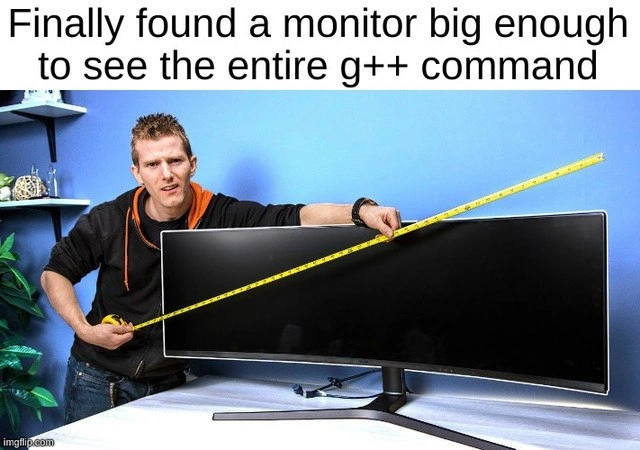
In a normal terminal window, a command that long would either wrap onto the next line or just scroll horizontally out of view. Wrapping means it continues on the next line on your screen, which can be a bit confusing to read. You’d have to scroll or resize things to see it end-to-end. This is why the meme is funny: the text says “Finally found a monitor big enough to see the entire g++ command.” It’s joking that the command is so outrageously long that you physically needed a wider screen to avoid it breaking into multiple lines. An ultra-wide monitor is one of those really long, horizontal screens (imagine two regular monitors side by side, but seamless). On such a monitor, you can have a really wide terminal window. The developer in the picture is using a measuring tape across the screen, looking happy – as if to say “Yes! This screen is X inches wide, that’s enough to fit my whole compile command in one line!”
From a junior developer perspective, it also pokes fun at how complicated C++ development can be. If you’ve only written simple programs or used an Integrated Development Environment (IDE) that hides these details, seeing the raw g++ command with all its flags can be surprising. It’s like peeking under the hood and finding a very messy engine. Each part of that command is important for the build, but altogether it looks intimidating. The meme uses humor to convey a feeling: “Wow, that’s a lot to handle!” Instead of expressing frustration directly, it exaggerates the scenario to something absurd – buying special hardware just to cope with it. This belongs to developer humor where we laugh about the quirks of our tools. The categories Compilers and CLI are relevant because this is about the C++ compiler and the command-line interface used to run it. And when we talk about Developer Experience (DX) here, it refers to how user-friendly (or not) these tools and processes are. A long command isn’t very friendly, and the joke solution improves the experience in the silliest way possible (make the output visible in one go).
In practical terms, as a newcomer you learn that compile commands can be split over multiple lines with the \ (backslash) for readability (as shown above), or you rely on build systems to manage them. Real developers don’t actually go out and buy a huge monitor just for this 😅 — they find other solutions, like organizing code to require fewer flags, using environment variables, or just not worrying about seeing the whole command at once. But feeling overwhelmed by a tons-of-flags command is normal. This meme is basically a lighthearted way of saying “C++ projects can get so complex that even something as simple as the compile command becomes gigantic.” And the image is a playful visual exaggeration of that fact.
Level 3: Flagpocalypse Now
For seasoned developers, this meme hits home as a parody of an all-too-familiar scenario: the “wall of compiler flags” that scrolls by during a build of a large C++ project. The humor comes from the sheer verbosity of real-world C++ compile commands and the lengths (pun intended) we go to manage them. A senior engineer has likely experienced a build system spitting out a compile command so lengthy it wraps multiple lines in the terminal or spews out in logs like an ancient scroll. We’re talking about commands with dozens upon dozens of options. Why is that funny? Because it’s true – modern C++ projects often require a small novel worth of flags to compile correctly. This meme exaggerates the solution: instead of simplifying the build, the developer just got a physically wider monitor to see it all at once. It’s a classic case of solving a software problem with hardware – a tongue-in-cheek approach that makes any experienced developer smirk.
Consider what typically happens in big projects: you might use a tool like CMake or Makefiles that auto-generates your compile commands. These tools dutifully include every include directory (-I/path/to/lib/include for each dependency), every needed macro definition (-DTHIS, -DTHAT=5 to toggle features or set constants), the required language standard (-std=c++14 or c++17, etc.), optimization level switches (-O0, -O2), warning toggles (-Wall, -Wextra…), plus any special flags to appease various platforms. By the time you add linker options like library search paths (-L) and libraries to link (-lSomethingLib), the single compile/link command becomes huge. It’s not uncommon for the printed command in build logs to be hundreds of characters long. Seasoned devs often joke about terminal width as a limiting factor – traditionally, terminals were ~80 characters wide (a relic of old punch-card columns and early console standards). Now we might use 120 or more columns, but these command strings can blow past even that, causing awkward line wraps or requiring horizontal scrolling. The meme jokes that the only way to avoid the ugly wrap is an ultra-wide monitor that can stretch one line across without breaking it. It’s hyperbole, but not by much if you’ve ever tried to screenshot a long command that refuses to fit neatly on screen.
The image itself is comedic: the developer is measuring the monitor with a tape measure, grinning like they achieved something grand. This visual gag resonates with senior devs because it satirizes our pride (and frustration) in dealing with ridiculously complex setups. We often measure improvements in terms of performance or lines of code – here we’re literally measuring a screen to accommodate a single line of text! It’s poking fun at the idea of Developer Experience (DX). A good DX would mean tools are ergonomic and commands are manageable. But in reality, using C++ with lots of libraries means the build commands aren’t very ergonomic – they’re verbose and unwieldy. Rather than fix that root cause, the tongue-in-cheek solution is to bend the environment to our unwieldy tools: “Got a beast of a command? No problem, get a beast of a monitor.” It’s like an inside joke on how often in tech we treat symptoms not causes (e.g., if your code runs slow, just throw more CPU at it; if your logs are too verbose, just get a bigger log viewer!).
There’s also a subtext here about compiler culture and C++ humor. C++ is notorious for things like extremely long template error messages (which can be pages long) and deeply nested include dependencies. The meme specifically targets g++, the GNU C++ compiler, which is widely used in Linux/Unix environments. Anyone who’s built a sizable C++ project from source has probably seen a g++ command printed out that looks intimidating. Perhaps you tried to copy-paste it to run it manually or debug something, and it spanned so many characters that your terminal or text editor had to break it into lines. It’s simultaneously impressive and ridiculous – impressive that our tools handle it, ridiculous that we humans have to see it. Senior devs share a knowing laugh because we remember our first time encountering such a monstrosity and thinking, “Surely there’s a better way?” Spoiler: the better way might be using build systems that hide this verbosity, but under the hood, even those systems are ultimately calling g++ with the same slew of flags. It’s a bit of an open secret that no matter how slick your IDE or build tool is, somewhere there’s that gigantic command line assembling your code.
In practice, real veterans have developed coping strategies. You might configure your terminal to have no line wrapping and use horizontal scroll, or pipe the build output to a file and open it in an editor to actually examine all those flags. Another trick is using CXXFLAGS/LDFLAGS environment variables so you don’t have to repeatedly type or see the same long options (though the build log will still show them expanded). There’s also a push in C++ tooling to adopt modules (as of C++20) which could reduce reliance on raw include paths and potentially shrink those command invocations. But back in 2020 when this meme was posted, modules were very new and most codebases were still using the traditional include system – meaning lots of -I flags everywhere. So the “flagpocalypse” was real for many of us: a proliferation of options as projects grew.
All these nuances are what make the meme funny for experienced folks. It’s mocking the pain lovingly. We don’t actually think buying an ultra-wide monitor is a solution to long compile commands, but the exaggeration highlights how out-of-hand things can feel. The categories of Compilers and CLI (Command-Line Interface) are directly in play here – the meme is basically a mashup of compiler nerdiness and command-line absurdity. And from a developer humor standpoint, it’s acknowledging a shared struggle (long build commands) and giving us a silly visual punchline (mega monitor to the rescue). In essence, it elicits that empathetic groan-laugh from senior devs: “Ha! I’ve been there – my build commands practically needed a 4K display to read comfortably.” It’s funny because it’s true, and also because as experts we appreciate the underlying complexity that leads to such a ridiculous situation.
Level 4: Argv Limit Exceeded
At the deepest technical level, this meme hints at how compiler invocations can push against system limits and design quirks. When you run g++ with an explosion of compilation flags, all those options are passed as arguments (the argv array) to the compiler program. There’s a hard limit on how much you can cram into a single command line: operating systems set a maximum size for the combined length of arguments. On many Unix-like systems, this limit is on the order of tens of kilobytes (it varies, but often around 128KB for the entire command-line). It sounds huge, yet large C++ build commands – with dozens of -I include paths, -D macro definitions, file lists, and libraries – inch nervously close to that boundary. In extreme cases, if you somehow exceed it, the OS would refuse to execute the command (yielding a scary "Argument list too long" error). This meme’s absurd solution of a bigger monitor underscores that the length of these commands is comical both to our eyes and potentially to our machines.
Why do C++ compile commands get so huge in the first place? It’s rooted in how C/C++ compilation works. Each source file is compiled in isolation, but must know about all the project’s include directories, preprocessor symbols, language standards, and libraries. Unlike some languages that use concise project files or classpaths, C++ traditionally relies on explicit flags every time. The compiler’s front end processes each flag to configure the compilation: -std=c++17 toggles C++17 mode, -O2 sets optimization level, -Wall enables a basket of warnings, etc. The preprocessor is told about every -I path to locate header files, and each -DNAME=value injects a compile-time constant or switch. The result is a gargantuan single-line command string constructed by build tools like Make, CMake, or Bazel. Internally, g++ parses this long string by tokenizing the whitespace-separated arguments, building an internal config object from them. It’s a testament to modular compiler design that you can pass so many switches – but the downside is an opaque, unwieldy invocation that’s hardly readable to a human.
Historically, there have been strategies to cope with lengthy compile commands. Ancient toolchains on limited OSes had to use response files (@file syntax) – instead of passing a hundred arguments directly, you put them in a text file and hand that file to the compiler to read. This avoids hitting the argv size ceiling and keeps the console output shorter. Modern GCC (g++) on Linux can accept very long commands, but even today build systems sometimes use response files for linking stages, where you might have thousands of object files and libraries to list. The meme’s joke is that rather than such elegant solutions, the developer went for raw hardware brute force: an ultra-wide screen to see the entire command in one go, as if defeating the problem by sheer display width. It’s a tongue-in-cheek nod to how developer experience (DX) issues sometimes get “solved” with bigger hardware (think of needing more RAM to handle Electron apps), even though the underlying complexity remains unchanged. The compiler doesn’t care about your monitor size, but as humans, we do – and seeing that whole colossal command without it wrapping feels like an achievement, albeit a comic one.
On a more theoretical note, this speaks to a form of verbosity vs. abstraction in tool design. Each -I or -D flag represents an explicit piece of data about the build, and C/C++ opts to make that extremely visible (and configurable) on the command line. In computer science terms, we could say the “information surface” of the build is very large – lots of explicit parameters – whereas other systems might encapsulate that information behind a smaller interface (for instance, a single build script reference). The humor arises because that large surface doesn’t even fit in a typical terminal’s width. We normally consider ultra-wide monitors great for viewing more code or multiple files, not one single command. Here, the entire horizontal real estate is devoured by one monster of a CLI command. The tape measure being stretched across the screen in the image exaggerates this fact: you’d normally measure physical objects like a workbench or a piece of fabric, not a line of text on your computer! It’s highlighting the absurd scale of something that, in theory, is just one instruction to the computer. In summary, at this deep-diver level we appreciate the blend of operating system constraints, compiler design choices, and extreme developer workarounds that set the stage for this joke. It’s funny because it’s a real technical scaling issue (how do we handle so many flags?) being met with a delightfully literal, non-technical fix (make the screen longer).
Description
This meme features a photo of Linus Sebastian from Linus Tech Tips looking perplexed while measuring a massive, curved ultrawide monitor with a yellow tape measure. A caption at the top of the image reads, 'Finally found a monitor big enough to see the entire g++ command'. The joke highlights the notorious verbosity of C++ compiler commands, especially when using g++. Complex projects often require long strings of flags for including libraries, setting optimization levels, defining macros, and specifying output files, which can easily wrap multiple times in a standard terminal. The humor lies in the exaggeration of needing an enormous monitor just to view the full command on a single line, a relatable frustration for any C++ developer who has wrestled with a complex build system
Comments
7Comment deleted
I'm convinced g++ commands aren't meant to be read, they're meant to be piped directly from a script written by someone who left the company three years ago
When a 49-inch ultra-wide is cheaper than asking whether we still need -DLEGACY_ORB_COMPAT=1, you’ve quantified technical debt in square inches
After 20 years in the industry, I've finally achieved the dream: a monitor wide enough to see both the -I flags at the beginning AND the template instantiation errors at the end of a single g++ command. Now if only I could afford a second one to display the resulting linker errors...
After 20 years of C++ development, you realize the monitor isn't for seeing the g++ command - it's for displaying the template error message that follows. The actual compilation flags are just the appetizer before the compiler serves you a 47-screen stack trace explaining why std::enable_if failed to SFINAE your perfectly reasonable template specialization
C++ devs upgrading hardware not for 4K, but to unscroll that -flto -fuse-ld=lld monster one-liner
Nice - wide enough to see my g++ flags end-to-end: from -std=c++20 through 300 -I flags to the off-screen -pthread that broke the build
Our g++ command has more -I than code; we bought the ultrawide, then remembered @response files exist and ARG_MAX stopped paging us