Vim as the Ultimate Security Measure
Why is this Security meme funny?
Level 1: Puzzle Lock
Imagine you have a diary that you don’t want anyone else to read. You could lock it with a key (like a normal password lock on your computer), but this meme jokes that you could instead use a super confusing puzzle as the lock. In this analogy, Vim is like a tricky puzzle box. When you leave your computer, instead of simply closing it or locking it with a code, you open this confusing program that nobody around knows how to use. It’s as if you left a book open but written in a secret code: a curious person might pick it up but quickly get frustrated that they can’t understand or navigate it. The humor comes from the idea that something complicated can act like a lock. Just like a puzzle door that confounds a burglar, Vim’s strange way of working can befuddle someone snooping on your computer. In real life, of course you’d just use a normal password to lock your screen. But it’s funny to think that opening a nerdy text editor could be even better – because the snooper sits down, wiggles the mouse or presses keys, and nothing makes sense! They eventually give up, leaving your stuff safe. The meme exaggerates this to make us laugh: it’s saying the most “galaxy-brain” way to secure your computer is to confuse people with the quirkiest tool only you know how to use. It’s like hiding your toys by making the toy box so confusing to open that your friends give up trying. Silly, right? That’s why it’s funny!
Level 2: Terminal Trap
Let’s break down the joke in practical terms. Vim is a text editor that runs in a terminal (a text-only window for entering commands, also known as a CLI – Command Line Interface). Unlike familiar graphical editors (like Notepad or VS Code) where you can click menus and the “X” button to close, Vim operates in a modal way and often full-screen in the terminal. Modal means it has different modes: usually Normal mode for commands and Insert mode for typing text. If you don’t know this, Vim can be incredibly confusing. When the meme says “launching Vim fullscreen,” it’s describing a scenario where someone leaves Vim open and maximized, covering the whole screen with just the Vim interface. To a person who hasn’t used Vim, this screen looks like gibberish or a dead end. They might see a dark screen with maybe some ~ tildes along the left side (Vim’s way of showing end-of-file) and a blinking cursor, but no obvious way to quit or go to another application.
Now consider the normal ways to secure your computer when you step away:
- Not locking your screen: This means you walk away and leave everything openly accessible. Obviously, that’s not secure at all – anyone can come use your computer. The meme lists this as the lowest-level (dim brain) idea.
- Shutting down the machine: Some people might jokingly do this if they’re very cautious or can’t lock the screen; turning the computer off ensures nobody can mess with it, but it’s also very impractical. You’d lose all your open programs and have to boot up again.
- Setting up a password (lock): This is the standard practice. Most operating systems let you lock your session (often with
Ctrl+Alt+Lon Linux, or Windows Key + L on Windows, for example), which requires your password to get back in. It’s straightforward and effective – any coworker or passerby who tries to use your machine will hit a login screen asking for credentials. - Launching Vim fullscreen: This is the punchline. Instead of doing the sensible thing (using a screen locker), a developer might just quickly open Vim to cover the screen. Why? Because the joke is that an unsuspecting person won’t know how to quit Vim and therefore can’t reach your actual work or desktop. It’s a tongue-in-cheek screen_lock_workaround.
Now, why is quitting Vim such a notorious problem (the vim_quit_problem)? Vim doesn’t quit with a simple Q or an obvious “Exit” button. To exit Vim properly, you typically hit the Esc key (to ensure you’re in Normal mode), then type :q and press Enter (which is the command to quit). If you’ve made edits to a file and haven’t saved, Vim will prevent you from quitting until you either save (:wq to write and quit) or force quit without saving (:q!). New users often don’t know any of this. If someone just starts mashing keys or trying common shortcuts:
- Pressing
Escmight not visibly do anything if they’re already in Normal mode. - Typing
:quitmight work, but only if they know to type that and hit enter. - Hitting
Ctrl+Cin the terminal might cancel a running process, but inside Vim it can interrupt some operation or do nothing if you’re just in Normal mode. Ctrl+Zwould actually suspend Vim (putting it in background), which might drop them back to a shell prompt — but a novice might not think of that either, and even if they did, the editor is still technically open.- Many will try the brute force: closing the terminal window or even restarting the computer (hence the meme’s second stage).
This difficulty is so common that “How do I exit Vim?” became a meme in itself in the developer community. It’s part of DeveloperHumor folklore, and it’s why using Vim as a “lock” is funny: you’re essentially booby-trapping your computer with a confusing interface. The intruder is likely to give up in frustration, or waste a lot of time – meanwhile your session stays safe. In security terms, it’s a form of human factor engineering: instead of a strong password, you rely on the intruder’s lack of knowledge. It’s somewhat related to using a non-intuitive UI as a barrier. This relates to the concept of “security through obscurity,” meaning hiding how something works (or making it overly complex) as a way to secure it. It’s generally not recommended as a sole security strategy, but as a joke it works great.
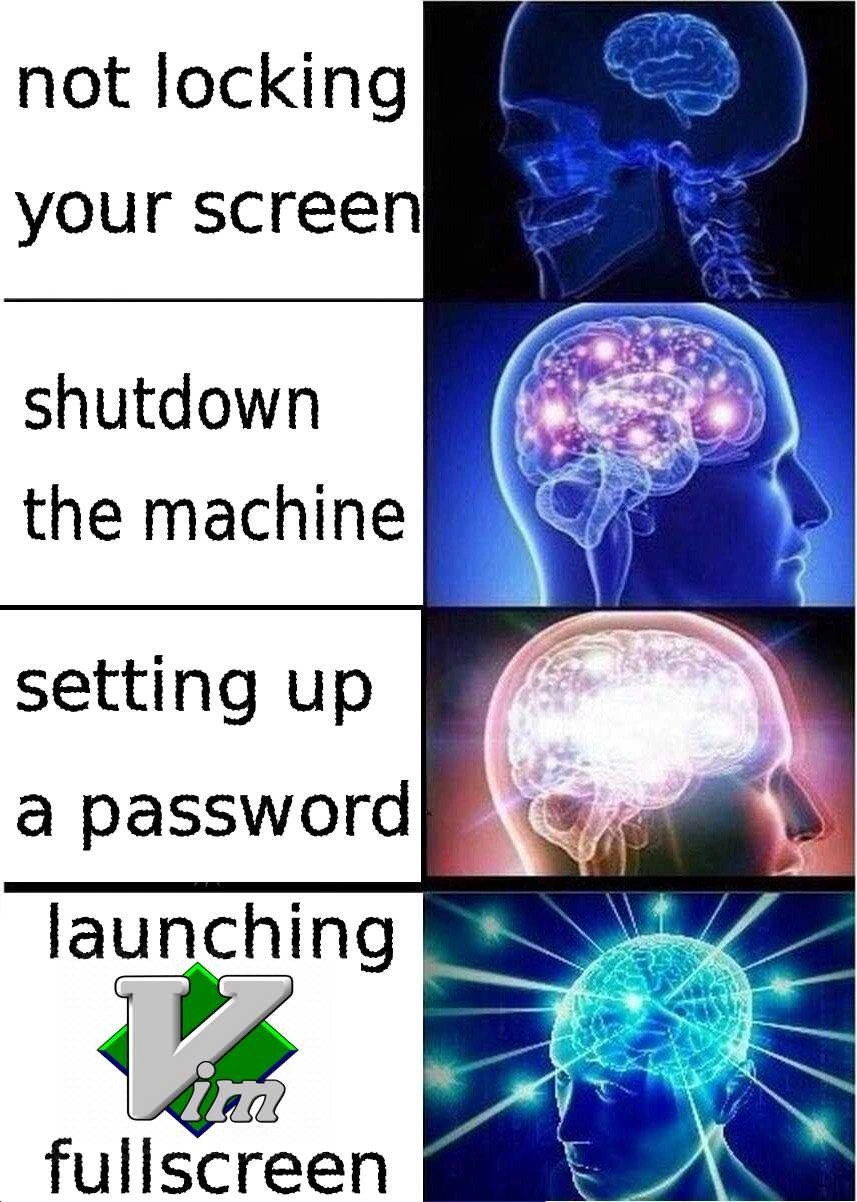
The Expanding brain meme format used here is a popular way to layer ideas from simple to absurd. Each row in the image shows a phrase on the left and an image of an increasingly “enlightened” brain on the right. By the last image, the brain is cosmic and radiating – implying the idea is the ultimate galaxy-brain move. However, the humor is that often the last idea is tongue-in-cheek or over-the-top. In our meme:
- Not locking your screen – brain is barely active (dumb idea, no security).
- Shutting down the machine – brain starts to glow (a bit extreme but foolproof; nobody can use a powered-off PC).
- Setting up a password – brain is brighter (smart and standard practice; a reasonable security step).
- Launching Vim fullscreen – brain is exploding with energy (a comically genius idea; not a serious suggestion, but portrayed as if it’s the highest form of wisdom).
We also see the green Vim logo (a green diamond with “Vim” text) in that last panel’s phrase, emphasizing it’s Vim specifically that’s the magic tool. IDEs_Editors category is referenced here because Vim is a code editor (though running in a terminal). And the meme subtly pokes at the EditorWars culture: Only a certain kind of programmer (often a sysadmin or hardcore developer who lives in the terminal) would think of using an editor as a lock. Emacs (another powerful old-school editor) might also confuse newcomers, but Vim has the more famous reputation for trapping users, so it’s the weapon of choice in the joke. In summary, for a junior developer or someone new to this humor, the key points are:
- Vim is a command-line text editor that’s powerful but not very user-friendly to beginners.
- People often joke about not knowing how to exit Vim.
- This meme suggests using Vim’s complexity as a protective measure: if someone tries to mess with your unlocked computer, Vim’s interface will confuse and stop them.
- It’s a playful take on computer security – combining a real security habit (locking your screen with a password) with a programmer inside-joke (Vim confusion).
Level 3: Security by Obscurity
At the highest level, this meme riffs on a classic security hack that leverages user confusion as a defense mechanism. The humor is rooted in an insider principle of security by obscurity – a normally discouraged practice where you rely on something being hard to understand as your safeguard. Here, our “obscure” defense is the venerable text editor Vim running in fullscreen mode. To an uninitiated intruder, a fullscreen Vim session is effectively an impenetrable vault. They sit down at your unlocked machine and instead of a friendly desktop, they’re staring at a cryptic CLI interface with no obvious exit. It’s like a digital booby trap: the intruder’s lack of Vim knowledge becomes the lock. In real infosec terms, this isn’t true security – it’s more of a prank. But that’s the joke: the meme presents it as the galaxy-brain “zero-day screen lock,” ironically implying a cutting-edge exploit. Seasoned developers recognize the tongue-in-cheek reference to a zero-day vulnerability, but here the “exploit” is simply dropping your snoopy coworker into Vim’s modal editing maze. The expanding-brain meme format exaggerates how enlightened each idea is, culminating in Vim as the ultimate cosmic brain move. It lampoons the gap between high-minded security practices and the chaotic good solutions devs actually concoct.
On a deeper level, this meme merges two beloved programmer in-jokes: TerminalHumor and EditorWars. The TerminalHumor part is the well-known “vim_quit_problem” – the joke that quitting Vim is so unintuitive, many users resort to extreme measures (like rebooting). In fact, there’s legendary forum threads and Stack Overflow posts with thousands of upvotes all asking “How do I exit Vim?”. The meme’s second panel (“shutdown the machine”) winks at this: if you can’t figure out Vim, pulling the plug literally is a novice’s desperate escape route. By the final panel, the meme flips the scenario: instead of the user panicking, we intentionally weaponize Vim’s steep learning curve against unsuspecting intruders. It’s a clever inversion of the usual frustration. The EditorWars angle comes from the perennial Vim vs Emacs (and others) rivalry. Vim users pride themselves on mastering a powerful but notoriously arcane tool. Turning Vim into a security measure is a playful flex — it’s saying “Look, my editor is so hardcore that it doubles as a security device.” This resonates with veteran developers who’ve seen endless debates over editors: here the debate ascends to a cosmic brain plane where the editor isn’t just for editing code, but also guarding your lunch laptop.
Technically speaking, running Vim fullscreen (often just by maximizing your terminal or using Vim’s -Z option in some setups) hijacks the display with a text interface that doesn’t respond to common GUI cues. There’s no IDE-style close button, no obvious menu — just the dreaded “COMMAND LINE” mode and perhaps a blinking cursor. If someone unfamiliar with Vim attempts to use the computer, they’ll find that typing does bizarre things (likely overwriting text or throwing error beeps) because Vim is in command mode awaiting specific key sequences. Hitting typical shortcuts like Ctrl+C or Alt+F4 might not do what they expect (and could even worsen their predicament by entering Visual mode or inserting random characters). The intruder’s brain goes “This isn’t Windows or macOS... what is this?!” Meanwhile, the seasoned dev is chuckling that their open editor is effectively jailing the intruder. It’s a humorous example of “Real security” via an unorthodox route. Those in the know understand that it’s poking fun at both poor security practices (not locking your screen) and Vim’s notorious learning curve. The expanding-brain image sequence dramatizes increasingly brilliant ideas: from doing nothing (dumb), to overkill (shutting down), to sensible (using a password lock), and finally to this absurdly brilliant hacker maneuver of using Vim. It’s absurd, it’s geeky, and it’s a shared wink among developers that sometimes the best security is simply “nobody knows how to use my tools except me.”
Description
A four-panel 'Expanding Brain' meme illustrating escalating levels of securing one's computer. The first panel shows a small brain next to the text 'not locking your screen.' The second panel shows a more illuminated brain for 'shutdown the machine.' The third panel displays a brightly lit brain for 'setting up a password.' The final, most enlightened panel, with a brain radiating light, corresponds to 'launching Vim fullscreen,' featuring the Vim logo. The humor stems from the notorious difficulty that beginners face when trying to exit the Vim text editor. The joke is that an unauthorized user would be so perplexed by Vim's modal interface that they'd be unable to do anything, making it a surprisingly effective, albeit humorous, security measure compared to a standard password lock
Comments
7Comment deleted
A password can be brute-forced in minutes, but an unauthorized user trapped in a fullscreen Vim session? That's a recursive problem that solves itself
Why bother with biometric auth when :q! has a 100% false-positive rate for non-devs?
The same developer who runs VirtualBox fullscreen to hide their Stack Overflow tabs is now architecting your zero-trust security model
The ultimate security measure isn't encryption, MFA, or zero-trust architecture - it's launching Vim in fullscreen mode. No attacker will risk getting trapped in modal purgatory trying to exit. It's not security through obscurity; it's security through ':wq' anxiety. Even your coworkers won't touch your unlocked workstation when they see that blinking cursor, knowing one wrong keystroke could leave them in visual block mode, desperately Googling 'how to quit Vim' on their phone while you're at lunch
Modal RBAC: our lock screen is full‑screen Vim; anyone who can exit without Googling already qualifies for prod access
Our CISO rolled out FIDO2, but the most effective physical-access control remains launching Vim fullscreen - a cognitive DoS where only people who know :q! can breach
:set fullscreen in Vim: ultimate security - hackers bounce off modal hell before breaching your session