
Skip to content
DevMeme
3727 of 7435
The Ascended Path of Binary File Editing
CLI Post #4066, on Dec 24, 2021 in TG

The Ascended Path of Binary File Editing

Why is this CLI meme funny?

Level 1: The Simplest Trick

Imagine you have a really tricky task, like opening a tightly sealed jar of cookies. At first, you might use a fancy jar-opening gadget that your parents bought (that’s like using a paid app to solve a problem). It works, but it’s kind of overkill. Then you try a simpler tool – maybe just a basic rubber grip or a normal jar opener (that’s like a free program that does the job). It’s cheaper and it works too. Next, you learn a special hack: run the jar lid under hot water and give it a little tap on the counter (this is like using a clever trick with common tools, such as converting data and editing with a simple editor). That method feels pretty smart, right? But finally, imagine your grandparent comes along, smiles, and simply uses their bare hands with a specific quick twist to pop the jar open instantly. No gadgets, no extra steps – just knowing exactly how to do it. That’s the ultimate “wow” moment. It’s funny because the simplest solution (just a twist of the hand) required the most experience to know, and it makes all the fancy tools look unnecessary.

This meme is joking about the same idea: sometimes the simplest, most direct way to fix something is something only a really experienced person would think to do. It makes us laugh because the person in the last panel is basically saying, “I don’t need any special tools at all!” – and that confidence is both impressive and a little bit humorous. It’s like a child realizing they can solve a puzzle with a quick trick after watching everyone else use complicated methods. The core feeling is: less can be more – the smartest solution might be the easiest one, if you truly understand the problem.

Level 2: Hex to Text to Hex

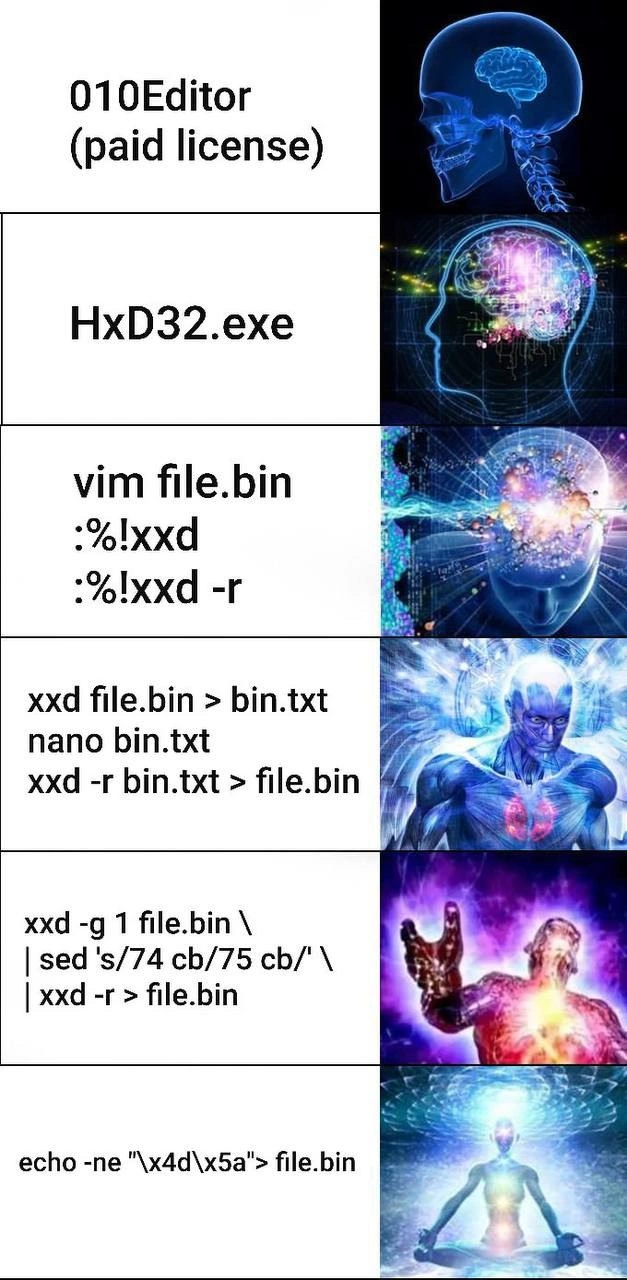
Okay, let’s break this down in simpler terms. We have a classic expanding-brain meme here: each row shows a method to edit a binary file (the left side text), and a picture of a brain that’s increasingly powered-up. The idea is that as the methods get more advanced (or depending on your view, more clever and low-level), the brain in the image glows more brightly, indicating a higher level of “smartness.” It’s a tongue-in-cheek way to rank different approaches to the same technical task. The task at hand is hex editing – that means directly modifying the bytes in a file, not just the text. A binary file is any file that isn’t plain text (for example, an .exe program, an image, etc.), and editing it requires special tools because you’re dealing with raw bytes (which often appear as hexadecimal values).

Let’s go through the methods listed, from top (least galaxy-brain) to bottom (most galaxy-brain), and explain what they are:

  1. 010Editor (paid license): This is referring to a specific program called 010 Editor. It’s a professional hex editor. A hex editor lets you open a file and see every byte of data, represented in hexadecimal (0-9 and A-F). You can edit those bytes, and thereby change the file’s contents at a very low level. 010 Editor is known for being powerful (it even has templates that decode structures in a file for you), but it’s not free – you need to buy a license. In the meme, this is portrayed as the most “basic” approach—someone using a fully packaged, paid GUI tool to patch a file. It’s like using a high-end gadget with all the training wheels on. Nothing wrong with it, but in programmer culture, it’s kind of vanilla.

  2. HxD32.exe: HxD is another hex editor, commonly used on Windows, and it’s free. The “32.exe” part likely just denotes the version or the fact it runs on 32-bit Windows, but essentially HxD is the program. Using HxD means you’re still in a GUI environment (windows, menus, etc.), but you’re not paying money for a license. It’s a popular choice for anyone who’s done casual binary editing, like modding a PC game’s save file or examining data in a file for corruption. In the meme’s progression, this is a step up in “brain expansion” — presumably because you were smart enough not to pay for a tool when a free one does the job. It’s still a straightforward approach: open file in HxD, scroll to the bytes you want to change, type in the new values, save.

  3. vim file.bin :%!xxd ...: Now this is a trickier method. Vim is a well-known text editor for the command line (very powerful, though it has a steep learning curve for newcomers). Here they’re using Vim to edit a binary file by converting it into a hex dump and then back. The commands :%!xxd and :%!xxd -r are Vim’s way to filter the file through external programs. xxd is a command-line tool that creates a hex dump of a file. When you run xxd file.bin, it outputs the contents of file.bin in a human-readable hex format (with the hex bytes and possibly ASCII on the side). The :%!xxd inside Vim means “take the entire file content (%) and replace it by the output of running xxd on it.” So after that, you’re no longer looking at gibberish – you see the hex representation of the file as text in Vim. You can then find the bytes you want to patch and change them (in their hex form). After editing, :%!xxd -r means “take the current text (the edited hex dump) and run it through xxd -r (reverse), which converts it back into binary form, replacing the text with the actual binary data bytes.” Then you’d save the file. So effectively, Vim + xxd let you do hex editing without leaving the terminal. This indicates a more advanced user: they’re using command-line interface tools and a bit of shell scripting within Vim. The meme treats this as a more “enlightened” stage than using a GUI. It’s something a power user might do, especially on a Linux system where maybe a GUI isn’t available. It’s also quite clever: it uses built-in tools (Vim and xxd are standard on many systems) instead of separate specialized applications.

  4. xxd file.bin > bin.txt; nano bin.txt; xxd -r bin.txt > file.bin: This method is very similar to the Vim trick but done step by step manually. Let’s break it down:

    • xxd file.bin > bin.txt runs the xxd hex dumper on the file and redirects the output into a new text file bin.txt. Now you have a text file containing the hex representation of the binary file.
    • nano bin.txt opens that dump in Nano, which is a simple text editor (also command-line based, but easier for beginners than Vim). You would scroll through or search in this text for the bytes (in hex) you want to change, then edit them. For example, if you know some offset or pattern like “74 cb” that needs changing, you’d locate that in the text.
    • After saving your changes in nano, you exit. Now you have a modified bin.txt (hex dump text).
    • xxd -r bin.txt > file.bin takes that text file and converts it back into binary, writing it over the original file. The -r flag means reverse the dump: xxd will interpret the hex text and produce the actual binary data out of it.

    This accomplishes the same thing as the Vim pipeline, but without requiring Vim or its filtering commands. It’s more manual: you literally go out to a text file and back. The meme shows this as an even bigger brain moment, perhaps tongue-in-cheek, because it’s actually a bit simpler conceptually than using Vim’s %! magic, but it’s fully using command-line tools and simple editors. The humor might be that a truly enlightened guru doesn’t even need Vim – they can do it with the most basic tools (Nano is often the only editor newbies know in CLI, ironically making this method accessible to relatively inexperienced users too). But doing all that by hand suggests patience and knowledge of how to chain these tools together. It’s also implying: “Look, I don’t need a specialized hex editor UI, I can do it myself with basic Unix commands.” This is the DIY approach to hex editing.

  5. xxd -g 1 | sed 's/74 cb/75 cb/' | xxd -r > file.bin: Now we’re entering real one-liner territory. This command is doing an inline find-and-replace on the file’s bytes. Let’s clarify:

    • xxd -g 1 file.bin prints the file’s hex contents to the terminal (grouping bytes one at a time, -g 1, so each byte is separate). If you ran this alone, you’d see lines of hex values.
    • | sed 's/74 cb/75 cb/' means we pipe that output into sed. Sed is a stream editor, commonly used for find-and-replace operations on text that’s flowing through a pipeline. The 's/74 cb/75 cb/' part is a substitution command: it looks for the exact text 74 cb in the stream and swaps it to 75 cb. This presumably corresponds to changing a specific sequence of bytes in the file (0x74 followed by 0xCB becomes 0x75 followed by 0xCB). The person writing this needs to know exactly what pattern to replace — it’s a very targeted change.
    • Then | xxd -r takes the edited stream from sed and pipes it into xxd in reverse mode, converting it back to binary form.
    • Finally > file.bin writes the result back to the file.

    All in one go, this command finds a byte sequence in the file and changes it, without any manual opening of editors. It’s automated patching via command line. For a newer developer, this might be the first time seeing how you can chain commands with | to do complex transformations. The meme places this near the top of the enlightenment scale because it’s quite the power move. It shows mastery of multiple command-line tools working together: using text processing (sed) to operate on what is originally binary data, thanks to xxd converting it to a textual form. It also implies the person is comfortable with regular expressions or sed syntax and knows how to precisely target what they want to change. It’s a bit risky too, because if you typo the pattern or if it occurs in more places than you expect, you could corrupt the file easily. But the comedic premise is that an enlightened hacker can do this in their sleep. This is the quintessential "bash scripting" trick that makes other programmers raise an eyebrow and say “whoa, that’s neat (and a bit crazy).”

  6. echo -ne "\x4d\x5a" > file.bin: Finally, the pinnacle. This command uses the simplest built-in shell command echo to directly output binary data. The flags -n (no newline at end) and -e (enable interpretation of backslash escapes) make it possible to output raw byte values. "\x4d\x5a" is a string containing two hex byte codes: 4D and 5A, as mentioned, which are ASCII for "MZ". When this runs, it literally creates a file file.bin that contains exactly those two bytes (because > redirects the output into the file, replacing anything that was there or creating a new file). This method assumes you know exactly what bytes you need in the file. It’s extremely minimal. No hex editor, no conversion, nothing. You just conjure the bytes with a command. In a real scenario, you might use something like this to quickly make a binary file of certain content, or overwrite a file’s beginning with some new bytes (though usually you’d need a more careful approach to not destroy the rest of the file). The meme portrays this as the ultimate enlightened state: the brain is now a serene figure emanating light. The joke is that the person doesn’t even need any conventional tool—they’ve essentially hardcoded the solution into an echo command.

In summary, as we go down the list:

  • The tools become more lightweight or generic (from specialized apps to general-purpose commands).
  • The degree of automation increases (from manual editing to scripting the edit).
  • And the required knowledge skyrockets (from just knowing how to use a UI, up to knowing shell, hex notation, particular byte values, etc.).

The humor is in the absurd one-upmanship: each method seems “smarter” or more elite than the last. It riffs on the programmer mindset of wanting to do things in a more efficient, scriptable, or clever way. People who work in Unix-like environments (Linux, etc.) often pride themselves on using the command line and combining simple tools to achieve complex tasks (that’s the whole philosophy of the command line interface, actually). This meme exaggerates that pride to the point of showing someone just using echo with hex codes — which is both brilliant and kind of comical. It’s like saying, “Why even bother opening an editor? I’ll just type the bytes directly!”

For a junior developer or someone new to shell scripting:

  • You learn here that there are different levels of interacting with data. GUI programs like 010Editor or HxD give you a lot of hand-holding (visual layout of hex, maybe warnings, etc.).
  • Then there are text editors you might not have thought could handle binary (like Vim with xxd — using a plugin-like approach inside the editor).
  • Then purely command-line pipelines that do it without any interactive editing at all (sed replacing on the fly).
  • And then raw shell commands that produce bytes.

It’s also a mini-intro to some cool tools:

  • xxd: a command that can dump binary to hex (and reverse). Developers often use this to quickly look at the contents of a file in hex or to embed binary data in a text format.
  • sed: a stream editor, very powerful for batch substitutions in text. Here it’s used to substitute one hex byte sequence for another.
  • echo -e with \x: not everyone knows you can output specific byte values using echo with hex escapes. This is a neat trick for inserting non-printable bytes into output.

So, the meme is funny because if you understand these, you see that each step requires a bit more finesse. It resonates especially if you’ve encountered that one colleague who always prefers a one-liner in Bash to do things. You might have heard the phrase "I can do that in one line of Bash". This meme is essentially that phrase, but applied to hex editing. It’s the Command Line Interface ethos taken to an extreme for comedic effect. And if you’re someone who started with easy tools and gradually learned these command-line techniques, you might chuckle and think, “yep, I’ve been there (maybe not all the way to the echo part, but close!).”

Level 3: GUI to Guru

This meme hilariously illustrates a hierarchy of hex-editing methods — from newbie-friendly GUI tools to hardcore command-line kung fu — and suggests that the more arcane your method, the "bigger your brain" must be. Each row on the left lists a way to modify the bytes of a file (to patch a binary), and on the right a glowing brain image indicates the perceived ingenuity or enlightenment of that approach. Seasoned developers are knowingly smirking at this progression. Why? Because it pokes fun at the dev culture where doing things with fewer tools (or more obscure commands) is seen as a flex of skill.

  • The journey starts with "010Editor (paid license)" – a powerful commercial hex editor. It has a polished GUI and advanced features (like binary templates for structures), but requiring a paid license makes it decidedly uncool in hacker circles. Relying on a pricey GUI is entry-level in this meme’s eyes (hence the smallest brain). Many of us began by using such friendly tools to inspect or edit binary files, but there’s a slight jab here: real gurus don’t need a corporate tool that your boss’s budget paid for.

  • Next, "HxD32.exe" represents a popular free Hex Editor on Windows (HxD). Being free, it’s a step up on the enlightenment scale – you’re savvy enough not to pay for 010Editor. HxD is widely used for basic low-level debugging, game modding, or troubleshooting (for example, tweaking a save file or analyzing a corrupted document). It’s a solid tool, but it’s still a GUI with buttons and dialogs. The meme suggests your brain is expanding a bit: you’ve moved away from the cushy paid route, but you’re still using a straightforward interface.

  • Then we jump into the command-line world with vim file.bin and the :%!xxd ... trick. Now the brain is really lighting up. This line shows a Vim hack: editing a binary by converting it to a hex dump inside Vim, editing as text, then converting back. :%!xxd tells vim to filter the entire file (% for whole file) through the external xxd command. xxd produces a hex representation of the binary. After making changes to that text (in Vim or here shown as immediate round-trip), :%!xxd -r converts the edited hex back into binary bytes. This is a clever use of Vim’s ability to integrate with shell commands, essentially turning Vim into a hex editor on the fly. At this stage, you’re using a CLI text editor (no mouse, all keyboard) and a built-in tool (xxd) that comes with many Unix systems. The meme’s brain image is now pulsing with creative energy — you’ve ditched the GUI entirely and are using a power-user workflow. Developers find this funny because it’s somewhat esoteric: not everyone knows Vim can do that. It’s like a secret handshake among Unix wizards.

  • The fourth method, xxd file.bin > bin.txt; nano bin.txt; xxd -r bin.txt > file.bin, is basically the manual version of what Vim did. Here, you run xxd directly to create a hex dump file (bin.txt). Then you use a simple text editor (Nano) to edit that dump. Nano is a no-frills CLI editor that even newbies on Linux often learn first (since it’s user-friendly and always says what keys to press at the bottom). So this step says: “I don’t even need Vim’s fancy filtering, I can use basic shell commands and assemble the workflow myself.” After editing the hex values in the text file, xxd -r is used to convert (-r stands for reverse) the text back into the patched binary. By now, the meme’s brain image suggests near-transcendence — you’re comfortable juggling multiple command-line steps to get the job done. This scene likely resonates with anyone who had to edit files on a server with no GUI: you get creative with whatever tools are available. It’s also showing off a bit of Unix pipeline mentality: break the task into parts (dump, edit, rebuild) using simple tools glued together by files, rather than relying on one monolithic application.

  • The fifth method is where things get ultra geeky: xxd -g 1 file.bin \| sed 's/74 cb/75 cb/' \| xxd -r > file.bin. This is a one-liner that does the binary patch in place through a pipeline. Let’s unpack that: xxd -g 1 file.bin outputs the hex dump to stdout, with -g 1 ensuring it’s grouped by 1 byte (so the output has a space between every byte pair, e.g. "74 cb", rather than something like "74cb" which would be harder for sed to pattern-match). This output is piped (|) into sed, the stream editor, with a substitution command s/74 cb/75 cb/. That tells sed: find the text "74 cb" and replace it with "75 cb". Sed will do this without any manual editing, instantly in the data stream. Then the modified stream goes into xxd -r, which turns the hex dump back into a binary, and the > file.bin redirects it to overwrite the original file. The result? In one composed command, every occurrence of the byte sequence 74 CB in the file gets changed to 75 CB. No intermediate files, no opening editors at all. This is pure shell scripting sorcery: using the command-line to perform a surgical edit inside a binary. The developer in this stage has essentially written a tiny program (using the shell, xxd, and sed) to do the hex editing automatically. The brain in the meme’s image is now exploding with cosmic energy — it implies an almost god-like understanding of both the file’s content and the tools needed to alter it. Why is this funny to devs? Because it’s simultaneously impressive and over-the-top. It’s the kind of one-liner you might see on Stack Overflow or in a gist, where someone flexes their ability to solve a problem in one shell pipeline. It evokes that "I see what you did there" nod. We’ve all met colleagues who prefer a one-liner over a GUI any day, and this meme is celebrating that approach with a wink. (Side note: if there were multiple unintended "74 cb" sequences, this pipeline would replace all of them and potentially mess things up. But our shell guru presumably knows exactly what they’re doing and which unique pattern to target. As the meme suggests, enlightenment comes with confidence… perhaps to a fault!).

  • Finally, the apex of enlightenment: echo -ne "\x4d\x5a" > file.bin. The left column text here is just that single shell command. The right side shows the radiant meditative brain, implying the person has become a binary patching deity. At this stage, all illusions of complexity are gone. No xxd, no editor, no intermediate text at all. Just directly writing bytes. This is the meme’s punchline: the idea that the ultimate smart solution is to use the simplest, rawest tool possible – echo – to achieve the goal. Echo is a shell built-in that typically prints text to the terminal. With flags -ne, it’s being used to print without a newline and to interpret backslash escapes. The string in quotes "\x4d\x5a" uses \xNN notation to represent bytes by hex code. So this prints the two bytes 4D and 5A (the "MZ" we discussed earlier). The output is then redirected right into file.bin, replacing its contents with those two bytes. It’s a bit like performing open-heart surgery with a stone knife: incredibly direct and with zero cushioning. The humor here is that after all those intricate methods above, our enlightened hacker says “forget all that, I’ll just conjure the bytes from thin air.” It’s absurdly minimal — borderline reckless — yet awe-inspiring in that mad scientist kind of way. In a real troubleshooting scenario, you might do something like this if you know the exact bytes you need to fix a corrupt header or structured file. For example, if a binary’s header got damaged and you know it should start with 0x4D 0x5A, you might patch it in. But doing it with a plain echo command is a very “because I can” move. Seasoned devs laugh because it satirically glorifies the most rudimentary approach as if it’s enlightenment. It resonates with the Unix philosophy fans: why use a big tool when a few bytes of shell script will do? Also, there’s an in-joke: many Unix-like systems have these powerful tools available by default (sed, xxd, etc.), so a true guru prides themselves in not relying on any proprietary software. They might say: “Give me a shell and I can move mountains (or patch binaries).”

This meme is ultimately about technical one-upmanship in a humorous way. Each row is basically saying, "Sure, you can patch a binary with a GUI or even a normal hex editor... but a REALLY enlightened developer would do it this way!" It exaggerates the pride engineers take in using the command line for tasks that others might use a GUI for. It also hints at the journey many of us take: starting with easy tools and slowly discovering the powerful, finer-grained methods. The expanding brain images drive the joke home visually — the more unconventional and terse the solution, the more galaxy-brained the practitioner must be.

The reason this tickles software folks is because it’s relatable. Perhaps you’ve seen a senior colleague fix a problem with a one-liner and felt both impressed and amused. Or you’ve been that person who avoids GUI utilities in favor of scripting something custom. The meme embraces the stereotype of the ultra-hacker in a terminal, to the point of absurdity (literally reducing the patch to an echo command). It’s an over-the-top celebration of CLI mastery and the almost spiritual joy of working directly with low-level data. In the end, we’re laughing at ourselves a bit: yes, sometimes the “simplest” solution (in terms of tooling) is actually the most complicated in terms of knowledge – and that glorious contradiction is what makes this so funny.

Level 4: Bash to the Metal

At the bare-metal level of binary patching, every tool and GUI ultimately boils down to manipulating bytes on disk. In the highest enlightenment tier of this meme, the developer has shed all layers of abstraction, using an echo command to write raw bytes directly to the file. This is essentially invoking the lowest-level operation: a write system call that places specific byte values into the file. It’s like the coder has become one with the machine code, manually emitting the exact opcodes needed. In the example, echo -ne "\x4d\x5a" > file.bin writes two bytes (0x4D and 0x5A) straight into file.bin. These bytes correspond to the characters "MZ", which is the magic number at the start of a Windows PE (Portable Executable) file. Fun fact: "MZ" are the initials of Mark Zbikowski, an early Microsoft engineer – every .exe begins with those letters as a signature. By directly echoing those hex values, our enlightened hacker is forcibly imprinting the correct file header with a single shell command.

To reach this mastery, you must understand what those bytes mean in context. Earlier in the meme’s pipeline, we saw a command replacing 74 cb with 75 cb in a hex dump. Those are actual opcode bytes for x86 assembly instructions! Changing one hex value here is a surgical tweak to the program’s logic. Specifically, 0x74 and 0x75 are opcodes for conditional jumps – flipping one into the other inverts a branch from “jump-if-equal” to “jump-if-not-equal”. In other words, one bit change can turn a conditional check on its head. Here’s what that substitution represents at the CPU level:

Hex Bytes x86 Instruction Effect
74 CB JE short -0x35 Jump if equal (ZF=1)
75 CB JNE short -0x35 Jump if not equal (ZF=0)

By using xxd and sed to find-and-replace 74 cb with 75 cb, the meme implies patching a program’s behavior (maybe skipping a check or altering a loop) without opening any editor at all. This is low-level programming wizardry: you recognize the exact hexadecimal byte sequence of an instruction and alter it with a stream edit. The command xxd -g 1 dumps the file byte-by-byte (group size 1) so that each byte is separated by a space, making it easier for sed to replace the exact pattern. Then xxd -r rebuilds the binary from the modified hex stream. The entire pipeline is pure text transformation of a binary file, leveraging the Unix philosophy that “everything is a file” (and here even binary data can be treated as text with the right encoding). Seasoned engineers admire this as a clever hack — the tools (xxd, sed, echo) are being weaponized in ways their creators might not have originally anticipated, just to patch a few bytes in-place.

Of course, with great power comes great responsibility (and a bit of tongue-in-cheek humor). Redirecting echo straight into a file will clobber the entire file content with those bytes, unless you’re careful (normally one might use dd with an offset to patch in-place without truncating the rest). But the meme isn’t about the safest practice; it’s highlighting the bravado of a guru who knows exactly what they’re doing. The enlightened figure in the final panel has transcended conventional interfaces. They’ve realized that at the end of the day, a file is just a sequence of bytes, and if you know the right bytes, you might not need any fancy interface at all. This is the zen of the command line: minimalism and complete control. The highest-level joke here is that the ultimate debugging or patching trick is literally a one-liner that directly communes with the binary. It’s as if the developer is Neo in The Matrix, seeing the raw hex code and bending it to their will.

Description

This is a multi-panel 'expanding brain' meme, illustrating a progression of methods for editing binary files, from simple to esoteric. Each panel on the left shows a command or tool, while the right shows a corresponding image of an increasingly enlightened or powerful being. It starts with user-friendly GUI tools like '010Editor (paid license)' and 'HxD32.exe'. It then moves to using standard command-line tools in clever ways, such as converting a binary to hex in 'vim', or dumping hex to a text file to edit with 'nano' and then converting it back. The complexity escalates to a convoluted pipeline using 'xxd', 'sed', and back again. The final, most 'enlightened' stage shows the simplest and most direct command: `echo -ne "\x4d\x5a" > file.bin`, which directly writes the magic bytes for an executable file. The humor lies in the irony that the most complex-looking solutions are often not the most elegant, and true mastery is in the simplest, most direct command, a journey of discovery familiar to many senior engineers


Comments

32
Anonymous ★ Top Pick The junior dev uses a GUI hex editor. The mid-level dev builds a 5-stage pipeline with sed and awk. The senior dev just uses echo. The principal engineer has a co-worker who knows how to do it
  1. Anonymous ★ Top Pick

    The junior dev uses a GUI hex editor. The mid-level dev builds a 5-stage pipeline with sed and awk. The senior dev just uses echo. The principal engineer has a co-worker who knows how to do it

  2. Anonymous

    Real dev zen is realising your entire hex editor can fit in an echo pipe and still pass the company’s ‘no new dependencies’ mandate

  3. Anonymous

    The same engineer who writes a 47-step sed pipeline to change one byte is now architecting your microservices mesh with 200 dependencies to serve a contact form

  4. Anonymous

    Patching 74 to 75 with sed - turning JZ into JNZ via regex is how license checks die and how seniors prove they never actually needed the debugger

  5. Anonymous

    The real galaxy brain move is spending 3 hours crafting the perfect sed one-liner to patch a single byte instead of just opening the file in a GUI hex editor and clicking once. But hey, at least you can put that pipeline in your dotfiles and pretend you'll need it again someday - right next to that awk script you wrote in 2019 that you're absolutely certain will be useful 'eventually.'

  6. Anonymous

    Real senior move: treat binary patching as text processing - xxd -g1 | sed 's/74 cb/75 cb/' | xxd -r - and save the license budget; enlightenment is remembering echo -ne "\x4d\x5a" can be a perfectly acceptable recovery plan

  7. Anonymous

    Hx32.exe for mortals; echo -ne '\xDå' for those who've transcended the GUI

  8. Anonymous

    Peak senior move: turn hex edits into a reproducible xxd | sed | xxd -r target, commit it to git, and let CI review the bytes

  9. ẞonny 4y

    I understand 0 from that

    1. @lord_nani 4y

      Same

    2. @lord_nani 4y

      Seems like converting text files to binary

  10. @nkormakov 4y

    4th is so familiar

  11. @lord_nani 4y

    Is meme about different ways of editing/saving as binary files?

  12. ẞonny 4y

    I laughed at paid license but I didn't understood the purpose. I'm just the men you gonna call when you don't know how to press that simple button. 🥲

  13. @dmitry_polshakov 4y

    This is different ways to edit binary file. But the last one not edit file, but fully replace its content. IDK is it by purpose or not

  14. @RiedleroD 4y

    Things I don't know here: - 010Editor - HxD32.exe - xxd - the meaning of "\x4d\x5a" so yeah I get this meme 👍

  15. @Santiaga 4y

    Paid hex editor Free hex editor vim in hex editor mode Binary<->hex encode decode program with GUI editor for bytes replacements Binary<->hex encode decode program with stream editor for bytes replacements Output entire patched file byte by byte with echo hex encoded strings (incomplete solution)

    1. @CcxCZ 4y

      I wouldn't call Nano GUI editor. It's terminal equivalent of notepad.exe, something as dumb that the controls fit on the bottom line of the screen. (Of course it wouldn't be software if it didn't bloat to the point of now having a syntax highlighting engine. It's editing capabilities are still as sharp as a spoon though.)

      1. @Santiaga 4y

        TUI, if you like. The point was it's interactive editor, not stream.

        1. @CcxCZ 4y

          Yeah. A CLI editor such as sam or ed would actually make sense here though for non-interactive use. As would dd invocations with precise byte offsets. But it would be less galaxy brain approach.

          1. @Santiaga 4y

            In addition, sed will make too many incorrect replacements on such a short pattern. dd is the more efficient way if you know the exact offset.

            1. @CcxCZ 4y

              Yeah, it kind of reminded me of CRISPR. AKA why we don't allow genetic editing of human embryos. You have no clue what places the edits might end up affecting.

  16. @CcxCZ 4y

    xxd is a tool that ships with Vim that allows you to encode and decode hexadecimal formats. The -r flag is "reverse", that is it converts hexadecimal representation of a file back to normal. https://linux.die.net/man/1/xxd It's rather simplistic. If you need actual binary patch format there is plenty to choose from. Even the Intel .HEX format can be used as one.

  17. @ZgGPuo8dZef58K6hxxGVj3Z2 4y

    What is :%!xxd ?

    1. dev_meme 4y

      launch external executable, xxd

      1. @ZgGPuo8dZef58K6hxxGVj3Z2 4y

        Yuuki and @CcxCZ thanks! On what platforms does this work?

        1. dev_meme 4y

          i think every platform which supports vim and xxd

        2. @CcxCZ 4y

          Any capable of running Vim

          1. @CcxCZ 4y

            xxd is part of Vim technically. But you may need to tweak executable path which IIRC is optional step during install on Windows.

        3. @CcxCZ 4y

          It's even in drop-down menu in gvim, unless they changed that in last decade. It's a pretty standard feature.

          1. @CcxCZ 4y

            https://cdn.arstechnica.net/wp-content/uploads/archive/vim0509/gvim_ars.png

    2. @CcxCZ 4y

      : run ex command % select all of the file ! filter through external executable, writing to it's standard input and reading from it's standard output xxd hexdump, explained in comments above

Use J and K for navigation
