Every Legend Has a Weakness, and For iOS Devs, It's App Store Connect
Why is this MobileDev meme funny?
Level 1: Even Heroes Have Weak Spots
Imagine you worked really hard to build a super cool toy or a science project. You’re proud of it and ready to show it off. But right before you can get a gold star, the teacher says, “Hold on, there’s a problem – you forgot to do one small thing.” Suddenly, you have to fix that little detail and wait, even though everything else was great. That’s what’s happening in this meme. The iOS engineer (the person making an iPhone app) is like a hero who did something amazing, but Apple – the company in charge of the App Store – is like the teacher who checks the work. The message “We noticed an issue with your submission” is Apple saying, “Uh oh, something isn’t right, please fix it.” It’s funny because it shows even a super talented “legend” can be stopped by a tiny oversight. It’s just like how a mighty hero in a story can have one small weak spot: maybe a strong hero loses all his power if his hair is cut, or an invincible warrior is only vulnerable in one heel. In the same way, no matter how great an app developer is, there’s a moment of weakness when they have to wait for Apple’s approval. The meme makes us smile because we all recognize that feeling: no matter how confident or powerful you feel, hearing that Apple found a problem with your work can make you feel as helpless as a hero who suddenly lost their strength.
Level 2: Review Reality Check
If you’re new to making mobile apps, here’s what’s going on in the meme. The iOS engineer (someone who writes apps for iPhones and iPads) is feeling as unstoppable as a mythical hero—until they hit the App Store’s submission review process. The cartoon shows famous heroes and their one fatal weakness, and for the developer, that weakness is the App Store review. In real life, after you finish building an app, you can’t just send it out directly to everyone’s iPhone. You have to go through Apple’s App Store Connect – a website where developers upload their app and click "Submit for Review" to ask Apple for approval to publish it.
Apple doesn’t approve apps automatically. They have a dedicated app review team (real people, plus automated systems) that checks each app for quality and rule violations. Apple’s rules for apps are written in a big document called the App Store Review Guidelines. When something isn’t right, the review team will refuse to approve the app – this is called a submission rejection. The meme shows the exact wording of a rejection notice: We noticed an issue with your submission. That’s basically Apple-speak for “Uh oh, there’s a problem with your app that you need to fix.” It’s a very common notification in an iOS developer’s life. You might see it as an email or as an alert in the App Store Connect dashboard (usually it starts with a friendly “Hello,” followed by the bad news about what needs to be fixed).
This can be pretty frustrating the first time it happens. Imagine spending weeks coding your app, testing it on your phone, and everything seems perfect. You feel proud as you hit that Deploy button to send it off to Apple. But then you get this vague message saying something’s wrong. As a new developer, your first reaction might be confusion: “It ran fine for me… what could be the issue?” The problem might be technical (maybe the app crashed for the reviewer when they did something you didn’t try), or it might be about Apple’s rules. Apple has a lot of rules to protect users and ensure quality. For example, if your app uses the camera or microphone, you must explain the reason in your app’s settings file (the Info.plist). If you forget to include a short description like “this app uses the camera to let you take profile pictures,” Apple will reject the app for privacy reasons. That’s a small detail, but it’s very important. Here’s what it looks like in code form, inside the app’s Info.plist file:
<!-- Info.plist excerpt: declaring why the app needs camera access -->
<key>NSCameraUsageDescription</key>
<string>We need camera access so you can take a profile picture.</string>
Without that line, when the Apple reviewer tests your app and tries to use the camera, they won’t see a message about why the camera is needed. Apple’s rule says every app has to provide this explanation for privacy, so if it’s missing, they’ll stop your app right there. The developer then has to add the missing text, make a new build of the app (called a binary, essentially the packaged app file), and submit it again. This causes at least a day or two of delay while waiting for another review. If you told your users or your boss that the app would be out on Friday, getting a surprise rejection on Thursday is a real headache!
Unlike deploying a website where your code goes live instantly after you push it, deploying to the App Store involves this human-driven checkpoint. In mobile app development on iOS, Apple is the gatekeeper for releases. They check things like:
- Does the app run without crashing and behave well?
- Does it follow all the content rules (no illegal or inappropriate content, not misleading users, etc.)?
- Are all the permissions handled properly (for example, showing the user a prompt to allow notifications, and including those reason messages for camera, location, etc.)?
- Did you describe the app accurately in the App Store listing? (If you say the app can do X, it should actually do X and not something else.)
- Are you using only allowed APIs and tools? (Using any private, non-public system functions is a big no-no; Apple’s automated checks will catch that.)
If any of these checks fail, you’ll get that rejection message. Sometimes Apple’s feedback is very clear about what to fix (e.g. “Your app crashed on iPad running iOS 16 when we tapped the Save button”). That kind of issue is straightforward to debug. But other times, the message can be vague, like “Your app does not comply with guideline 4.2” – which means you have to go read the guidelines, figure out what section 4.2 covers, and how it might apply to your app. This uncertainty is why even veteran developers joke that App Store review is their personal Achilles’ heel: it’s the one part of the process where you’re not 100% in control.
For a junior dev or someone just starting out, the main thing to learn is: don’t panic if Apple rejects your app at first. Almost every iOS developer has been through it. It’s practically a rite of passage to fix an issue and resubmit. In fact, many apps are rejected on the first try and later make it through on the second or third submission after addressing the feedback. The review process is there to help you align with Apple’s quality and safety standards, but it can definitely introduce stress (people often talk jokingly about release anxiety – the nerves while waiting for approval). You might find yourself constantly refreshing the App Store Connect page when your app is “Waiting for Review” or “In Review”. Even for TestFlight (Apple’s beta testing platform), if you want to invite a bunch of external testers, Apple does a lighter review of your beta build. That’s what testflight_waiting_for_review refers to – your test build sits in a mini-queue for approval too. It usually goes faster than a full App Store review, but it still means another wait.
In short, this meme is saying: even the best iOS developers can be humbled by the App Store’s review step. The black-and-white comic compares a programmer to legendary heroes to make a funny point. Samson was unstoppable until a haircut did him in, Achilles only failed because of one tiny heel, and an iOS developer – no matter how skilled – can see their app stopped by a single review message. As a new developer, it’s good to know that writing the code is just one part of delivering an app. The final boss, so to speak, is getting through App Store review. With experience, you get better at anticipating what Apple might object to (and designing your app to avoid those issues). But whenever you do get that “We found an issue” note, remember: it happens to everyone. The difference between a newbie and a seasoned dev is often just knowing that it’s normal, fixing things patiently, and resubmitting. The meme gives a warm nod to that shared experience: it’s a mix of “ugh, I hate when that happens” and “haha, it’s so true!” that unites the iOS developer community.
Level 3: The Cupertino Gauntlet
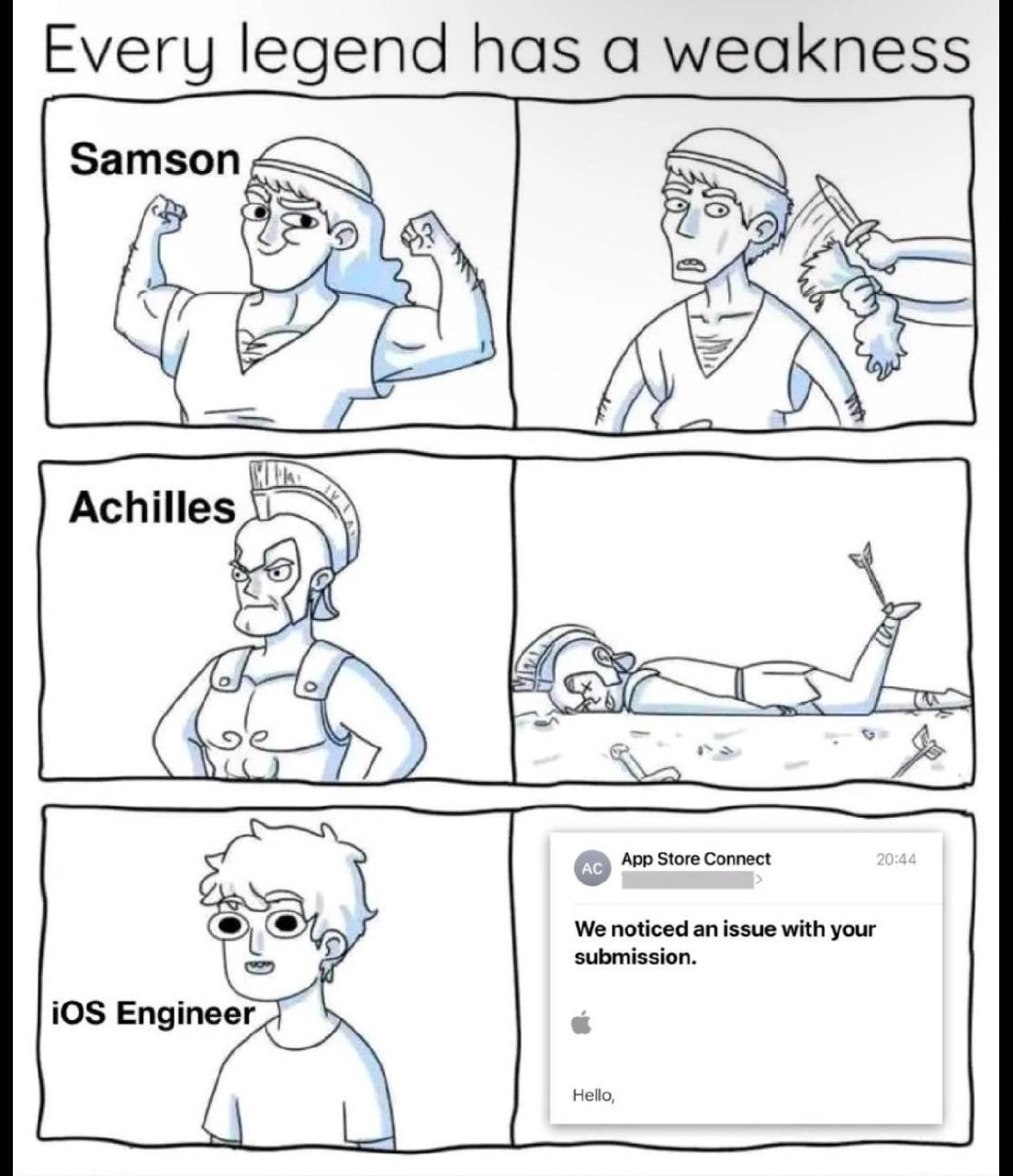
Every legend has a weakness – this meme nails that truth with mythological flair and a modern twist. In the first panels, mighty Samson is unbeatable until a mere haircut robs his strength; fearless Achilles dominates the battlefield, but one arrow to his heel brings him down. The final row delivers the punchline: even the confident iOS engineer, who can wrestle Xcode and craft sleek Swift code all day, has a crippling weak spot – the moment their app hits Apple's App Store review process. It's the ultimate developer Achilles' heel.
| Legend / Role | Strength (Superpower) | Weakness (Kryptonite) |
|---|---|---|
| Samson | Superhuman strength as long as his hair remains uncut. | A simple haircut drains all his power instantly. |
| Achilles | Nearly invincible in battle, O(1) vulnerability. |
His heel – one small target, one lucky arrow and he's down. |
| iOS Engineer | Mastery over Swift, UIKit, and Xcode; deploys builds effortlessly. | "We noticed an issue with your submission" – one cryptic App Review rejection halts the release. |
For seasoned iOS developers, those words We noticed an issue with your submission. are the stuff of nightmares. It's the polite, corporate way of saying "Your app got smited rejected." 😔 After weeks of coding, testing every edge case, and finally hitting "Submit for Review" in App Store Connect, an iOS dev might feel as mighty as Samson pre-haircut. But then at 20:44 on a Tuesday, up pops a notification from App Store Connect (the portal for managing iOS app releases) with that exact phrasing. That one bland sentence is the Apple equivalent of a Delilah sneak attack or an arrow finding its mark. All of a sudden, your MobileDev victory parade screeches to a halt.
Why is this so relatable? Because it happens all the time in the Apple ecosystem. No matter how experienced you are, the Apple review team can always surprise you. The humor here comes from that universal developer pain point: feeling unstoppable in code, yet utterly vulnerable to Apple's opaque review rules. It’s a classic developer experience (DX) gut-punch – you think the hard part (coding) is over, but the true gatekeeper is a reviewer in Cupertino following an arcane checklist.
An App Store rejection can stem from a laundry list of issues, some obvious, some comically obscure. By the time you reach senior status, you’ve probably met them all:
- Crashes or bugs that slipped through QA: Apple testers somehow find the one scenario (like running on an old iPod Touch or switching the device language to Klingon) in which your app crashes. Boom, Guideline 2.1 (Performance) violation.
- Private API usage: You included a sneaky unsupported framework call or used something like
UIWebViewlong after Apple deprecated it – automatic rejection. Apple’s review bots will sniff that out faster than Achilles drops from a well-aimed arrow. - Missing Info.plist entries: Forgot to explain why you need camera or location access? Guideline 5.1.1 (Privacy) says nope. Without a
NSCameraUsageDescriptionstring, your app will be bounced for “using the camera without clarifying its purpose.” - Metadata quirks: Maybe your app’s description mentioned an Android version (gasp, a competitor) or said “free” in a way Apple doesn’t like. Perhaps your login screen didn’t provide a demo account for testers. Apple will flag it under some catch-all rule. Suddenly the submission_rejection lands in your inbox over a marketing detail – a true Achilles heel you never saw coming.
- Design guideline nits: Your app might violate Apple's Human Interface Guidelines in subtle ways – perhaps a UI element is misaligned or you used an emoji in a push notification without user consent. The result? "Hello, we noticed an issue…" – the euphemistic harbinger of rework.
Each of these feels trivial compared to writing thousands of lines of code, yet any one can sideline an entire release. Big companies and indie devs alike have stories of an app being held up because of a seemingly minor point in the App Store Review Guidelines. The meme exaggerates it by comparing it to mythical weaknesses, but for developers it truly can feel mythical. Like an ancient hero consulting oracles, senior iOS devs learn to comb through Apple’s rules (a hefty document that reads like scripture) to foresee and avoid these gotchas. Still, an app_store_connect_notification saying there's an issue is often the first sign you’ve angered the App Store gods.
The systemic reality is that Apple runs a tightly controlled walled garden for iOS apps – they are the mobile_release_gatekeeper. On one hand, this ensures a baseline of quality and security for users; on the other hand, it means even a trivial oversight can trigger a rejection and days of delay. The shared industry joke (with an edge of trauma) comes from how inevitable this feels. No matter how bulletproof your app is technically, you're never truly done until Apple blesses it. As a result, release anxiety is real: developers often build buffer time into launch schedules anticipating that dreaded rejection. Teams will nervously watch the TestFlight status go from "Waiting for Review" to "In Review", holding their breath for either a green light or that familiar kryptonite email.
This meme hits home for any iOS engineer who’s had a last-minute "Achilles heel" derail an app launch. It's deployment humor with a dark twist – code can be perfect, QA can pass with flying colors, but you still kneel before Apple's review team. The legends of mythology had no choice against their weaknesses, and in the same way an iOS dev has to accept that some things (like App Store policies) are beyond their control. You can almost hear a battle-scarred developer chuckling and saying, "Even after 10 years of releases, App Review is the one boss I can’t reliably one-shot." It's funny because it’s true: in the saga of shipping iPhone apps, even iOS engineers meet their match at App Store review time.
Description
A three-row, two-panel comic titled 'Every legend has a weakness'. The first row depicts the biblical figure Samson, initially strong and flexing, then weakened by having his hair cut. The second row shows the Greek hero Achilles, first standing proud, then defeated by an arrow to his heel. The final row introduces a modern 'legend,' the 'iOS Engineer,' who appears confident in the first panel. Their weakness, revealed in the second panel, is not a physical vulnerability but a notification from 'App Store Connect' stating, 'We noticed an issue with your submission.' This meme humorously equates the devastating, mythical weaknesses of ancient heroes to the dreaded, often vague rejection notices from Apple's app review process, a significant source of frustration for mobile developers
Comments
13Comment deleted
Samson had Delilah, Achilles had his heel, and the modern iOS dev has a junior reviewer at Apple who thinks your app's background refresh 'negatively impacts the user's battery life' on a 3-year-old iPod Touch
You can mock network calls and stub Core Data, but no test suite can simulate the App Store reviewer on a Friday night
After 15 years of shipping iOS apps, you learn that Apple's review team operates on quantum principles - your app exists in a superposition of both 'approved' and 'rejected for metadata' until observed, and the act of observation always collapses it into the latter state, usually at 8:44 PM on a Friday before a critical launch
After 15 years of iOS development, you learn that 'We noticed an issue with your submission' is Apple's way of saying 'We'll tell you what's wrong in 3-5 business days, maybe.' It's the only deployment pipeline where the error message is literally just 'Hello,' and you're expected to divine the rest through meditation and reading tea leaves in your Xcode console
App Review is a nondeterministic finite automaton whose only accepting string is 'same binary, new build number'
Fastlane says green, but at 20:44 App Store Connect whispers “We noticed an issue,” reminding you that the real monolith isn’t your codebase - it’s code signing, entitlements, and policy interpretation-as-a-service
Samson feared clippers, Achilles arrows - iOS legends crumble at 'metadata mismatch' in week 17 of resubmissions
Can you please explain me this?😂 Comment deleted
maybe ios dev was not submissive enough Comment deleted
When you want Apple App Store to list your app (and for the longest time it’s been the only way to ship your app to the users) you have to go through a rigorous approval process. It’s the “Achilles heel” of iOS devs Comment deleted
This still aplies Comment deleted
"Will your app be distributed in France?" Just cause this prompt alone - no Comment deleted
This thing nearly killed me on my first time 😂😂😂 Comment deleted