ESLint Configuration: The Undefeated Heavyweight Champion
Why is this Tooling meme funny?
Level 1: The Unbeatable Boss
Imagine you’re playing a video game, and there’s a big boss at the end of the level. You think you’re ready to beat it, so you jump in saying “I got this!” But the boss is super tough. It punches your character out again and again. Every time you try, you discover there’s something new you did wrong – maybe you missed a spot to dodge or didn’t hit the right weakness. You go back, fix what you think was the issue, and try again… only for the boss to clobber you in a new way. No matter what you do, that boss seems one step ahead, and you end up back at the start to try yet another time. It’s frustrating, right? But when you tell your friends, it’s also a little funny because of how completely the boss outsmarted you at every turn.
In this meme, the developer’s situation is just like that. The “boss” is a tool called ESLint that checks code. The developer kept trying to “defeat” it by fixing things in the code, but each time, ESLint found another problem – almost like the boss always finding a new move to beat them. In the end, it feels like ESLint was unbeatable in that moment. It’s funny in a cartoonish way: we have a mental image of a person boxing with a rulebook or a robot, and every round the rule-enforcer wins. The poor developer is left saying, “Wow, that thing hits hard!” just like you might say after losing to the same game boss for the tenth time. The humor comes from how exaggerated the struggle is – the tool isn’t literally a boxer, but it felt like a boxing match to the developer. Even if you’re not a programmer, you can understand that feeling: trying your best at something, and a pesky thing (like a strict teacher or a tough game) keeps pushing you back to do it over until it’s perfect. It’s frustrating while it happens, but a bit funny when you look back and realize even the computer’s rule checker gave you a run for your money.
Level 2: Commit History Chaos
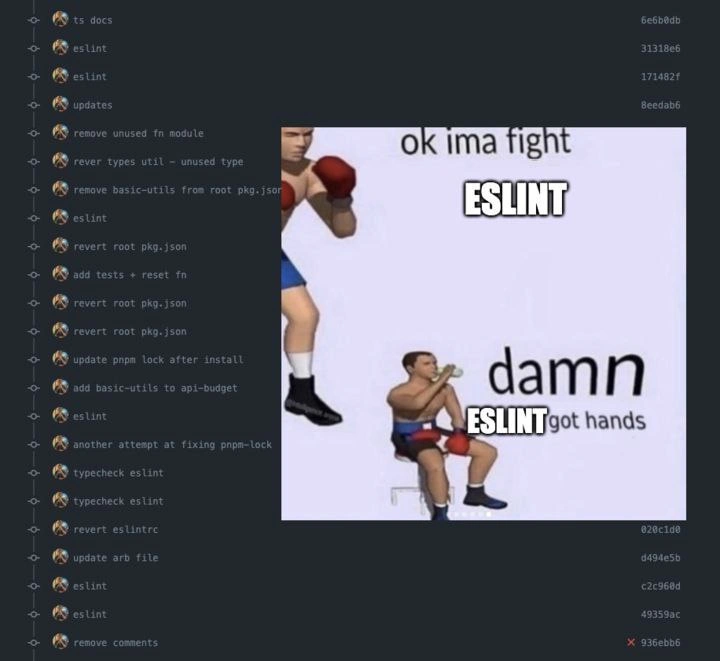
What’s happening in this meme is a tale of a developer wrestling with ESLint, which is a tool that checks code for problems and enforces style rules in JavaScript/TypeScript projects. On the left side, we see a list of commits (saved changes in a Git repository). Each line is basically a snapshot of the project at a point in time, labeled by a short hash (like 6e6b0db) and a commit message (like “remove unused fn module” or just “eslint”). This is the commit history. Normally, commit messages describe new features or important changes. But here, most of the messages are about small fixes: removing unused code, updating config files, or simply referencing ESLint. It looks chaotic because the developer had to make many tiny corrections one after the other, instead of one clean update. It’s kind of like seeing a conversation between the developer and the codebase, back-and-forth:
- Developer: “Okay, I’ll remove this unused function like the linter wants.” (commit: “remove unused fn module”)
- ESLint/Build: “Well, now something else is off – maybe a dependency is missing?”
- Developer: “Oops, better put that dependency back.” (commit: “revert root pkg.json”)
- ESLint: “Hmm, your lock file is out of date.”
- Developer: “Alright, I’ll update the lock file.” (commit: “update pnpm lock after install”)
- ESLint: “Oh, and you still have some lint errors.”
- Developer: “Fixed those too.” (commit: “eslint”)
- ESLint: “Nope, still finding issues… remove those commented-out lines!”
- Developer: “Fine, I removed the comments.” (commit: “remove comments”)
And so on. You can practically hear the sigh in commit messages like “another attempt at fixing pnpm-lock”.
On the right side of the meme, there’s a two-panel image known as the boxing meme format. In the first panel, the smaller boxer (labeled as the developer with the caption “ok ima fight ESLINT”) is bravely stepping up, thinking they can handle ESLint. In the second panel, that same boxer is beaten and sitting on the ground, while the big boxer labeled “ESLINT” stands tall. The smaller boxer says “damn ESLINT got hands”. In internet slang, saying someone “got hands” means they’re good at fighting (implying ESLint packs a punch). This visual joke perfectly matches the commit log on the left: the developer tried to “fight” the linter, but got whooped, as evidenced by all those fix and revert commits.
Let’s clarify some of the technical pieces that are driving this DeveloperHumor:
ESLint: This is a popular linting tool for JavaScript and TypeScript. Linting means analyzing code for potential errors or style violations without actually running the code. ESLint checks for things like unused variables, missing semicolons, improper indentations, use of banned functions, etc. Teams configure ESLint with specific LintingRules. For example, a rule might say “no unused variables allowed” as an error. If you have a variable or function that you never use, ESLint will complain.
Example – Unused Variable: Suppose you wrote code like this:
function calculateBudget(data) { // ...some calculations but we end up not calling this function anywhere } let unusedValue = 42; console.log("Hello World");ESLint with a rule like
no-unused-varswould highlightcalculateBudgetandunusedValuebecause they are defined but never used. In a code editor, you might see a squiggly line or a warning. In a project with strict settings, this warning might actually fail your build or test process. The developer in the meme likely had many such warnings that had to be fixed. The commit message “remove unused fn module” sounds exactly like them deleting some function or module that ESLint flagged as unused. It’s the linter saying, “Hey, you have this bit of code that isn’t being used, better remove it!” and the developer complying.Git and Commits: Git is a version control system, and a commit is like a save point or snapshot of your code along with a message describing the change. A good commit history is usually a clean, chronological story of development. But here we see commit_history_spam – a lot of noisy commits in a row. For instance, seeing “eslint” twice or thrice in a row suggests the developer was repeatedly fixing lint issues. Commits like “remove comments” indicate they went through and deleted commented-out code (some ESLint configurations disallow leaving large chunks of commented code, considering it dead weight).
Reverts: The word
revertin a commit message (like “revert root pkg.json”) often means the developer usedgit revertor otherwise manually undid a previous change. If you remove something critical in one commit and things go wrong, a quick way to fix the mistake is to revert that commit, which essentially makes a new commit that adds whatever you removed back. In the log we have at least two instances of revertingpackage.json(the file that lists project dependencies). This implies a bit of panic or trial-and-error — removing a dependency, then quickly putting it back when something broke or the linter/CI complained. It’s uncommon to see multiple revert commits in a row on the same file, so this shows how frustrating the cycle was: “Take it out! No, put it back! Actually, take it out differently… no, that still didn’t work, put it back again.” It’s practically slapstick comedy for developers.PNPM and lock file: PNPM is a package manager (like npm or Yarn) used to install libraries your project needs. It keeps a lock file (
pnpm-lock.yaml) that locks the exact versions of all those libraries. Ideally, every time you install or remove a dependency, this lock file updates to reflect the current state. In a collaborative project, if your lock file isn’t in sync with yourpackage.json, your Continuous Integration might yell at you to update it. The commit “update pnpm lock after install” is likely the dev saying “Alright, I installed the packages and here’s the updated lock file.” Then “another attempt at fixing pnpm-lock” suggests even after that, something was still off (maybe a version mismatch or a different environment produced a slightly different lock file). Lock file issues can be a headache for anyone not familiar — it’s essentially the tools arguing about consistency. Newer devs often learn the hard way that if you change dependencies, always commit the lockfile too! Otherwise, your teammates or your CI server will generate a different lock and cause noise.Typechecking: The commits labeled “typecheck eslint” hint that this project uses TypeScript. TypeScript adds compile-time type checking to JavaScript. So aside from ESLint’s style rules, the developer also had to satisfy the TypeScript compiler (ensuring function return types, variable types, etc., are correct). If the commit says “typecheck eslint”, it might mean they ran type checking and linting together or sequentially and then committed whatever fixes were needed for both. Type errors can pop up after you remove or change code — for example, removing that “unused type” as one commit says (“rever types util – unused type”) might have caused other code that did use that type to break, prompting a revert. So the dev was not only boxing with ESLint, but also sparring with the TypeScript type system at the same time. It’s a one-two punch situation: style issues and type errors coming at them simultaneously.
Developer Experience (DX): You’ll see this term DeveloperExperience_DX in the categories, which is about the overall experience developers have with their tools and workflow. A smooth DX means you have tools like ESLint set up in a friendly way (maybe your editor auto-fixes things, or a pre-commit hook prevents bad commits up front). A rough DX is what we see evidence of: the developer only discovered these problems after making commits, possibly via a failing CI build or by manually running checks late. That leads to frustration and lots of tiny commits to correct course. It’s funny in hindsight because it’s exaggerated here, but in the moment it can be pretty stressful to see error after error. Imagine trying to merge your code and each time you think you’re done, an automated test or linter says “Nope, build failed, fix this now.” That’s why the meme struck a chord with many — it’s a humorful reflection of a bad day with our beloved (and sometimes infuriating) tools.
In summary, the meme uses a boxing match to illustrate a linting battle. The commit history is chaotic because the developer was essentially debugging and cleaning up their code style in real time, committing each fix. Every commit was like a new round in the ring. And ESLint, the tool supposed to help keep code clean, is portrayed as a heavyweight boxer knocking the developer down repeatedly. It’s both a cautionary tale (about how not to let tooling dominate your workflow) and a shared joke among programmers: we’ve all been that developer at some point, muttering under our breath “damn, ESLint hits hard” when our code doesn’t pass the quality gate on the first (or fifth) try.
Level 3: Rumble in the Repo
In this meme, a developer’s Git commit history has basically turned into a round-by-round boxing scorecard, and ESLint is the undisputed heavyweight champion. The left side shows a dark-mode commit log riddled with messages like “eslint”, “remove unused fn module”, “revert root pkg.json”, and “another attempt at fixing pnpm-lock” — evidence of a brutal back-and-forth between the coder and their code linter. On the right side, a two-panel boxing image makes it explicit: a tall boxer labeled ESLINT stands over a smaller battered boxer (the hapless developer). The smaller fighter starts with brash confidence (“ok ima fight ESLINT”), only to end up dazed on the floor mumbling “damn ESLINT got hands”. In developer terms, the linter is winning every single round of this fight.
To seasoned developers, this scenario is painfully familiar and darkly funny. It satirizes the days when you introduce a new strict lint rule or update your project’s coding standards, and suddenly your simple feature branch turns into a slugfest of fix-commit, revert-commit, fix-again. CodeQuality tools like ESLint are meant to help catch bugs and enforce consistency, but here we see the other side of that coin: a relentless enforcer that can dominate your commit history and morale. Each commit in the screenshot is essentially the developer tapping out or adjusting their stance after getting knocked down by yet another lint error or build failure. The commit history isn’t telling a story of new features, it’s a blow-by-blow account of a developer locking horns with their tooling.
Let’s break down a few jabs in this fight: The commit “remove unused fn module” hints that ESLint (likely via the no-unused-vars or no-unused-components rule) complained about a function or module that wasn’t being used anywhere. The developer obligingly deleted that code to make the linter happy. But then we see “revert root pkg.json” (multiple times!) – this suggests the dev tried to remove or tweak a dependency (perhaps one flagged as unused or obsolete) from the root package.json, only to discover that change caused something else to break. Maybe tests failed or the app wouldn’t start, so they had to undo the package.json edit with a git revert. The presence of pnpm (a Node.js package manager) in commits like “update pnpm lock after install” and “another attempt at fixing pnpm-lock” shows a classic struggle: every time they change dependencies or run install, the lock file (pnpm-lock.yaml) changes. When your CI/CD pipeline insists that the lockfile be up-to-date (to ensure reproducible builds), forgetting to commit it will fail your build. It seems our embattled dev tried at least twice to get that lockfile right — a clear sign of ToolingFrustration. And of course, sprinkled liberally throughout the log are commits simply titled “eslint”, likely auto-fixes or small manual tweaks to satisfy the linter’s ever-growing list of nitpicks (semi-colon here, extra space there, unused variable gone, console.log removed, you name it).
What makes this DeveloperHumor is how exaggerated yet relatable the situation is. We’ve got a TypeScript project (note the initial commit “ts-docs” and references to typechecking) where presumably CI runs a suite of quality checks: ESLint, type checks, maybe tests. Instead of sailing through, the poor developer hit one snag after another. Fixing the linting issues in one commit triggered the need for another commit (perhaps the fix wasn’t quite right or revealed a new warning). Then they tried to optimize or clean up by removing supposedly unused code or dependencies, which backfired and had to be reverted. They even fiddled with the ESLint config itself – the commit “revert eslintrc” implies they briefly changed their .eslintrc (perhaps to turn off a troublesome rule out of desperation) but then backed out, either because it didn’t help or team standards didn’t allow it. The result? A cluttered commit history that’s half bugfixes and half undoing those bugfixes. In boxing terms, the dev thought they landed a punch by “fixing” something, but ESLint counter-punched immediately with a new error or unintended consequence.
This resonates with senior devs because it highlights a gap between ideal process and messy reality. Ideally, you run your linters and tests locally, fix everything in one or two tidy commits, and maybe squash those before merging so the main branch history stays clean. In reality, especially under time pressure, you might push a commit only for the continuous integration to fail with a red build. You scramble to patch it with a quick commit (“eslint: fix trailing comma”), only to see another lint rule or a unit test fail. You fix that, now a different rule or the previously ignored lockfile trips you up. It becomes an endless bugfix commit loop. The meme nails this with the caption “wins every single commit round” – each round being another commit where ESLint comes out on top, and the developer is forced to play defense. Everyone who’s integrated a new LintingRules setup into a big JavaScript/TypeScript repo, or fought with a strict continuous integration policy, has felt this pain. It’s a shared war story: “Remember that one Friday where 90% of my commits were just making the linter shut up?” Yup, we do, and it’s both tragic and comedic in hindsight.
On a deeper level, this speaks to DeveloperExperience_DX and the fine line between helpful automation and demoralizing friction. ESLint and similar tools (Prettier, stylelint, type checkers) are fantastic for maintaining code health, but when misconfigured or introduced late in a project, they can overwhelm you with hundreds of errors. The DeveloperFrustration tag is well-earned: one minute you’re adding a cool feature, and the next you’re in linting battle mode, where the only thing you’re “accomplishing” is appeasing a tool. The meme’s humor comes from exaggeration — here ESLint is personified as a buff boxer with serious knockout power, and the developer is throwing commits like weak punches that barely land. There’s irony too: the tool that’s supposed to aid the developer is instead depicted as their adversary. It’s as if the linters and build tools gained sentience and decided to haze the dev: “Oh, you fixed that unused variable? Cute. Now I’m gonna hit you with a missing dependency in package.json. Didn’t see that coming, did ya?”
From a senior perspective, there’s also a hint of “we’ve all been the junior getting schooled by a linter”. It’s a rite of passage to accidentally spam the commit history or break the build in new and interesting ways while learning to wrangle all the tools in a modern dev environment. Many teams adopt strategies to avoid this exact scenario: like running eslint --fix locally to auto-fix as much as possible, using pre-commit hooks to catch lint errors before a commit is made (so those faulty commits never even hit the repo), and breaking large refactors into smaller reviews. But when those practices fail or aren’t in place, you get the wild west commit log we see in the meme. And trust me, any lead engineer who reviews that PR will facepalm at the noisy history — then chuckle sympathetically, because they too have wrestled with an adversarial CI pipeline. In summary, the meme lands a TKO because it captures an extreme yet truthy scenario: the day the repos’ quality gate went full Mike Tyson on a developer. It’s an absurd boxing match where the “referee” (the linter) ends up dominating the ring, and we’re left laughing at how something as simple as code style rules can turn into an epic showdown.
Description
A developer-themed meme that combines a screenshot of a Git commit history with a two-panel boxing meme. On the left, a long and chaotic Git log shows numerous commits with messages like 'eslint', 'revert root pkg.json', 'another attempt at fixing pnpm-lock', and 'typecheck eslint', illustrating a protracted struggle. On the right, the meme depicts the developer's journey. The top panel shows a boxer ready to fight, captioned 'ok ima fight ESLINT', symbolizing a developer's initial confidence. The bottom panel shows the same boxer, now exhausted and defeated, sitting down for a water break, with the caption 'damn ESLINT got hands'. The meme humorously and relatably captures the often maddening experience of wrestling with ESLint configuration, where a seemingly simple task can devolve into a long, frustrating battle documented by a messy commit history
Comments
15Comment deleted
My ESLint config file is now longer than my actual application code. I call it 'config-driven development'
Our monorepo’s Git log finally confirmed the org chart: we write features, ESLint reverts them, and CI refuses the merge until we concede on semicolons - guess the linter’s our real tech lead
After 15 years in the industry, you realize the real boxing match isn't with ESLint - it's with the junior who keeps adding conflicting Prettier rules to the same codebase, creating an infinite loop of pre-commit hook failures that somehow only manifest in CI/CD
When your Git history looks like a boxing match replay, you know ESLint has been teaching you the true meaning of 'strict mode' - not in TypeScript, but in pain tolerance. That moment when you realize you've committed 'revert root pkg.json' three times in a row is when you understand that the real technical debt isn't the code, it's your relationship with your linter
Turning on type-aware ESLint rules is the only change that reliably converts a five-minute fix into a rollback saga of reverts and pnpm-lock churn bigger than the feature
ESLint --fix: the eternal cycle where every lint error fixed births three more, until your config begs for mercy or your parser explodes
Nothing throws hands like ESLint: one 'remove unused fn' becomes 15 commits of style penance, two root package.json reverts, and a pnpm-lock exorcism
don't talk until you've wrestled with moodle-codesniffer Comment deleted
dafuq is this long ahh screenshot Comment deleted
full-site screenshot from firefox Comment deleted
Ctrl+Shift+S, very handy Comment deleted
it's illegible, you should send it as uncompressed/file Comment deleted
it's barely legible on purpose Comment deleted
Meeeeeeoooooow Comment deleted
nya! Comment deleted