ESLint and the Developer's Plea for Free Speech
Why is this CodeQuality meme funny?
Level 1: Coloring Outside the Lines
Think of it like a coloring book. There are lines on the page that show you where to color, kind of like rules that help make the picture look nice. Using a tool like ESLint is like having those helpful lines or a teacher guiding you: “Stay within these boundaries, use these colors here.” Now, imagine a kid who’s tired of being told to color properly. One day, they scribble all over the page however they want, ignoring all the lines, and then proudly say, “Look, I can draw however I want! I have freedom!” It’s a bit silly, right? They’re acting like breaking a small rule in a coloring book is the same as some big important freedom. That’s exactly why this meme is funny. The developer in the picture is basically doing the same thing: the coding tool (like the coloring book lines) was telling them how to write their code neatly, but they got annoyed and turned that tool off for one line. They’re jokingly calling that act “free speech,” as if they’ve stood up for their personal rights. In simple terms, it’s funny because it’s an overreaction to a small victory – like a kid laughing about getting away with something minor. We all understand the feeling of wanting to do things our own way, so seeing a programmer compare writing a messy line of code to a big freedom-of-speech moment just makes us smile. It’s like celebrating coloring outside the lines as if you’ve written the Constitution – a playful exaggeration that anyone can giggle at.
Level 2: Linting Laws and Loopholes
Let’s break down the key pieces of this meme and why they matter to a coder, especially if you’re newer to the world of front-end development. First up: ESLint. ESLint is a popular linter for JavaScript, especially common in frontend projects (think React, Vue, or Node.js backends too). A linter is basically a tool that checks your source code for potential errors, bad practices, or style deviations without actually running the code – this is known as static analysis. The term “lint” originally comes from a 1970s tool that looked for problematic code patterns in C; the name stuck, so now we say we “lint” our code like we “spell-check” an essay. Linters act like a meticulous proofreader or a strict teacher for your code: they underline things that might be wrong or just don’t follow the team’s style guide. For example, ESLint can catch real bugs (like using a variable that was never defined) and also enforce style rules (like “always use single quotes for strings” or “no trailing spaces at end of line”). These rules are configurable, and teams often have a defined set of them to ensure CodeQuality and consistency across the project.
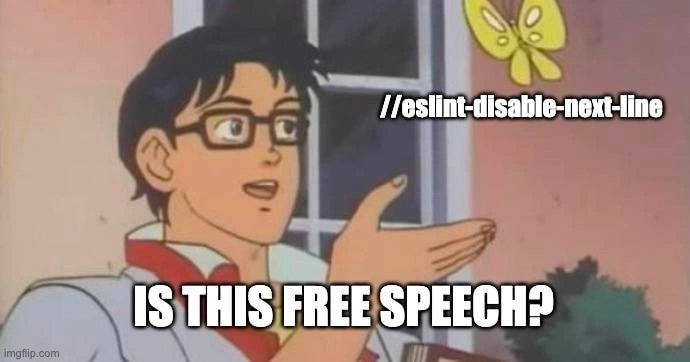
Now, sometimes you’ll see special comments in code like /* eslint-disable */ or the more targeted // eslint-disable-next-line. These are linter directives – basically secret messages to ESLint. When a JavaScript file has // eslint-disable-next-line, it’s telling ESLint: “For the very next line of code, please ignore your rules.” If a particular rule is specified (for instance, // eslint-disable-next-line no-console), it means “ignore the rule about not using console on the next line.” In the meme’s image, the butterfly has the text "//eslint-disable-next-line" right on it, indicating this exact comment. That’s the loophole in the “law” – a way to opt-out of the normal rules. It’s like telling the code police, “Skip me, I’m special!” just this once. The developer in the picture is pointing at that comment and marveling as if it’s something profound.
Why would a developer do this? There are a few common reasons:
- Legitimate exceptions: Sometimes the linter flags something that isn’t actually wrong. Maybe you’re using a global variable provided by the environment (like a browser API or a testing framework) that ESLint doesn’t recognize – it might throw an “‘x’ is not defined” error. If you can’t easily configure ESLint to know about it, a quick disable comment might be used to skip that line.
- Rule too strict or not applicable: Let’s say the team ESLint config says “no console.log allowed” (
no-consolerule) because logs clutter production code. But you absolutely need aconsole.logfor debugging right now or for some reason in this one spot. You might justify disabling that rule on this line, thinking “just this one time.” - Quick and dirty fix: You’re racing against a deadline, and the linter is complaining about something minor (like a variable name or unused import). Rather than spending time to refactor properly, you slap
// eslint-disable-next-lineabove it to make the error go away and get the build to pass. It’s the coding equivalent of sweeping dust under the rug. - Frustration or learning curve: New developers (and let’s be honest, even experienced ones on a bad day) might not understand why a rule exists or how to fix an error it flags. If you’re under pressure, it might seem easier to silence the tool than to figure out the “right” solution. “Ugh, it keeps complaining — fine, I’ll just disable that check here.”
When you’re early in your career, encountering a linter can be surprising. You write code that works, but your editor or build throws a bunch of yellow warnings or red errors about things that don’t look like errors at all. It might say “Expected ‘===’ and instead saw ‘==’” or “Missing semicolon,” or more confusing stuff like “React is defined but never used.” It can feel pedantic: “Why is this such a big deal? The code runs!” This is where the temptation to use the override comment grows. It’s similar to when you first discover the ignore button on a spell-checker – “I don’t care if it’s not in the dictionary, just leave me alone, spell-check!” For ESLint, that ignore button is literally a comment in your code. As a junior dev, you might drop one of these comments in and suddenly all those squiggly underlines vanish. It feels like magic – you found the off-switch for all those nitpicks. That’s the moment captured in this meme. The developer is basically saying, “I turned off the automatic rule-enforcer... am I not basically championing free expression now?” with a facetious tone.
The “Is this a pigeon?” image is a famous meme template from an early 90s anime. Meme enthusiasts and developers alike have repurposed it countless times. In the original scene, the character (an overly earnest guy named Meme History Trivia Bonus! Yuuta from The Brave Fighter of Sun Fighbird) points to a butterfly and sincerely asks “Is this a pigeon?” because he’s hilariously mistaken. Online, people use this format to joke about someone misidentifying or misunderstanding something. Here, the dev is misidentifying a humble ESLint disable comment as “free speech.” It’s a goofy comparison – equating a coding tool workaround to a fundamental human right. Frontend devs find this extra funny because working with JavaScript and its ecosystem often means juggling lots of build tools and linters. They know the feeling of shouting “Let me code how I want!” at an inanimate tool. The pastel anime frame and bold meme text just amplify the silliness. It’s a bit of FrontendHumor that also hints at a real tension: we want our code to be clean and high-quality (that’s why lint rules exist), but we also sometimes feel constrained by all those rules, especially when we’re just trying to get something to work.
One more layer here is how this relates to tooling culture. Modern development has a tool or library for everything – and usually some config files to determine how those tools behave. ESLint’s config can be very strict (making even minor stylistic issues count as errors) or more relaxed. Teams often debate which rules to enable. A new dev might find a codebase where “no ANYTHING” seems allowed: no var, no sloppy equality, no unused vars, no console logs, no debugger statements, etc., enforced by CI. It can feel like a lot of “don’ts.” In that context, learning that you can locally turn off a rule feels like finding a secret trapdoor. The free speech metaphor comically dramatizes that relief. Of course, in reality, disabling a linter rule is not without consequences – it should be done sparingly. In fact, many teams have a rule against too many eslint-disable comments, or they at least ask for a comment explaining why you disabled it. The meme isn’t advocating to always rebel, but it captures the emotion of that one time you do it. It’s a mix of “hehe, take that, rules!” and “I probably shouldn’t be doing this…”. In summary, at this level we understand the meme is about a linter bypass (the eslint_disable_comment) being humorously compared to a free speech metaphor. It’s a little tale of static analysis rebellion that every coder can relate to once they’ve dealt with strict linting laws and discovered the loopholes.
// Imagine ESLint has a rule against using console.log (no-console).
console.log("This line would normally trigger a lint error.");
// eslint-disable-next-line no-console
console.log("But I want to log anyway, freedom to print!"); // No lint error now 😇
(Above, we see how a developer might use the // eslint-disable-next-line comment in code. The first console.log would normally be flagged by ESLint’s no-console rule. By placing the disable comment before the second one, the linter is instructed to ignore that rule for the next line, allowing the “forbidden” code to pass. It’s literally a hall-pass for one line of code.)
Level 3: Linters vs Liberty
At the heart of this meme is a battle between code quality tooling and developer autonomy, dramatized in classic anime form. Any seasoned front-end engineer recognizes // eslint-disable-next-line as the nuclear option in a JavaScript file – a special ESLint comment that tells the linter, “Back off, don’t judge this next line.” In the image, our bespectacled developer character is pointing at that very comment (depicted as a butterfly) and asking, “Is this free speech?” This mashup is hilarious to experienced devs because it exaggerates a mundane coding workaround into a grand act of defiance. The meme playfully frames a programmer’s decision to bypass linting rules as if it were a heroic stand for free expression.
Why is this combo so funny? It’s poking fun at the feeling many devs share when wrestling with strict static analysis tools: sometimes disabling a rule can feel liberating. We’ve all been there – the linter (our automated code critic) keeps complaining about some minor stylistic infraction or an edge case it doesn’t understand. After the tenth red squiggly line in your editor or a failed build due to a petty rule, the temptation grows: slap an // eslint-disable-next-line on that code and move on. In that moment, it feels like sticking it to “The Man” (or rather, the machine). It’s the coder’s version of civil disobedience, a tiny rebellion in the commit history. By equating this to free speech, the meme satirizes how developers sometimes inflate the importance of overriding the rules – as if our static analysis tool were an oppressive regime and a simple comment is the Declaration of Independence for our code.
There’s an industry inside-joke here about CodeQuality vs. creativity. ESLint and similar linters exist to enforce consistency and catch bugs early. They’re part of our tooling arsenal in modern front-end development, often running in CI pipelines or as pre-commit hooks to prevent sloppy code. Seasoned devs know these tools are invaluable for maintaining large codebases – they’re the guardians against dangerous patterns and the guarantors that team code style guidelines are followed. But they also know the flip side: overly rigid rules can become a nuisance. There’s that unwritten developer trope that “having too many lint rules feels like having your IDE constantly nagging you – a strict schoolteacher watching over your shoulder.” The meme captures the cathartic release of telling that nagging tool, “Quiet, I’ll do what I want with this line of code!” – and doing so with a simple //eslint-disable comment, which feels almost absurdly easy as a form of protest.
In real-world scenarios, this usually happens when best practices collide with practical deadlines. Imagine a Friday 5 PM deploy: you’ve got a hotfix for production, but ESLint blocks your commit because you used console.log or a dangling comma somewhere. Rather than refactor properly or hunt for the config setting, you take the path of least resistance: insert a // eslint-disable-next-line and suddenly the CI linter is appeased. It’s a guilty pleasure among developers; you know you’re adding a bit of technical debt (and perhaps a code smell), but it unblocks you right now. In that instant you might jokingly think, “Ha! I can finally write code freely – no linter telling me what to do. Freedom at last!” Of course, any senior engineer will smirk at this because we know it’s a Pyrrhic victory. Sure, you’ve silenced the tool, but you might also be silencing a legitimate warning. It’s like taking the batteries out of a smoke alarm – yes, the annoying beeping stops, but the fire might still be brewing.
The shared experience this meme taps into is the mix of relief and mischievous glee when bypassing an automated rule, coupled with the knowledge that it’s slightly naughty. There’s an almost universal developer memory of the first time they discovered they could add // eslint-disable and make the red error lines disappear. It felt like discovering a cheat code in a video game. Senior devs laugh because they’ve gone through the fallout of such cheat codes: code reviews calling out “Who disabled ESLint here and why?”, or coming back to your own code months later thinking, “Hmm, I disabled the linter for this… what monstrous hack was I trying to slip past?” In teams, indiscriminate use of eslint-disable comments can become a serious anti-pattern. It often signals that the team’s rules might be too strict or someone didn’t want to properly handle an edge case. Over time, if everyone starts doing it, you end up with lint-free zones in the code where anything goes – exactly what the linter was supposed to prevent. It’s the equivalent of declaring parts of your codebase a lawless wasteland just to avoid minor inconveniences.
So, the humor also lies in self-awareness. Devs laugh at this meme because they recognize the slightly over-dramatic mindset. The caption “IS THIS FREE SPEECH?” is written in bold, capital letters, underscoring the melodrama. It’s mocking that moment when a programmer justifies a quick hack with grandiose principles. In reality, disabling a lint warning is not exactly writing a revolutionary manifesto, but in that punchy anime frame, it’s depicted as one. The classic “Is this a pigeon?” meme format amplifies the joke: that character in the anime is known for misidentifying a butterfly as a pigeon – here the dev is misidentifying a comment for a courageous act of free speech. Every experienced engineer who has dealt with linters and code reviews immediately gets the reference and probably chuckles, maybe with a touch of “hehe, guilty as charged.” This is DeveloperHumor at its best: taking a mundane coding moment and elevating it to something absurdly epic, all while reminding us of the ongoing tension between strict code quality enforcement and the developer’s desire for a little breathing room to be creative (or just get stuff done).
Description
This meme uses the popular 'Is this a pigeon?' format, which features a screenshot from the anime series 'The Brave Fighter of Sun Fighbird.' In the image, the main character points at a butterfly, mistaking it for something else. Here, the butterfly is labeled with the code comment '//eslint-disable-next-line'. The caption below, delivered by the character, asks, 'IS THIS FREE SPEECH?'. The joke is a satirical commentary on developer attitudes towards code quality tools like ESLint. ESLint enforces coding standards and helps prevent bugs, but sometimes developers disagree with a rule or need a quick workaround. Using '//eslint-disable-next-line' allows them to bypass the linter's judgment on a specific line of code. For experienced engineers, the humor lies in the dramatic, misplaced analogy of this action to a fundamental human right like free speech, mocking the occasional developer tendency to view coding standards as an infringement on their creative freedom

Comments
10Comment deleted
The line after `//eslint-disable-next-line` is the code's equivalent of 'what happens in Vegas, stays in Vegas'
Claiming // eslint-disable-next-line is ‘free speech’ is like calling unchecked exceptions ‘libertarian architecture’ - you’re not defending rights, you’re drafting tomorrow’s post-mortem
After 15 years in the industry, I've learned that '//eslint-disable-next-line' is just technical debt's way of filing for diplomatic immunity - it's not free speech, it's a hostage negotiation with your future self who will inevitably wonder why production is throwing errors that could have been caught by a simple array bounds check
Every eslint-disable-next-line is a tiny ADR that says 'I considered the rule and decided I'm special.'
Ah yes, the classic developer's interpretation of 'freedom' - the liberty to silence the linter that's trying to save you from your own technical debt. It's like calling a fire alarm 'oppressive' because it interrupts your arson. Sure, `eslint-disable-next-line` exists for legitimate edge cases, but we all know it's mostly used to ship that PR before standup while promising yourself you'll 'come back and fix it properly later' - a lie we've been telling ourselves since the first `// TODO` comment was written in 1972
// eslint-disable-next-line is developer free speech: constitutionally protected, operationally expensive, and always paired with a TODO that outlives the feature flag
// eslint-disable-next-line feels like free speech; Husky pre-commit, Code Owners, and GitHub Actions remind you that in this repo rights end at the pipeline
// eslint-disable-next-line: the butterfly flap that unleashes tech debt hurricanes on your legacy monolith
4:20 MSK moment Comment deleted
5:14 Belgorod) Comment deleted