The Illusion of Client-Side Security
Why is this Security meme funny?
Level 1: Gate with No Fence
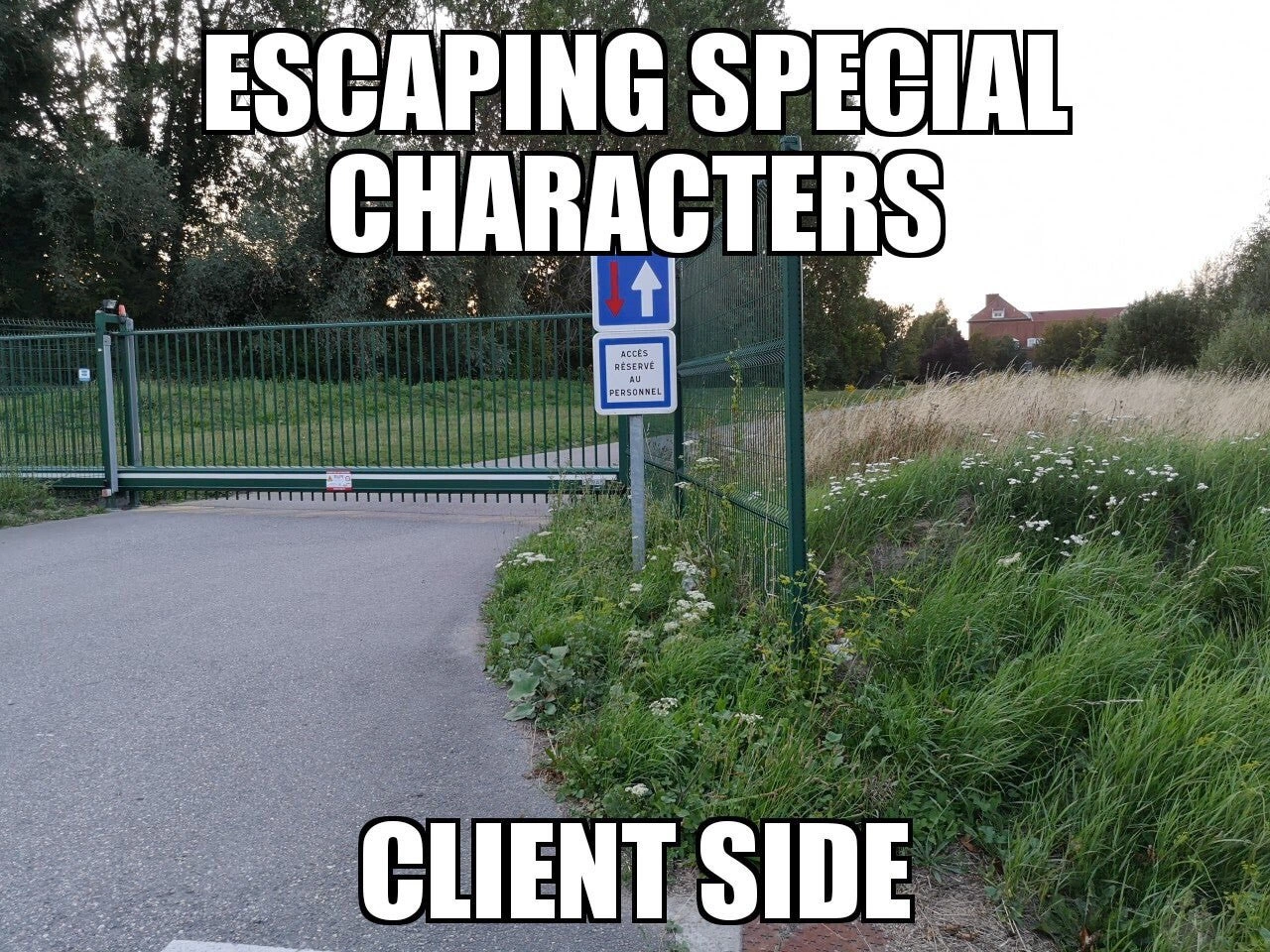
Imagine you put a big, shiny gate across a path to keep people out. It has a sign that says “Authorized Personnel Only” and it looks super official and secure. But right beside the gate, the fence just… stops. The field next to it is wide open. What do you think a sneaky person is going to do? They’ll simply walk off the road, go around the end of the fence, and get in without ever touching the gate. In other words, the gate by itself doesn’t actually protect anything because there’s nothing on the side to support it. It’s all for show. You’d probably laugh and say, “What was the point of that gate?!”
This meme is joking about a computer security mistake that’s just like that gate. In websites, we often have rules to keep out bad stuff (for example, to stop bad guys from putting dangerous code into a text box). Doing it only on the “client side” means the rule is only checked in the user’s web browser – like the gate on the road. It might pop up a warning on your screen if you type something bad. But if the bad guy doesn’t use the normal screen at all, and instead sneaks around by talking to the server in a different way (not using the gate on the road), then that rule doesn’t do anything. It’s like our intruder ignoring the gate and walking through the grass. The website gave the impression of safety (because the gate was there in the page), but in reality the back door was wide open.
So the funny picture of the gate with no fence is saying: just because you put a lock or rule in the obvious place, don’t assume you’re safe if you left a big opening somewhere else. In everyday terms, it’s like locking your front door but leaving a huge window next to it open — the burglar will just climb in through the window. It makes us chuckle because it’s such a silly oversight. In the context of web apps, the lesson is simple enough for anyone: a security measure that only works in one place (and can be easily avoided) is basically no security at all. You have to lock all the doors to keep the bad guys out!
Level 2: Never Trust the Client
If you’re a junior developer or just starting out in web development, this meme is pointing out a fundamental lesson in WebSecurity: never trust the client. In simpler terms, that means you should never assume that data coming from a user’s browser is safe or correct, even if you put some checks in the browser. Let’s break down the scenario:
Client-side vs Server-side: The client-side is code that runs on the user’s device – typically the JavaScript in their browser (the front-end of the website). The server-side is code running on the web server (the backend) which actually receives requests and sends responses (like your database operations, business logic, etc.). The client is like the public entrance to a building, and the server is the building’s interior where the vault is. You control the server, but the client is out in the wild.
Escaping special characters: This refers to taking characters that could be dangerous in HTML or JavaScript (such as
<,>,"or') and replacing them with safe representations. For example,<becomes<in HTML. By doing so, if someone tries to input a snippet of code like<script>alert('hi')</script>, escaping would turn it into harmless text<script>alert('hi')</script>that displays as text instead of running as code. This process is a form of InputValidation or output encoding intended to prevent attacks like XSS (Cross-Site Scripting).XSS (Cross-Site Scripting): This is a type of vulnerability/attack where an attacker manages to inject malicious scripts into a web page such that other users load and run that script. In an XSS attack, the bad guy typically finds a way to include
<script>tags or other HTML in content that the website will display. If the site doesn’t clean that input properly, it will deliver the attacker’s script to unsuspecting users. For instance, an attacker might put a piece of JavaScript into a comment or profile field; if the app is vulnerable, whenever someone views that comment, the evil script runs in their browser (potentially stealing their data or performing actions on their behalf). It’s called “cross-site” scripting because it often involves injecting code into a site that will run in someone else’s session.
Now, what does the meme’s text mean by “Escaping special characters – Client side”? It’s warning about a scenario where developers only perform this escaping in the browser (client side), not on the server. For example, imagine you have a form where users enter their name or a message. A developer might write some JavaScript in the webpage that, as soon as you hit submit, automatically strips out or encodes any < or > characters so that you can’t even send a <script> tag to the server. This might make it seem like the app is protected against XSS, because during normal use via the webpage, you can’t input a bad script. The gate in the picture symbolizes that client-side check blocking the obvious path.
The critical oversight, however, is forgetting that users (especially malicious users) are not confined to using your webpage in the intended way. They can modify the client or use other tools. “Never trust the client” means a user’s browser should be treated as already compromised or under the user’s control (because it is!). If you only validate input in the browser, a determined attacker can just disable that validation or avoid it. For instance:
- They could turn off JavaScript in their browser, bypassing any JS-based filters.
- They could use the browser’s developer tools to remove your validation code or change the allowed input after the page loads.
- Easiest of all, they can use an external tool to send requests. Tools like cURL (a command-line HTTP client), Postman, or custom scripts let a user send whatever data they want directly to your server’s API, ignoring the entire front-end. This is what we call an attack_vector_bypass – finding an alternate route that dodges the protective measures in the interface.
Consider a concrete example: A web form says “no special characters allowed” because the dev included an HTML attribute or some JS that checks for < and > and pops up “please remove special characters” if you try. That’s nice for a well-meaning user who accidentally types something wrong – it guides them to fix it. But an attacker will not use that form at all; they’ll send a handcrafted message right to the server (like using a curl command with a JSON payload containing the forbidden <script>). If the server isn’t also checking and sanitizing input, it will accept those forbidden characters since it doesn’t know the client blocked them (the server has no idea what happened in the user’s browser). Frontend_only_protection = no real protection. The net effect is the attacker sneaks their malicious <script> into the database or page, and your site becomes vulnerable.
The gate analogy makes this easy to visualize. The “gate” is the client-side escape/validation: it blocks the road that regular users travel (the normal form submission path). But the fence ends right next to it, meaning the server’s side has no guard – an attacker can literally step off the road and go around that gate. In cybersecurity terms, the server should have its own gate (server-side validation) and ideally the fence should be continuous (multiple layers of defense). Relying on just the UI for security is often jokingly referred to as “security through UI” (not an official term, but expressive) – similar to the idea of “security through obscurity,” it’s not a robust strategy.
To drive home the point: Always validate and sanitize on the server side. It might feel redundant (you already did it in JavaScript, why do it again on the server?). But that redundancy is crucial. Client-side checks are about convenience and user experience; server-side checks are about actual security. Modern frameworks and libraries (both front-end and back-end) do offer help. For example, React and Angular automatically escape values inserted into the DOM, and backend frameworks often have utility functions or middleware to filter input or encode output. However, these tools must be used correctly, and they don’t absolve you from doing proper checks in the backend. If you explicitly disable these protections (like using dangerouslySetInnerHTML in React to inject raw HTML, or turning off sanitization in a template), you can create exactly the kind of hole this meme is talking about. SecurityTradeoffs come into play when developers, for the sake of convenience or performance, decide to skip the extra validation step on the server. It might save a bit of time in the short run, but it’s never worth the risk of a potential hack. Seasoned devs will tell you: the minor effort to implement proper server-side validation is nothing compared to the headache of cleaning up after an XSS attack or data breach.
In summary, the meme’s message in practical terms for a junior dev is: Don’t be fooled by the “gate” you put in the browser. The real test of security is on the backend. If you ensure that your server is also checking for those special characters or dangerous patterns, you’ll close the gap in the fence. Think of client-side escaping as a helpful sign that guides most people, but the server must be the actual gatekeeper that no one can walk around. This way, you’ll build web applications that are much harder for attackers to exploit.
Level 3: Client-Side Charade
At first glance, the meme’s imagery is comically absurd: a sturdy green gate stretches across a road with an authoritative “ACCÈS RÉSERVÉ PERSONNEL” sign (restricted access), but just a few steps to the right the fence simply ends, leaving a wide-open gap in the tall grass. It’s a perfect visual metaphor for a classic WebSecurity blunder. In software terms, that imposing gate represents escaping special characters on the client side – and the gap in the fence is the entirely unprotected server beyond the browser. The meme’s bold caption “ESCAPING SPECIAL CHARACTERS – CLIENT SIDE” calls out this scenario: the development team proudly put up a visible barrier in the user interface (the gate), but an attacker can just walk around it by sending requests directly to the server. This is security theater at its finest – a Client-Side Charade where the app looks secure on the surface while the real defense perimeter is wide open.
From a senior developer’s perspective, the humor (and horror) comes from how familiar this situation is. It satirizes the all-too-common anti-pattern of relying solely on client_side_escaping to prevent attacks like XSS (Cross-Site Scripting). In a proper XSS mitigation, any user input that could end up in HTML must be sanitized or encoded on the server (or at least rigorously validated) before being used. But here, the developers only put the filter in the browser. It’s like they installed a heavy-duty lock on a screen door in an open field – it might stop a naïve script kiddie who only uses the UI as intended, but it won’t slow down a determined attacker for even a second. The attacker can simply forge a request that bypasses the UI entirely. No attacker ever said, “Oh darn, this input field won’t let me type a <script> tag, guess I’ll give up.” They’ll go around the client-side checks without breaking a sweat.
Why is this an open_gate_vulnerability? In technical terms, the application is performing InputValidation and character escaping in the wrong place. Perhaps the front-end uses some JavaScript or a framework utility (maybe a react_escape_util or similar) to scrub out < and > characters or other dangerous input before sending data. That’s the gate on the road. However, the server – which is the final authority receiving form submissions or API calls – isn’t verifying or escaping those inputs on its side. This creates a critical trust boundary mistake: the server trusts data from the client as if it were already safe. A malicious user can exploit this by crafting a request that never passes through that client code. For example, they might open the browser’s DevTools and remove the front-end validation script, or more simply use a tool like cURL or Postman to POST malicious data directly. This is hinted by the tag curl_payload_injection – an attacker can literally curl the server endpoint with a payload containing <script>alert('XSS');</script> or some injectable SQL/HTML, and the server (with its guard down) will obligingly accept it. In the picture, the path over the grass is that alternative attack vector, a route the developers didn’t block. This is exactly how an XSS attack can slip through: the server receives <script> in a user input field because only the browser was escaping it, and since the browser’s escape routine was bypassed, the dangerous <script> goes straight into the database or the web page. The next time some innocent user or admin loads that data, boom – the evil script executes in their browser. The supposedly “secure” app just turned into an attack_vector_bypass playground.
The meme lands especially well with experienced developers and security engineers because it encapsulates a LaxSecurityAttitudes scenario we’ve all seen (or regrettably implemented) at some point. It’s the illusory comfort of front-end validation: the form field says “no special characters allowed” and maybe even shows a friendly error message if you type a bad character, so the dev breathes a sigh of relief thinking XSS is handled. But that’s like a guard at the main gate who doesn’t realize the back fence fell over ages ago. The seasoned folks know that feeling of facepalming in code review when they spot something like:
// Example of a naive client-side escape approach (ineffective alone)
function sanitizeAndSend() {
let userComment = document.getElementById('comment').value;
// "Escape" angle brackets on the client-side
userComment = userComment.replace(/</g, "<").replace(/>/g, ">");
sendToServer(userComment); // Sends data to server (server does no checks!)
}
In a dev’s mind, this might have been “escaping special characters ✅ done!” All looks fine in the UI: if you type <script>bad()</script> into the comment box, the JS immediately replaces < with <, so you see harmless text “<script>bad()</script>” in the preview. The gate closed, pat on the back! But an attacker can simply call the same sendToServer endpoint without that sanitation step. For instance, using a raw HTTP request:
curl -X POST "https://example.com/api/comments" \
-H "Content-Type: application/json" \
-d '{"text":"<script>bad()</script>"}'
This cURL command goes around the gate – it sends a <script> tag straight to the server, bypassing the browser’s replace() function entirely. If the server just stores that comment or returns it unescaped, an XSS is born. The attacker essentially walked through the grass around the fence. Frontend_only_protection is no protection at all in this case.
This brings up the core issue: the security_through_ui fallacy. That term (a play on “security through obscurity”) means thinking your app is safe just because the user interface tries to enforce rules or hide the raw functionality. It’s a false sense of security. Real security has to be enforced at the proper layer – and that layer is the backend/server (and often also in how data is output). The front-end’s role in validation should be viewed as a convenience and usability feature (preventing accidental mistakes, giving quick feedback), not as a true security barrier. Seasoned devs know the mantra by heart: “Never trust the client.” The client (browser) is an environment you, the developer, do not control – attackers can modify the JavaScript, fiddle with requests, or write their own clients. It’s like assuming a determined burglar will politely use the front door you’ve locked, rather than the open side window. Experienced engineers have learned (often the hard way) that any critical checks must happen on the server side, where you do control the rules and can be sure they are applied consistently to every request.
What makes this meme funny is that the mistake is so blatant once you see it – like that lonely gate, it’s practically shouting “look how pointless I am!” It highlights the gap between best practices and what sometimes happens in real projects under deadline pressure or with less experienced teams. Everyone in the room chuckles because either they remember making this mistake as a newbie, or they’ve been the one urgently patching a production system at 2 AM because someone else left the gate open. (Yes, discovering a live XSS exploit due to a missed server check is the kind of late-night “fun” many of us would prefer to forget.) This meme is a gentle industry self-own: we laugh, a bit embarrassed, because we collectively know better now. It’s a humorous reminder that WebSecurity must be taken seriously beyond just the glossy front-end. In the end, the image of a gate guarding nothing in an open field perfectly captures the essence of a security tradeoff gone wrong – lots of effort on the wrong layer and zero effect on the actual security. The senior devs nod knowingly and grin: seen it, fixed it, let’s not do that again.
Description
This meme uses a photograph of a closed green metal gate blocking a paved path to illustrate a fundamental web security flaw. Next to the gate, a wide-open, grassy field provides an effortless way to walk around it. White text with a black outline is superimposed over the image. The top text reads, 'ESCAPING SPECIAL CHARACTERS,' and the bottom text says, 'CLIENT SIDE.' A small blue sign in French, 'ACCES RESERVE AU PERSONNEL,' is visible, meaning 'Access Reserved for Staff.' The visual metaphor is direct and powerful: the gate represents client-side validation (like escaping special characters in a web form), which appears to be a security measure but is easily bypassed, just like walking around the gate. For experienced developers, this is a classic joke about the futility of relying on security measures implemented only in the user's browser (the client-side). Any malicious actor can easily circumvent these checks by crafting a direct HTTP request or using browser developer tools, making server-side validation the only reliable line of defense against attacks like SQL injection or Cross-Site Scripting (XSS)
Comments
7Comment deleted
Client-side validation is just a UI suggestion. The real security check is the server-side logic that treats every incoming request like it was personally written by a cat walking across a keyboard connected to `curl`
Sure, your React component escapes every <script>, but the attacker disabled JavaScript, fired up curl, and strolls past like it’s a grassy shortcut beside your shiny new gate
The same junior dev who insisted on client-side escaping just submitted a PR that stores JWT secrets in localStorage because "it's more performant than cookies."
Client-side validation is like putting a 'Staff Only' sign on an open path - it politely suggests compliance while providing zero actual enforcement. Any attacker with browser DevTools is essentially walking around that fence, directly manipulating your POST requests while your carefully crafted regex watches helplessly from the DOM. The real security perimeter isn't where your JavaScript thinks it is; it's on the server where you should be treating every input like it came from a malicious actor with a PhD in creative Unicode exploitation
Client-side escaping: the velvet rope of security - elegant, visible, and trivially bypassed with F12
Client-side escaping keeps honest browsers honest; attackers don’t ship browsers - they ship curl
Client-side escaping is the gate; the attacker takes the footpath and POSTs JSON straight to /v1/orders with curl - bind parameters and encode output or enjoy the 3am page