Skip to content
DevMeme
5392 of 7435
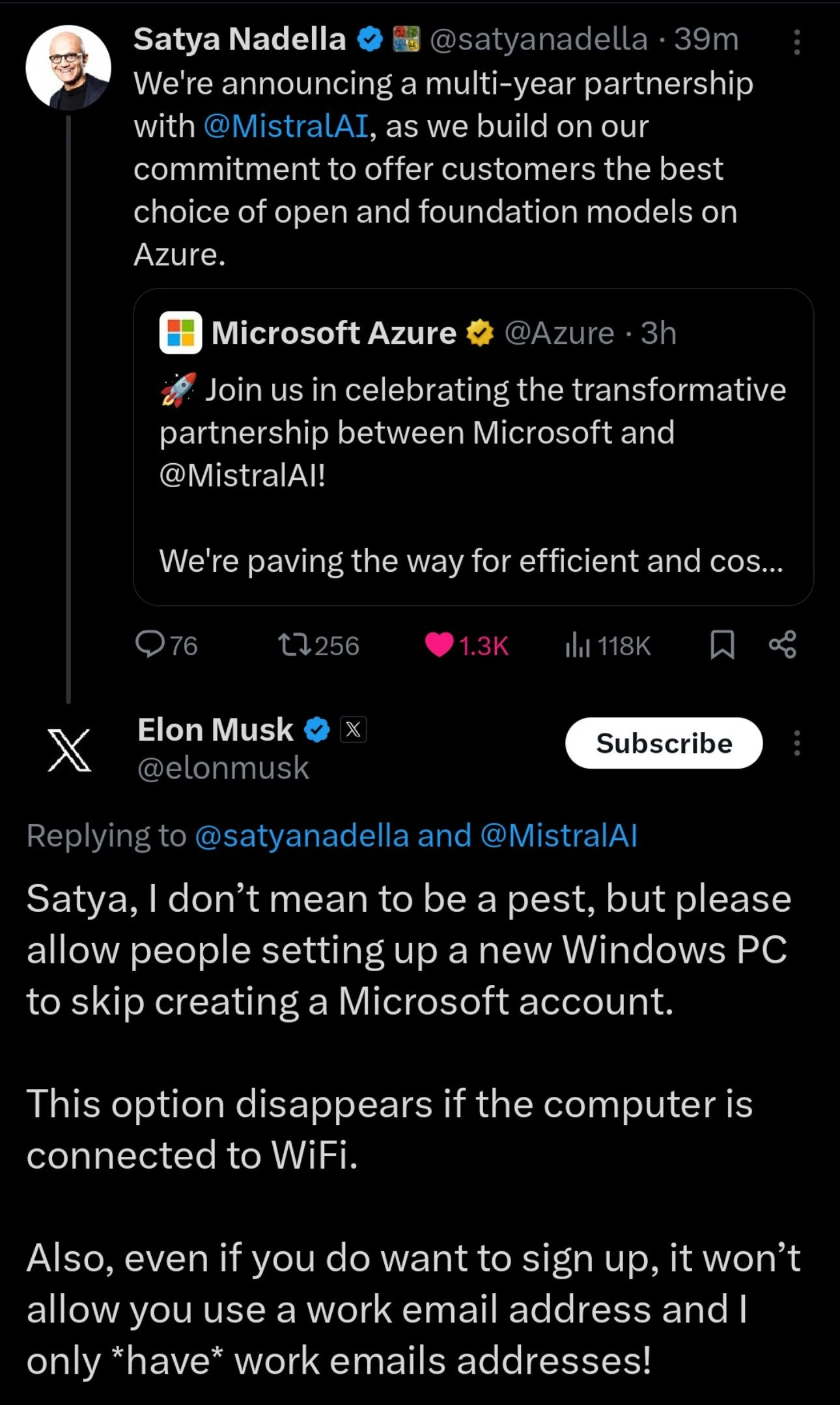
Elon Musk's Windows Setup Complaint Derails Microsoft's AI Announcement
Microsoft Post #5911, on Feb 26, 2024 in TG

Elon Musk's Windows Setup Complaint Derails Microsoft's AI Announcement

Why is this Microsoft meme funny?

Level 1: Grand Opening, Locked Door

Imagine a big toy store announcing a huge grand opening party with a brand new, super exciting toy on display. The owner (like the boss of the store) is on a loudspeaker telling everyone how amazing this new toy is and inviting everybody to come see and play with it. People are excited and gathering around, thinking “Wow, this is going to be awesome!”

But when the crowd walks up to the store’s entrance, they hit a problem: the front door is locked, and there’s a guard saying, “Hold on! To come in, you first need to sign up for our store membership card.” Essentially, before anyone can enjoy the party or see the new toy, they’re being asked to fill out a form to create an account with the store.

Now, in the crowd, there’s a famous celebrity (imagine someone like Elon Musk in a t-shirt, mingling with everyone else). He raises his hand and shouts to the owner, “Excuse me, I don’t mean to be a bother, but can you just let people in without making us sign up for that membership? Some of us only have our work IDs with us, and your form won’t accept those!”

It’s a funny scene because the owner was busy hyping up the big new toy (the exciting thing everyone wants), but this celebrity (speaking for all the regular folks) is complaining about a basic issue — they just want to get in the door easily. The owner is talking about something huge and futuristic, but the crowd is stuck on a very simple, everyday problem: “We just want to come in without jumping through hoops!”.

In other words, the joke is showing how sometimes big companies make grand announcements about cool new things (like the new toy or, in the real story, a big AI project), but people will immediately point out the simple inconvenience that the company hasn’t fixed (like the locked door or, in reality, Windows not letting you skip creating an account). It’s funny and relatable because it’s like saying, “All that fancy stuff is great, but can you please solve this one small thing that’s annoying all of us?” Everyone can understand that feeling.

Level 2: Lock-In at Login

Let’s break down what’s happening in this meme in simpler terms, and explain some of the tech jargon and context:

1. The Big Announcement (Satya’s Tweet):
Satya Nadella is the CEO of Microsoft. In his tweet, he’s announcing a partnership between Microsoft and a company called Mistral AI. Microsoft runs a huge cloud computing service called Azure (think of Azure as a giant online platform where you can run apps, store data, or use powerful computers — it’s like renting supercomputers over the internet).

Now, Mistral AI is a startup known for working on open AI models. When we say “open and foundation models”, we’re talking about large AI systems (for example, kind of like the brains behind chatbots or image generators) that are open-source or broadly available. A foundation model is basically a very large, general-purpose AI model that can be the “foundation” for many different tasks (like how GPT-4 or other large language models can do answering, translation, coding help, etc., once you fine-tune or prompt them). Open models mean the designs or weights are open-source, which developers love because it gives them freedom to use or modify the model outside of any one company’s control.

So Satya’s saying: “We’re partnering with Mistral AI for several years. We want to give our customers the best selection of open foundation models on Azure.” In plainer words, Microsoft is teaming up with this AI company so that people who use Microsoft’s cloud (Azure) will have access to some really advanced AI tools that are not closed off. This is a big deal in the cloud and AI world because it shows Microsoft embracing an open approach (not just their own models or the ones from OpenAI, but also third-party open models). It’s also a competitive move: Microsoft is basically saying “Hey, if you want to use the latest and greatest AI, come to Azure — we’ll have all the options (closed-source and open-source) available for you.”

2. The Relatable Problem (Elon’s Reply):
Right under that fancy announcement, Elon Musk replies. Elon Musk is known for many things (Tesla, SpaceX, and notably he owns X, formerly Twitter, where this conversation is happening). Instead of commenting on the AI partnership, he brings up a user experience issue with Windows, Microsoft’s operating system for PCs. This is a very ground-level, everyday user kind of problem:

  • Setting up a new Windows PC requires a Microsoft account:
    When you turn on a brand new Windows 10 or Windows 11 computer (especially Windows 11 Home edition), during the setup process (called OOBE – Out Of Box Experience), Windows really wants you to log in with or create a Microsoft account. A Microsoft account is basically a single sign-in account you use for Microsoft services (like Outlook email, Xbox, OneDrive, etc.). Think of it like an Apple ID for Apple products, but for Windows. Microsoft pushes this because if you sign in, they can sync your settings, back up your files to OneDrive, and integrate you into their ecosystem.

    There used to be an option to “skip” creating or signing in with a Microsoft account and just make a local user account on the PC (just a username and password stored only on that PC, not tied to any online account). Many tech-savvy folks and privacy-conscious users prefer a local account for personal PCs, so they don’t have to connect everything to Microsoft.

  • The Skip Option Disappears if WiFi is connected:
    Here’s the trick: In newer versions of Windows setup, that “I don’t have internet” or “skip for now” option is hidden if your computer is online. Basically, if Windows detects that it has an internet connection during setup, it will force you to log in or create a Microsoft account. If you don’t connect to the internet (say you skip connecting to WiFi or unplug the Ethernet cable), then Windows, seeing no internet, will offer you an alternative path to create an offline/local account. In short: offline = you can create a local PC account; online = you must use a Microsoft account.

    Elon is pointing out this exact behavior: “This option disappears if the computer is connected to WiFi.” That means when you’re online, the setup wizard no longer shows the “set up without Microsoft account” choice. A lot of users find this frustrating because it feels like the system is trying to trick or force them into something. Many have discovered the workaround: do the initial setup with no internet to get the local account option. It’s a bit ironic – to gain “freedom” in setup, you have to disconnect from the very internet.

  • Can’t use a work email to sign up:
    Elon’s next complaint: if you do go ahead and try to create a Microsoft account, it won’t let you use certain emails, like a corporate/work email address. Microsoft accounts typically are created with personal emails (like @outlook.com, @gmail.com, etc.), or you can use your own email but then it becomes a Microsoft account login. However, if your email domain is clearly a company (for example, @spacex.com or @tesla.com in Elon’s case), the Microsoft account sign-up might say something like “That looks like a work or school email. To use this, your organization might need to sign you in with a different method” or it might prompt to use a different email. This is because Microsoft distinguishes between personal Microsoft accounts and organizational accounts (which are managed through a different system called Azure Active Directory for businesses).

    In Elon’s situation, he says he only has work email addresses. Imagine only having, say, [email protected] and [email protected] as your emails. If those aren’t accepted for a normal Microsoft account creation, he’d have to make a new email (like create a new Gmail or Outlook address) just to set up his PC – which is kind of an absurd hoop to jump through if you’re in a hurry. For regular users, this might not come up often (most people have some personal email). But it underscores how rigid the setup process is.

3. The Contrast and Why It’s Funny:
Now, put these two together: Microsoft’s CEO is making a high-profile announcement about the future of AI on their cloud, which is a very big picture, strategic topic, likely aimed at developers, investors, and the tech community. Right beneath, Elon Musk is effectively doing customer support criticism about a very basic Windows usability issue that many everyday people (especially techies setting up their own PCs) have complained about. The contrast is striking and humorous:

  • It’s like someone at a conference talking about sending humans to Mars, and another person interrupts saying, “Your spaceship door is jammed, could you fix that first?” Both are important in different ways, but they’re completely different scales.
  • For developers and IT folks, this is a relatable joke. We often see big companies make grand announcements (“we’re launching X new platform or Y new partnership!”) while sometimes neglecting quality of life fixes that users have wanted for ages. It’s that feeling of “Cool story, but what about this thing that actually bugs us day to day?”

4. Developer Experience (DX) Angle:
The term DeveloperExperience_DX is relevant here. Microsoft’s Azure partnership news is actually aimed at giving developers more tools (so arguably improving developer experience on the Azure platform with more AI options). But at the same time, the Windows account issue is a negative developer experience on the OS side. Many developers set up new machines, VMs, or reinstall OSes frequently, and having to deal with mandatory account creation can be an annoyance each time. It’s especially irksome in scenarios like setting up a quick test PC or a demo machine that you don’t want linked to any account.

So in the meme, Elon Musk is voicing a DX gripe that a lot of devs share: “Please, let us skip unnecessary steps (like creating yet another account) so we can get on with our work.” The fact he’s telling this directly to Satya Nadella in front of everyone is both bold and amusing, because it puts a spotlight on something Microsoft likely knows is unpopular but enforces anyway.

5. The Context of Microsoft’s Strategy:
Why does Microsoft do this forced account thing? In simple terms, they want users to sign in because:

  • It ties the user into Microsoft’s ecosystem (OneDrive, Office 365, Windows Store, etc., all work smoother when you’re logged in).
  • It enables data syncing and data collection (telemetry). For Microsoft, knowing how you use Windows (when you’re logged in) can help them improve products, but also it’s valuable for their business to understand usage patterns.
  • It’s a security and support play as well: accounts allow devices to be managed, found (device recovery), and so on. But for a lot of users, those advantages don’t outweigh the desire for a simple local setup.
  • It’s also a way to discourage piracy and encourage licensed usage (though Windows 10/11 have been pretty lenient with unactivated versions anyway).

On the flip side, Microsoft touting “open models on Azure” is part of a trend to appear developer-friendly and flexible. They know many companies and devs are interested in open-source AI (so you’re not locked to one vendor’s model). So that announcement is them saying: “We hear you, we’ll support many options!” It’s a bit ironic when you contrast it with the Windows situation: supporting open AI models (choice!) vs. removing the choice of a local account (no choice!). This kind of irony is not lost on the tech community.

In summary, what we have is a meme-worthy scenario where:

  • A high-level corporate tweet about a cutting-edge AI partnership (Microsoft + Mistral AI) is being photobombed by a practical complaint about Windows 10/11’s user onboarding experience.
  • The two messages clash in tone: one is polished and promotional, the other is informal and pleading for a fix to an annoyance.
  • Developers and IT folks find it funny because they’re often in Elon’s shoes – wanting those basic usability fixes – and they enjoy the candid moment of someone actually calling it out directly to the boss in public. It’s a bit of “speaking truth to power,” except it’s one tech power speaking to another.

Anyone who’s set up a Windows PC recently and struggled with the forced Windows account setup likely chuckled seeing Elon’s tweet. And anyone following cloud/AI news understood the backdrop of Satya’s post. The meme brings these worlds together in a one-two punch: big tech news… and a reality check from the trenches. It’s a perfect snapshot of tech culture and humor.

Level 3: Open AI, Closed Doors

At first glance, this meme mashes together two entirely different tech worlds: a cloud AI power move and a desktop UX gripe. On the top, Satya Nadella (Microsoft’s CEO) is proudly tweeting about a multi-year partnership with Mistral AI to offer open foundation models on Azure. This is big strategic news in the AI_ML and cloud sphere – Microsoft basically saying, “Hey developers, we'll have the best open AI models ready for you on our cloud!” It’s a flashy AIIndustryTrends announcement (complete with a 🚀 emoji in the Azure promo tweet) aimed at showing Microsoft as a leader in open AI and giving customers more choice.

But right below that, we see Elon Musk chiming in with a completely different topic: a nitty-gritty Windows setup annoyance. Elon’s reply, in essence, says: “Satya, great partnership and all, but could you please fix Windows so I can set up a new PC without being forced to make a Microsoft account? By the way, as soon as my new computer is on WiFi, the ‘skip account’ option vanishes. Oh, and even if I cave and try to sign up, it rejects my work email – and all my emails are work emails!”

This juxtaposition is hilarious to developers because it highlights a classic tech-world irony: grand platform vision vs everyday developer frustration. On one hand, Microsoft is broadcasting openness (partnering with an open-model AI startup, touting “choice” on Azure). On the other hand, their flagship product (Windows) is literally locking users in – forcing a Microsoft login for basic PC setup, which feels anything but open. It’s the corporate_announcement_vs_user_pain gap in action. We’ve got lofty cloud innovation talk versus a very grounded “let me use my PC on my own terms” plea.

Why do seasoned devs find this so on-point? Because we’ve all lived it. This is a textbook DeveloperExperience_DX conflict:

  • Vendor Lock-In vs. User Choice: Microsoft loves to get users into its ecosystem. Requiring a Microsoft account to even start using your new Windows machine is a form of VendorLockIn – tying you into their services (OneDrive, Microsoft Store, syncing, telemetry, you name it). It’s a strategic move: by making you log in, they ensure you’re identified and connected to Microsoft from the get-go. But it’s done in a sneaky UX way: the installer actually hides the local account option if internet is detected.
  • The WiFi Trick: Every IT old-timer and Cynical Windows installer knows the trick: disconnect the internet during setup to create a local account. Microsoft’s out-of-box installer (OOBE) literally changes behavior based on connectivity. If you’re offline, tada – you get a “Skip for now” or “Offline account” choice. Online? That choice disappears like a ghost. It’s so consistent that it’s practically an inside joke. Elon explicitly mentions this: “This option disappears if the computer is connected to WiFi.” Every sysadmin reading that likely smirked. We’ve been there, shouting at the screen “Where’s the skip button? It was right here!” before yanking out the Ethernet cable.
if (internetConnected) {
    ShowMicrosoftAccountSignup();
    HideLocalAccountOption();    // 🙈 Skip button vanishes when WiFi is on
} else {
    ShowLocalAccountOption();    // 🎉 Offline? You get to create a local account
}

The code above isn’t from Windows, but it’s basically what’s happening under the hood. The wifi_hidden_skip_option is by design, not a bug. Microsoft wants that account login, enough to make the “Skip” a conditional feature. Devs see this and roll their eyes, because it’s a UX dark pattern: design the flow so most users will end up doing the thing Microsoft wants (creating an account) unless they know the secret workaround.

  • Work Email Rejection: Elon’s other gripe: if he does try to sign up for a Microsoft account during setup, it won’t accept a “work email”. This part is interesting. Likely, the Windows setup is detecting that the email domain is a business domain (say, @tesla.com or @spaceX.com) and is either (a) expecting a different enterprise setup process, or (b) forcing him to use a personal email (like Gmail or Outlook). Microsoft accounts are usually personal accounts; corporate emails might be managed through Azure Active Directory or might already be registered in some corporate tenant. So Elon saying “I only have work email addresses!” is the ultimate CEO problem 😅 – he probably doesn’t maintain a personal email separate from his companies. Developers chuckle here, too: it’s a UX edge case that the average user might not hit, but leave it to Elon to stumble on it publicly. It’s a perfect example of DeveloperExperience_DX vs corporate assumption: Windows assumes everyone setting up a PC at home has a personal email to create a Microsoft account. If you deviate from that assumption (like only having a work identity), the setup flow just says “Nope, not gonna work.” It’s a friction that feels silly and unnecessary.

All of this is playing out below a tweet about AI models on Azure. The humor is that Microsoft’s CEO is likely trying to drum up excitement about Azure’s openness and how they’re partnering with an open-source AI company (Mistral AI) to give users more freedom and choice in AI tools. It’s a strategic counter to the narrative that “Microsoft = proprietary.” (Remember, Microsoft also heavily backs OpenAI’s ChatGPT – which ironically isn’t very “open” despite the name – so teaming with Mistral, a truly open model player, is a way to cover all bases). This is the high-level chess of the AI industry: Azure wants to be the go-to cloud for all AI, open or closed.

But Elon’s reply drags the discussion back to baseline: How can you talk about openness and choice when Windows won’t even let me choose not to log in? It’s a mic-drop moment of irony. Developers and power-users have been grumbling about this forced account setup for a while; seeing Elon Musk call it out to Satya Nadella’s face (well, Twitter face) is both cathartic and comical. It’s like a public airing of what many scream at their screens in private.

From an experienced dev perspective, there’s also a subtext of priorities and siloed realities within big tech companies:

  • The Azure team and Microsoft’s AI division are off making billion-dollar partnership deals, planning how to deploy large language models across distributed cloud infrastructure, solving hard scaling problems (think clusters of GPU servers, high-speed networking, model optimization – heavy-duty cloud engineering). They’re in a world of cutting-edge tech and fierce competition (Google, AWS, etc.).
  • Meanwhile, the Windows team is pushing a (perhaps growth-hacking driven) agenda to maximize user sign-ins. They likely have metrics like “Microsoft Account attach rate” for Windows installs, and some PM decided to remove the skip option when online to bump those numbers. It’s arguably a trivial feature in comparison to Azure AI models, but it directly affects millions of users daily.

The disconnect is comedic: Microsoft can put foundation models on Azure and launch rockets on tweets, but can’t (or won’t) put a “No thanks” button on the Windows login screen if you have WiFi. As devs, we appreciate this as more than just a one-off joke – it’s representative of a pattern. Big companies often focus on glitzy advancements while letting user experience papercuts fester. And when called out, the contrast is stark. Here, that contrast became meme-worthy because of who said it and where. Elon Musk (one tech billionaire) basically turned Microsoft’s glitzy PR moment into a product support thread about Windows setup. Talk about stealing the thunder! 🙃

In summary, the meme lands so well with the tech crowd because it’s truth wrapped in humor: even at the highest levels of tech innovation, it’s the silly little things – like a missing “skip” button – that drive us crazy. And the fact that Elon chose to bring up that little thing in response to Satya’s big announcement is chef’s kiss. It highlights the eternal struggle between platform ambition and user experience reality. We laugh, and maybe cry a little, because we’ve been there: listening to our company tout amazing new initiatives, while we’re internally screaming “But can you fix this basic issue first?!”

Description

The image is a screenshot of a conversation on the social media platform X (formerly Twitter) in dark mode. The top tweet is from Satya Nadella, CEO of Microsoft, announcing a multi-year partnership with MistralAI to enhance their offerings on Azure. Below this, there is a direct reply from Elon Musk. Instead of commenting on the partnership, Musk's tweet is a complaint addressed to Satya about the Windows operating system setup process. He pleads for an option to skip creating a Microsoft account when setting up a new Windows PC, noting that this option disappears when connected to WiFi and that the system doesn't permit the use of work email addresses for signup. The humor and relevance for a technical audience come from the stark contrast between a high-level corporate strategy announcement and a fundamental, relatable user experience grievance. It perfectly captures the frustration many tech-savvy users feel with forced sign-ups and demonstrates that even the most powerful figures in tech will use their platform to complain about everyday usability issues
Comments

7
Anonymous ★ Top Pick Microsoft announces a strategic AI partnership, and Elon Musk immediately files a high-priority bug report on the Windows onboarding experience in the comments. Some pull requests just can't wait for sprint planning
  1. Anonymous ★ Top Pick

    Microsoft announces a strategic AI partnership, and Elon Musk immediately files a high-priority bug report on the Windows onboarding experience in the comments. Some pull requests just can't wait for sprint planning

  2. Anonymous

    Azure may offer every "open" foundation model on earth, but the most impressive generative model in Redmond is still the one that conjures a disappearing “Skip Microsoft Account” button the instant DHCP hands you an IP

  3. Anonymous

    When the world's richest man has to publicly beg a CEO for basic UX fixes, you know we've reached peak dark pattern - where the only reliable workaround is disconnecting from the internet like it's 1995

  4. Anonymous

    Nothing says 'customer choice' quite like announcing an AI partnership while your OS actively detects network connectivity to remove the 'skip account creation' button - a masterclass in feature flagging based on environmental variables that would make any A/B testing framework proud

  5. Anonymous

    Satya hypes open foundation models on Azure, but Windows OOBE ensures you're foundationally chained to MSFT auth first

  6. Anonymous

    Azure promises “choice of open models”; Windows OOBE delivers “choice of accounts.” It’s the Redmond CAP theorem: open, cloud, or local account - pick two; unplug Wi‑Fi for eventual consistency

  7. Anonymous

    Azure can host every foundation model, yet the rarest state machine in Redmond is still the Windows OOBE - where the “local account” transition only fires when network_liveness == false, otherwise you’re funneled into MSA like an A/B test for lock‑in

Use J and K for navigation