Elon Musk Takes on Windows Setup
Why is this Microsoft meme funny?
Level 1: Sign Up to Play
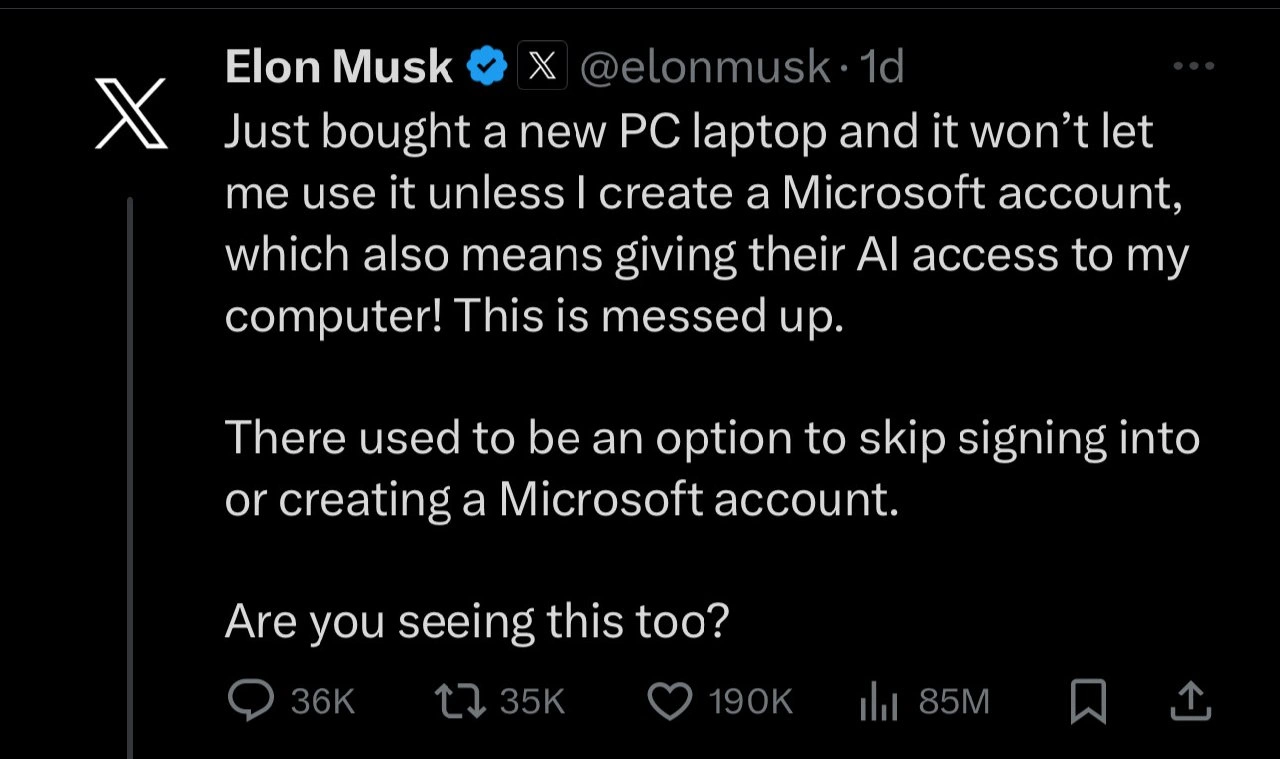
Imagine you got a shiny new toy for your birthday, but before you can play with it, the toy says: “Wait! You have to join our club and give us your info first.” That’d be pretty annoying, right? That’s basically what’s happening in this meme. Elon Musk (a really rich and famous guy who builds rockets and cars) bought a new computer with Windows 11, and he’s upset because his new “toy” (the PC) won’t let him start playing until he signs up for a Microsoft account. In simple terms, the computer is asking him to log in to Microsoft’s system and kind of “check-in” online before he can even use it. He’s also worried that by doing so, he’s letting Microsoft’s AI helper peek into his computer, which feels like letting a stranger into your room. It’s funny because usually billionaires like Elon can do whatever they want, but here he is, stuck at a login screen like the rest of us, saying “This is messed up.” The humor is that everyone can relate to that ugh feeling of just wanting to use something you own without jumping through hoops. Even a guy who makes self-driving cars is frustrated that he has to click “Create Account” just to get to the desktop. In kid terms: he’s essentially being told “no playing until you fill out this form and let our robot buddy watch.” That mix of surprise and frustration — from anyone, rich or not — is why people find this situation both silly and true. It’s like the computer is the boss, and even big-shot Elon has to follow its rules to get his turn to play.
Level 2: Local Accounts Outlawed
Alright, let’s break down what’s going on in simpler terms. The meme revolves around Windows 11 (the latest version of Microsoft’s operating system) forcing people to log in with a Microsoft account when setting up a new PC. A Microsoft account is basically a username (often an email like [email protected]) and password that you use to sign into Microsoft services – kind of like a master key for things like the Windows app store, OneDrive cloud storage, or Microsoft’s built-in apps. In the past, when installing Windows, you could choose to make a local account instead. A local account is just a user profile stored on the computer itself, not linked to any online Microsoft services – think of it like a standalone login on your PC that isn’t connected to the internet or any company.
Elon Musk’s tweet says his new laptop “won’t let me use it” unless he creates that Microsoft account. He’s noticing that the installer no longer shows the old “Skip” or “Offline account” option. This isn’t a bug – it’s a deliberate change Microsoft made. It means during the initial setup (also called the OOBE – Out Of Box Experience), Windows 11 home and pro editions will insist you sign in to a Microsoft account (or create one if you don’t have it). There’s no obvious way around it on the setup screens. In other words, local accounts are effectively outlawed during setup – you can’t easily make one as your first login. This was still possible in Windows 10 if you looked hard for it, but Windows 11 removed the easy path. That’s why Musk is surprised and asking “Are you seeing this too?” – he remembers (correctly) that “There used to be an option to skip.” Many users and developers remember that, and yes, we’re seeing it too: Microsoft really did take that choice away for normal users.
Now, why does he mention “giving their AI access to my computer”? He’s referring to Windows 11’s new AI feature, which is commonly known as Windows Copilot. Copilot is an AI assistant integrated into Windows (kind of like a supercharged Clippy or a built-in chatGPT that can help with tasks). It can do things like summarize documents or suggest actions, but to do that it might need to look at your data or send info to Microsoft’s AI servers for processing. If you’re signed in with a Microsoft account, Microsoft can tie what Copilot does (and the data it uses) to your account. Musk (and others) are worried that requiring an online account is Microsoft’s way of making sure their AI and cloud features are always active, thereby potentially scanning or utilizing your content. In plain terms, he’s concerned about privacy – that by logging in, he’s opening the door for Microsoft’s AI to peek into his files or usage habits. It might sound a bit conspiratorial, but it’s rooted in real changes: Windows 11 is deeply connected to cloud services and AI by design. If you’re not logged in, those services can’t work as intended – so Microsoft really wants you logged in.
This ties into privacy concerns and online privacy. A lot of developers and power users value controlling who has access to their data. When an operating system forces a cloud login, it typically also enables a bunch of data syncing and telemetry (telemetry means the OS sending usage data and diagnostics back to Microsoft). With a local account and no sign-in, you could previously choose not to connect to the internet and avoid some of that data sharing. Now it’s harder to avoid – you must at least connect once to get through setup. That’s why people feel it’s a “dark pattern”: a design decision that pushes users to do something they might not really want (create an account, share data) by not giving them a straightforward alternative. It’s like if a game had a huge “Yes, sign me up!” button and the “No thanks” was hidden in a tiny corner. Here, the “No thanks, I just want an offline account” option is practically hidden or requires a hack. For everyday folks, it means they’ll just sigh and make the account. For developers who know what’s happening, it feels a bit like a trap – hence the frustration.
Let’s talk about DeveloperExperience_DX for a second. This term refers to the overall experience developers have when using tools or platforms. Windows forcing a Microsoft account during setup is seen as a blow to a good developer experience because it’s an extra hurdle. Imagine you’re a developer who just wants a clean machine to write code on. You’re not interested in Xbox apps, OneDrive sync, or AI helpers – you plan to install your editor, your compiler, and get to work. But out of the box, you have to connect to Wi-Fi and sign up/log in to an online account, possibly stirring up a bunch of default settings you don’t want (like syncing to a OneDrive you’ll never use on this machine). It’s annoying. It feels unnecessary. Many devs remember when they could skip all that, create a throwaway local admin account named “DevUser” or something, and later decide if they ever want to connect it. Now it feels like Microsoft is saying “we know best, just sign in and trust us.” That rubs a lot of tech-savvy folks the wrong way.
The category Microsoft and tags like VendorLockIn also play into this. Vendor lock-in means making a user so dependent on a company’s ecosystem that it’s hard to leave. By requiring a Microsoft account, Microsoft is nudging you into its ecosystem from the get-go. Suddenly you have an account that works with Outlook, Xbox, OneDrive, Office 365, etc. – everything is tied together. That can be convenient, but it also discourages you from switching to alternatives (like Google Drive or Apple’s iCloud) because hey, you’re already signed in to the Microsoft world. For Microsoft, that’s good business. For users who just wanted a simple PC without strings attached, it can feel like a bit of a lock-in tactic.
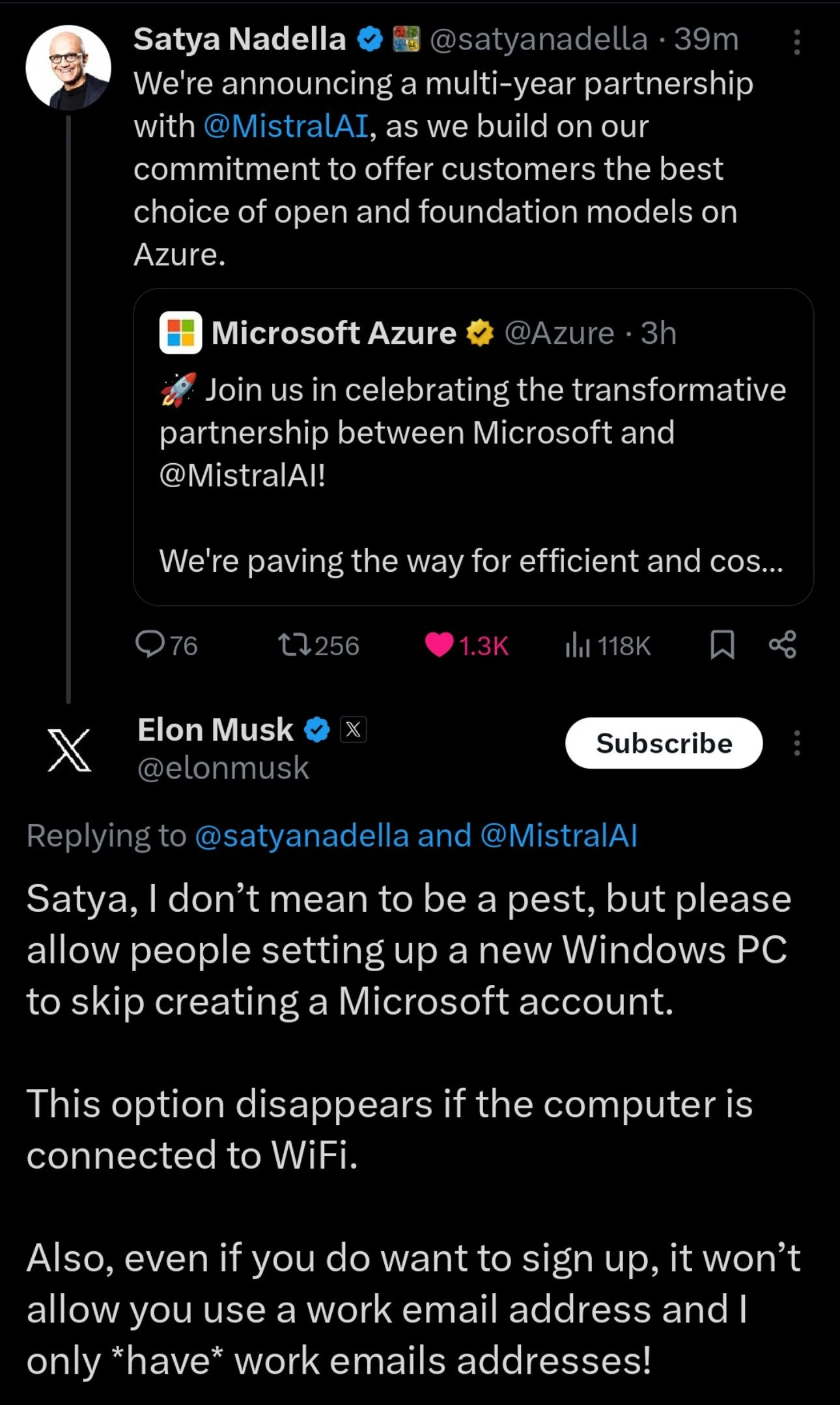
Now, the meme specifically shows Elon Musk complaining. This adds a layer of irony and humor. Elon is famously a tech CEO (running SpaceX, Tesla, and owning X/Twitter), and he’s quite outspoken. Seeing him complain about a setup issue that regular folks have griped about for a while is kind of cathartic. People are joking, “If even Elon can’t get past the Windows 11 account requirement without fuss, you know it’s bad.” It also highlights how user-unfriendly this requirement can be – it’s not about technical skill (Elon’s plenty tech-savvy, presumably), it’s about Microsoft simply not allowing it without jumping through hoops. Some developers also chuckle at Elon’s phrasing, because he says “giving their AI access to my computer” in an alarmed tone, which sounds like how a non-techy person might misunderstand it. A seasoned Windows user might clarify: logging in by itself doesn’t literally hand over your whole PC to an AI, but it does enable features like Copilot that run via cloud AI – so his concern isn’t baseless, it’s just worded dramatically. Still, the dramatization is part of the meme’s appeal – it underscores the frustration. Musk even asks “Are you seeing this too?” which is funny because thousands of replies no doubt said “Yes, welcome to Windows 11…”. It’s a shared experience: users venting together about a modern annoyance.
From a developer or IT perspective, there are known ways to avoid this, but they’re not obvious. For example, one trick is to set up Windows 11 without internet access (if you don’t connect to Wi-Fi or plug in ethernet, some versions will let you create a local account after complaining that it can’t go online – though Microsoft has been locking even this path down with recent updates). Another trick, as mentioned earlier, is pressing Shift+F10 to open a command prompt and using a command to bypass the requirement. But these are hacky solutions – not something the average user would know. The very need for such tricks is what makes developers roll their eyes. It’s like needing a secret handshake just to use your own computer on your own terms.
In summary, the meme highlights a real DeveloperFrustration and PrivacyConcern: Windows 11’s setup forcing online accounts feels user-hostile to many longtime users. Elon Musk ranting about it just amplifies the message in a high-profile way. It’s a clash between a user’s expectation of control (I bought this PC, let me use it how I want) and the company’s desire for integration and data (please log into our ecosystem, we’ll make the experience better – trust us!). For new developers or users reading this, know that this has been a hot topic in tech communities. It’s not that having a Microsoft account is evil per se – it can be convenient – but people strongly believe it should be a choice, not a requirement. The fact that this mandatory_cloud_login came bundled with AI features (Copilot) and data syncing just heightens the sense that personal control and privacy are being traded away. That’s why you see folks on forums sharing scripts to disable telemetry, remove pre-installed bloatware apps, and yes, restore local account options. It’s all part of reclaiming a bit of power from the OS that’s supposed to serve us. And when someone like Musk publicly shares the same grievance, it validates the frustration – making this meme both amusing and a tiny rallying cry for user freedom in the Windows ecosystem.
Level 3: Billionaire at the Gates
Even a tech billionaire isn’t immune to Microsoft’s login gatekeeping. The meme shows Elon Musk on X (formerly Twitter) complaining that his brand-new Windows 11 laptop “won’t let me use it unless I create a Microsoft account.” This is the same mandatory cloud login that countless developers have groaned about. The humor (tinged with pain) comes from seeing one of the world’s richest, most powerful tech figures run head-first into the vendor lock-in wall that regular users hit every day. It’s a classic case of “Welcome to the club, Elon – your money’s no good at this setup screen.”
At its core, this post highlights a controversial Windows 11 design choice: removing the option to set up a local account during installation. In earlier versions of Windows, you could click “Skip” or choose an offline account to avoid any online sign-in. Now that skip button is effectively gone – buried like a secret level most users don’t know how to access. It feels like the OS is saying, “No Microsoft account? No entry, buddy.” This heavy-handed onboarding is often called an onboarding dark pattern because it funnels users into doing what the company wants (creating an account) by making the alternative nearly impossible to find. Musk’s tweet exclaiming “This is messed up” echoes the sentiment of many seasoned engineers who remember when setting up a new PC didn’t involve appeasing the cloud gods.
Why would Microsoft do this? One reason is deeper integration of cloud services and AI into the OS. Windows 11 comes with Windows Copilot, an AI assistant (powered by OpenAI’s tech and Bing) built right into the taskbar. Copilot can analyze your screen, access your files, and answer questions – but only if you’re logged into a Microsoft account (which doubles as your Azure AD identity under the hood). From Microsoft’s perspective, requiring sign-in ensures you’re always connected to their cloud: settings sync via OneDrive, app installs via Microsoft Store, and Copilot’s AI can tap into your data (with permission, in theory). It’s the “embrace the ecosystem” strategy: tightly coupling the operating system to online services to boost user engagement (and yes, revenue). In practice, that means privacy trade-offs. A seasoned dev sees “giving their AI access to my computer” and immediately thinks about telemetry data, file indices, and usage patterns being sent to Microsoft’s servers. Musk’s phrasing might sound dramatic, but he’s pointing to a real concern: an online account potentially lets AI features peek at your content to “help” you, raising privacy concerns for those of us paranoid enough to read the fine print.
This situation is peak DeveloperFrustration material. It combines AI hype vs. reality with classic OnlinePrivacy fears. Microsoft hypes Copilot as the helpful future of computing – “AI integration that improves your life!” – but the reality for a dev setting up a new machine is an annoying roadblock demanding credentials and consent to data sharing. It’s funny in a dark way: even the guy launching rockets to Mars and building self-driving cars is stuck yelling at Windows setup like the rest of us. Developers who have scripted OEM debloaters since XP feel a pang of schadenfreude: “See, it’s not just us – even Elon’s fed up with the bloat and dark patterns.” There’s a camaraderie in frustration. We’ve all been there, yelling at some install wizard that refuses to budge. This meme just ups the ante by casting Elon Musk in the role of “frustrated IT guy,” encountering the kind of obstacle we usually joke about on Reddit.
Let’s talk history for a moment, because this Microsoft account saga has been brewing for years. Here’s a quick breakdown of Windows versions and their stance on local vs. online accounts:
| Windows Version | Local Account Setup | Online Microsoft Account |
|---|---|---|
| Windows XP / 7 | Default (local only) | Not applicable (no cloud login) |
| Windows 8 (2012) | Available (but cloud optional) | Introduced (Live ID integration) |
| Windows 10 (2015) | Available (hidden “Offline” option) | Strongly pushed (MS account by default) |
| Windows 11 (2021+) | Required for Home/Pro setup (cloud login mandatory) |
In ye olde days (XP, Windows 7), you’d create a simple username and password offline, and you were good to go. Windows 8 introduced the idea of signing in with a Microsoft Live ID to sync stuff, but it still let you choose a local account if you dug around. Windows 10 made the “use offline account” option hard to find (some tiny “Domain join instead” link or a dark UX pattern like that), but if you persisted, you could avoid the cloud. With Windows 11, Microsoft essentially said “No more Mr. Nice GUI”. Initially, the Home edition forced online sign-in, and by 2023 even Windows 11 Pro demands internet + an MS account at first setup. The local account is gone from the normal flow. This progression feels like a slow tightening of the screws – leaving privacy-conscious and power users feeling cheated.
And of course, developers found workarounds. The tweet asks, “Are you seeing this too?” – oh, we saw it, alright, and we came armed with hacks. For instance, if you press Shift + F10 during Windows 11 setup, you open a secret command prompt (yes, even the installer has a backdoor for us old-school folks). By running a special command like OOBE\BYPASSNRO, you can force the installer to reboot and Bypass Network Requirement (that’s what NRO stands for). This hidden trick brings back the offline account option that Microsoft tried to hide:
REM Bypass Windows 11's network requirement to allow local account creation:
OOBE\BYPASSNRO
It’s almost comical that in 2024, setting up your PC “your way” requires cheat codes like you’re playing Doom. Seasoned devs have turned this into a Developer Experience (DX) ritual:
- Unbox new laptop.
- On first boot, curse at the mandatory_cloud_login screen.
- Open a terminal with ninja shortcuts, invoke arcane incantations (
OOBE\BYPASSNROfeels like a Konami code for PCs). - Finally create the local account that should have been an option in plain sight.
- Proceed to debloat Windows: uninstall Candy Crush, disable telemetry, neuter Cortana/Copilot if possible.
So when Elon Musk says “This is messed up”, every programmer who’s reinstalled Windows in the last few years is nodding furiously. We’ve spent late nights wrestling with these “features.” We know the feeling of buying hardware and then fighting the software just to gain basic control. It’s a mix of absurdity and indignation that fuels the meme’s relatability. DataPrivacy advocates and developers share a common gripe here: the OS should serve the user, not rope the user into serving the company’s ecosystem.
Another layer of irony: Elon Musk lamenting that AI might get access to his data through the Microsoft account. This is the same Elon who runs a social media platform that notoriously vacuums up user data, and who’s launching his own AI ventures. The hypocrisy isn’t lost on the tech community – and a cynic might chuckle that he’s suddenly playing privacy champion when it inconveniences him personally. But irony aside, he’s voicing the exact worry many users have: if you must log in, you’re implicitly agreeing to let Microsoft’s AI (Copilot) and services glean info from your device. It’s a valid concern packaged in a sensational soundbite.
In true Cynical Veteran fashion, the whole scenario feels like déjà vu. Big tech finds a way to inconvenience users for its own gain, users complain, big tech maybe walks it back a tiny bit or just waits out the outrage. Will Microsoft restore an obvious “Skip account setup” button because Elon blasted them? Probably not – they bet on most users just caving and creating the account. After all, it’s not like we have many desktop OS choices if we need Windows-specific apps. That’s the power (and curse) of a near-monopoly: they can afford to ignore even a tweet from Elon Musk. The rest of us cynical coders just shrug and keep our boot-time battle scripts ready.
So this meme is funny-true on multiple levels: the absurd picture of Elon Musk locked out of his own laptop by a Windows 11 setup screen; the shared frustration of developers and privacy-conscious folks who hate these os_onboarding_dark_pattern tactics; and the deeper commentary on how even the mighty must bow to the petty rules of someone else’s platform. It’s a digital age fable of vendor lock-in: no one, not even a billionaire, gets a free pass when the software says “By logging in, you agree to give us a bit of your soul (and data).” The DeveloperExperience_DX here is downright dystopian, and we’re all laughing so we don’t cry.
Description
A screenshot of a tweet from Elon Musk's account on X. The text reads: "Just bought a new PC laptop and it won’t let me use it unless I create a Microsoft account, which also means giving their AI access to my computer! This is messed up. There used to be an option to skip signing into or creating a Microsoft account. Are you seeing this too?". The tweet captures a widely shared frustration among tech-savvy users regarding the mandatory Microsoft account requirement in recent versions of Windows. The technical issue is Microsoft's push away from local user accounts to integrate users into its cloud ecosystem. Musk's comment, particularly the part about "giving their AI access," taps into broader concerns about data privacy and the increasing, often opaque, integration of AI into consumer operating systems. The situation is ironic and humorous to developers, as one of the world's most prominent tech figures encounters a common user setup annoyance and voices the same complaints as the average power user
Comments
7Comment deleted
The richest man in the world can't bypass the Windows OOBE screen. Maybe he should try pivoting to a career in IT support; the first step is learning the Shift+F10, OOBE\BYPASSNRO trick
Turns out even the richest user on Earth can’t bypass the Azure-AD onboarding wizard - guess the “skip” button is only available in the Enterprise LTSC edition
The richest man in the world discovering dark patterns the rest of us have been shift+F10'ing around since 2021 is like watching your CTO discover npm audit warnings for the first time
Ah yes, the classic Windows 11 OOBE experience: where 'Out Of Box Experience' really means 'Out Of (escape) Options, Buddy.' Microsoft's removing the local account bypass is the enterprise equivalent of removing the 'I'll decide later' button - except now it's 'Sign in or your $2000 laptop becomes a very expensive paperweight.' At least in the old days, you could hit Shift+F10, run 'OOBE\BYPASSNRO', and feel like a 1337 h4x0r. Now you need a burner email and the willingness to let Copilot analyze your localhost traffic. Nothing says 'personal computing' quite like mandatory cloud authentication for a device you physically own
Windows 11’s OOBE turned the kernel into an OAuth client - apparently you need SSO to launch Notepad
Windows 11 turned OOBE into OAuth - no desktop until you grant scopes; seniors quietly hit Shift+F10 and run oobe\bypassnro like it’s a feature flag
Windows OOBE: The ultimate zero-trust architecture where your local admin dreams get force-pushed to Redmond's tenant