Skip to content
DevMeme
4636 of 7435
When your editor is a browser but my browser is an editor
IDEs Editors Post #5083, on Dec 14, 2022 in TG

When your editor is a browser but my browser is an editor

Why is this IDEs Editors meme funny?

Level 1: We Are Not the Same

Imagine two friends showing off how they use their gadgets, and it gets a little crazy. The first friend is using a big device to do a small job: he uses an entire laptop (computer) just to run a calculator app to do 2+2. Now the second friend does the opposite crazy thing: he somehow turned his little pocket calculator into a machine that can browse the internet. That means his tiny calculator can go online and show web pages, which is something you’d normally need a big computer or smartphone to do! The second friend straightens his tie and says, “We are not the same.”

In simple terms, the joke is about reversing roles. One person’s tool is inside a bigger tool, and the other person’s big tool is inside a smaller tool. It’s as if one kid built a small toy inside a huge box, while another kid managed to fit a huge toy inside a small box. The one who did the wild, impressive swap says, “See, we’re nothing alike.” He’s playfully bragging that his way is more special.

This is funny because it’s so exaggerated and unexpected. It’s like saying: you needed something big to do a simple thing, but I fit something big into something small — we are not the same! Even if you don’t know anything about code editors or browsers, you can giggle at the idea of someone running a web browser inside a text editor. It’s a silly, geeky boast, kind of like a friendly “I did it differently (and cooler) than you.” In the end, it’s just a fun way for computer lovers to compare their toys and laugh about whose setup is crazier.

Level 2: Browser vs Editor 101

Let’s break down the key references in this meme in simpler terms. The meme compares two popular programmer tools: Visual Studio Code (VS Code) and GNU Emacs. Both of these are text editors (programs for writing and editing code), but they come from different eras and have very different designs. The joke text says: “Your text editor runs inside a web browser. My web browser runs inside a text editor.” This sounds a bit crazy at first! What does that mean?

  • VS Code runs inside a web browser: Not literally the browser you open like Chrome or Firefox, but inside a browser engine. VS Code is built on something called Electron. Electron is a software framework that packages a web browser engine (Chromium, the same core as Google Chrome) with a Node.js JavaScript runtime. In plain words, Electron lets developers create desktop applications using web technologies (HTML, CSS, JavaScript). So Visual Studio Code, though it looks like a native application, is actually a giant web page running in a dedicated browser window behind the scenes. All the buttons, panels, and even the text editing area in VS Code are rendered using web technology (just like a website does). This is why the meme says a VS Code user’s editor “runs inside a browser” – the program relies on a browser engine under the hood. It’s a common approach nowadays (other apps like Slack, Teams, or Discord do it too), because it’s convenient and cross-platform. But it also means VS Code carries the weight of a full browser, which is a funny thing when you think about it – you’re using something as heavy as Chrome just to edit text! Developers jokingly poke fun at this by saying VS Code is basically “Chrome with extra steps.” That’s the first part of the meme.

  • Emacs runs a web browser inside it: Emacs is a very old (but still widely used) text editor that is almost endlessly customizable. Emacs has been around since the 1970s and is the epitome of an extensible editor – you can program it to do new things using its built-in Lisp scripting language. Over the years, Emacs users have added all sorts of features, even turning Emacs into a tool for other tasks. One almost unbelievable feature is that Emacs can browse the web. Emacs includes a built-in web browser called EWW (Emacs Web Wowser). EWW is not a graphical web browser like Chrome; it’s more minimal and mainly text-based (think of reading a webpage’s text and links in a simple view). Still, it can retrieve web pages by URL and display them inside the Emacs editor window. So if you’re using Emacs, you could, for example, read Wikipedia or check an HTML document inside your editor, without opening a separate browser application. When the meme says “My web browser runs inside a text editor,” it’s referring to this capability of Emacs. It’s highlighting that Emacs is so powerful and extensible that it can actually host a web browser as one of its features. This is the reverse of the VS Code situation: instead of an editor built on a web browser, here we have a web browser built into an editor!

  • “We are not the same”: This phrase is a popular meme catchphrase. It’s usually used humorously when comparing two similar-sounding things that are actually quite different in quality or approach. In this context, both people have a combination of a text editor and a web browser, but configured in opposite ways. The first person’s setup is the common one: using a modern editor (VS Code) that, unknowingly to many, contains browser tech. The second person’s setup is almost absurd: using an old-school editor (Emacs) that can even function as a web browser. By saying “We are not the same,” the Emacs user is jokingly bragging that their approach is more hardcore or special. It’s like saying, “You use your tools in a standard way, but I use mine in a hacker-inspired way – we’re on different levels.” The suited man image reinforces this braggy, confident tone.

  • Editor Wars and Developer Humor: This meme is part of a long tradition of programmers playfully arguing about editors and tools. Tags like EditorWars and DeveloperHumor are clues that this is all in good fun. VS Code and Emacs are just tools – each has its faithful users. Emacs is a symbol of the classic, highly customizable editor favored by some veteran developers, while VS Code is the shiny, modern editor that many developers (especially newer ones) love for its ease of use and rich features. The meme exaggerates the differences. In reality, most people don’t actually browse the web in Emacs regularly (it’s possible, but not very graphical or practical for heavy web use). And while VS Code is built on a browser engine, end users don’t really notice that day-to-day aside from maybe higher memory usage. But for someone learning about these tools, it’s interesting to know:

    • Visual Studio Code: A free code editor from Microsoft, extremely popular, with features like IntelliSense code completion, a marketplace of extensions, and a user-friendly interface. It runs on Windows, Mac, and Linux – part of how it achieves that is by using Electron (so one codebase runs anywhere Chrome runs). It’s considered an IDE-lite or powerful editor, great for many programming tasks. However, because it uses Electron, it’s not as lightweight as a simple native editor; it’s doing a lot under the hood.
    • GNU Emacs: One of the oldest code editors still in use, created by Richard Stallman and others, part of the GNU Project. It’s known for being extremely extensible via Lisp scripting. Emacs often runs in the terminal or in its own window with a very simple GUI. You can customize every aspect of it – key bindings, appearance, features – by editing your Emacs configuration (often called .emacs or init.el). Emacs can handle text editing for virtually any programming language through EmacsPackages (community-contributed extensions), and it also has modes for many other tasks (reading email, managing todo lists, playing music, you name it!). The downside is that Emacs has a steep learning curve. It doesn’t hold your hand with a fancy interface; you have to learn the commands and sometimes write Lisp code to configure it. That said, Emacs users are very proud of how they can stay inside Emacs to do everything. The EWW web browser is a perfect example of an Emacs feature that sounds wild to someone used to simpler editors.
  • Why is this funny to developers? The idea of an editor running in a browser vs a browser running in an editor is like a quirky mind-bender. It highlights how software can be layered in unexpected ways. It also pokes a bit of fun at both sides: VS Code for being bloated (i.e., requiring a browser to run), and Emacs for being over-the-top extensible (i.e., including something as big as web browsing inside an editor). Developers often tease about Electron apps because they use more memory; and they tease about Emacs for trying to be an entire operating system. Here, those jokes converge. It’s a form of DeveloperExperience_DX humor: only in the programmer world do we worry about whether our text editor has a Chromium engine or can display HTML in a buffer!

In summary, the meme contrasts two opposite approaches to combining an editor and a browser:

  • A modern approach: VSCode is essentially built with web technology (the editor lives on top of a browser engine).
  • A classic hacker approach: Emacs can incorporate web browsing within itself (the browser lives inside the editor). And the Emacs side jokingly claims superiority with “We are not the same.” If you’re a junior developer or just someone new to these tools, the take-away is that this is an inside joke. Both VS Code and Emacs are powerful in their own ways. The meme is funny once you understand that one is basically a souped-up web app and the other is an insanely extensible old program. They each represent a very different philosophy of tool design, and that contrast tickles the programmer funny bone.

Level 3: Editor Inception

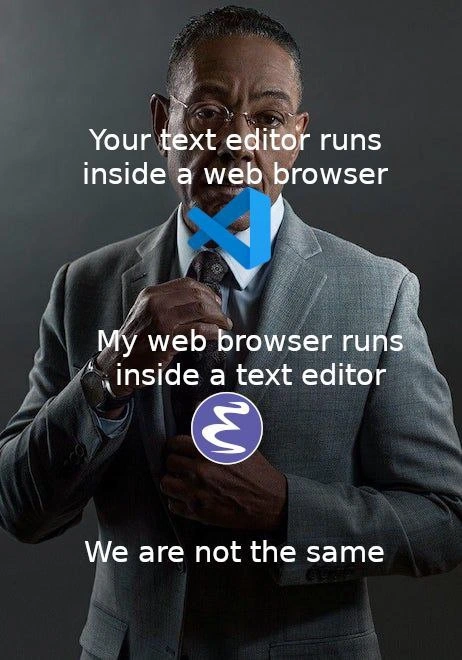
At first glance, this meme is flexing about code editor architecture in a tongue-in-cheek way. The top text reads “Your text editor runs inside a web browser”, and the middle retorts “My web browser runs inside a text editor”, followed by “We are not the same.” The suited man adjusting his tie (actor Giancarlo Esposito in the alpha_chad_format meme template) is labeled with logos: a blue VS Code emblem on the tie knot and a purple GNU Emacs swirl on his suit. This setup screams EditorWars: it’s pitting a modern code editor against an old-school one by literally flipping their software stacks. The humor targets developers’ inside knowledge of how these tools work: Visual Studio Code is built on an Electron app (basically a Chromium browser under the hood), whereas Emacs is so extensible it can run a web browser inside itself. The punchline “We are not the same” completes the flex, implying the Emacs user is the refined Chad who’s taken things to a meta level.

Let’s unpack the first statement: “Your text editor runs inside a web browser.” This refers to the architecture of VS Code and similar tools. VS Code isn’t a traditional native program; it’s essentially a fancy web app. It’s built with Electron, which means it bundles a modified Chromium browser engine and Node.js runtime. The entire editor UI — from the text area to the settings panels — is written in HTML/CSS and TypeScript, just like a website. Electron wraps this in a desktop application. In other words, when you run VS Code, you’re really launching a hidden Chrome browser that’s loading a local site (the VS Code interface) and using Node.js to access your files. This is why the meme says the text editor runs inside a browser. It’s a cheeky way to point out that VS Code (and many other developer tools or ElectronApps like Slack or Discord) are powered by web technology under the hood. Seasoned developers often joke about Electron for being resource-heavy — you might hear groans about Electron apps each spawning “yet another Chrome instance” and gobbling RAM. The meme plays on that insider knowledge: the modern editor is basically a full browser in disguise. It’s a bit of DeveloperHumor aimed at the fact that today’s sleek IDEs_Editors sometimes sacrifice efficiency for convenience by leveraging the browser stack. (After all, a text editor in 2022 might use more memory than an entire operating system did 20 years ago, since it’s running a browser engine!).

Now the reversal: “My web browser runs inside a text editor.” This is referencing the almost legendary extensibility of Emacs. GNU Emacs is a venerable text editor dating back to the 1970s, written in C and extensible through Emacs Lisp. Emacs enthusiasts lovingly (and sometimes jokingly) call it an operating system more than a text editor, because you can do just about anything without leaving it. Need to manage files? Emacs has dired. Email? Emacs has mail clients. Play Tetris? Yes, Emacs has a game or two. And crucially, it even has a web browser built in! Emacs comes with EWW (short for Emacs Web Wowser) – a text-based web browser that you can launch inside an Emacs buffer. This means inside your editor window, you can actually fetch and read web pages. It’s not a full Chrome-like experience (EWW renders HTML and can display images and follow links, but it’s largely for reading and doesn’t run complex JavaScript by default), but it’s legitimately a web browser inside Emacs. There are even more graphical options (Emacs can embed a WebKit widget in newer versions), but the meme likely points to the sheer idea that Emacs can do that at all. So when the meme’s suave Emacs user says his browser runs inside his text editor, he’s bragging about Emacs’s power: “Haha, your editor needs a browser underneath to even work, but my editor is so powerful it can contain a browser within it!” It’s an absurd role reversal. Emacs, the tool from the era of green-screen terminals, is ironically capable of subsuming a task (web browsing) that normally you’d do in a separate modern program like Chrome or Firefox.

This inversion is the core joke: the tools have literally flipped roles. It’s a playful nod to “Yo dawg, I heard you like editors, so we put a browser in your editor so you can browse while you code.” For veteran developers, there’s a lot of context here. In the old days, Emacs was often ribbed for being bloated – people joked that EMACS stands for “Eight Megabytes And Constantly Swapping” (back when 8 MB was huge!). It was the kitchen-sink of editors even in the ’80s, known for doing everything. Fast forward to today, and we routinely run editors like VS Code that use hundreds of megabytes or even a gigabyte of RAM, because they’re running a whole Chromium instance. The meme flips the old notion of bloat on its head. Now Emacs – with its text-based browser and Lisp engine – looks like the quirky efficient genius, while VS Code – built on a heavyweight browser stack – is the one carrying extra baggage. There’s an ironic truth: Emacs, once considered heavy, is comparatively lightweight next to Electron-based apps. An Emacs process might consume tens of MBs for a lot of functionality, whereas launching VS Code spawns Chromium processes that easily consume much more. The Cynical Veteran in me chuckles: our “modern, sleek” tools are running an entire browser just to edit text, while the “ancient, bloated” Emacs can read Reddit from inside your terminal. We truly have come full circle. It’s a classic tooling joke about how computing power has grown and how software design has changed – sometimes trading efficiency for convenience.

From a DeveloperExperience_DX standpoint, this also highlights philosophy differences. VS Code prioritizes approachability and rich UI/UX: you get a friendly interface, extension marketplace, and integrations that work out-of-the-box (thanks to that underlying browser tech enabling things like embedded webviews for extensions). It’s the popular choice in part because web technology lets it be very visually interactive and easy to update. Emacs, on the other hand, is the hacker’s editor: extremely customizable but with a steeper learning curve. Its UI is more spartan (mostly text and keyboard-driven), but it’s infinitely malleable if you can write some Lisp. Emacs users often invest a lot of time tailoring their environment – “editing your .emacs config is your lifestyle” – and as a result, they end up with an editor that feels more like a custom OS. They can even browse StackOverflow or Wikipedia from within Emacs, never alt-tabbing to Chrome. Emacs fans wear this ability as a badge of honor. In the meme, the Emacs user (with the Emacs logo on his chest) is basically saying: “I see you running your code editor on top of Chrome – cute. I embedded Chrome-like functionality inside my editor. We are not the same.” It’s dripping with that geeky swagger and satire.

There’s also the subtext of the never-ending EditorWars. For decades it was Emacs vs Vim as the holy war of editors. These days, VS Code has emerged as a dominant editor/IDE, so the rivalry extends there. Emacs users are a proud bunch (some might say stubborn 😛). They stick to their 40-year-old editor and continuously extend it, while VS Code users embrace modern tooling that comes ready-made with a slick GUI. This meme humorously elevates the Emacs side by leveraging a quirky feature (EWW browser) to one-up the VS Code side. It’s the kind of joke both sides can laugh at: VS Code users know their editor is essentially a Chrome app (they might even open dev tools inside VS Code and see an HTML UI), and Emacs users know how ridiculously far one can push Emacs (browsing the Web in a lisp buffer, why not!). The DeveloperHumor thrives on these specific details that outsiders might not notice. Who else would find it funny that “my editor can literally read web pages”? Only folks who live in text editors all day and have strong opinions on them.

This meme also hints at how software layering has changed. Running an editor inside a browser engine (Electron) is a very 2010s approach to ensure cross-platform support with one codebase. It’s a trade-off: you get consistency and easy use of web tech, but you carry the weight of a whole browser. Emacs comes from an earlier ethos: one monolithic program providing lots of functionality internally, through built-in extensibility rather than stacking on another huge runtime. Neither approach is “wrong” per se – they solve different problems. But it’s undeniable that there’s a comedic absurdity to needing a top-of-the-line web engine just to edit Python or JavaScript files. That absurdity is exactly what the meme zeroes in on. The we_are_not_the_same_meme phrase format usually implies one person is the sophisticated “Chad”. Here the Emacs user is the Chad in the suit, implying that embedding a browser in your editor is a superior, galaxy-brain move compared to embedding your editor in a browser. It’s a playful elitism: the Emacs user is basically saying “I do computing in a more hardcore way.”

To illustrate the contrast technically, consider these facts: launching VS Code spawns processes with names like Code.exe or Electron which, if you inspect, reveal Chrome’s DNA (you can even find a Chrome/User Data folder in VS Code’s files). Conversely, launching Emacs gives you a chance to run Lisp commands; for example, you can open a web page inside Emacs with a simple function call. Here’s a quick peek at how an Emacs user might invoke the built-in web browser:

;; In Emacs, open a web page in the built-in browser (EWW):
(require 'eww)              ; Load the Emacs Web Wowser module
(eww "https://www.gnu.org") ; Browse the GNU website inside an Emacs buffer

// Emacs will fetch the page and render its text content right inside your editor window, no external browser needed!

This snippet shows the kind of thing the meme boasts about. Emacs, using just a few lines of Emacs Lisp, pulls in a web page. No Chrome, no Firefox – just Emacs doing Emacs things. Meanwhile, if we think about how VS Code works, it’s almost the opposite: VS Code’s TypeScript code is executed by the built-in Chrome V8 engine, and its UI is styled with CSS – it behaves a lot like a browser that happens to edit text. You could say VS Code is a browser pretending to be an editor, while Emacs is an editor pretending it can be a browser. The meme gleefully points out this symmetry and reversal. It’s a clever jab at how blurred the line between “editor” and “browser” has become in modern developer tooling.

Ultimately, the humor lands because it’s so specific and nerdy. It’s the kind of joke you’d see on r/ProgrammerHumor or in a dev Slack channel, where everyone knows both tools. It taps into shared experiences: maybe one developer grumbles “ugh Electron apps” while another says “brb, reading news in Emacs”. Both know they’re being a bit ridiculous, and that’s what makes it funny. “We are not the same,” says the meme. And indeed, for all the similarity that both VS Code and Emacs are just text editors at heart, the way they operate under the hood is dramatically different. That difference – web tech vs decades-old Lisp machine – is exaggerated here as a point of pride and comedy. In summary, Level 3 analysis shows how this meme mixes tool architecture trivia with longstanding developer culture (the editor wars, the pride in one’s setup) to create a joke that only makes sense if you know what’s under the hood of VS Code and Emacs. It’s a high-five to the developers who do. 😄

Description

The image uses the classic "suited man adjusting his tie" template on a dark background. White text is overlaid in three parts: "Your text editor runs inside a browser" at the top, "My web browser runs inside a text editor" in the middle, and "We are not the same" at the bottom. A blue Visual Studio Code logo is placed at the tie knot, while a purple GNU Emacs swirl logo sits on the suit chest, emphasizing the punchline. The meme highlights that VS Code is an Electron (Chromium) application - so a text editor inside a browser - whereas Emacs can embed a full web browser (EWW), flipping the relationship. It humorously references the long-running editor wars, developer tooling choices, and the blurred boundary between browsers and native development environments
Comments

6
Anonymous ★ Top Pick VS Code ships a whole Chromium just to highlight braces; Emacs writes a browser in Lisp inside a buffer - one of them understands recursion, the other is just nested iframes until swap starts screaming
  1. Anonymous ★ Top Pick

    VS Code ships a whole Chromium just to highlight braces; Emacs writes a browser in Lisp inside a buffer - one of them understands recursion, the other is just nested iframes until swap starts screaming

  2. Anonymous

    Your editor uses 300MB of RAM to render a blinking cursor. Mine uses 30KB to implement a Lisp interpreter that accidentally became sentient in 1976 and now handles my email, calendar, and existential dread

  3. Anonymous

    The real irony is that both camps spend more time configuring their editors than actually writing code - VS Code users installing extensions to make it feel like a real IDE, while Emacs users write Lisp to make it do literally everything except edit text efficiently. At least VS Code users can close their editor without consulting the manual

  4. Anonymous

    VS Code users tweak settings.json; Emacs users forge a browser from Elisp while the build compiles

  5. Anonymous

    Your editor rides on Electron; my “browser” is M-x eww in a buffer - one amortizes latency across renderer processes, the other across a decade of muscle memory

  6. Anonymous

    Electron solved 'write once, run anywhere' by bundling Chrome; Emacs solved it by making the browser a minor mode - guess which one needs 2GB to open README.md

Use J and K for navigation