Navigating the Art of the Git Diff
Why is this VersionControl meme funny?
Level 1: Tangled Ribbons in a Storm
Imagine you're holding two long ribbons, one red and one green, and suddenly a strong wind starts swirling them all around you. They get tangled up in the air, and you have to grab them and tie them together into one piece before the wind blows everything away. You feel nervous because the wind is wild and time is running out, but you know you have to do it.
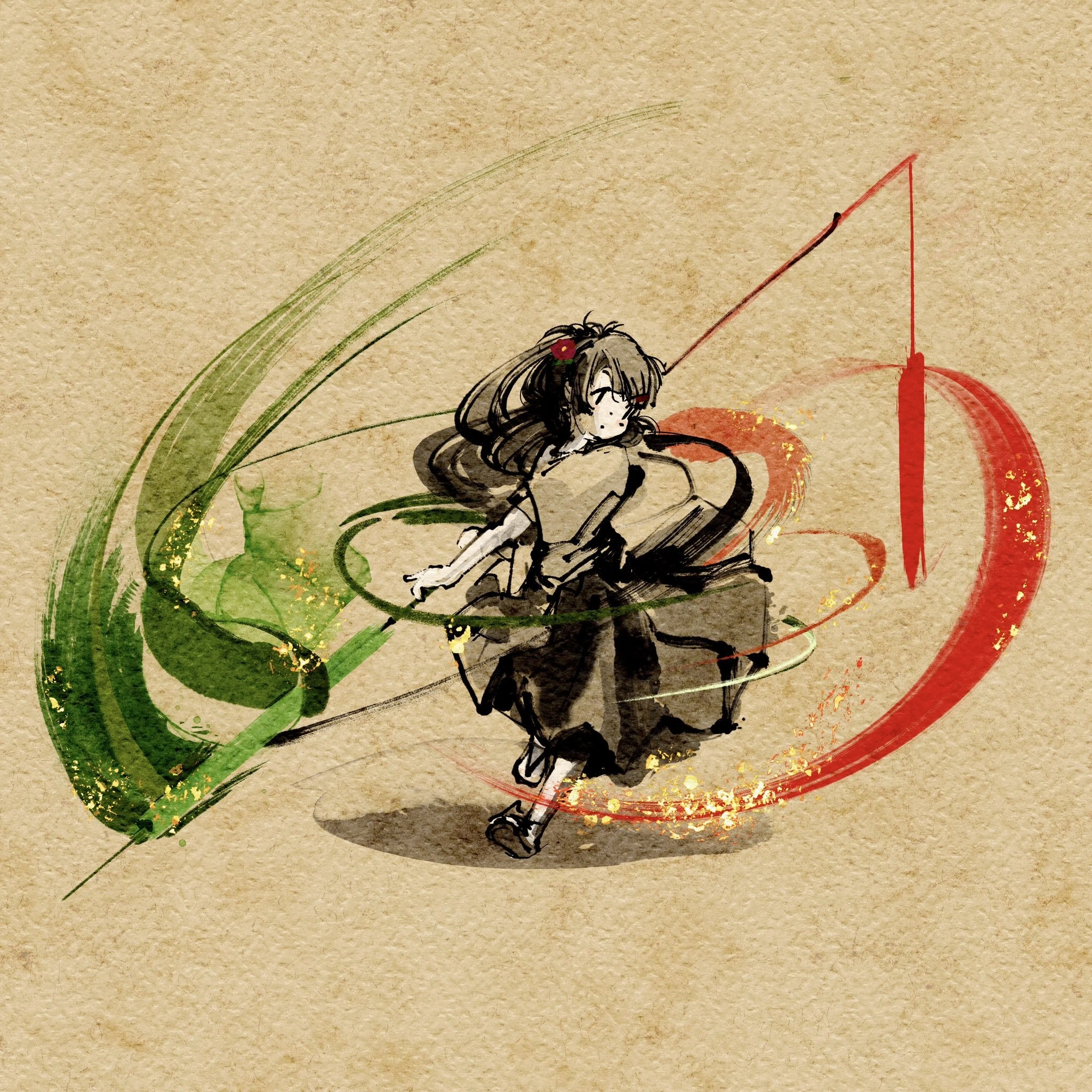
In the picture, the girl is in a situation just like that. The red and green swirls around her are like those tangled ribbons (except in her case, they're actually pieces of something important she's working on that have gotten all mixed up). She looks worried, but also determined, like a hero in a story trying to fix a big problem. Even though everything around her is chaotic, she's focusing really hard to sort it out. The scene shows what it feels like when something important you're working on becomes a jumbled mess at the last minute: it's scary and overwhelming, but you stay brave and do your best to untangle it—just like she's doing.
Level 2: When Branches Collide
Let's break down what's happening in this meme in simpler terms. Git is a popular tool developers use for version control, which means tracking changes in code over time and helping people collaborate. One of Git's powerful features is the ability to create branches so multiple people can work on different features or fixes at the same time without immediately interfering with each other. However, eventually those branches need to come back together (be merged), and that's where conflicts can happen:
- Branch: A separate copy of the code where you can make changes independently. Think of it like taking the project in a different direction temporarily.
- Merge: Bringing two branches back together, combining their changes. Ideally, Git figures out how to put all the work into one unified codebase.
- Diff: Short for "difference." It's a view that shows how one version of a file differs from another. Added lines are often shown in green with a
+at the beginning, and removed lines in red with a-. This color-coding helps visually track changes. - Merge conflict: When two branches change the same part of a file in different ways, Git doesn't know which change to keep. It marks that section of the code as a conflict, essentially asking the developer to decide what the final code should be.
When a merge conflict happens, Git will stop the automatic merge and present the conflicting sections to the developer inside the file. In a text editor or the terminal, it literally shows both versions of the code (one from each branch) with special markers indicating the split. The developer has to manually review those and reconcile them. For example, a simplified diff might look like this:
- totalCount = calculateTotal(items);
+ totalCount = calculateTotal(orderItems);
In this snippet, the line that was in one branch (- prefix) is being replaced by a new line from another branch (+ prefix). If you were viewing this change in a Git tool or on GitHub, the - line would be highlighted red (a removal) and the + line highlighted green (an addition). The meme's swirling red and green strokes correspond exactly to this idea: red for code being removed or replaced, green for code being added.
Now, imagine dozens of such differences all around you—that's what a tough merge conflict can feel like. The anime girl in the image is essentially a developer who is “dueling” a merge conflict. The red and green bands encircling her represent all the conflicting code changes flying around that she needs to sort out. She looks anxious because resolving conflicts can be tricky; you have to carefully read the code from both branches and decide how to merge them so the final program works correctly. It's almost like solving a puzzle where two people tried to put pieces in the same spot. You need to figure out how to make those pieces fit together.
The phrase "moments before the release cutoff" means this is happening right before a deadline (the point at which no more changes can be added for a software release). In real development teams, there's often a cutoff time by which all code must be merged into the main branch for a release build. Finding a conflict at the last minute is nerve-wracking. You know everyone is waiting on that merge so they can deploy, and suddenly you're stuck untangling a mess. That's why the scene is so dramatic — it's a high-pressure situation.
The art style combines anime aesthetics with a traditional watercolor (sumi-e) look. Anime (Japanese animation) is known for depicting battles with dynamic energy and visual flair. Here, that idea is applied to a coding problem. The image looks like a samurai duel painted on old parchment, which is a fun, artistic twist: it makes a modern tech problem (a Git merge) look like an ancient, epic battle. The red vs green code changes swirling around are normally just lines of text on a computer screen, but the artist turned them into physical swirls of paint or magic energy. This gives life to something abstract, helping you see the problem.
For a newer developer (or anyone who hasn't experienced this), the meme is saying: merging code from different people can sometimes be chaotic and challenging. It's acknowledging that feeling when you're new to Git and suddenly hit your first big conflict — it can be overwhelming, like "Whoa, everything's breaking!" But it also frames it positively: the developer is depicted as a hero in an anime, bravely facing the challenge. In other words, even if handling a merge conflict feels like a stormy battle, you have the ability to conquer it. It's a normal part of the developer experience, and with practice (and maybe a good merge tool or mentor), you'll get through that "merge tornado" and come out victorious on the other side.
Level 3: Merge Conflict Maelstrom
Those vivid green and fiery red brush strokes spiraling around our anime heroine are instantly recognizable to any seasoned developer: the classic diff color palette of a nasty merge conflict. In the world of version control (specifically Git), additions are highlighted in green and deletions in red. Here, it's as if a giant git diff has exploded off the screen and turned into a literal vortex that the developer must battle. The humor is that a mundane coding woe—resolving conflicting code changes—has been dramatized into an epic anime duel.
This image nails the feeling of merging a long-lived feature branch into main just minutes before a release cutoff. Experienced devs know that sinking feeling: two branches have diverged, each with significant changes, and now Git branching strategies come to a head in the most chaotic way. Of course it's right before the deadline when this merge demon rears its head—when else? The lone heroine, representing a senior dev, is depicted mid-spin with eyes wide in anxious focus. That posture perfectly captures the mental choreography required to untangle a gnarly merge conflict under pressure. One wrong move (or a mis-resolved line) could break the build or introduce a bug, so she's treating it like a high-stakes sword fight.
Notice how the green and red swirls encircle her from opposite sides. It's a visual metaphor for two sets of code changes attacking from different branches: one side might be the "new feature" code (green additions) and the other side the "old guard" code or conflicting changes (red deletions). In a real code review or when running git diff, you'd see exactly these red vs. green indicators showing what lines were removed or added. Here they have literally come alive. Every experienced dev has felt like they're trapped in a tornado of diffs at least once, especially when dealing with a huge pull request full of last-minute changes.
The sumi-e watercolor style on a parchment background gives this battle a timeless, almost Zen aesthetic—which is ironic because there's nothing Zen about a merge conflict at 2 AM. Yet, there's a kernel of truth in it: resolving complex conflicts can feel like a martial arts kata or an artful dance when done well. A veteran developer might even approach it calmly, systematically slicing through conflict markers (the <<<<<<< and >>>>>>> lines in the code) with the precision of a katana. The anime flair here isn't just for looks; it taps into the dramatic flair many devs jokingly imagine themselves having during crunch time. It's like the final boss fight of software development: the Git CLI becomes your weapon, and each git merge or manual edit is a sword strike against chaos.
For the uninitiated, a "merge conflict vortex" might sound fantastical, but everyone in the industry recognizes this as a painfully relatable situation. It often arises from the classic trade-off of moving fast on separate branches: teams delay integrating their work, and all those parallel changes collide at the end. You get a conflagration of conflicting code — exactly what those intermixing green and red strokes represent. If you squint, the flecks of gold in the storm could even symbolize the few parts of the code that miraculously didn't conflict, shining through the mayhem like little victories.
Seasoned developers also might chuckle at how accurately the artist captured the experience: the heroine's anxious expression basically says "This is fine," even though everything is on the brink of chaos (a nod to that famous meme of denial). There's even a hint of orange and black in the spirals, evoking warning colors (like a caution sign) amid the conflict. It's a code review fever dream: you're standing alone against a swirling diff monster composed of your teammates' changes and your own. And just like in any good anime duel, there's a strange beauty in the chaos — the problem is rendered in gorgeous strokes, much like how solving a tough coding problem can feel rewarding once the dust settles.
In short, this meme is version control humor at its finest. It takes a stressful reality of developer life (wrangling a difficult Git merge) and portrays it as a legendary showdown. It's funny and dramatic at the same time because it rings true: sometimes coding really does feel like fighting unseen monsters, especially when a deadline looms and your code has other ideas.
Description
An artistic, anime-style illustration on textured, parchment-like paper. A female character with dark hair and a red flower is depicted in a dynamic, dance-like pose at the center. She is surrounded by large, expressive, swirling brushstrokes - a vibrant green one on the left and a bold red one on the right. Both strokes are adorned with flecks of gold leaf, adding a touch of elegance. The overall style resembles traditional Japanese ink wash painting (sumi-e) mixed with modern anime aesthetics. This image is a clever, abstract representation of working with version control, specifically the process of reviewing a 'diff'. The green and red swirls symbolize the additions and deletions in a code change, familiar to any developer who has used `git diff`, Vim's diff mode, or reviewed a pull request on platforms like GitHub. The character gracefully navigating this 'storm' of changes represents the ideal developer, skillfully managing complex merges and refactoring tasks. The artistic style elevates the mundane, often stressful, task of code review into a form of art
Comments
7Comment deleted
This is how it feels to finally resolve a three-way merge conflict at 2 AM. You're not just a developer; you're a master of the blade, gracefully cutting through a sea of red and green
When the diff view starts looking like abstract art, you’re only one `git rebase -i --autosquash` away from either inner peace or total repository annihilation
When your PR reviewer asks you to defend your architectural decisions and you channel the same energy you had defending your anime preferences in the company Slack at 2 AM
When your GPU renders anime waifus faster than it compiles your Rust code, you know you've optimized for the wrong metrics - but at least the frame rate on your desktop wallpaper is buttery smooth at 144fps
TDD in prod-scale codebases: red for 'flaky integration hell,' green for 'hooked it,' refactor before tech debt bites back
Rebase is choreography: one misstep and HEAD detaches, CI goes red, and now you’re explaining a force‑push to protected main in the postmortem
Senior dev translation: a 3‑way merge tried “ours” during a tangled rebase, and the only brush left is --force-with-lease