Meta-Meme: The Drake Format Recreated in an Excel Spreadsheet
Why is this Microsoft meme funny?
Level 1: Block by Block Fun
Imagine you have a big grid paper or a board with lots of tiny squares, and you want to make a picture. Instead of drawing a picture in the usual way, you color in those little squares one by one. Eventually, all the colored squares together form a larger image – kind of like a mosaic or those perler bead art projects. That’s what’s happening in this meme, but on a computer! The person used a program (Microsoft Excel, which is normally for making tables of numbers) full of tiny square boxes, and they colored each box to create a famous Drake meme picture.
Now, the Drake meme is that popular two-part cartoon you might have seen: in the first part, the character (Drake) is waving his hand like “no, I don’t like that,” and in the second part he’s pointing to something he likes with a happy smile. People usually use it to joke about preferring one thing over another. Here, the two things are: “Normal memes” (just regular funny pictures made the normal way) and “Excel format memes” (funny pictures made inside an Excel grid). In the top half, Drake is saying “no” to normal memes, and in the bottom half, he’s saying “yes” to Excel-made memes.
Why is this funny or cool? It’s because making a meme out of colored squares in a spreadsheet is a lot of extra work – kind of a silly, over-the-top thing to do – and that’s what makes it amusing. It’s like if you wanted to make a birthday card for a friend and instead of drawing it with crayons (easy and normal), you decide to cut out hundreds of tiny colored pieces of paper and glue them together to make a picture on the card. The result might look similar, but everyone would think, “Wow, you really went all out to do it that way!” They’d probably chuckle and admire it at the same time, because it’s both funny and impressive that you used such an unusual method.
So the meme is basically sharing that feeling. It’s saying: a regular meme is fine, but a meme painstakingly built in Excel? – Now that’s awesome! It tickles people who love computers and nerdy projects, because it’s both clever and absurd. Even if you don’t know Excel well, you can appreciate that someone essentially “drew” a picture using a giant grid of boxes on the computer. It’s creative, a bit crazy, and that’s why it makes people smile.
Level 2: Cell by Cell Art
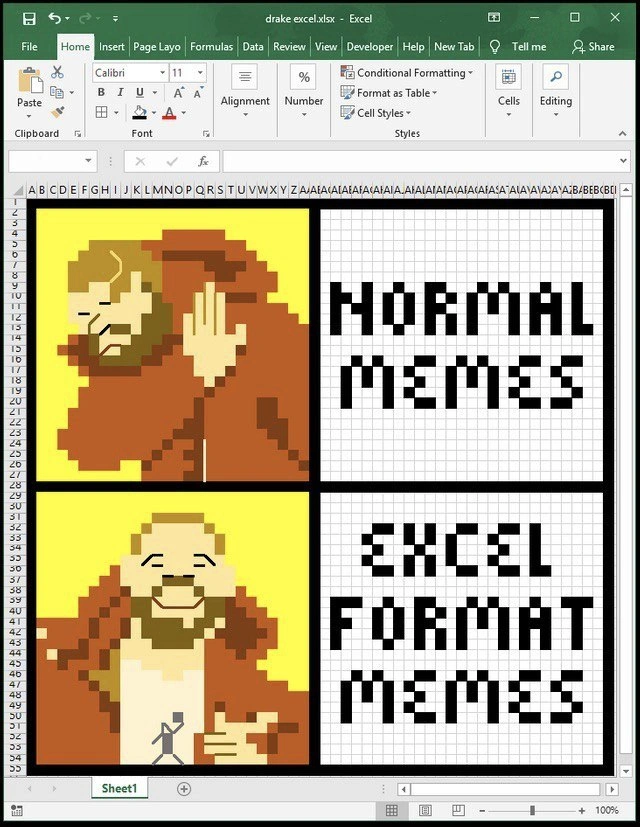
At this level, let’s break down the meme in simpler terms and explain the tech references. The image shows a familiar meme format: the Drake meme, which usually has two panels with Drake (a famous rapper) making a “no thanks” face in the top picture and a happy approving face in the bottom picture. People use it to compare two ideas – one that Drake rejects (top) and one he likes (bottom). Here, the two ideas being compared are “Normal Memes” vs “Excel Format Memes.” Drake is rejecting “normal memes” and is pleased with “Excel format memes.”
Now, what exactly is an “Excel format meme”? It’s literally a meme created inside Microsoft Excel. Excel is a spreadsheet program – basically a big grid of cells (rows and columns) where people usually put numbers, text, and formulas for tasks like budgeting, data analysis, or schedules. Each small rectangle in the grid is called a cell. Usually, you type data into cells or use formulas like =SUM(A1:A10) to add numbers. But here someone did something unusual: they used each cell like a tiny square of color, like a pixel in a digital image. By coloring cells different colors, they drew the pictures and text of the meme inside the spreadsheet. This is a form of pixel art, where an image is made up of many small single-colored squares (just like old video game graphics or mosaic tiles).
In the screenshot, you can see Excel’s interface around the meme. The top shows Excel’s toolbar (the “ribbon”) with tabs like Home, Insert, Formulas, Developer, etc. The presence of the Developer tab is a little clue that the person who made this is comfortable with Excel’s advanced features (that tab lets you do things like write macros or use form controls). However, you don’t necessarily need macros to do this pixel art; you can simply use the regular cell formatting tools – fill color, cell size adjustments – to manually color each cell. The fact that the file is named “drake excel.xlsx” and not just a screenshot underscores that this meme truly lives in a spreadsheet file. It’s not Photoshop; it’s Excel doing double-duty as an art program!
Let’s decode the two halves of the meme content:
- Left side images (Drake): They recreated Drake’s poses using colored cells. If you look closely, Drake’s orange jacket, his face, and his hand position are all represented in a chunky, 8-bit pixelated style. Each “pixel” is actually an Excel cell filled with a solid color (orange, beige, yellow, etc.). It’s like digital LEGOs on a screen: each cell is a brick in the picture. This resembles old-school gaming sprites or icons, which is why it feels retro and nerdy-cool.
- Right side text: The words “NORMAL MEMES” in the top panel and “EXCEL FORMAT MEMES” in the bottom panel aren’t typed with a font – they’re also built out of black squares on a white background. Each letter is formed by a pattern of black filled cells. It looks like a blocky arcade-game font. For example, the letter “M” is made by coloring a group of cells in an M shape. This is painstaking to do in Excel because you have to decide which cell gets colored and which stays white to shape each letter. Essentially, the meme text itself is pixel art too!
So why is this funny to developers or techies? A few reasons:
- It’s an unexpected use of Excel: Excel is a serious business tool, part of the Microsoft Office suite, typically used for finance or data – very dry stuff. Using it to create a fun meme image is delightfully out of place. It’s like using a calculator to draw a picture, or using a bunch of Post-it notes on a wall to recreate the Mona Lisa. There’s a sense of “you’re not supposed to do that, but wow, you did it!”
- Extra effort = geek humor: A “normal meme” would just be an image file or a quick copy-paste of Drake’s picture with text added. Usually, making a meme is quick and easy with the right tools. But a meme in Excel means someone put in a ton more effort for a trivial outcome. That kind of over-engineering is a running joke in programming circles. Developers often find it funny when someone builds something needlessy complex just because they can. It’s a form of showing enthusiasm and creativity.
- Meme format nod: The Drake format itself is well-known, so by using Drake to compare “normal vs Excel memes,” the meme is self-referential. It’s essentially saying: “A meme made in Excel is superior (cooler) to a plain meme.” The humor is half in the statement and half in the proof – the meme itself is an Excel-made creation. It’s very meta.
Additionally, there’s a bit of inherent developer humor in using what’s at hand. In many workplaces, Excel is ubiquitous. Sometimes, if a developer or engineer is stuck in a corporate environment with limited tools, they find ingenious ways to use what’s available. There are stories of people making entire games or complex art in Excel simply because it’s installed on their work PC and maybe they can’t install other software. Excel also has features like Conditional Formatting (see the button in the toolbar in the screenshot) which can automatically change cell colors based on values. For example, you could set a rule that if a cell has the number 1, color it orange; if it has 2, color it black, etc. That way, by putting the right numbers in a grid, Excel would fill the colors for the pixel art automatically. It’s possible the meme maker leveraged something like that to speed up the coloring process. This use of tooling (i.e., using a tool in a creative way) is something developers appreciate. It shows a bit of hackery – using Excel’s features in an unintended way.
To sum up this level: The meme is funny because it’s taking something very normal (making a meme) and doing it in a hilariously non-standard way (inside an Excel spreadsheet). It’s loaded with references that tech folks love: the Drake meme format from internet MemeCulture, the use of a well-known Microsoft tool in a clever way, and the sheer silliness of the effort involved. Even if you’re a junior developer or just starting out, you can appreciate that someone basically made a digital mosaic in a spreadsheet software just for a laugh. It encourages you to think out of the box (or in this case, in the cells 😄).
Level 3: Spreadsheet Sorcery
This meme is a masterstroke of OfficeHumor and TechHumor, turning a routine tool into a canvas for creativity. What we have here is the classic Drake meme template meticulously recreated inside Microsoft Excel. Yes, that’s an actual Excel workbook (drake excel.xlsx) in the screenshot, not a regular image file. The meme’s creator has used Excel’s grid of cells as if each cell were a pixel, producing a pixel-art Drake in his orange jacket on the left and blocky text on the right. The top panel reads “NORMAL MEMES” (with Drake turning away in disapproval), and the bottom reads “EXCEL FORMAT MEMES” (with Drake smiling and pointing approvingly). The humor comes from juxtaposing “normal” meme-making (quick, ordinary) with the extra effort and geeky pride of doing it in Excel, a tool absolutely not intended for graphic design. It’s a tongue-in-cheek celebration of geeky spreadsheet-based developer humor, where doing things the hard, unorthodox way (for the sheer fun of it) wins approval.
To a seasoned developer, this hits on multiple levels of absurd delight:
- Repurposing Tools: Excel is typically used for budgets or data, but here it’s a pixel canvas. Using a serious business tool to make silly art is inherently funny. It’s like writing code on a fridge or deploying a website via Microsoft Paint – wonderfully absurd.
- Nerd Flex: It showcases a kind of nerd cred. Any dev knows it would be far easier to use an image editor or a meme generator, but doing it in Excel is a flex, saying “Look, I can bend Excel to my will!”. The Developer tab visible on the ribbon is a wink to fellow coders, showing that the person has even enabled advanced features. (The Developer tab is normally hidden; turning it on says “I know my way around Excel’s underbelly – macros, VBA, and all.”)
- Detail and Effort: Every letter in “NORMAL MEMES” and “EXCEL FORMAT MEMES” isn’t typed text at all – it’s drawn by filling individual cells with black color to form chunky 8-bit letters. And Drake’s images are made of dozens of colored cells. This required patience (or perhaps a clever use of conditional formatting rules or a script). It’s a techie form of pixel art. Such devotion to a joke commands respect (and laughs) from those who know the tedium involved.
- MemeCulture Meta: The meme itself is about meme formats. The Drake format is one of the most recognizable MemeFormats on the internet. By recreating it in Excel, the creator is riffing on meme culture: “Sure, you’ve seen Drake memes, but have you seen one in Excel? Now that’s premium nerd content.” It’s humor for the in-crowd of developers and spreadsheet tinkerers.
In the developer community, there’s an inside joke that “Excel is the world’s most popular programming language.” It sounds crazy, but countless non-programmers “code” in Excel with formulas and macros every day. Spreadsheets are even Turing-complete, meaning in theory Excel can do anything a programming language can do (indeed, people have created chess games, simulators, even Doom inside Excel). This meme plays on that notion. If Excel can run a flight simulator (as an Easter egg in Excel 97) or complex financial models, why not run our meme game, too? It’s pushing the tool to its limits for comedic effect.
Clippy: “It looks like you’re trying to create a meme in Excel. Would you like help with that?” 📝😅
For many veteran devs, seeing an Excel spreadsheet used this way triggers both laughter and a nostalgic twitch. We’ve all seen Excel abused gloriously: massive project plans with rainbow conditional formatting, office pranks with formula-driven art, or that one colleague who made a ticketing system entirely in Excel. It’s absurd, it’s inefficient, and yet it’s undeniably clever. The meme is essentially Drake (representing the developer) saying “Normal memes? Nah.” and giving a big thumbs-up to “Excel format memes.” It champions the creative misuse of corporate tooling. In a world where we’re inundated with templated content, a meme built cell-by-cell in a spreadsheet stands out like an inside joke for the initiated.
In sum, the humor resonates on an architectural level (using a grid as pixels), a cultural level (Drake meme gets a coding twist), and a practical level (who hasn’t fiddled with an idle Excel sheet out of boredom?). It’s a reminder that developers often find joy in bending everyday software in quirky ways, turning boring spreadsheets into works of art for a laugh. Normal Memes are easy; Excel Format Memes show dedication – and that’s why Drake/dev is smiling.
| Normal Meme Creation | Excel Meme Creation |
|---|---|
| Use an image editor or meme app | Open Excel (a spreadsheet program) |
| Drag-and-drop Drake image template; add text in seconds | Manually color hundreds of tiny cells to draw Drake and text |
| Saves as a PNG/JPEG image file | Saves as an .xlsx spreadsheet file (and you screenshot it) |
| Anyone can do it, quick and simple | Requires planning, skill, and maybe some VBA magic – a true nerd craft |
| Fun result, standard meme | Fun result, plus bragging rights for “doing it the hard way” |
The table above highlights why the Excel approach is hilariously over-the-top. The very inefficiency is the point of the joke – it’s delighting in a needlessly complex solution for a trivial problem (a very developer thing to do). This is camaraderie through craziness: only someone with a coder’s mindset would think of using Excel’s cells as pixels for a meme, and only fellow techies will fully appreciate the insanity. It’s the kind of joke you forward to your team with the subject “I both love and hate this 😂”.
Description
A screenshot of a Microsoft Excel window, titled 'drake excel.xlsx', where the user has painstakingly recreated the popular 'Drake Hotline Bling' meme format using pixel art. Each cell in the spreadsheet is colored to form the pixels. The top panel shows a pixelated Drake looking displeased and holding up a hand in rejection, with the adjacent text 'NORMAL MEMES' also in pixelated font. The bottom panel shows a pixelated Drake looking happy and pointing in approval, with the text 'EXCEL FORMAT MEMES' next to him. This is a highly meta meme that demonstrates an impressive level of dedication and misuse of a tool. For technical professionals, especially those in data-heavy or corporate roles, it's a humorous nod to the absurd lengths people will go to procrastinate or be creative with business software. It finds humor in the unexpected and highly inefficient use of Excel as a graphics editor
Comments
10Comment deleted
Someone spent hours turning Excel, a tool for wrangling data, into a raster graphics editor. It's the software equivalent of using a screwdriver as a hammer - painful, inefficient, but strangely impressive when it actually works
“Normal memes” are cute; the Excel version ships with a VBA macro, sneaks into production, and five years later the entire revenue pipeline depends on Drake’s conditional formatting - tell me you haven’t seen that architecture review slide
When your PM asks for 'data-driven memes' and you take it literally - because nothing says 'enterprise-ready humor' like a Drake meme with full VLOOKUP support and pivot table compatibility
When your stakeholders demand everything in Excel format, so you deliver - even the memes. This is what happens when a developer discovers conditional formatting has more creative potential than the entire Adobe Creative Suite, and honestly, the merge conflicts are way easier to resolve
Excel memes: infinitely scalable without Kubernetes, but good luck migrating off that monolith
In enterprise land the most portable front end isn’t HTML - it’s .xlsx; call it a “conditional formatting shader” and Security will happily let it through
Normal memes live on Slack; Excel-format memes ship to prod - because the most widely deployed runtime in the enterprise is Outlook + .xlsx
More please Comment deleted
Wow! This must have taken time to do in excel Comment deleted
Omg windows is so shittt Comment deleted