The Eternal Chase: DOM and JQuery
Why is this Frontend meme funny?
Level 1: A Classic Cat-and-Mouse Chase
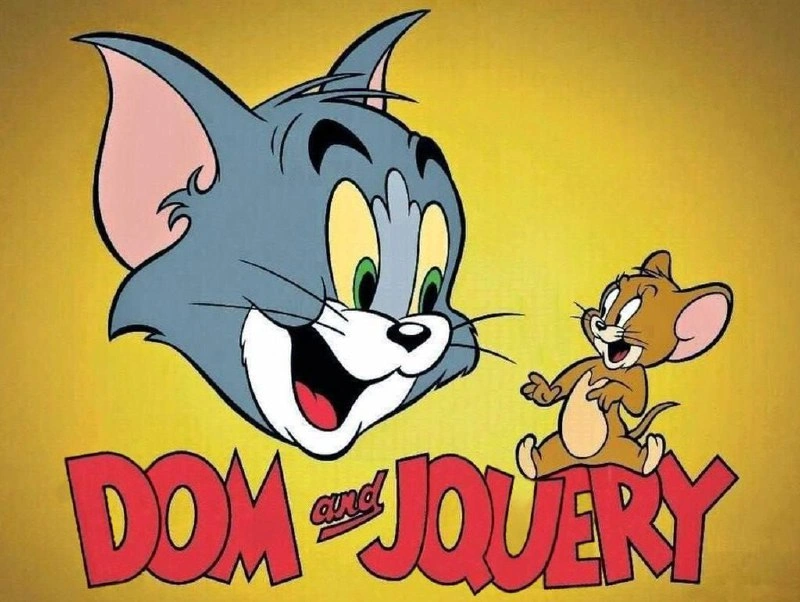
This picture is funny because it compares building web pages to a cat-and-mouse chase, just like the old Tom & Jerry cartoons. Imagine the DOM as a big playful cat – that’s all the parts of a web page that you see and interact with. Now imagine jQuery as a quick little mouse – that’s a helper tool that programmers used to use a lot to change things on the page. In the cartoon, the cat is always trying to catch the mouse, but the mouse is clever and helps solve problems (or sometimes causes mischief!). In the same way, when making websites years ago, the big web page (cat) could be hard to control, and the little jQuery mouse was always running around helping to fix things or do neat tricks on the page. The meme makes people who write code laugh because it brings back memories of that silly, endless chase: the big DOM cat being tamed (or teased) by the tiny jQuery mouse. It’s like remembering a favorite old cartoon, but for web developers – a warm and funny reminder of how we used to make pages interactive, one cat-and-mouse act at a time.
Level 2: Cat-and-Mouse in the Browser
Let’s unpack the joke in simpler terms. The DOM, short for Document Object Model, is basically the browser’s internal representation of a web page. Think of the DOM as a big family tree of everything on the page: the <body> is the trunk, with branches for each <div>, <p>, and <button> element, and smaller twigs for text and attributes. Web developers interact with this tree using JavaScript to change how the page looks or behaves. However, in the early days, dealing with the DOM directly could be tricky — each web browser had its own way of doing things, and writing code that worked everywhere was a bit like trying to catch a slippery mouse.
jQuery is a famous JavaScript library that became incredibly popular about 10-15 years ago for making DOM manipulation much easier and more reliable. A library in programming is like a toolkit: it’s pre-written code that you can include in your project to help with common tasks. jQuery’s specialty was simplifying common web page actions — selecting elements, handling clicks, changing content, animations, server requests — all while smoothing out browser inconsistencies automatically. Its slogan was “Write Less, Do More,” because it let developers accomplish tasks with a lot less code than using plain DOM APIs. For instance, compare adding a click behavior to a button using the DOM directly vs using jQuery:
<button id="saveBtn">Save</button>
<script>
// Without jQuery: plain DOM method
var button = document.getElementById("saveBtn");
button.addEventListener("click", function() {
alert("Saved (vanilla JS)!");
});
// With jQuery: using the $() selector and shorthand event
$("#saveBtn").click(function() {
alert("Saved (jQuery)!");
});
</script>
In the first snippet, we call document.getElementById and then addEventListener – two separate steps and more to remember. In the jQuery version, the $("#saveBtn") finds the button in one go (using a CSS-style selector), and .click(function {...}) attaches the event. It’s concise and readable. This convenience is why almost every web project in the 2010s started by including the jQuery file. Developers would wrap interactive code in $(document).ready(function(){ ... }); which basically means “wait until the DOM (the page structure) is fully loaded, then run this code.” This was jQuery’s way of ensuring the cat (page elements) were all present before the mouse (our jQuery code) tried to play with them.
Now, the meme itself is a tom_and_jerry_parody: it replaces the cartoon characters Tom (the cat) and Jerry (the mouse) with “DOM” and “jQuery.” In Tom & Jerry cartoons, the cat and mouse are always in a humorous chase. Similarly, in web development, jQuery was constantly used to chase down and handle DOM-related issues. If the DOM was doing something unexpected or if a page element wasn’t behaving, you’d send in jQuery (like Jerry with a clever trick) to fix it or smooth it out. It’s a playful way to describe dom_vs_jquery interactions. The big grey cat head labeled “DOM” represents the whole web page structure (often cumbersome and a bit unwieldy), and the small brown mouse labeled “jQuery” represents the nimble tool that helped control that structure. The cat is grinning and the mouse looks confident, hinting that despite their chasing, they’re in a kind of partnership that older devs found endearing (and occasionally frustrating!).
For a junior developer, it’s useful to know that jQuery was essentially the framework before modern frameworks came along. It was everywhere. If you open an older project’s source code, seeing $(something) is as common as seeing <script> tags. Today, you might use React or Vue which handle updates to the DOM for you in a different way. But prior to those, jQuery was how we did interactive front-ends. This meme taps into that knowledge: it’s FrontendHumor that juxtaposes a classic cartoon with classic web tech. Even if you haven’t used jQuery much, you likely know Jerry the mouse always outsmarts Tom the cat. Here that translates to “jQuery making DOM tasks easier.” It’s a bit of TechNostalgia too – many developers remember their first little script using $("#hideButton").click(...); or wrestling with an old jQuery plugin. The meme gets a laugh (and a knowing nod) because it reminds us of those simpler times when our biggest problem was making sure a dropdown worked in IE8, and jQuery was our trusty sidekick in the chase.
Level 3: Jerry-Rigging the DOM
In the late 2000s and early 2010s, front-end WebDev felt like a slapstick cartoon. The browser’s Document Object Model (DOM) was the big, elusive structure every script had to grapple with, and jQuery was the clever little library scurrying around to tame it. This meme’s title card-style image — with “DOM and jQuery” mimicking the classic Tom & Jerry logo — instantly teleports seasoned developers into a scene of Tech Nostalgia. It recalls an era when every webpage load began with a familiar incantation: $(document).ready(). That single line was our signal to start the show, ensuring the DOM was fully loaded before jQuery sprang into action.
Back then, working with the raw DOM API could feel like a never-ending cat-and-mouse game. Each web browser (Internet Explorer, Firefox, Chrome, etc.) had its own quirks and inconsistencies. Adding an event listener or styling an element often meant writing different code paths for different browsers — a headache in pure JavaScript. Enter jQuery (our resourceful Jerry): it chased down those browser bugs and differences, wrapping them in one “write once, work everywhere” interface. For example, whereas vanilla scripts might wrestle with document.getElementById or document.attachEvent versus addEventListener, jQuery provided the $() selector and a unified .on() method, quietly abstracting away the chaos. It was the tool to **“write less, do more,”* flipping a messy DOM interaction into a one-liner. Senior engineers remember how jQuery’s selectors (powered internally by the Sizzle engine) cleverly navigated the DOM’s tree, much like Jerry darting through maze-like mouse holes to find cheese (or in this case, to find <div>s and <span>s).
The humor here comes from that dynamic: jQuery was always one step behind the DOM’s antics, implementing polyfills and patches for browser oddities — just as Tom devises contraptions only for Jerry to cheekily outwit him. Every time the DOM (or a browser update) introduced a new challenge, jQuery would scramble to catch up. We saw this in the constant legacy vs modern tussle: old IE6 rendering bugs, unpredictable DOM events, memory leaks from mishandled nodes… jQuery became the de facto fix-it kit, offering consistent methods where native DOM APIs felt like unpredictable slapstick props. Seasoned devs chuckle (and perhaps cringe) because we’ve all seen jQuery do amazing things with minimal code, only to occasionally face edge cases where the mighty library still couldn’t completely trap the DOM’s wild behavior (looking at you, old IE!). It’s a shared, relatable developer experience: spending late hours debugging why a seemingly straightforward $("#menu").hide() wasn’t working in one weird scenario, reminiscent of a frustrated Tom finding his plan foiled by some tiny detail.
What makes this especially nostalgic is how far the Frontend world has evolved since. Modern frameworks (React, Angular, Vue – the new cats in town) now handle the DOM in more systematic ways, often using virtual DOMs or reactive data binding. This largely ended the direct jQuery-vs-DOM chase on new projects; developers no longer manually query and poke the DOM for every little update, because the framework does it behind the scenes. Yet, many frontend_legacy_codebases still harbor that classic duo: you dive into a decades-old codebase and find both raw document.createElement calls and $() wrapped logic living side by side. It’s like stumbling on an old cartoon rerun in the era of high-tech CGI movies. The meme captures that feeling perfectly. Seeing “DOM and jQuery” in bold red letters with a grinning cat and mouse isn’t just a pun — it’s a tribute to the golden age of jQuery when it tirelessly chased the DOM’s problems around the browser, to the amusement (and occasional exasperation) of developers.
Description
This image is a clever parody of the classic 'Tom and Jerry' cartoon logo. It features the iconic smiling head of Tom the cat and a cheerful Jerry the mouse against a bright yellow background. The title, rendered in the familiar red font of the cartoon, has been altered to read 'DOM and JQUERY'. Tom, the large cat, represents the 'DOM' (Document Object Model) - the complex, tree-like structure of a webpage that developers must interact with. Jerry, the small and agile mouse, represents 'JQUERY', a once-ubiquitous JavaScript library famous for simplifying DOM traversal and manipulation. The meme perfectly captures the 'cat-and-mouse' dynamic that web developers often feel when trying to select and modify elements on a page, a task that jQuery made famously easier and more elegant compared to verbose vanilla JavaScript of its time. It's a nostalgic joke for any developer who remembers the era when jQuery was the king of frontend development
Comments
9Comment deleted
The DOM is the house Tom endlessly tries to control, and jQuery is Jerry, living in the walls and rewriting the floor plan with a single line of code
Remember when our biggest architectural debate was whether to let jQuery chase the DOM or just write Vanilla JS - then React showed up with a whole multiverse and said, “Hold my virtual DOM.”
After 15 years of watching jQuery chase DOM quirks around, we've come full circle: now we're writing document.querySelector() and pretending we invented it, while our legacy codebase still has 47 different versions of jQuery loaded 'just in case.'
Much like Tom's futile attempts to catch Jerry, jQuery spent years chasing the DOM trying to make it behave consistently across browsers - and just when it finally succeeded, React and Vue showed up and said 'actually, we don't need to touch the DOM directly anymore.' The irony? jQuery solved cross-browser DOM manipulation so well that modern frameworks could afford to abstract it away entirely, making jQuery's greatest achievement also its obsolescence
DOM and jQuery - spent a decade chasing browser quirks with $, and another decade chasing $ out of the bundle
jQuery was the mouse that outsmarted IE6, and in 2025 we’re the cat trying to evict $.fn without detonating thirty legacy plugins that somehow need jQuery 1.12 and 3.6 simultaneously
DOM & jQuery: the legacy duo chaining queries like Tom chasing Jerry - fun until bundle sizes forced a messy divorce
😂 Comment deleted
can't believe I'm finally seeing a new js meme after all these years Feels like being intern again Comment deleted