DevOps Generational Warfare: A Thousand Logos vs. FTP
Why is this DevOps SRE meme funny?
Level 1: Too Many Gadgets vs. One Good Hammer
Imagine you have two builders trying to fix a simple piece of furniture. One builder (like the “Zoomer” in the meme) brings an entire toolbox with 50 different gadgets: electric drills, special measuring lasers, a dozen types of screwdriver heads, even a robot assistant – one tool for every tiny task. The other builder (the “Boomer”) walks in with just a hammer, a screwdriver, and some nails. Now, both builders can get the job done, but they go about it very differently. The first builder spends a lot of time switching between tools, setting up the drill, calibrating the laser level, checking a digital manual on his tablet – it looks super high-tech, almost like a science lab for a simple job. The second builder just eyeballs it, hammers a nail, tightens a screw by hand, and boom, the furniture is fixed.
The meme is joking about a similar situation in the software world. The young developers today carry a huge “bag of gadgets” (lots of software tools) to do their work – one for planning, one for coding, one for testing, one for talking to teammates, and so on. It’s like they have an app or service for every step, and it can get a little crazy keeping track of all of them (imagine having to remember 10 different passwords and websites just to finish one project!). The older developers from back in the day often used a much simpler set of tools, kind of like only having a hammer and screwdriver. They might write code in a simple program (like writing a letter in Notepad), send the code to the server by something like email or a basic file transfer (similar to dragging a file into a USB stick), and tell their team what’s going on via email or a quick call. It wasn’t fancy, but it worked with just a few basic steps.
So why is this funny? It’s the over-the-top contrast. It’s like seeing someone use a smartphone app to measure how much water to pour into a cup versus someone just using their eyes and a regular measuring cup. The first way might be very precise and modern, but also feels a bit over-complicated for a simple task. The second way is simple and old-fashioned, maybe not as exact, but you get the result with much less fuss. People find it funny because we’ve all experienced this in some way – like that friend who has a different gadget for everything and that grandparent who says “back in my day, we did it the simple way.” The meme puts that idea into the context of DevOps (which is just a term for how developers and IT folks work together to make and release software). In short, the left side (Zoomers) is an overflowing toy chest of modern tools, and the right side (Boomers) is a minimal tool belt. Both sides form an infinity loop, meaning they’re aiming to do the same cycle of work, but one uses a ton of helpers and the other uses just a few trusty basics. It’s poking fun at how sometimes we might be over-complicating things in the modern day, and also how the older generation might be sticking to the bare bones. It’s like having 10 apps to remind you to drink water vs. just drinking when you’re thirsty – one will send you fancy notifications, the other just relies on a simple habit. The end result (you stay hydrated or you ship your code) is the same, but the journey looks hilariously different.
Level 2: Plan, Build, Deploy, Repeat
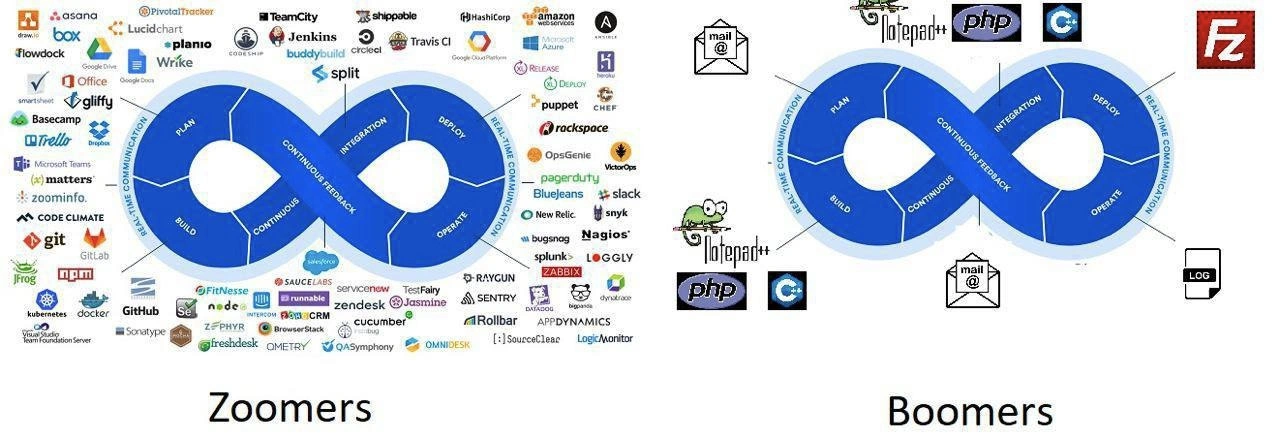
Let’s break down what’s happening in this meme and explain the key terms for those newer to DevOps. The graphic on both sides is a DevOps infinity loop. This loop illustrates the continuous nature of modern software development and operations: you PLAN what to build, BUILD the software, get CONTINUOUS FEEDBACK (through testing and monitoring), INTEGRATION (merge code changes, ensure everything works together), DEPLOY the software to production, and OPERATE it in the real world. Then the cycle repeats as you take feedback and plan the next changes. DevOps is all about making this cycle quick and smooth – continuously delivering updates without breaking things. The side label “REAL-TIME COMMUNICATION” hints that throughout this loop, the team is communicating (ideally instantly, to collaborate and respond to issues fast).
Now, the Zoomers (modern) side shows a lot of specific tools and services around each stage of that loop. Each logo represents a product commonly used to automate or assist that part of the process. It might look like alphabet soup, so let’s clarify some of them by category:
Planning & Project Management: Logos like Asana, Jira, Trello, Wrike, Basecamp are project management tools. These help teams plan tasks, track progress, and manage projects collaboratively (instead of, say, emailing spreadsheets around). Modern dev teams (the “Zoomers”) often use these to keep everyone on the same page about what’s being built and who’s doing what. Real-time communication tools like Slack, Microsoft Teams, or Mattermost (an open-source Slack alternative) are also part of this – they let developers chat, share updates, and integrate notifications (for example, a message pops up in Slack when code is pushed or a build finishes). The label ZoomInfo is a bit of an odd one out (ZoomInfo is a sales intelligence tool, possibly included humorously or by mistake), but likely the idea was to include Zoom (for video calls) or show that even meetings and calls are part of the real-time comms. Essentially, Zoomer teams have a bunch of real-time collaboration apps to discuss and plan their work continuously.
Coding & Version Control: We see Git, GitHub, GitLab logos. Git is a version control system – a tool that tracks changes in code so multiple developers can work together without overwriting each other. GitHub and GitLab are popular platforms for hosting Git repositories and collaborating on code (reviewing code, tracking issues). Modern dev teams use Git extensively; it’s a pillar of DevOpsCulture to integrate code frequently (this practice is part of Continuous Integration, often abbreviated as CI). The code itself for Zoomers might be written using advanced IDEs or code editors (for example, Visual Studio Code, IntelliJ, etc., though their logos aren’t explicitly shown, it’s implied that modern devs use heavy-duty tools).
Build & Continuous Integration (CI): Tools like Jenkins, TeamCity, Travis CI, CircleCI, Buddybuild, Bamboo appear around the loop. These are CI servers or build automation tools. They automatically compile the code, run tests, and package the software every time developers make changes (or on a schedule). This practice ensures that integration issues are caught early – instead of waiting weeks, you find out within minutes if a new code change broke something. For a newcomer: imagine writing an essay with friends where every time someone adds a paragraph, a robot immediately checks if the whole essay still makes sense and highlights any conflicts – that’s what CI tools do for code. Zoomers rely on these heavily: rather than manually building the software on their own machine each time, a tool like Jenkins does it on a server, every commit.
Deployment & Infrastructure: There are logos like Amazon Web Services (AWS), Kubernetes, Docker, Puppet, Chef, Release, DeployBot, HashiCorp etc. These relate to how the software is packaged and deployed to the servers/users. Docker is a tool that packages applications into containers (lightweight, portable environments). Kubernetes orchestrates those containers (like an air traffic controller for Docker containers, managing where they run on a cluster of machines). Puppet and Chef are configuration management tools – they automate setting up servers and environments (like scripts that ensure each server is set up exactly the same way, so deployment is predictable). HashiCorp is a company known for tools like Terraform (for provisioning cloud infrastructure as code) and Vault (for managing secrets), so its logo hints at using modern infrastructure-as-code techniques. DeployBot and similar tools help automate the process of releasing new code into production (maybe by pushing new versions to servers or app stores). So, the Zoomer side shows that for deploying and running their software, they’ve got all these cloud and automation services – rather than, say, copying files manually, everything is scripted and managed by specialized software.
Testing & Quality Assurance: Names like Sauce Labs, BrowserStack (for cross-browser testing), TestFairy (mobile app testing), Zephyr (test management), Jasmine (a JavaScript testing framework) appear. These indicate the modern emphasis on rigorous testing at multiple levels. Instead of just hoping the code works, Zoomer pipelines run automated test suites (unit tests, integration tests, UI tests in multiple browsers, etc.). Code Climate might be in there as well – it’s a code quality tool that analyzes your code for issues or maintainability, giving continuous feedback to developers about their code quality. The term Continuous Feedback on the loop means tools are constantly giving information back to developers (failing tests, code coverage metrics, performance monitoring data) so they can improve the code in near real-time.
Monitoring & Operations: In production (the “Operate” stage), modern stacks use monitoring and logging tools. We see Nagios, Zabbix (both are classic monitoring systems that check if servers are up, disk space isn’t full, etc.), Splunk and Loggly (log aggregation services – instead of logging to individual files, all logs are centralized so you can search them easily), Sentry, Raygun, Rollbar (error tracking systems that catch exceptions from applications and alert the developers with details), New Relic and AppDynamics (APM – Application Performance Monitoring, which tracks things like response times, server health, user metrics in real time). Then there are incident management tools like PagerDuty, OpsGenie, VictorOps (if something goes wrong, these will wake up the on-call engineer via phone/text/notification – ensuring someone responds quickly). Also, Freshdesk, Zendesk, OmniDesk show up – those are support ticket systems or helpdesk software, suggesting even user-reported issues get tracked formally. Modern DevOps means after deployment, you keep a close eye on the application and infrastructure – everything is monitored and any problem triggers an alert or a ticket. Real-time communication on this side could mean that many of these tools are integrated to send alerts to a Slack channel or a mobile app instantly, so the team knows about issues as they happen.
Now, compare all that to the Boomers (legacy) side. The Boomer setup has only a few familiar, maybe “old-school” items around that same DevOps loop:
Notepad++: This is a lightweight text editor for Windows, beloved by many programmers who either don’t need or don’t prefer a heavy Integrated Development Environment (IDE). It’s very simple compared to something like VS Code or Eclipse, but it’s fast and gets the job done for editing code or configuration files. Seeing Notepad++ here implies that our boomer dev might be writing code in a simple editor (maybe even directly editing code on the server, or writing scripts without fancy IDE features like auto-complete or refactoring tools). It’s a symbol of a minimal development environment. No Git integrations, no container tools built-in – just you and your code in a plain text form.
PHP and C: These logos represent programming languages. C is a low-level, compiled language (old but gold, used since the 1970s) – its presence could imply an older system or tooling written in C, or just a nod to “older tech stack.” PHP is a scripting language primarily for web development that was extremely popular in the early 2000s (and still used today). If you think of a “boomer” web developer, PHP + MySQL on a simple server (the classic LAMP stack: Linux, Apache, MySQL, PHP) might come to mind. PHP projects often didn’t require a complex build pipeline – you’d write code and it would run on the server as is. The inclusion of these languages implies the legacy stack might be a simple monolithic application written in a straightforward language, rather than a bunch of microservices in containers.
Mail @ (Email): The envelope icons labeled “mail @” stand for email being used at multiple stages. One at the “Plan” side suggests communication of plans and requirements happens via long email chains or exchanging documents (instead of a real-time project management board). One at the “Operate/Feedback” side suggests that when something goes wrong or when something is delivered, notifications are sent by email – e.g., an ops person might email a developer saying “Hey, the server is down,” or the system might send a basic alert via email. Before Slack and instant messaging, teams really did rely on emails for a lot of collaboration. It’s slower and not truly “real-time,” but it was the norm. Some older systems even have email notifications for things like nightly build results or monitoring alerts (like a cron job sends an “ERROR LOG FOUND” email at midnight).
LOG (log file): The log sheet icon on the Boomer side likely signifies plain log files. In lieu of centralized logging systems like Splunk, older setups just write text logs to a file on disk. If something goes wrong, a developer or sysadmin might manually open the log file (or use a simple tool like
tailin a terminal) to read what happened. No fancy web dashboard, just raw logs. It’s actually still quite common – a small app might just have aapp.logfile on the server. The drawback is you have to log into the server to see it, or have it emailed periodically (again, via that email icon!). But it’s simple and there’s not much that can break in that process except running out of disk space.FileZilla: This is a free FTP (File Transfer Protocol) client. It’s used to upload and download files to servers, typically websites on remote hosts. It has a big red "Fz" icon. A generation of developers deployed websites by editing files locally and then dragging-and-dropping them via FileZilla to a server (some still do for simple sites!). No continuous deployment pipeline, no containers – just “I changed index.php, let me FTP it up to the live site.” FileZilla in the meme indicates that deployment for the Boomer stack is manual: the developer probably compiles or prepares the code on their own machine and then uses FTP to put it on the production server. This is pretty old-school by today’s standards – it’s error-prone (you might forget to upload a file, or upload to the wrong place) and doesn’t scale well (can’t handle 10 deployments a day without someone going crazy), but it works for small projects or infrequent updates.
Notice what’s missing on the Boomer side: no explicit version control logos (they might not be using Git; perhaps they use older systems like Subversion or even no version control, just file backups), no CI servers (compiling and testing might be a fully manual process, or maybe a simple nightly build script at best), no container or cloud infrastructure depicted (likely a single server or a simple host is used), no team chat (the team might just talk in person or stick to email/phone). It’s a legacy approach to software delivery – minimal automation, more reliance on individuals remembering to do things right, and using general-purpose tools (like email and FTP) rather than dedicated software for each step.
To a junior developer, the difference can be surprising. The modern DevOps stack (Zoomers) is powerful but daunting: each logo you see around that infinity loop is something you might have to learn or at least interact with. This can feel overwhelming – almost like you need a tool just to manage all your tools! But each exists for a reason: they solve specific problems (like Jenkins automates builds so you don’t compile code by hand; Splunk collects logs so you’re not SSHing into servers to read them). Companies often piece together many such services to streamline development and deployment, which is part of the DevOps culture of automation and continuous improvement. The downside is complexity: all those integrations need to be maintained, and there’s a learning curve for each tool.
On the flip side, the legacy stack (Boomers) is simple to describe and learn – you could probably get a basic site up with a text editor, an FTP client, and some patience – but it lacks safety nets. There’s no automated testing, so bugs can slip through until users report them. There’s no continuous integration, so if two people change code, they might not find conflicts until it’s too late. There’s minimal monitoring, so issues might go unnoticed longer. In short, the legacy way relies a lot on individual diligence and often results in slower iteration (you might only deploy once in a blue moon, because it’s a pain to do it, and everyone’s nervous when it happens).
The meme contrasts “Modern vs Legacy” in a tongue-in-cheek way: it exaggerates for humor. Not every young dev uses every tool shown (they’d go crazy), and not every older dev is stuck in the stone age of tech. But it captures a real feeling: new developers are inundated with specialized tools for everything (sometimes jokingly called “Tool X as a Service” syndrome, where X could be anything you can think of), whereas veteran developers often reminisce about a simpler workflow (even if it had its own challenges). The tags like ToolingOverload and ModernVsLegacy sum it up – too many tools versus time-tested minimalism. And tags like DevOpsHumor and DevOpsCulture remind us that this is a lighthearted take on how DevOps practices differ across generations or company cultures.
To put it simply, if you’re a junior engineer:
- Don’t panic when you see a wall of tool logos – you’re not expected to master them all at once. Over time you’ll encounter many of them, and each will make sense in context.
- Understand why each tool exists. For example: Jenkins exists because manually building software for every code change doesn’t scale; Docker exists because deploying software was hard when “it works on my machine” but not on the server; Slack exists because quick team communication can solve problems faster than slow email chains.
- Realize that legacy systems often don’t follow modern DevOps practices. If you join an older project, you might actually use some “boomer” techniques – like editing a config file in Notepad and uploading via FTP – especially in smaller companies or older IT departments. It’s good to know both worlds! Sometimes you might even need to modernize a legacy pipeline by introducing a CI server or proper source control.
The infinity loop diagram being identical on both sides is a fun detail: it suggests that in theory both Zoomers and Boomers are doing the same lifecycle (planning, coding, deploying, etc.), just with vastly different toolchains. So the meme is saying: “DevOps infinity loop for young vs old: one filled with 50 apps, one with 5 tools.” It’s a visual punchline about how generational differences and tech evolution affect daily workflows. A Zoomer DevOps engineer might deploy code with a click of a button in a fancy dashboard and get a Slack ping if it fails, whereas a Boomer engineer might SSH into a server and run a script, then send an email when it’s done. Both get the job done – just in different styles.
Here’s a quick comparison to summarize the key differences depicted:
| DevOps Stage | Modern “Zoomer” Tools (Examples) | Old-School “Boomer” Approach |
|---|---|---|
| Plan & Track | Agile boards like Jira, Asana, Trello for tasks; real-time chat in Slack/Teams for discussing work and quick questions. | Emails threads for requirements, or face-to-face meetings; maybe a shared Excel or just a brief phone call to coordinate. |
| Code & Build | Code in an IDE or advanced editor; use Git with a hosting service (GitHub/GitLab) to collaborate. Automated builds via CI tools like Jenkins or Travis on every commit. | Code in a simple editor like Notepad++ (or Vim/Emacs); possibly no formal version control (or older systems like SVN). Compile or build the software manually on a developer’s machine when needed. |
| Test & Integrate | Write automated tests (using frameworks like Jasmine for JavaScript, etc.). CI runs these tests for each change. Use quality tools (Code Climate, etc.) for continuous feedback. Integration is continuous – small merges happening all the time, with tools ensuring compatibility. | Testing is done manually (clicking through the app, eyeballing results) or not very frequently. Integration might be “big bang” (everyone’s work merged infrequently, e.g., at the end of the week or release cycle) and tested in one go by a person. No automated test suite to catch issues immediately – relies on developers’ carefulness and maybe a dedicated QA phase later. |
| Deploy/Release | Automated deployment pipelines (e.g., a CI/CD setup where merging code triggers deployment). Use containers (Docker, managed by Kubernetes on the cloud) or cloud services (AWS, Azure) to host apps. Infrastructure and configs managed by code (tools like Puppet/Chef or Terraform). Deployments can happen many times a day with confidence, since the process is scripted and repeatable. | Manual deployment: e.g., build the software, then use FileZilla (FTP) or a remote desktop to copy files onto a server. Perhaps run a manual install script. Often done during off-hours (night/weekend) to avoid users being on. Deployment is a bit of a ceremony (might happen only once in a while, because it’s risky and labor-intensive each time). If something’s misconfigured, an engineer has to fix it on the fly on the server. |
| Operate & Monitor | Comprehensive monitoring: Nagios/Zabbix check server health, New Relic/AppDynamics track performance, logs from all servers centralized in Splunk/Loggly for analysis. Errors are caught by Sentry/Rollbar automatically. On-call rotations use PagerDuty/OpsGenie: if the system has an issue at 2 AM, an alert is sent to someone’s phone instantly. The team often has dashboards and real-time alerts, so they know the system status at all times. | Ad-hoc monitoring: maybe a simple script or two that pings the server and sends an email if it’s down. Logs are kept on each server (developers might RDP/SSH in to read them when troubleshooting). Many issues are discovered when a user or client reports them. There might be scheduled checks (e.g., someone scans logs each morning over coffee). No sophisticated alerting – if something critical happens off-hours, it might wait until the next day unless someone notices. |
| Feedback & Comm | Continuous feedback via integrated tools. For example, after deployment, team gets instant notifications if something fails or if users are encountering errors. Feature usage metrics might feed back into planning via analytics. Team communicates in real-time (group chat, video calls, etc.), keeping a dynamic, fast-moving cycle. | Delayed feedback: feedback often comes through manual channels – an email from a customer, a meeting where the team reviews what went wrong last release. It’s not as immediate. Communication is mostly via email or scheduled meetings, which introduces delays. The development cycle is more segmented (develop, then wait for feedback later) rather than continuous. |
As you see, the Zoomer column is packed with tech brand names – each one is essentially a specialized solution for a part of the DevOps lifecycle. The Boomer column leans on generic tools and human effort. Neither column is “wrong” – they’re just different ways of doing things. In practice, many workplaces fall somewhere in between: using some modern tools but not all, or modernizing gradually. But memes like this use extremes to make the point clear and humorous.
For a new developer, this comparison also teaches a bit of tech history and culture:
- You may hear senior colleagues joke about how they “used to upload sites via FTP” or “ship software on CDs via mail” – that’s the world depicted on the right. It emphasizes self-reliance and simplicity, but also had limitations we’ve since addressed with new tools.
- You’ll also hear people complain about “tool fatigue” or “too many DevOps tools” – referring to the overwhelm of the left side. Each tool might be great, but keeping track of dozens of them (and paying for them, and training people on them) can be exhausting. Some companies even hire dedicated DevOps engineers or SREs (Site Reliability Engineers) whose whole job is managing these pipelines and tools, because it’s a complex domain of its own now.
In essence, this meme is a crash course in how DevOps tooling has evolved. It went from “just use what you have” (e.g., a text editor and manual scripts) to “use the best tool for each job” (even if that means having 50 tools). The truth lies somewhere in the middle, but seeing the two extremes side by side is both educational and amusing. You can appreciate the power of modern DevOps (faster releases, more reliability) and also the elegance of a simple approach (less overhead, easier to grasp). And if you ever feel overwhelmed by a new shiny DevOps tool being introduced at work, just remember the Boomer side – people shipped great software long before that tool existed, so sometimes it’s okay to question if you truly need it or if things are getting too complicated. That kind of critical thinking is part of growing as an engineer.
Level 3: The Infinite Toolchain
Modern DevOps has turned into an infinite toolchain of specialized services – a far cry from the minimal setups of the past. The meme’s Zoomers vs Boomers split highlights a generational toolchain contrast in painfully funny detail. On the left (“Zoomers”), we see the DevOps infinity loop diagram absolutely smothered in logos – essentially a rainbow of tools for every single stage of the pipeline. It’s a case of tooling overload taken to the extreme. Planning is done in Jira, Asana, or some agile tracker; coding and building involve GitHub/GitLab, CI servers like Jenkins or Travis CI, containers with Docker, orchestration with Kubernetes, and so on. Testing, integration, and deployment have their own parade of SaaS products (from artifact repositories like JFrog Artifactory to deployment managers, feature flag services, etc.). Operations and monitoring? Take your pick: Splunk for logs, New Relic or AppDynamics for APM, and alerting via PagerDuty, OpsGenie, or whatever trendy on-call tool is in vogue. Even real-time communication isn't spared – Slack, Microsoft Teams, and a dozen chat ops integrations are all wired in. The Zoomer DevOps stack looks like a NASCAR jacket covered in sponsor logos or a corporate slide boasting every integration under the sun.
On the right (“Boomers”), the same infinity loop is almost comically bare, featuring just a handful of icons. Instead of an army of SaaS apps, it’s a minimalist tooling approach – essentially an old-school, no-frills DevOps pipeline. Notepad++ (the chameleon logo) represents the code editor of choice – a lightweight text editor favored by many veteran developers for its simplicity. There’s a big PHP logo and a C language logo, hinting that our boomer-era dev might be writing straightforward server code in PHP or a compiled C program, rather than chasing the latest JavaScript framework or spinning up microservices. The deployment process? Forget automated Docker/Kubernetes pipelines – there’s a FileZilla icon (the red “FZ”), meaning code is probably uploaded via FTP by hand. The CI/CD concept for Boomers might just be “Copy It/Click Deploy.” Integration and testing are manual or minimal – maybe just running the code locally or on a staging server, no fancy cloud test runners needed. For monitoring, the boomer stack has a plain “LOG” icon: logs are simple text files, checked manually or emailed around, instead of being aggregated by ELK stacks or flashy dashboards. And speaking of communication, notice the envelope icons labeled “mail @” on the boomer side – that’s right, email-based workflow all the way. If something breaks in production, someone might literally send an email (or two) about it, rather than an automated Slack alert spamming your phone at 3 AM.
The humor here is how DevOps culture and expectations have exploded in complexity. The Zoomer side illustrates the modern “everything-as-a-service” mindset: every stage of the infinity loop (Plan -> Build -> Integrate -> Deploy -> Operate -> Continuous Feedback) has dedicated tools, each arguably best-in-class for a niche function. This reflects real trends – companies adopt specialized products for project management, version control, CI, containerization, config management, testing, monitoring, and incident response. In theory, this tool sprawl yields efficiency and automation. In practice, it can feel like juggling chainsaws: you spend half your time managing tool configurations, integrations, and user accounts. It’s DevOps/SRE on hard mode, where maintaining the pipeline is a project of its own. Seasoned engineers (the ones chuckling at this meme) know the pain of context-switching between a dozen dashboards and keeping up with constant updates or outages in one of these many services. (When one of them goes down, the whole pipeline can grind to a halt – continuous integration is great until TeamCity or GitHub has an outage and everyone’s blocked). The meme exaggerates for effect, but not by much – a modern DevOps stack in a large org truly can involve this many moving parts, and it’s both impressive and absurd.
Contrast that with the Boomer side: it embodies the “Keep It Simple, Stupid” (KISS) philosophy. Fewer tools, fewer failure points. It might lack automation or real-time collaboration, but it’s straightforward and predictable. An old-school developer might plan in an email thread, code in a single environment, manually compile or copy files, and check logs as needed. There’s a certain charm – and risk – to this minimal stack. It’s how a lot of legacy systems have been run for decades. Sure, it doesn’t scale well and it’s not “cloud-native,” but it works (until it doesn’t). Many of us have inherited a so-called legacy system that’s basically held together with batch scripts and manual processes, yet it chugs along with surprising reliability. The meme tickles our funny bone because it’s too real: we’ve seen younger teams drowning in new tools and older teams stubbornly clinging to VB scripts and cron jobs. It’s a satire of the generation gap in tech. Zoomers (representing new-gen devs) are depicted as embracing every shiny DevOps tool – maybe to a fault – while Boomers (old-gen devs) appear almost proudly behind the times, using what’s worked since the ’90s: a text editor, email, and trusty FTP.
At a deeper level, this also pokes at the industry’s tendency to swing like a pendulum. Once, the “minimal stack” was the only stack – you had a server, some code, and maybe a nightly backup script; teams were small and all-in-one. As software grew more complex and teams grew larger, we carved the process into specialized stages, giving birth to a myriad of tools for CI/CD pipelines and collaborative DevOps. We gained automation and consistency but at the cost of complexity and tool sprawl. Now, ironically, managing all those “simplifying” tools has become a complex job in itself (some say we’ve just traded one big problem for a hundred smaller ones). The meme captures that irony visually. The DevOps infinity loop is supposed to represent seamless, continuous delivery and feedback – yet on the left it looks like an overloaded circuit. On the right, it’s an almost empty loop, implying a smooth ride, albeit with arguably less capability or sophistication. It’s like the difference between a spaceship control panel (full of switches and screens) versus an old car with just a steering wheel and a few gauges. One can do a lot more but takes a pilot’s training; the other anyone can operate but may not fly very far.
In summary, experienced engineers laugh at this meme because they recognize both sides in real life. They’ve heard the promises of the latest DevOps tools (“This will totally streamline our pipeline!”) and also the curt wisdom of an old sysadmin (“If it ain’t broke, don’t fix it – just email me the patch”). It’s a send-up of DevOps humor and culture: where one generation’s cutting-edge best practice is another generation’s over-engineered nightmare. Every logo in that Zoomer cluster means well – each solves a real problem – but altogether it’s overwhelming. And every icon in the Boomer setup is outdated or inefficient by today’s standards – yet somehow it got the job done. The meme holds up a funhouse mirror to our industry’s evolution, showing that between modern vs legacy approaches, neither is without flaws or irony. After all, at the end of the day, both Zoomers and Boomers are trying to ship software – one with a spaceship’s control room, the other with duct tape and a wrench. The infinity loop is the same shape for both, suggesting that despite all the differences in tools, the goal is identical: Plan, Build, Integrate, Deploy, Operate, get feedback, and (hopefully) improve continuously. The path to get there, however, can be as simple as an email or as convoluted as a web of cloud services – and that’s exactly why this meme draws knowing smirks from DevOps veterans.
Description
A two-panel comparison meme contrasting the DevOps toolchains of 'Zoomers' and 'Boomers'. Both panels feature the same blue DevOps infinity loop diagram (Plan, Build, Integration, Deploy, Operate, Feedback). The 'Zoomers' panel on the left is cluttered with dozens of logos of modern software development tools, representing a complex, highly-integrated ecosystem. Recognizable logos include Docker, Kubernetes, AWS, Azure, Git, Jenkins, Slack, Trello, and New Relic. The 'Boomers' panel on the right shows the same DevOps loop but with a dramatically simplified and dated toolset: Notepad++ for editing, PHP and C++ as languages, FileZilla for deployment (implying manual FTP), a simple email icon for communication, and a generic 'LOG' file for monitoring. The humor lies in the stark contrast between the modern, often over-engineered, service-heavy approach and the bare-bones, manual methods of a previous era, poking fun at the evolution and complexity explosion in development practices

Comments
26Comment deleted
The 'Boomer' deploys via FTP and prays. The 'Zoomer' has a 45-minute CI/CD pipeline that sends 300 Slack notifications, only to fail on a transient dependency, achieving the same result: praying
Zoomer pipeline: 38 SaaS logos negotiating OAuth while the YAML linter fails; Boomer pipeline: `tar | scp` - deployment done before your webhook’s cold start
The left side has 47 tools to achieve what the right side does with a log file and someone who actually reads it
Both loops ship to production; one just needed 47 SaaS contracts and a platform team to rediscover what FileZilla's drag-and-drop already did
The real DevOps infinity loop: Zoomers spend the 'PLAN' phase evaluating 47 SaaS tools, while Boomers spend it trying to remember their FTP password. Both loops are infinite, but only one requires a venture capital round to complete a sprint
Zoomers YAML-indent into k8s oblivion; Boomers callback-chain through PHP infinity - trade-offs eternal
Left: twelve agents, six dashboards, and YAML orchestrating more YAML; right: ftp, tail -f, and the same MTTR - the only thing that scales is the SaaS invoice
We swapped Notepad++ and FTP for GitHub→Actions→Terraform→Helm→ArgoCD→K8s, yet the DevOps infinity loop is consistent: both pipelines end at 3am, whispering “it was the config.”
More like startup vs corpo Comment deleted
*Copro Comment deleted
That's on the left of the picture Comment deleted
rip php Comment deleted
Alive and well, thank you. Unlike all these frameworks that live for 1 year and then die because "are considered bad and old style" Comment deleted
hmm maybe because they were bad to begin with? nah, couldn't be that, let's verbally degrade php some more. Comment deleted
So all JS frameworks are bad? They change like every month. Comment deleted
js by itself is bad. js frameworks are only bad because they have to work with this garbage joke of a language Comment deleted
That I agree Comment deleted
Docker changes the game. Make container easy to implement. Comment deleted
The only thing that php does better than others is non-nullable types Comment deleted
php is literally just a html preprocessor. If you need more than that, use a proper language with proper abstractions. If you need just that, use php. Comment deleted
1. Tell that to the managers out there. 2. If you bake programming-language things into your scripting language, I'm evaluating that language as a programming language Comment deleted
1. I would 2. scripting languages are programming languages, and so are most preprocessors. I just meant that php isn't meant for complex heavy duty backend work. Comment deleted
+ Custom heavy solutions will make it week at performance and adding resources won't help. It also can use the most of SSD throughout. Comment deleted
I'll keep pushing for Haxe whenever I have to run/interop with painful runtimes Comment deleted
Haxe… the same haxe Friday Night Funking runs on? I hate it, from a user-standpoint. It was really difficult to get it to work for some reason. Comment deleted
I had no idea what that was, but yes. In Debian, it wasn't particularly difficult. Install the package and compile it Comment deleted