Skip to content
DevMeme
2835 of 7435
Arch-based Xfce desktop flex: minimal panels, neofetch, and system stats everywhere
CLI Post #3135, on May 19, 2021 in TG

Arch-based Xfce desktop flex: minimal panels, neofetch, and system stats everywhere

Why is this CLI meme funny?

Level 1: Decorating Your Computer

Imagine you have a plain bedroom and you decide to make it super cool and 100% your style. You spend hours painting the walls your favorite color, hanging up posters of things you love, putting up string lights, and arranging your toys or gadgets just the way you like. Then you invite your friends over to show off how awesome it looks. That’s basically what this person did with their computer! They took a normal, boring computer screen and decorated it with all kinds of personal touches. They put up a pretty picture as the background (like painting the walls), added little widgets that show how busy the computer is (kind of like hanging up thermometers and gauges to see the “health” of your room or car), and even wrote a fun, colorful “Hello!” message right on the screen. They even stayed up really late, from midnight until the morning, tweaking every little detail (we know because the clock on the screen changed from 12:09 AM to 10:10 AM!). Why go to all that trouble? For the same reason someone decorates their room or customizes their bike – it’s fun to make something your own, and it feels good to show it to others. It’s funny and endearing because we can tell how proud they are of their tricked-out setup. Just like a kid who put stickers and neon lights on their bike and can’t wait to show their friends, this developer styled their computer in a unique way and is excited for everyone to see it. You don’t have to understand all the tech to get the idea: they made their computer totally theirs, and they’re sharing that joy with anyone who’s curious.

Level 2: Tricked-Out Desktop

So, what exactly are we looking at here? This meme is highlighting a customized Linux desktop – specifically an Arch Linux system running the Xfce desktop environment – that a developer is proud to show off. Let’s break down the pieces in simpler terms:

  • Arch Linux is a version of the Linux operating system known for being minimal and DIY. Unlike user-friendly Linux distros (like Ubuntu or Fedora that come ready-to-use), Arch starts you with just the basics and lets you choose and install everything else. That means the person who made this setup had to manually pick which desktop environment, themes, and tools to install, configuring each part of their system. It’s a point of pride for them because setting up Arch is a bit like building your own custom car from parts – it requires know-how and lets you tailor everything. There’s even a running joke where Arch users love to mention they use Arch (hence the phrase “I use Arch, btw”) because it’s seen as a tech-savvy badge of honor among programmers.

  • Xfce is the graphical interface on top of Arch in this setup. Think of Xfce as the equivalent of Windows’ desktop or macOS’s Finder + Dock – it provides the visual environment, like the panels (toolbars) and how windows look and behave. Xfce is known for being lightweight (it doesn’t use a lot of memory or CPU) and very customizable. In the screenshots, the top bar you see with the Arch logo on the left and the word "cyan" in the middle is an Xfce panel. It’s basically a toolbar that the user has configured to be super minimal. There are no large start buttons or task thumbnails; it’s just a slim bar with a few icons. “cyan” likely indicates the current workspace or maybe the user’s chosen name for their theme. On the right side of that bar are small icons (system tray icons for things like network, battery, volume) and "EN" showing the keyboard language. By trimming down the panel to just these basics, the desktop gains a clean, uncluttered look – something many developers love, so nothing distracts from the code or tasks on the screen.

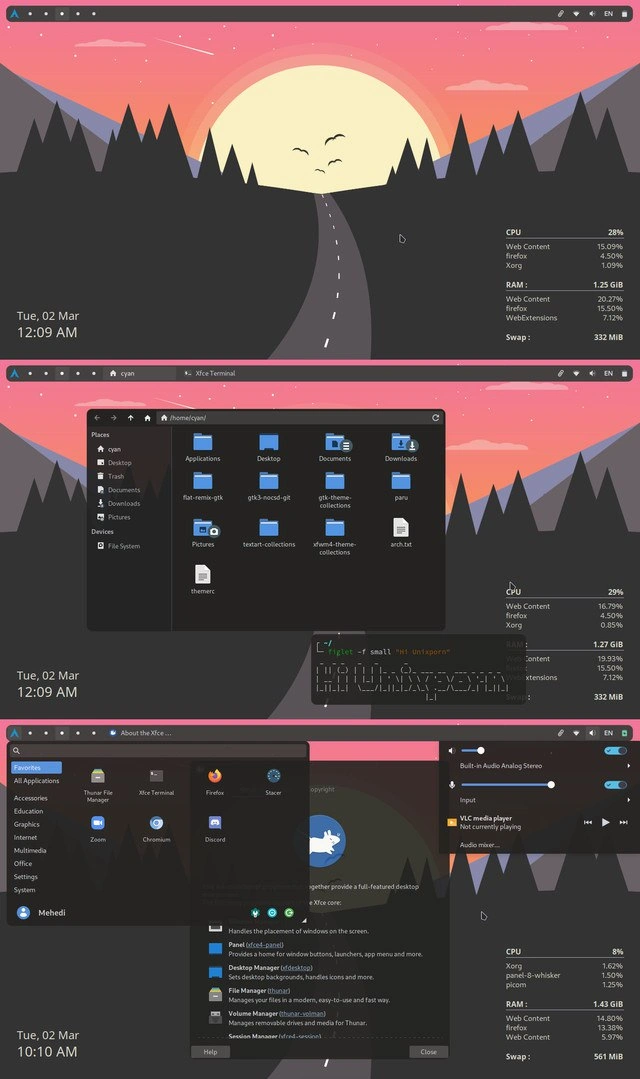
  • Now, on the wallpaper (which is a pink sunset over mountains, giving a calm hacker vibe), you see text like “CPU 28% | Web Content 15.09% | Firefox 4.50% | Xorg 1.09%” and below that “RAM: 1.25 GiB” and “Swap: 332 MiB” (the numbers change a bit in each screenshot). That text isn’t part of the wallpaper image; it’s generated live by a program called Conky. Conky is a system monitor that you can embed right on your desktop background. Think of it like those dashboards in a car that show speed, RPM, fuel – except here it’s showing the computer’s “vital signs.” It lists how much of the CPU is being used (and even breaks it down by top processes: for example, something related to Firefox was using ~15% CPU in one shot), how much of the memory (RAM) is in use, and how much swap (an extension of RAM on disk) is used. So at a glance, this person can always see how their computer is performing. A normal Windows user might open Task Manager to see this, but here it’s just always there on the desktop in a pretty format. It’s both useful and a bit of a show-off move – useful because it tells you if something’s hogging resources, show-off because it looks complex and cool to anyone walking by. By the last screenshot, those numbers drop (CPU 8%, RAM 1.43 GiB, etc.), indicating the user might have closed some programs or is just idling – again, showing that everything updates in real time.

  • In the bottom-left corner of each screenshot, there’s a line showing the date and time (e.g., “Tue, 02 Mar 12:09 AM” and later “Tue, 02 Mar 10:10 AM”). Instead of a typical clock in the corner of the screen, they’ve chosen to display the date/time in text overlay on the desktop. This could be another Conky widget or possibly an Xfce panel dedicated just to a clock, formatted to look sleek. The interesting part is the timestamps: the first two images have 12:09 AM (just past midnight) and the last one shows 10:10 AM. This implies the screenshots were taken about 10 hours apart. It’s very likely the person was up late at night customizing their setup (common for enthusiasts who get caught up tweaking things), and then took another screenshot in the morning to show the final result. It adds a little narrative: “I spent all night perfecting this, and here’s the proof!”

  • In the middle screenshot, there’s a black window open showing a bunch of folders – that’s the Thunar file manager, basically the app you use to browse files on Xfce (similar to Windows Explorer). The location is /home/cyan, which is like the “home folder” for the user named "cyan". We see normal folders like Desktop, Documents, Downloads – the usual stuff where you keep files – but also some files that hint at customization. For example, flat-remix-gtk sounds like the name of a custom theme (Flat Remix is a popular icon/GTK theme), and gtk3-nocsd-git appears to be a specially installed tweak to change how window controls look (it removes client-side decorations, which is a visual tweak). These names suggest that the user installed additional themes or tweaks, likely from the AUR, which stands for Arch User Repository. The AUR is a community-driven repository of software for Arch Linux. If the official Arch software servers don’t have something (like a funky theme or a niche program), chances are someone put it in the AUR. Arch users love the AUR because it means they can get almost any software or customization by running a simple command, instead of hunting the web for it. Seeing those files in the home directory tells us this person was tinkering with custom themes and possibly even compiling things themselves (since AUR often involves compiling from source). It’s like seeing tools and paint buckets in the corner of a beautifully painted room – evidence of the work that went into decorating it.

  • Also in that middle shot is a small terminal (command prompt) window with rainbow-colored text saying “hi Unixporn”. How did they get rainbow text? They used two command-line utilities: figlet and lolcat. figlet takes text and prints it in big ASCII art letters (imagine letters made out of lines and blocks, kind of like digital bubble letters). lolcat takes any text output and sprays it with rainbow colors (the name is a play on the “LOLcats” internet meme, but here it’s just about colorful text). The user ran the command figlet -f small "hi Unixporn" | lolcat to produce that “hi Unixporn” greeting in the terminal with a rainbow effect. This is essentially a shout-out to the r/unixporn community (despite the name, it’s a family-friendly subreddit where “porn” just means “eye-candy” for tech setups). It’s where people post screenshots like these to show off their “riced” (slang for custom-themed) desktops. By including “hi Unixporn” in the screenshot itself, the person is directly addressing that community, almost like holding up a sign in a photo that says hello to your friends. It also shows they prefer doing fun stuff via the terminal (the command-line interface) – instead of a graphical app to make art or text, they use quirky little Unix commands to do it. That’s a source of pride for many developers: being able to do everything with a few keystrokes.

  • Although not directly shown, neofetch is mentioned in the title and is a likely part of this setup. Neofetch is another command-line tool that a lot of Linux users include in their screenshots. When you type neofetch and hit enter, it will display your system information alongside an ASCII art of your OS logo (in this case, an Arch Linux logo made of text characters). Typically, people run neofetch and then take a screenshot so that anyone looking can see at a glance: “This is Arch Linux, with Xfce, using X amount of RAM, theme X, icons Y,” etc. It’s basically a quick profile of the system, and it looks cool in a terminal window. Given that this meme’s title mentions neofetch, we can assume the user either ran it or is referencing that culture of always including system info to brag a little. It’s like the spec sheet of a car at a car show.

  • The final screenshot (the bottom image) shows the Whisker Menu open. The Whisker Menu is Xfce’s version of a Start Menu – you click the little icon (in this case, likely the Arch logo on the top panel) and it pops up a menu with your applications. We can see the Favorites column with icons for things like the Home folder (file manager), Terminal, web browser (Firefox), Discord (a chat app popular with devs), and others. This gives a sense of what this person uses often. Everything in that menu has a dark, sleek look, which means the theme they applied is working globally (not just on the panel or just on the file manager, but on every window and menu). Next to the menu, on the right side of that screenshot, is an audio volume control slider (titled “Built-in Audio Analog Stereo” with an Output and Input section). Even that has the same dark theme and appears in a consistent style. The user likely opened it to demonstrate: “Hey look, even my volume control is themed!” It’s the kind of detail only someone who loves customizing would show. In short, the final image proves that this isn’t just a pretty wallpaper with some stats – it’s a fully thought-out theme across the whole desktop experience.

To sum it up, this meme is showcasing how far a developer can go in personalizing their workspace on their computer. If you’re a newer developer or not super familiar with Linux: imagine instead of just changing your desktop background, you change everything – the icons, the text style, the color of your windows and menus, and you add widgets that show live information. This person chose a very programmer-friendly operating system (Arch Linux) and a flexible interface (Xfce) exactly so they could tweak it to their heart’s content. They’ve essentially built their dream setup from the ground up. It’s like customizing a car: some people just drive it, others spend weekends tuning the engine, painting racing stripes, and installing custom lights. Here, our user spent their time in configuration files and terminals, making their computer look and behave just right. The result is both practical and showy: practical because they have all the info and tools they need at a glance, and showy because, frankly, it looks like a hacker’s paradise – and they’re proud enough to share it. The humor and charm in this come from the sheer dedication involved. Most people might never bother to change a default setting, but developers and tinkerers find joy in it. This meme says: “Here’s my cool, one-of-a-kind setup – it took a lot of nerdy effort, but I love it and I hope you think it’s cool too!”

Level 3: I Use Arch, BTW

In the developer world, a customized Arch Linux desktop with the Xfce environment and system monitors plastered everywhere is the equivalent of revving a tuned engine at a car show. This triple-screenshot collage practically screams “Check out my setup!” to anyone fluent in Linux geekery. It’s a classic Arch-user flex: the unspoken motto here is “I use Arch, btw.” Every detail in these images is engineered to impress fellow hackers on forums like /r/unixporn – the go-to gallery for bragging about extreme LinuxCustomization.

Look at the top panel: a tiny Arch logo on the left, a workspace label reading “cyan” (the user’s theme name or handle), and a few minimalist status icons on the right. The user has stripped away any frills or bulky widgets, leaving just the essentials. This is operating system minimalism at work – Arch gives you a barebones OS, and you add only what you truly need (or in this case, what looks cool). And what does this person add? Conky widgets and command-line bling, apparently. On the right side of the wallpaper, a Conky system monitor is live-updating CPU usage for various processes (Web Content at 15%, Firefox at 4.5%, Xorg at 1%), along with readouts for RAM (around 1.2 GiB) and Swap usage. Having these system stats everywhere is a point of pride: it shows that even with a web browser and apps running, this lean setup barely breaks a sweat (1.2 GiB RAM use is peanuts by modern standards). It’s a humblebrag in text form: “See? My custom rig is so lightweight, I can display all my performance metrics on the desktop and still have memory to spare!” Meanwhile, at the bottom-left corner, there’s either a tiny panel or an overlay displaying the date and time in sleek lettering. The timestamps themselves tell a story: from “Tue, 02 Mar 12:09 AM” in the first two shots to “Tue, 02 Mar 10:10 AM” in the last shot – an indication that this Arch enthusiast pulled an all-nighter tweaking their setup. Only a true Linux night-owl finds it normal to be theming your desktop at midnight and still polishing it the next morning, all for that perfect screenshot.

The middle frame highlights the user’s filesystem in the Thunar file manager, open to the home directory /home/cyan. We see directories like Applications, Documents, Downloads, and some telling files (names like flat-remix-gtk and gtk3-nocsd-git catch the eye). These likely refer to a custom GTK theme (Flat-Remix) and a tweak to remove client-side window decorations – packages installed from the Arch AUR (Arch User Repository). In Arch-land, if you want something done, there’s probably an AUR package for it. This user has clearly been shopping in that repository for fancy themes and niche tools to get Xfce looking just right. The open Xfce Terminal window at the bottom is pure eye-candy for the command-line crowd: it’s running a playful command, figlet -f small "hi Unixporn" | lolcat. This uses figlet to render the text “hi Unixporn” in block ASCII letters, then pipes it into lolcat to colorize it in rainbow hues. It’s basically a geeky greeting card to the /r/unixporn community. By creating a neon rainbow message right in the terminal, the user is flexing their CLI muscles and saying, “I do everything through the terminal — even art!” And of course, no Arch showcase would be complete without neofetch – that beloved tool that prints your distro’s logo and system info – likely executed just before these screenshots. The presence of neofetch’s signature ASCII art and specs isn’t explicitly shown, but it’s implied by the pride taken in listing system details. It confirms to anyone looking that this is indeed Arch Linux with Xfce, running exactly the kernel, theme, and hardware stats that the user curated.

In the final screenshot, we see the Whisker Menu (Xfce’s application launcher) opened up, showing favorite apps like the Home folder, Xfce Terminal, Firefox, Discord, etc., next to a brief “About Xfce” blurb. Even the menu is styled dark and minimal, fitting the theme perfectly. A volume control pop-up is visible as well, confirming that even the tiniest UI elements (like the audio mixer) have been themed and positioned for aesthetic harmony. This attention to detail says, “I didn’t just swap a wallpaper – I themed everything.” The humor here, especially for seasoned developers, comes from recognizing the blend of obsessive minimalism with over-the-top tweaking. The desktop looks sparse and efficient, yet behind that simplicity lies hours of configuration effort and a mountain of dotfiles. Many of us have gone down this rabbit hole: one moment you install Arch “to keep things simple,” and the next you’re scripting custom Conky readouts, tuning your terminal transparency, and debating which ASCII font best matches your wallpaper. It’s a running joke in the dev community that we sometimes spend more time perfecting our development environment than actually writing code. But hey, that’s part of the DeveloperExperience joy – when your computer’s setup reflects your personality and prowess, it makes those late-night coding sessions just a bit more satisfying. This meme captures that vibe perfectly, celebrating the art of the setup as much as the code that might eventually get written on it.

Description

Composite of three stacked screenshots showing a heavily-customized Arch Linux Xfce desktop with a pink-hued sunset mountain wallpaper. Each shot includes a top bar with an Arch logo, workspace label "cyan", tray icons, and language indicator "EN". Bottom-left overlay reads "Tue, 02 Mar 12:09 AM" in the first two frames and "Tue, 02 Mar 10:10 AM" in the last. Right side features Conky-style text widgets: "CPU 28% | Web Content 15.09% | Firefox 4.50% | Xorg 1.09%" plus "RAM 1.25 GiB" and "Swap 332 MiB" (values vary slightly across frames). Middle screenshot shows Thunar at "/home/cyan" with directories like "Applications", "Desktop", "Documents" and a translucent XFCE-terminal running "figlet -f small 'hi' | lolcat" rendering rainbow "hi Unixporn" ASCII art. Final screenshot opens the Whisker menu listing favorites "Home File Manager", "Xfce Terminal", "Firefox", "Discord", etc., alongside an audio mixer pop-up. The setup highlights Linux customization culture, tiling panels, CLI pride, and lightweight tooling beloved by developers tweaking performance and aesthetics
Comments

6
Anonymous ★ Top Pick Conky tells me my Arch-XFCE desktop idles at 1.2 GB; Kubernetes tells me each sidecar needs 4 GB just to say it’s healthy - apparently minimalism is still a workstation-only feature flag
  1. Anonymous ★ Top Pick

    Conky tells me my Arch-XFCE desktop idles at 1.2 GB; Kubernetes tells me each sidecar needs 4 GB just to say it’s healthy - apparently minimalism is still a workstation-only feature flag

  2. Anonymous

    Spending three days perfecting your desktop rice while the actual monitoring alerts have been silently failing in prod because you themed the notification daemon to match your sunset aesthetic

  3. Anonymous

    When your Linux rice is so meticulously crafted that you spend more time perfecting your dotfiles and system monitoring widgets than actually coding - but hey, at least Firefox is only consuming 15% of your RAM instead of the usual 80%. The 'LINUX SUPREMACY' ASCII art in the terminal really ties the whole aesthetic together, though one wonders if the time invested in achieving this perfect pink-gradient-sunset-over-mountains-with-conky-integration could have been spent shipping actual features. But who needs production deployments when your desktop screenshot can farm karma on r/unixporn?

  4. Anonymous

    Spent the sprint “improving DX” by making Arch+XFCE declarative with dotfiles and paru; my desktop now has better observability than prod and exactly zero SLAs

  5. Anonymous

    Shipping features: 20 minutes; shipping this desktop: two evenings, three AUR helpers, and a postmortem every time pacman -Syu nudges Xorg - observability never looked so pretty

  6. Anonymous

    1% RAM idle: Leaner than your average Spring Boot app, heavier on the flex

Use J and K for navigation