My Code vs. Tutorial Code
Why is this Learning meme funny?
Level 1: Looks Easy, Actually Hard
Imagine you want to build a toy house, and you have a big box of plain LEGO bricks. You spend all afternoon using 500 little pieces to make a small, simple house. It’s a bit crooked but you’re proud you made it with so much effort. Now, you see a video where someone else builds a huge, super cool mansion using only 50 LEGO pieces! How is that even possible? Well, it turns out they have some special pieces – large pre-made walls, shiny windows, and fancy roof pieces – so they don’t need as many blocks as you did. In just a few steps, their house looks like an architect’s mansion, while your house looks like a child’s drawing. You feel a mix of amazement and frustration: “They made it look so easy with so few pieces, and I used a ton of pieces and mine still looks basic!”
This is the funny feeling the meme is talking about, but with writing computer code instead of LEGO. It’s like watching a magic trick: the magician does something incredible quickly, while you’re struggling doing it the long way. The joke is that sometimes things that seem quick and easy (like the YouTuber’s 50 pieces/code) only look that way because of hidden help or special tools. When you try it yourself without those tricks, it takes a lot more work (your 500 pieces/code) to get a much simpler result. It’s a bit unfair and a bit funny – and it’s exactly how every beginner feels when they compare their first projects to the flashy examples online. The big lesson: just because it looks easy, doesn’t mean it is – there’s often more going on behind the scenes.
Level 2: Hidden Complexity
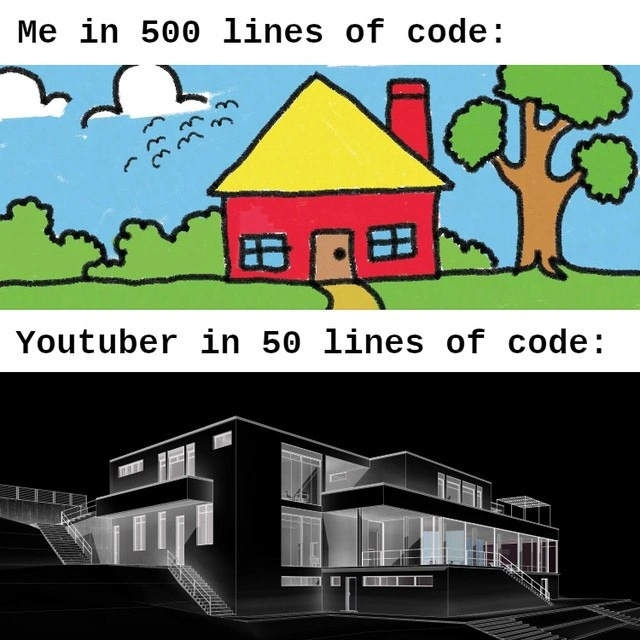
This meme highlights the difference between writing a lot of code yourself and using powerful tools to write code for you. The top part says "Me in 500 lines of code" and shows a simple crayon-style house drawing. This represents a developer (probably a learner or anyone feeling inexperienced) who wrote 500 lines of code to get a basic result – analogous to a child’s drawing. The bottom part says "YouTuber in 50 lines of code" under a detailed 3D model of a big modern house. That stands for a content creator (say, a programming YouTuber) who somehow achieved a far more complex, polished result with only 50 lines of code. It’s a comical lines_of_code_comparison meant to make us laugh at how unfair that seems.
Let’s break down why 50 lines of someone else’s code might outshine 500 lines of yours:
- Lines of Code (LOC): This literally means how many lines long your program or script is. It’s a rough measure of size. In the meme, 500 lines vs 50 lines is the big comparison. A newbie might think more lines = doing more work, but that’s not always true. You can sometimes do a lot with a few well-chosen lines if you know the right tricks. Other times, fewer lines can mean oversimplifying or hiding work elsewhere.
- Frameworks and Libraries: These are collections of pre-written code that you can include in your own code to get lots of functionality quickly. Think of them like power tools or packaged solutions. The YouTuber’s 50 lines likely make heavy use of a library that does 3D graphics or drawing. By writing, say,
FancyGraphics.drawHouse(), those few lines trigger maybe thousands of lines inside the library that create that mansion. The person with 500 lines might be doing everything the hard way, not using such high-level helpers. For example, they might be manually drawing each shape of the house step by step.
To illustrate, compare two approaches to drawing a simple house with code:
# Approach A: Drawing everything manually (lots of lines):
draw_rectangle(x=50, y=80, width=100, height=60, color="red") # house walls
draw_triangle(x=50, y=140, base=100, height=40, color="yellow") # roof
draw_square(x=70, y=100, size=15, color="blue") # window 1
draw_square(x=115, y=100, size=15, color="blue") # window 2
draw_rectangle(x=90, y=80, width=20, height=30, color="brown") # door
draw_tree(x=160, y=80) # maybe a custom function, but imagine it's lots of low-level calls
draw_cloud(x=30, y=180)
draw_bird(x=120, y=190)
# ... and on and on for every element (bushes, sky, etc.)
# Approach B: Using a high-level library (fewer lines):
from fancy3Dlib import Scene, ModernHouse, Tree, SkyDecor
scene = Scene()
scene.add( ModernHouse(style="villa", floors=2) ) # a pre-modeled villa
scene.add( Tree(type="oak", x=160, y=80) ) # add a tree object
scene.add( SkyDecor(clouds=3, birds=5) ) # add clouds and birds objects
scene.render(camera="isometric")
In Approach A, we explicitly draw each part of the house and scene by hand, which takes many lines. In Approach B, we use a high-level library (fancy3Dlib here is a pretend example) that provides ready-made objects like ModernHouse, Tree, and SkyDecor. We only needed a few lines to set them up, because the library’s internal code takes care of the details. The library might have thousands of lines defining how a ModernHouse looks and how to render it with lighting, etc., but as the user of the library, you don’t see that – you just call ModernHouse() in one line.
This is what we mean by hidden complexity: a lot of complicated work is happening under the hood, but it’s hidden from you. The meme jokes that the YouTuber’s 50 lines are probably leveraging hidden complexity (like a fancy library or engine), whereas your 500 lines might be you painstakingly doing everything yourself without such shortcuts. It’s the same reason a beginner’s code can be lengthy and clunky while an expert’s code can be short and elegant – the expert knows which abstractions to use and which code to reuse.
We also shouldn’t ignore tutorial overpromise. Online tutorials and coding videos often have titles like "Build X in 10 lines" to grab attention. In reality, following along is rarely so simple. You might have to set up environment variables, install packages, copy boilerplate code, or the tutorial might be using a lot of default settings that aren’t obvious. The result: you write a lot more code or get stuck on issues that the video never mentioned. If you’ve ever tried a “5 minute craft” or a quick coding tutorial and felt it took you much longer, you’ve experienced this gap between ideal examples and the real world.
This meme hits a DeveloperPainPoint: you can feel a bit demoralized seeing someone achieve in a few lines what took you pages of code. It’s important for learning developers to realize that those 50 lines on YouTube don’t tell the full story. The person making that video probably spent hours tweaking things off-screen. They might be using advanced techniques or have years of experience with that problem. They also choose specific examples that showcase the tool’s strengths, often ignoring the complex cases.
Learning Curve: When you’re new, you tend to write out everything in detail (hence hundreds of lines) because you’re figuring it out as you go. As your skills grow, you learn about built-in functions and libraries that can replace a lot of manual code. Think of it like learning shortcuts: at first, you take the long route, but later you discover there was a highway all along. That’s why an expert’s solution can be much shorter. They’re not necessarily working less — they’ve just already built the road (or they know who built it).
Finally, remember that lines-of-code are not a quality metric. A 50-line program isn’t automatically better than a 500-line program. Sometimes, writing more lines is actually clearer and more maintainable. If you try to squeeze everything into 50 lines, you might end up with a confusing script that only the original author understands. For example, “code golfing” (trying to solve a problem in as few characters as possible) is a fun challenge, but the solutions are nearly unreadable for everyday use. In real development, clarity often matters more. It’s perfectly fine that your project took 500 lines – maybe you included comments, error handling, and made the code easy to read. The YouTuber’s 50-line wonder code, on the other hand, might not scale or be easily adaptable outside that demo.
In summary, the meme humorously assures us: don’t feel bad if your code looks like a crayon drawing compared to someone else’s flashy demo. There are usually lots of unseen aids and simplifications behind those sparse lines. Everyone starts out drawing stick figures before learning how to leverage the real powerful stuff. Experienced developers laugh at this meme because they know those 50 lines are just the tip of an iceberg made of frameworks, prior work, and sometimes a pinch of smoke-and-mirrors. It’s all part of the learning journey in coding, not a sign that you’re doing something wrong.
Level 3: The 50-Line Illusion
The meme’s two panels starkly contrast a developer’s personal code with an online tutorial’s code. The top caption says "Me in 500 lines of code:" above a child-like crayon drawing of a simple house. The bottom says "YouTuber in 50 lines of code:" above a sleek 3D wireframe mansion. This juxtaposition pokes fun at how a 500-line homemade program yields a rudimentary result, while a YouTube creator’s 50-line snippet produces a stunning outcome. Seasoned developers immediately recognize the 50-line miracle as a classic YouTube tutorial vs reality situation – an entertaining exaggeration of our Real World vs Ideal frustrations.
At its core, the joke highlights how misleading lines-of-code counts can be as a measure of work or skill. Historically, managers and junior devs alike have fallen for the trap of equating more lines with more productivity or fewer lines with clever efficiency. In reality, lines-of-code (LOC) is a notoriously deceptive metric. A famous industry saying captures this perfectly:
"Measuring programming progress by lines of code is like measuring aircraft building progress by weight."
— Bill Gates
In other words, counting code tells you little about actual complexity or effort. It’s quite possible to write 500 lines of verbose, repetitive code when a well-placed loop or library call could do the same in 50 lines – and vice versa, sometimes those 50 lines conceal a mountain of complexity.
So how does the YouTuber in 50 lines pull off that polished 3D mansion? The veteran perspective: it’s largely an illusion of simplicity. Those 50 lines likely call into powerful frameworks or libraries that handle all the heavy lifting behind the scenes. The tutorial maker might import a 3D graphics engine or a pre-built "modern house" model, effectively outsourcing the hard work to code that isn’t shown on screen. Meanwhile, the "Me in 500 lines" scenario implies doing everything manually – like drawing each little window and tree with raw code, akin to scribbling a house with crayon. The result is bound to look primitive compared to code leveraging high-level abstractions. It’s the difference between using basic tools versus an entire engine optimized for the task.
Let’s be real: a 50-line program conjuring a multi-level glass villa has a lot of hidden complexity tucked away. Perhaps the YouTuber’s snippet looks like this: load_library("ModernVilla3D"), villa = ModernVilla(), villa.render(). Three lines and boom – mansion on screen. But that ModernVilla3D library might be tens of thousands of lines of intricate code that the content creator didn’t write live in the video. By contrast, if you painstakingly code every rectangle for walls and triangle for a roof, 500 lines might only get you a child’s drawing of a house, especially if you’re still learning.
The humor also stems from the tutorial overpromise phenomenon. Online coding videos often carry click-bait titles like “Amazing 3D App in 50 Lines!”. Experienced engineers chuckle (or cringe) because they know it’s never that simple. The glamorous demo code usually omits a lot:
- Massive Frameworks in One Import: The tutorial’s first line might be
import FancyGraphicsEngine. That single line brings in a framework of 50,000 lines. So sure, your code is only 50 lines long, but it’s standing on the shoulders of a giant codebase. This boosts Developer Productivity on the surface, while hiding the true scope of what’s running. - Pre-fabricated Content: Often the presenter has pre-built assets or setup done off-screen. In our meme, the 3D mansion could be a model that’s loaded from a file. Creating that model from scratch would be enormously complex (and definitely not shown in those 50 lines). It’s like a cooking show where the tedious prep work is done in advance – the host just says “voilà!” and a perfect roast appears.
- Skipping Edge Cases: Tutorial code is typically a happy-path prototype. No error handling, no dealing with weird user input, no commenting every step – all the things that make real-world code longer and more robust. Those 50 lines are idealized and wouldn’t survive a real production environment at 3 AM. If something went wrong with that slick mansion code, you might discover DeveloperFrustration when trying to debug a terse snippet that looked magical. Seasoned devs know that in a crunch, they’d rather maintain 500 clear and explicit lines than 50 lines of clever one-liners that explode on contact with reality.
- Code Golf Mentality: In pursuit of minimal lines, some content creators compress code in unnatural ways. They might use overly clever syntax, chained operations, or language tricks that shorten code at the expense of readability. Sure, it fits in a tweet, but now it’s an opaque wall of logic. A learning developer copying this may be completely lost trying to modify or extend it.
The top panel’s crayon drawing is an apt metaphor for a newbie’s project: drawn with love and effort, but wobbly and simple. The bottom panel’s high-fidelity render is the tutorial highlight reel: dazzling, but you didn’t see the scaffold holding it up. The meme resonates because virtually every coder has felt this. You spend days writing code that “works” but looks clunky, then you see an online example claiming to do more with a fraction of the code. Cue the developer insecurity and imposter syndrome: “Am I just bad at this? Why does my code look like a kid’s drawing while theirs is an architectural masterpiece?”
DeveloperExperience (DX) teaches you over time that there’s more than meets the eye. The Learning Curve in software is steep; experts appear to achieve feats with ease only because they’ve mastered tools and learned from many failed attempts you didn’t witness. This meme is a bit of communal DeveloperHumor – we laugh at the absurd comparison because we’ve all been the person with the crayon drawing at some point. It’s a satirical reminder not to take those flashy “50 lines” claims at face value. As any battle-scarred coder will tell you, Real World vs Ideal comparisons are apples to oranges. In production code, clarity and thoroughness win over brevity. When something breaks in that magical 50-line code (and trust me, it will), you’ll wish you had 450 more lines of explanation! In the end, it’s better to have a solid, even if unspectacular, house built with 500 lines than a mirage of a mansion built on 50 lines of magic abstraction.
Description
A two-panel meme. The top panel, labeled "Me in 500 lines of code:", displays a colorful, simple, child-like drawing of a house, representing verbose or basic code. The bottom panel, labeled "Youtuber in 50 lines of code:", shows a complex, professional architectural wireframe of a modern building, symbolizing the concise and impressive results often seen in coding tutorials. The meme humorously captures the feeling of imposter syndrome developers experience when their own, often more verbose, code doesn't seem as elegant as the hyper-optimized examples presented by online educators, who might be leveraging extensive libraries or frameworks off-screen
Comments
7Comment deleted
My 500 lines include the boilerplate, error handling, and a 'TODO: refactor this later' comment. The YouTuber's 50 lines are just one import statement from a library they wrote last week
Sure, his “50 lines” draw a mansion - if you don’t count the 800-kiloline dependency tree, the 2 GB Docker image, and the Terraform plan that secretly provisions half of AWS
The real difference isn't the 450 lines of code - it's the 50 hours of Stack Overflow searches, 3 deprecated libraries, and 2 complete rewrites that YouTubers conveniently edit out between 'it's super simple' and 'voilà, we're done!'
This perfectly captures the existential crisis of watching a 10-minute YouTube tutorial where someone builds a full-stack microservices architecture with Kubernetes orchestration, real-time WebSocket communication, and ML-powered recommendations in what appears to be 50 lines of perfectly abstracted code - while your 'simple' CRUD app somehow balloons to 500 lines just handling edge cases for date parsing and null checks. The real kicker? Their code probably has another 5,000 lines of boilerplate hidden in that custom framework they casually mention they 'built over the weekend.'
My 500 LOC: bulletproof bungalow after audits and edge cases. YouTuber's 50 LOC: viral villa that ghosts on first prod deploy
Sure, it’s 50 lines - if you exclude the 80k LOC of transitive deps, the codegen scaffolding, and the 1,500-line YAML the video “skips for brevity”
Youtuber: mansion in 50 LOC - because 49 are import magic; mine’s 500 because idempotency, retries, observability, and the SBOM don’t fit in a thumbnail