
Skip to content
DevMeme
3876 of 7435
How to Download More RAM: The Cursed Google Drive Swap Method
OperatingSystems Post #4220, on Feb 17, 2022 in TG

How to Download More RAM: The Cursed Google Drive Swap Method

Why is this OperatingSystems meme funny?

Level 1: Download More RAM

Imagine your computer is like a small kitchen with limited counter space (that counter is the RAM). You’re cooking a big meal with lots of ingredients (programs and data). When the counter is full, you start putting some pots and pans temporarily in a pantry or fridge in the next room (the hard drive acting as swap). It’s slower to go back and forth, but at least you can keep cooking. Now, what if even the fridge is full? In this joke, the cook decides to use a friend’s house across town for storage – literally sending extra ingredients to a faraway storage and fetching them when needed. That’s like using Google Drive (the cloud) to hold overflow memory. It does give you effectively endless space for stuff, but every time you need something from that space, you have to make a long trip across town (over the internet) to get it. So you can “download” more working space from the internet, but it’s ridiculously slow and impractical to do in real life. The meme is funny because normally when your computer is out of memory, you can’t just magically get more from the internet like downloading a file – but here someone actually tried doing exactly that! It’s as if they found a absurd loophole in the rules. It’s the tech equivalent of a cartoon solution: your table is full, so you stick stuff on a cloud in the sky. It might work in a pinch (your computer won’t crash because it has more room), but it’s going to be very slow – and kind of silly! The humor comes from seeing that crazy idea, “download more RAM,” turned into a real experiment. It’s both clever and ridiculous, which is exactly why it makes computer folks grin.

Level 2: Actually Downloading RAM

Let’s break down what’s happening in simpler terms. RAM (Random Access Memory) is your computer’s short-term memory – it’s very fast and used to hold data that programs are actively working with. Think of RAM like a small work table: you can reach everything on it quickly, but it has limited space. Swap space (or virtual memory) is like an overflow area on your hard disk (or SSD) that the computer uses when the RAM/table is full. If too much stuff accumulates on the table, the OS moves some of the less-used items to the hard disk – kind of like moving papers off your desk into a filing cabinet to free up space. This process is called swapping or paging. On Windows, it’s known as the pagefile; on Linux and other UNIX-like systems, it’s often a designated swap partition or a swap file. Using swap helps prevent programs from crashing when you run out of physical RAM, but it comes at a cost: the filing cabinet (disk) is much slower to access than the desk (RAM). If you’ve ever had a PC start chugging and the hard drive light going crazy when too many apps are open, that’s likely because it ran out of RAM and started swapping to disk. The whole system slows down because it’s constantly shuffling data between RAM and disk.

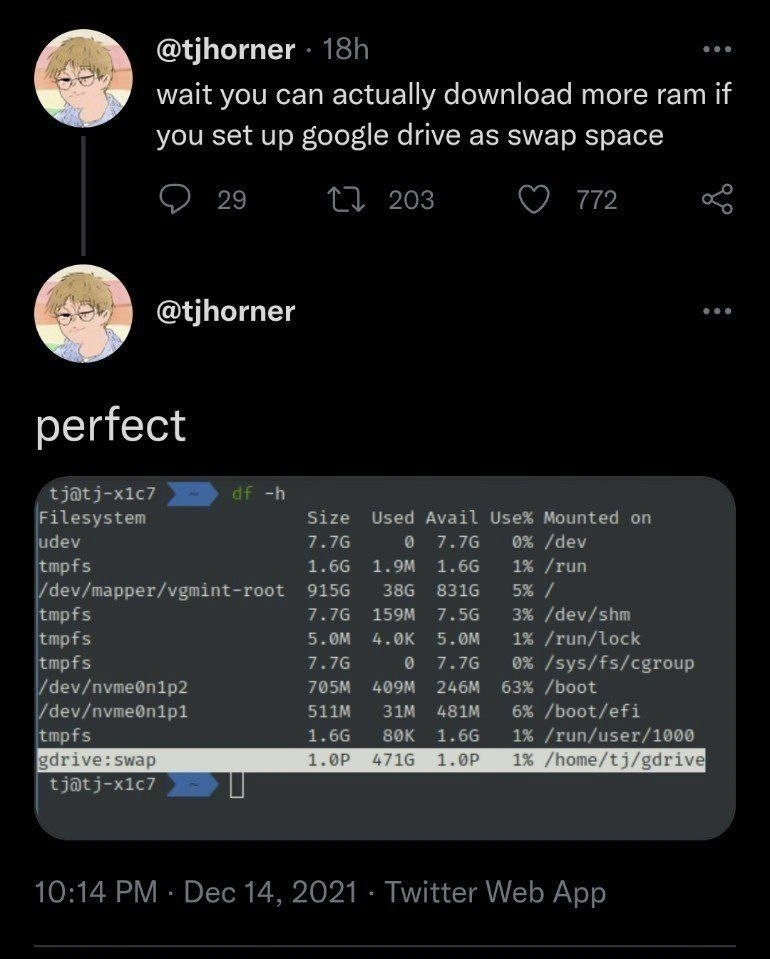
Now, normally swap resides on a local drive in your computer. What this meme shows is an extreme twist: they put the swap on Google Drive, which is a cloud-based storage service. Google Drive is usually where you store files, photos, backups – things you access via the internet. By configuring Google Drive as if it were just another folder or disk on the system (using a tool or integration), the person essentially fooled the computer into treating the internet storage as an attached drive. In the screenshot, the command df -h (which lists disks and their usage in human-readable form) shows an entry gdrive:swap mounted at /home/tj/gdrive. This suggests the Google Drive is mounted to that folder. The size is listed as 1.0P (1.0 petabyte = 1024 terabytes!) with only 1% used, indicating a huge capacity. Most likely, the tool mounting Google Drive either reports an arbitrarily large number (some cloud mounts report a fake size like 1PB to mean “effectively unlimited storage”), or perhaps this is an enterprise Google Drive with enormous storage. In any case, it’s far beyond typical. That “1.0P” is basically saying, “We have way more space than we’ll ever need for swap.” Usually, a home computer might have, say, 4 GB of swap or maybe 16 GB – not a million GB! Seeing that number alone is part of the joke – it’s overkill in the funniest way.

So what does it mean to use Google Drive as swap space? It means if the computer’s real RAM fills up, it will start writing the overflow data into a file on that Google Drive folder (which is actually on Google’s servers somewhere). Later, when that data is needed, it will read it back (download it) from Google Drive into RAM. In plain terms, the computer ends up uploading and downloading parts of its memory over the internet. That’s the literal realization of “downloading more RAM.” Instead of memory coming from a chip inside your machine, it’s coming from a file in the cloud. This is a wild idea because normally if you need more RAM, you either install more physical memory sticks or upgrade your plan (in cloud VMs). It’s definitely not standard to reach out to Google Drive in the middle of running a program just to compensate for low memory. But thanks to how flexible operating systems are, it’s technically doable. It’s like the OS is saying, “Okay, I don’t have enough memory, I’ll use whatever you give me – even if it’s an internet drive!”

For a newer developer or someone still learning, a lot of the humor here comes from contrast with normal expectations. Early on, you learn that hardware is hardware – if you have 8 GB of RAM, that’s it, you can’t magically make it 16 GB without adding more chips. You might have come across the tongue-in-cheek suggestion to “download more RAM” as a joke when complaining your computer is slow. It’s funny because it sounds like you could just download an upgrade, but you can’t; it was a way to poke fun at non-technical folks. Now along comes this meme showing a terminal where, in a sense, they did download more RAM by using a cloud service. To a junior dev, this is both confusing and intriguing: wait, is that for real? The answer is yes – real in concept, but not something you’d do for any practical purpose. Setting this up isn’t something you do by accident; it requires knowing some Linux tricks. For instance, to mount Google Drive on Linux, you might use a userspace filesystem tool (like FUSE with Google Drive API) or a utility such as rclone. Once mounted, making a swap file involves commands like dd or fallocate to create a large empty file, then mkswap to format it as swap, and swapon to start using it. These are not everyday commands a beginner would use — they’re typical SystemAdministration tasks. The person who did this had to be comfortable with the command line and the concept of mounting remote drives.

Let’s demystify a bit more: Google Drive is a service where your files live on Google’s servers and you access them via internet. Usually, if you open a file from Drive, it downloads to your computer. By mounting Google Drive as a folder, the user made it so that any file operations in /home/tj/gdrive are transparently talking to Google’s cloud. So, when the OS starts writing to the swap file located on /home/tj/gdrive, those writes are actually being sent over the network to Google. Later, when it reads, it’s pulling data down from Google. It’s like having an external hard drive that’s actually sitting in a Google data center. MemoryManagement on the OS side doesn’t really differentiate – it just sees a slower drive. But from our perspective, we know this “drive” is incredibly slow compared to any local disk, because it’s limited by internet speed and all the overhead of talking to a cloud service. It’s an ingenious misuse of cloud storage. In techie terms, this is an extreme case of thinking outside the box (or perhaps abusing the storage box). We sometimes call such unconventional setups “not a supported configuration.” In other words: just because you can do it, doesn’t mean it’s a good idea for daily use!

For a junior dev or IT student, there’s also a learning moment: it highlights how OperatingSystems provide a layer of abstraction. The OS doesn’t really care if swap is on an SSD, an HDD, or some mount point – it’ll try to use it. It also underscores why having enough physical RAM or fast local swap is important: if you had to actually rely on this cloud-swap regularly, your user experience would degrade massively. Imagine clicking to un-minimize a frozen browser and waiting many seconds for it to respond because it’s busy downloading the part of itself that was swapped out! 😅 In fact, one could say this Google Drive trick is like a ridiculously overextended version of something Windows did back in the day called ReadyBoost – where you could use a USB flash drive to augment memory. But even a USB stick (flash memory) is way faster than an internet connection to a remote server.

So, is it really “downloading RAM”? In a tongue-in-cheek way, yes. Whenever the system needs to bring data back from that swap file on Google Drive, it’s effectively downloading part of the computer’s memory from the cloud. It’s the closest thing to the old joke becoming reality. The reason this is funny is because everyone knows it’s a terrible idea performance-wise, but it’s a clever tech stunt. It teaches one more thing: with enough creativity in software, even hardware limitations can be worked around… sort of. You can extend memory with disk, extend disk with cloud — you can always trade speed for quantity. But you’ll feel that trade-off when you actually use it. In the end, this meme is showing off a quirky intersection of OperatingSystems and CloudStorage, and it makes us smile because it turns an impossible request (“give me more RAM via the internet”) into a real demo. It’s the kind of playful experimentation a lot of us geeks love to tinker with, just to see what happens. And the verdict here? It works on screen, and the concept is mind-blowing (or maybe “bandwidth-blowing”), but you probably don’t want to rely on it for your next gaming session or production server!

Level 3: Swap as a Service

"wait you can actually download more ram if you set up google drive as swap space" – this tweet sets the stage for a nerdy punchline that had seasoned engineers cackling. The author isn’t just musing; they follow up with a screenshot proving they actually did it. For veteran developers and SystemsAdministration folks, this joke lands on multiple levels. On one hand, it’s riffing on the classic tech quip “Just download more RAM.” For years, whenever someone cluelessly asked how to speed up a slow computer, the sarcastic answer was, “Have you tried downloading more RAM?” Of course, RAM is physical hardware – memory chips – so you can’t literally download it. That absurdity spawned countless inside jokes and even fake websites offering free RAM downloads to troll newbies. Here, our cunning engineer takes that decades-old meme and, Frankenstein-like, bolts it onto reality using pure sysadmin wizardry: configuring Google’s cloud as if it were a stick of RAM. This is the kind of humor that makes an experienced developer do a double-take and then nod in begrudging respect: the impossible “download more RAM” has been achieved by abusing an OperatingSystem feature in an incredibly literal (and literally incredible) way.

The second tweet simply says “perfect” and shows a terminal with a df -h output. For Linux users, df -h (disk free, human-readable) is a familiar TerminalCommand that lists all mounted filesystems and their usage. Scanning the output, you see normal entries like /dev/mapper/vgmint-root (the main disk), /boot, some tmpfs (temporary filesystems in RAM). But the eye-popper is the last line:

gdrive:swap    1.0P   471G   1.0P    1%   /home/tj/gdrive

Wait, 1.0P? As in 1.0 Petabyte of space?! Clearly, Google Drive has been mounted on this Linux system (likely via a tool like rclone or a FUSE-based Google Drive filesystem). The mount point is /home/tj/gdrive, and it’s labeled as gdrive:swap. The used space is 471 GB (perhaps the user’s existing cloud data), which is just 1% of a mind-boggling 1.0 PB capacity. Seeing a petabyte in a home directory is hilariously absurd – most of us work with disks in the tens or hundreds of gigabytes, maybe a few terabytes. One petabyte is 1000 TB, a number you only encounter in big enterprise storage or bragging rights. It looks as if the system suddenly has an almost inexhaustible well of storage to swap to. It’s the ultimate cheeky answer to low memory: attach CloudStorage so vast that you’d never run out of swap space. Storage abuse at its finest. Of course, this “infinite RAM” comes with a huge asterisk: it’s so slow that using all of it would be a nightmare. But the screenshot isn’t about practicality – it’s about flexing that it’s possible. The one-word reaction “perfect” drips with ironic triumph: the ridiculous idea works, at least on paper (or rather, on a terminal display).

From a senior engineering perspective, several things make this hysterical and intriguing. First, the sheer audacity: using a cloud drive (which runs over the internet, with all the latency and throughput limitations that entails) as swap space for memory. Swap space is the OS’s safety net – when RAM is full, it writes some data out to swap (traditionally a portion of your disk) to free up RAM for active processes. It’s supposed to be a local, relatively fast disk, because if you start heavily swapping, things are already bad performance-wise. Now imagine swap over a network: every time the OS needs to swap a memory page in or out, it has to send data to Google’s servers or retrieve data from them. A seasoned sysadmin knows this is a recipe for insane latency. We’re talking delays on the order of tens to hundreds of milliseconds per memory page, instead of micro or nanoseconds – basically turning memory access into the speed of a 1990s dial-up download. The system would crawl if it ever seriously started using that petabyte of swap. In fact, if something really tried to allocate, say, another 100 GB of memory and the OS dutifully started paging most of it out to Google Drive, you’d likely see the machine freeze up or become extremely unresponsive. The CPU would spend most of its time idling, waiting for data to arrive over the network – a state known as thrashing. The joke here is that no sane person expects this to perform well; the value is in the stunt and the visual of “1.0P swap space” more than in real utility. It’s a bit like strapping a rocket to a car – yeah, it’s technically more horsepower, but good luck controlling it.

Secondly, consider reliability and SystemAdministration nightmares. Relying on an external service like Google Drive means your “RAM” now has a dependency on your internet connection and Google’s uptime. If either hiccups, your system could stall or crash spectacularly. It’s one thing for your cloud storage to disconnect – you might lose access to some files temporarily – but if your swap disappears, the OS will have a fit (imagine the OS reaching for some data it swapped out, and suddenly that data isn’t there because your Wi-Fi dropped!). This is truly a swap_as_a_service scenario: your memory is at the mercy of a service provider. It’s hilariously absurd to anyone who’s been on call for a production system. A seasoned engineer might joke, “Well, there’s one way to ensure your on-call nights are never boring… When Google Drive has an outage and your server starts panicking because its brain is half offline.” The tweet doesn’t show that chaos – just the idyllic promise of endless swap – which is part of the humor: it glosses over the imminent disaster such a setup implies if actually used.

Now, from an engineering craft standpoint, one can’t help but respect the cleverness. This hack demonstrates deep knowledge of how Linux systems work. The person had to mount Google Drive locally (probably using an OAuth token and a user-space filesystem layer). Then they likely created a big swap file on that mount (fallocate a large file on /home/tj/gdrive and then mkswap on it, followed by swapon). Linux doesn’t really care that the file is on a remote mount – as long as it’s accessible as a file, it will cheerfully try to use it for swap. The OS abstracts the swap device so well that it can be a file on an exotic filesystem, even one backed by some Google data center halfway across the world. This is SystemAdministration meets CloudStorage creativity. It’s the kind of stunt a bored sysadmin might try on a lark, or an experienced developer might do just to say, “Haha, check this out guys – I put my swap on Google Drive!” The tweet’s popularity (hundreds of retweets and likes) shows that this gag resonated with a lot of folks in tech. It pokes fun at both newbie misconceptions and our own penchant for ridiculous hacks. After all, the industry mantra often goes: if it’s stupid and it works, it’s not stupid. Here, we might amend: It’s stupid, it works, and it’s hilarious precisely because it’s stupid.

In summary, the meme’s humor comes from colliding a naive idea with hardcore tech ingenuity. It satirizes the concept of cloud outsourcing in an extreme way – “memory-as-a-service” literally. We’ve seen software-as-a-service, infrastructure-as-a-service; why not swap-as-a-service? It tickles the same part of the brain that laughs at overly literal interpretations of advice. Senior devs laugh because they know exactly why you’re not supposed to do this – the latency, the potential system meltdown, the sheer wrongness of treating Google Drive as a RAM stick – yet they secretly enjoy that someone actually went and did it for giggles. It’s a celebration of the fact that with enough know-how (or insanity), you can bend systems in outrageous ways. It’s the digital equivalent of using a wrench as a hammer: sure, you can do it if you’re clever, but expect some dents! The tweet showcases that perfect blend of OperatingSystems knowledge, Storage hackery, and tongue-in-cheek audacity that makes experienced engineers both laugh and nod in appreciation.

Level 4: The Memory Mirage

At its core, this meme exploits the concept of virtual memory – one of the most ingenious tricks in operating systems. Virtual memory creates a mirage of almost unlimited RAM by using other storage as backup. In a modern OS, each process thinks it has a vast continuous memory, but behind the scenes the kernel might be shuffling some data off to disk (the swap space) when actual physical RAM fills up. This relies on fundamental OS internals: page tables, page faults, and the idea that we can trade speed for capacity. A page fault occurs when a program tries to access data not currently in real memory, triggering the OS to load that data from secondary storage back into RAM. This mechanism, developed in the 1960s, allowed computers to run bigger programs than their physical memory could hold by treating disk storage as an extension of memory. It’s a beautiful illusion – the memory mirage – letting us overcommit memory and still (mostly) work. But like all illusions, it has limits grounded in physics and hardware.

In classical computer architecture, we talk about a memory hierarchy. At the top are the fastest, tiniest storage units (CPU registers and cache), then the main memory (RAM), then slower, larger forms like SSDs or HDDs, and finally remote storage or tape. Each step down the hierarchy is orders of magnitude slower but offers more capacity. RAM access latency is measured in nanoseconds (billionths of a second), while disk access is in microseconds or milliseconds (thousandths of a second). Network storage (like a cloud drive) adds even more latency – tens or hundreds of milliseconds. In raw numbers, accessing data from Google Drive over the internet can easily be 500,000 times slower than grabbing it from local RAM! The OS’s memory manager treats all these tiers abstractly as places to put data, but when it starts moving bytes between such disparate layers, performance can plummet. This disparity is why thrashing occurs: if a program’s working set doesn’t fit in actual RAM, the computer might spend more time paging data in and out (in this case, uploading and downloading memory pages over a network) than doing real work. It’s like an academic illustration of the CAP theorem of storage vs. speed: you can have practically infinite memory capacity by adding layers (even cloud storage), but you sacrifice consistency in speed and performance.

By mounting a cloud drive as swap, our intrepid tweeter has effectively tacked an extra rung onto the memory hierarchy – one that stretches out across the internet. Historically, paging to remote storage wasn’t common outside of research, because the idea of relying on a network for memory is fraught with latency and reliability issues. (In fact, some operating systems won’t even let you put swap on an NFS network drive by default, precisely because if the network hiccups, the system can deadlock or crash.) Yet, the elegance of the virtual memory system is that it doesn’t really care what the backing store is – it could be a cutting-edge NVMe SSD, a slow spinning disk, or an absurdly distant CloudStorage service. So long as the OS can read/write to it like a disk, it’s fair game. This flexibility is a testament to decades of Operating Systems design focusing on abstraction. Here that abstraction is being pushed to comical extremes. It’s a proof-of-concept of an almost philosophical point: given enough layers of indirection, you could “download” extra memory. But while the theory might check out, the real-world implications (like waiting forever for each memory access) remind us that no software trick can fully escape the hardware reality. In summary, the meme sits at the intersection of clever OS theory and harsh physical limits, highlighting how MemoryManagement and storage layers work together – and how absurd it gets when you take an idea to its theoretical limit.

Description

A screenshot of a Twitter thread from user @tjhorner. The first tweet humorously suggests, 'wait you can actually download more ram if you set up google drive as swap space'. The user then replies to their own tweet with 'perfect', followed by a screenshot of a Linux terminal. The terminal displays the output of the 'df -h' command, which shows mounted filesystems. The punchline is the last line in the terminal output, which lists 'gdrive:swap' as a filesystem with a size of 1.0 Petabyte and 1.0 Petabyte available, mounted on '/home/tj/gdrive'. This meme is a highly technical joke that elevates the classic novice prank of 'downloading more RAM' into a cursed but technically feasible experiment. Experienced engineers find it hilarious because they immediately understand that using a high-latency network drive for swap space would result in catastrophically slow performance, making the system virtually unusable despite the absurdly large amount of 'virtual memory'


Comments

31
Anonymous ★ Top Pick I finally figured out how to run my IDE, a dozen Docker containers, and a Chrome tab at the same time. The trick was 16GB of RAM and a petabyte of swap on Google Drive. My computer now operates on geological time, but it hasn't crashed yet
  1. Anonymous ★ Top Pick

    I finally figured out how to run my IDE, a dozen Docker containers, and a Chrome tab at the same time. The trick was 16GB of RAM and a petabyte of swap on Google Drive. My computer now operates on geological time, but it hasn't crashed yet

  2. Anonymous

    Mounted Google Drive as swap so we can literally download more RAM - each page fault now costs 200 ms and an egress fee, but finance calls it “serverless memory” and suddenly it’s innovation

  3. Anonymous

    Finally achieved the performance metrics we promised investors: our app now has infinite memory capacity and response times measured in geological epochs

  4. Anonymous

    One petabyte of swap with API rate limits - the OOM killer would have been the merciful option

  5. Anonymous

    Ah yes, the classic solution to memory pressure: swap to a network filesystem with 100ms+ latency and rate limits. Nothing says 'production-ready' like your kernel blocking on OAuth token refresh during a page fault. At least when the OOM killer strikes, you can blame it on your internet connection instead of your architecture decisions. Bonus points for the 1PB capacity - finally enough swap space for that Electron app

  6. Anonymous

    Using Google Drive as swap is basically implementing WAN‑NUMA with OAuth on every major page fault - congrats, you turned memory pressure into latency SLOs

  7. Anonymous

    Peak cloud-native: page faults touring data centers worldwide, accruing egress fees faster than you thrash

  8. Anonymous

    Google Drive as swap: because every page fault should require OAuth and show up on your egress bill - “download more RAM” becomes “download more latency.”

  9. @dugeru42 4y

    oh god

  10. @LonelyGayTiger 4y

    Except that it immediately crashes.

  11. ẞonny 4y

    Some people deserve the hell

  12. @karumsenjoyer 4y

    You will have a very big swap

  13. @karumsenjoyer 4y

    10

  14. @dugeru42 4y

    it will be more limited by speed

    1. @dugeru42 4y

      on plus side this RAM speed limit allows for more reaction time on crit memory leaks

      1. @SamsonovAnton 4y

        Usually, when you run out of physical RAM, the whole system almost freezes during swapping out, so you can actually do nothing but watching the disaster to escalate.

        1. @dugeru42 4y

          watch me go

        2. @dugeru42 4y

          stopped it myself

          1. @SamsonovAnton 4y

            Lucky you!

            1. @dugeru42 4y

              really depends on drive speed i did memory leak myself

  15. @dugeru42 4y

    still slower than RAM, but fine i guess

    1. @dsmagikswsa 4y

      Much slower

  16. @cfyzium 4y

    Am I missing something or you still have to place the entire swap file on some physical drive? And syncing it with a cloud is kinda irrelevant?

    1. @dugeru42 4y

      doubt he have physical petabyte for gdrive

    2. @dugeru42 4y

      you are missing FUSE things like GCSF

  17. @affirvega 4y

    begone thot @yuki0iq plz delete

    1. @sylfn 4y

      done

      1. @affirvega 4y

        thanks :D

  18. @pxrxnoia 4y

    fren using m2 nvme 256gb as swap already feels like infinite ram

  19. @QutePoet 4y

    That's dirty hack!

  20. dev_meme 4y

    *sets swappiness to 100*

Use J and K for navigation
