
Skip to content
DevMeme
4307 of 7435
The Siren Song of a Shiny New Framework
IndustryTrends Hype Post #4709, on Jul 30, 2022 in TG

The Siren Song of a Shiny New Framework

Why is this IndustryTrends Hype meme funny?

Level 1: Spelling Matters

Imagine you have a friend named Sylvie. You go around telling everyone, “Wow, talking to Sylvie is so easy and fun!” But later, when you see her across the playground and try to call her over, you accidentally yell “Slyvie!” or “Syvlie!” by mixing up the letters in her name. Sylvie doesn’t respond because, well, that’s not exactly her name. You can shout as loudly as you want, but if the name is wrong, she might not realize you mean her.

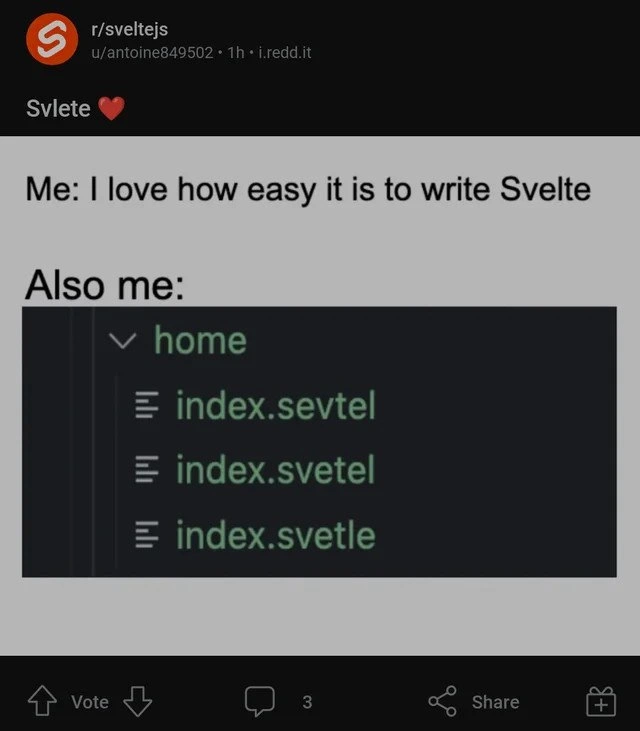
This meme is just like that, but with a programming twist. The developer is basically saying, “I love working with Svelte, it’s so easy!” Svelte (pronounced “Svelt”) is the tool’s name. But when this person makes a file for their Svelte code, they spell “Svelte” wrong in the filename – kind of like calling Sylvie by the wrong name. And just like Sylvie didn’t answer, the computer doesn’t “respond” to the misspelled file. The program doesn’t work because the file name isn’t quite right.

It’s funny because the mistake is so small and silly. It reminds us of a kid boasting, “I know all my spelling words!” and then immediately writing one of them incorrectly. The humor comes from that oopsie moment. Even though using Svelte is easy (like talking to your friend), you still have to spell their name right (or in coding, name your files correctly) or things won’t work. In the end, the meme is a light-hearted way of saying: even smart people can mess up small details, and it makes us grin because we’ve all been there in one way or another.

Level 2: Svelte Spelling Slip-ups

Let’s break this down in simpler terms. Svelte is a tool developers use to build web interfaces, kind of like how you might have used Lego pieces to build structures as a kid. In the programming world, Svelte is known for being very friendly to work with. When people say “it’s easy to write Svelte,” they mean that creating a web component (like a button, form, or an entire page) feels straightforward. You write an .svelte file which can contain all the pieces – the HTML markup, the styling, and the interactive behavior – in one place. It’s convenient and avoids a lot of the boilerplate (extra setup code) that some other frameworks require. For example, if this were React, you’d likely have to import React, write a class or function, manage state with hooks, etc. In Svelte, you can just write normal-looking code and it reactively updates – it feels almost like plain HTML/JavaScript with superpowers. No wonder the developer says, “I love how easy it is to write Svelte.” It’s a genuine compliment to the framework.

Now, Svelte uses files that end in the file extension .svelte. A file extension is like a label that tells the computer what kind of file it is. For instance, .txt means a text file, .png means an image, and .html means a webpage. So .svelte tells the Svelte compiler (and your code editor) “Hey, this is a Svelte component file.” The code editor will usually highlight the syntax in pretty colors and the Svelte compiler knows to process that file and turn it into regular JavaScript for the browser. If you don’t use the right extension, it’s as if you mislabeled the file – the tools might not recognize it.

In the meme, the person has a folder named home and they intended to create a file index.svelte inside it (maybe to be the home page component). But instead, we see three files with slightly wrong names:

  • index.sevtel
  • index.svetel
  • index.svetle

Each of these is a failed attempt at spelling “svelte” in the filename. It’s like they were typing quickly or from memory and kept swapping letters around. This is a typo, which means a small typing mistake. We all make typos in everyday writing (like typing “adn” instead of “and”). In programming, a typo can cause a lot of trouble because the computer isn’t as forgiving as a human reader. If something is off by even one character, the computer might not understand it at all.

So what likely happened here? The developer created a Svelte component file but named it wrong. When they tried to run their application or import that component in their code, they probably got an error or nothing happened. The tools were essentially saying, “Umm, I’m looking for index.svelte but I don’t see it – I see these weirdly named files I don’t recognize.” It’s similar to if someone told you, “Go get the book titled Svelte Guide from the shelf,” but all the books on the shelf had slightly different titles like “Svlete Guide” or “Svetle Guide.” You’d be confused, right? The computer was confused for the same reason.

The funny part is the contrast. The person is bragging about how easy and simple things are with Svelte, yet simultaneously struggling with a basic detail: spelling the name correctly. It’s a bit ironic. Imagine someone saying “I’m an excellent speller!” and then immediately spelling a common word wrong – it’s comedic and a little endearing. In developer culture, this falls under relatable humor because every programmer, no matter how experienced, has had a “D’oh!” moment like this. Maybe you named a variable userNmae instead of userName and couldn’t figure out why things were broken. Or you saved a file as .jpeg instead of .jpg and wondered why the image wasn’t loading. Little mistakes can cause big headaches in coding.

We also see that the meme was shared in a community (r/sveltejs on Reddit) where Svelte enthusiasts gather. That means the audience instantly gets the context. They know what .svelte files are, and they likely have a sense of humor about common newbie mistakes. A new Svelte developer might even read this meme and think, “Phew, I’m not the only one who did that!” It’s comforting and funny at the same time.

To put it simply, this meme is highlighting a beginner mistake in a funny way: the developer loves Svelte for its simplicity, but they keep spelling the framework’s name wrong when creating a file, which of course causes errors. It teaches a tiny lesson amidst the laughter: no matter how easy a tool is, you’ve still got to mind the details – even if that detail is just getting a six-letter word spelled right!


Level 3: Off-by-One Letter

In the universe of frontend frameworks, Svelte has a reputation for being simple and lean, almost magical in how it reduces boilerplate. You write a component in a single file with HTML, CSS, and JS all together, and the Svelte compiler does the heavy lifting to turn it into efficient code. No extra layers like virtual DOMs – what you write is close to what you get. Developers often gush about how easy it is to build UIs with Svelte compared to say, React or Angular. The meme’s first line captures that enthusiasm: “Me: I love how easy it is to write Svelte.”

Then comes the punchline: “Also me:” followed by an IDE screenshot showing a folder of Svelte components with hilariously misspelled filenames: index.sevtel, index.svetel, index.svetle instead of the correct index.svelte. Seasoned developers immediately crack a grin here. Why? Because this is a textbook example of a tiny slip-up causing a big headache – the kind of DeveloperHumor only someone who’s been bitten by a one-character bug can fully appreciate. It’s poking fun at the classic truth that Naming things is hard. In fact, there’s an old joke: “There are two hard problems in Computer Science: cache invalidation, naming things, and off-by-one errors.” This scenario manages to combine the last two: an off-by-one-letter spelling error while naming a file. The result? The poor Svelte compiler is completely baffled.

For context, Svelte files must have a .svelte extension. That’s how the build tool recognizes “Oh, this is a Svelte component, I should compile it.” If you accidentally save your file as index.svetle (letters out of order), the tooling won’t treat it as a Svelte component at all. It might just ignore it or throw an error like:

Error: Cannot find module './home/index.svelte'

Because from the compiler’s perspective, that correctly-spelled index.svelte file simply doesn’t exist in the folder – only these imposter files with the wrong spelling. The meme shows three attempts, implying our hapless developer kept renaming the file, trying to fix the typo, and each time got the letters in the wrong order. It’s like watching someone fumble with a key in a lock: they know how to drive the car (write Svelte code), but they just can’t get the door open because the key’s cut wrong (the filename). The IDE (integrated development environment) interface itself adds to the humor: the green-colored file names suggest the editor doesn’t even recognize the .sevtel or .svetle extensions, as if to say “I have no clue what kind of files these are.” Meanwhile, our developer is probably scratching their head wondering why the app isn’t showing their component, despite their code being logically correct.

This kind of issue is painfully familiar to experienced programmers. It’s a rite of passage to spend an absurd amount of time debugging only to discover a typo was the culprit. Maybe it was a mis-capitalized variable, a missing character in a file path, or in this case a file extension typo – such CodingMistakes can be deceptively hard to spot. That’s why this meme hits home as RelatableHumor. The author is laughing at themselves (and inviting us to laugh along) because they got tripped up by something so small right after praising how smooth everything is. It’s the classic tech irony: the fancy framework works flawlessly; the human using it, not so much.

Beyond the immediate joke, there’s an undercurrent of camaraderie in this FrontendHumor. By posting “Svlete ❤️” (intentionally misspelled Svelte with a heart) on the Svelte subreddit, the user signals, “I adore this tool, but hey, I still can’t spell it on the first try!” Other Svelte developers likely chimed in with comments about their own silly mistakes (perhaps confusing .svelte with .velte or .svetl on a late night). It’s a form of collective debugging therapy – we’ve all been there, so let’s bond over it. And it subtly highlights an important point for framework creators and users alike: developer experience isn’t just about language design, but also about preventing or quickly catching simple errors. (Maybe an idea: could the Svelte compiler detect a .svetle file and suggest “Did you mean .svelte?” one day? 😜)

In summary, at the deepest level this meme resonates with the experienced crowd by juxtaposing Svelte's elegant simplicity against the blunt reality of human error. It’s saying: no matter how advanced our tools, the “middle-man” (us developers) will always find creative ways to introduce bugs. And sometimes those are as laughably basic as spelling the framework’s name wrong. As a veteran coder might chuckle: “Sure, Svelte is easy – until you make a typo and the easy part breaks.” This mix of earnest love for the tech and self-deprecating admission of fallibility is what makes the humor work so well. It’s a gentle reminder that humility (and double-checking your filenames) goes a long way in development.


Description

This meme uses the classic 'Distracted Boyfriend' format to poke fun at developers' tendencies to be distracted by new technologies. The 'boyfriend' in the foreground, representing a developer, is looking back with admiration at a 'woman' who represents a 'Shiny New JavaScript Framework'. Meanwhile, the developer's 'girlfriend', looking shocked and offended, represents the 'Project's Well-Defined Technical Stack'. This meme perfectly captures the common scenario where developers are tempted to introduce new, trendy technologies into a project, even when the existing stack is perfectly adequate. For senior engineers, it's a humorous nod to the challenges of keeping a team focused, managing technical debt, and resisting the urge to chase the latest hype

Comments

15
Anonymous ★ Top Pick The best part is when the new framework becomes legacy in six months, and you have to explain your architectural choices to a new generation of developers who are distracted by an even shinier framework
  1. Anonymous ★ Top Pick

    The best part is when the new framework becomes legacy in six months, and you have to explain your architectural choices to a new generation of developers who are distracted by an even shinier framework

  2. Anonymous

    Svelte’s “no-runtime” pitch sounds great - until the release pipeline globbing **/*.svelte comes back empty because everyone committed .svetel and .svetle files. Congrats, we just tree-shook the entire app

  3. Anonymous

    After 15 years of typing '.js', '.jsx', '.ts', and '.tsx', your muscle memory has developed its own autocorrect algorithm that's surprisingly resistant to patches - even when the framework promises to make everything else simpler

  4. Anonymous

    The irony of Svelte's tagline 'write less code' is that you'll spend half that saved time trying to remember if it's .svelte, .svetle, .sevtel, or .svetel. At least with React's .jsx you only have to remember three letters - though knowing the React ecosystem, there's probably already a heated debate about whether it should be .reactx or .rxt in some RFC thread

  5. Anonymous

    Svelte is easy; convincing Vite that index.svetle counts is not - turns out our “type system” is a glob and a correctly spelled file extension

  6. Anonymous

    Svelte's DX is so frictionless, you prototype four index.sveltes before noticing - zero-runtime redundancy achieved

  7. Anonymous

    Nothing exposes the dark side of convention-over-configuration like a watcher keyed to "**/*.svelte" - three typos later and the router implements Schrödinger’s page: it exists in your tree but nowhere in the build

  8. @rglrd 3y

    Yet another sip of vodka because of yet another js framework.

  9. @paul_thunder 3y

    what the fuck is Slevte?

    1. @RiedleroD 3y

      svelte is a server- and client-side web framework, decently minimal at that too

  10. @paul_thunder 3y

    https://www.youtube.com/watch?v=PoyejjJGajk

  11. @Algoinde 3y

    .svlt

  12. @theu_u 3y

    Wow author doesn't even know what the fuck useState is

    1. @Algoinde 3y

      more like uselessState amirite

    2. @nohat01 3y

      Gay technology that's all

Use J and K for navigation
