
Skip to content
DevMeme
6028 of 7435
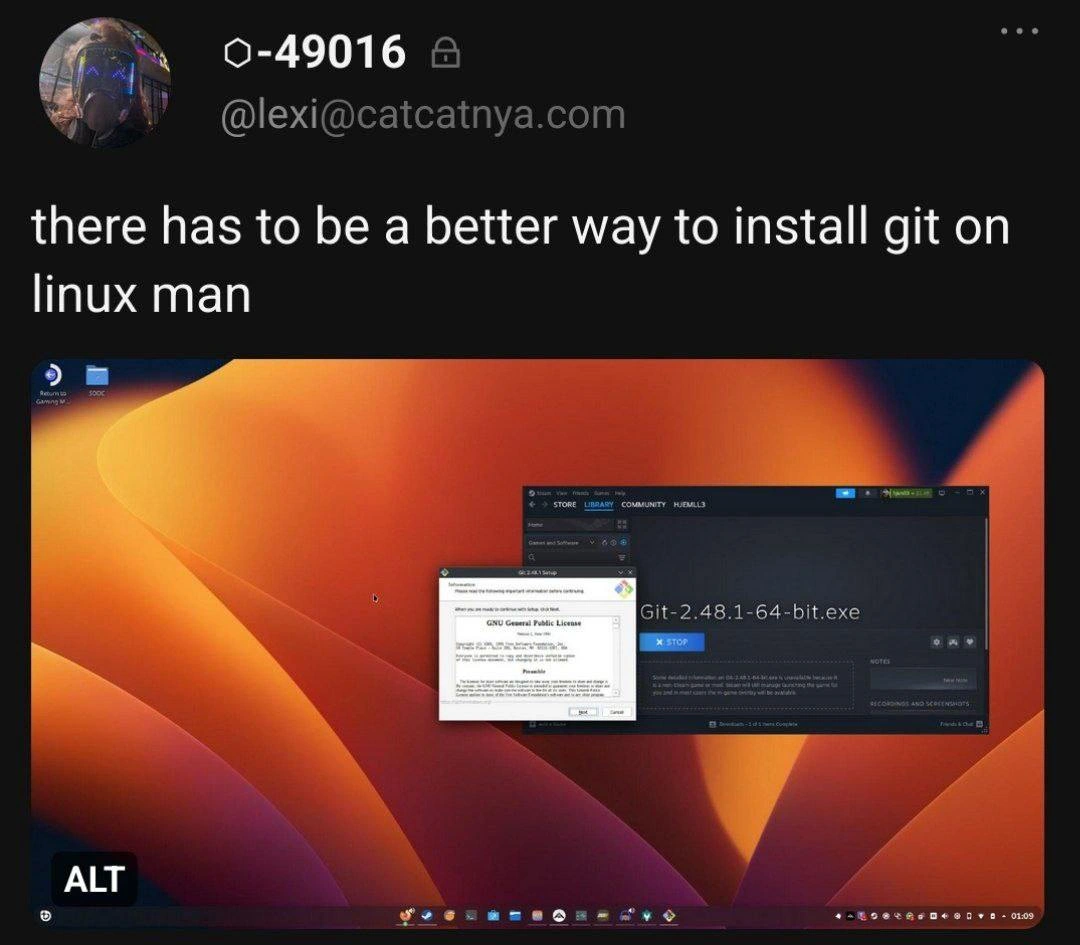
When Your Linux package manager is literally Steam downloading Git.exe
VersionControl Post #6600, on Mar 30, 2025 in TG

When Your Linux package manager is literally Steam downloading Git.exe

Why is this VersionControl meme funny?

Level 1: Rocket to Cross the Street

Imagine you live in a neighborhood and your friend’s house is just across the street. To visit your friend, you could simply walk for 30 seconds and ring their doorbell – easy, right? Now picture someone doing this instead: they build a giant rocket ship in their backyard, put on a space suit, blast off into the sky, circle the entire Earth, and then land the rocket on their friend’s front lawn. 😮 All that just to go across the street! It’s an unbelievably complicated way to do something very simple. Everyone watching would probably laugh and say, “Why didn’t you just walk? There was a much easier way!”

That’s exactly what’s going on in this meme. The person wanted to install Git (a tool) on their Linux computer. There was a super easy way to do it – basically a one-click or one-command solution (like walking across the street). But instead, they chose an insanely roundabout way – using a video game program (Steam) and a Windows installer (the rocket ship) to get the tool. It’s funny because it’s such overkill. The core of the joke is the silliness of using something so overcomplicated to solve a simple problem, when the simple solution was right there the whole time. It’s a big, exaggerated “Why would you do it THAT way?!” moment that anyone can chuckle at, even without knowing the tech details.

Level 2: APT vs .EXE

Let’s break down why this situation is so ridiculous by explaining the key parts:

  • Linux Package Manager (apt/yum/pacman): On Linux systems, you typically install software using a package manager. Think of it as an app store for your system, but accessed through the command line (or a software center GUI). For example, on Ubuntu (a popular Linux distribution), you can open a terminal and run sudo apt install git. This one command will download the correct Git program for Ubuntu and set it up automatically. Other Linux distros have similar tools (yum or dnf on Fedora, pacman on Arch, etc.). The point is, installing something like Git on Linux is usually quick and easy – often just one command.

  • Git: Git is a widely-used version control system. It lets developers track changes in code, collaborate on projects, and revert to earlier code if needed. Importantly, Git was originally created for the Linux kernel project. On Linux, Git is usually either pre-installed or easily obtainable through the aforementioned package managers. In other words, Linux natively supports Git; it’s not some alien software that Linux doesn’t understand.

  • Windows .exe Installer: In Windows, software often comes as an .exe (executable) installer that you download and run. For Windows users, installing Git typically means downloading the Git for Windows installer (a .exe file) from a website or maybe the Microsoft Store, then clicking through a setup wizard (Next > Next > Finish). That installer is specifically made for Windows – it includes things to make Git work on Windows (like a minimal Linux-like environment under the hood, since Git’s internals expect some Unixy tools). If you try to run a Windows .exe on Linux directly, nothing happens because .exe files are a Windows format. Linux can’t run them natively. You’d usually get an error like “command not found” or “cannot execute binary file: Exec format error,” because the file isn’t built for Linux’s architecture.

  • Steam: Steam is an application mostly used for downloading and managing video games. It runs on Linux, Windows, Mac – but its primary job on Linux is to fetch games (and some software) and launch them. On Linux, Steam has a feature called Proton (built on Wine) that allows many Windows-only games to run on Linux by translating their calls (so gamers can play Windows games on their Linux machines). Steam is not a normal way to install typical developer software. You wouldn’t usually think “I need a compiler or a tool, let me check Steam!” – that’s what the system package manager or language-specific package tools (like pip for Python, npm for Node.js, etc.) are for.

  • Wine/Proton (Windows Compatibility on Linux): Wine is a compatibility layer that lets Windows applications run on Linux. It’s like a translator between the Windows world and Linux world. Steam’s Proton is essentially a packaged, gaming-optimized version of Wine that automatically runs when you launch a Windows-only game through Steam on Linux. In the meme scenario, when our user tries to run Git-2.48.1-64-bit.exe through Steam, Proton/Wine is activated to run that Windows installer on Linux. That’s why we see a Windows-style installer dialog on a Linux desktop – Wine is making that possible behind the scenes.

Now, given those definitions, here’s what’s happening in simpler terms: the person wanted to install Git on their Linux machine, but instead of using the straightforward method (the Linux package manager), they downloaded the Windows installer for Git and ran it through Steam’s Proton (i.e., through a Windows compatibility layer). They basically treated Steam as if it were a tool like apt or yum. This is highly unusual because:

  • Complexity: Typing sudo apt install git in a terminal would have achieved the goal in maybe 5 seconds. The system’s package manager would handle downloading the correct files and installing Git properly for Linux. In contrast, the route shown involves multiple extra steps: using Steam to get the file, running a whole Windows installer wizard, etc. It’s a long way around for something that has an easy shortcut.

  • Environment Integration: When you use the package manager, the software (Git in this case) integrates with your system. It ends up in the right directories, and you can just open a terminal and use git ... commands immediately. When you use a Windows installer via Wine, the software doesn’t integrate cleanly. It’s stuck in a fake Windows folder on your Linux system. To use that Git, you likely have to either launch a special “Git Bash” (that comes with Git for Windows) inside Wine or do some extra configuration to make it accessible system-wide. It’s definitely not something a beginner would find straightforward to actually use after installation.

  • Why Someone Might Do This: It’s possible the person behind the meme is doing this as a joke – it’s so over-the-top that many suspect it’s intentional humor. However, it’s also plausible that someone new to Linux, coming from Windows, might not know about the package managers yet. They might instinctively open a web browser (or in this case, Steam’s browser or an odd method) to download software because that’s how they did it on Windows. The tweet caption, “there has to be a better way to install git on linux man,” suggests they realize this is not ideal. It’s a tongue-in-cheek way of saying “Installing Git on Linux shouldn’t be this crazy” – and of course, it isn’t, if you know the proper method.

In short, this meme contrasts the right way vs. the ridiculous way to set up a developer tool on Linux. For a junior developer or someone not familiar with Linux: remember that Linux distributions come with built-in package repositories. If you need a tool like Git, you normally don’t hunt it down as if you were on Windows. Instead, you open the terminal and let the system grab the package for you. It’s safer, faster, and will save you from a lot of headaches. This meme is a funny exaggeration of what happens when someone doesn’t use those built-in tools – and how overcomplicated things can get as a result.


Level 3: APT-get Off My Lawn

Tweet: "there has to be a better way to install git on linux man" – @[email protected]

Oh, the irony is strong with this one. An exasperated user on a Linux desktop is literally using Steam – yes, the PC gaming platform – to download a Windows installer (Git-2.48.1-64-bit.exe) for Git. In the screenshot, a Windows-style Git setup wizard (complete with the GNU GPL license screen) floats in front of the Steam client on a Linux machine. This poor soul is effectively treating Steam as a package manager, running a Windows .exe via a compatibility layer on Linux. For seasoned developers, this is a potent cocktail of humor and horror: it’s like watching someone reinvent the wheel as a Rube Goldberg machine. There has to be a better way, they plead – and every veteran dev is screaming at the screen, "Buddy, just use apt-get!"

Why is this so comically absurd? Let’s unpack the layers of dependency management irony:

  • Native Solution Ignored: On Linux, installing Git is usually a one-liner. For example, on Ubuntu/Debian you’d do sudo apt install git and call it a day. On Arch Linux, sudo pacman -S git – done. Even on Fedora, sudo dnf install git. These package managers pull the correct Git build for your system, no fuss. It’s the intended (and vastly simpler) way. Here, that obvious path was not taken. Instead, we see a Windows-centric approach awkwardly shoehorned into Linux. The user went out of their way to fetch Git for Windows – a version of Git meant to run on Windows – and run it on Linux. It’s a bit like insisting on buying the Mac edition of a tool to use on your PC: technically possible with enough tricks, but why on earth would you?

  • Steam as an Installer: Steam is designed to download games and software from Valve’s servers, typically into a special directory. Seeing "Git-2.48.1-64-bit.exe" in the Steam download list is a grade-A head-scratcher. Perhaps they added the Git installer as a "Non-Steam game" or used Steam’s built-in web browser to grab the file. Either way, they’re co-opting a gaming client to perform the duties of a system package installer. We’re essentially looking at a scenario where someone’s Linux package manager is literally Steam. It’s a digital-age facepalm for any sysadmin: using a game library manager in place of the purpose-built system package management tools. This is the kind of over-engineered workaround you joke about, not actually do (until someone actually does it).

  • Wine/Proton Wizardry: The moment we spot a Windows installer GUI on Linux, we know Wine (or its gaming-optimized cousin Proton) is at play. Wine stands for “Wine Is Not an Emulator” – it’s a compatibility layer that lets Windows applications run on Linux by translating Windows system calls into Linux ones. Steam on Linux uses Proton (based on Wine) to let Windows-only games run on Linux. Here that capability is being abused to run the Git for Windows installer. In practical terms, the user is running a Git installer inside a faux Windows environment on Linux. They’ve virtualized a whole Windows installation process just to get a CLI tool that has been natively available on Linux for ages. We have officially entered the realm of overcomplicated setup path.

  • Senior Dev Facepalm: The meme hits a nerve in the Developer Experience (DX) community – it satirizes how newbies or misinformed folks sometimes tackle problems in the most convoluted way. Every senior developer has a war story of a junior colleague doing something wild like this. The tags don’t lie: this is classic senior_dev_facepalm material. The seasoned engineer in us is cringing (“I’ve seen some crazy hacks at 3 AM, but routing a Git install through Steam is new levels of madness”). It’s the kind of stunt that makes an on-call veteran spit out their coffee: Did this person seriously just download Git through a gaming client? You can almost hear the collective groan echoing through the IT department.

  • Historical Irony – Git’s Origins: Here’s the kicker that every tech historian and grizzled coder appreciates: Git was originally created by Linus Torvalds for Linux development. It’s a tool born in the Linux world (for managing the Linux kernel source code, no less). Linux users normally install Git from their distro’s repositories, where it’s tested and optimized for their system. So what does our intrepid meme protagonist do? Install the Windows port of Git on Linux, effectively using a tool built for Linux in a roundabout Windows form. It’s as if someone had a fresh spring water tap in their yard but chose to import bottled water from across the globe through a maze of customs. That twist is exquisite: the meme isn’t just about any tool, it’s about Git – a pillar of open-source/Linux ecosystem – being installed as if Linux had no idea what it was. Somewhere, deep in his Finnish lair, Linus Torvalds is probably rolling his eyes.

  • Technical Madness Under the Hood: Let’s consider the system havoc this approach could wreak. The Git installer .exe will try to install Git into a Windows-like directory (probably C:\Program Files\Git in the Wine virtual C: drive). It might set up a bundled msys environment (a minimal Unix layer on Windows) and add Git to the Windows PATH. But none of that translates to the Linux environment seamlessly. After our friend clicks Finish on the installer, if they open a regular Linux terminal and type git --version, there’s a high chance it won’t even find the Git they just installed (because that Git lives in Wine’s playground, not in the native OS PATH). To actually use it, they might have to run something like wine git.exe or add Wine’s Git path to their Linux environment. It’s Rube Goldberg-level complexity to end up with what is essentially the same Git functionality that sudo apt install git would have provided in seconds. The meme doesn’t show what happens post-install, but any experienced dev can imagine the dependency hell and config nightmares looming.

To visualize the contrast, check out the difference in steps:

Approach Steps to Install Git Complexity
Standard Linux Way 1. Open terminal
2. sudo apt install git (or equivalent)
Minimal – one command, done.
Steam + Wine Way 1. Install Steam (if not already)
2. Launch Steam on Linux
3. Add Git installer as a “Non-Steam game” (clever hack)
4. Click Install, let Steam download Git-2.48.1-64-bit.exe
5. Steam/Proton launches the Windows installer
6. Click through the Windows Git Setup Wizard (Next, Next, I agree, etc.)
7. Git gets installed inside Wine’s C: drive
8. Figure out how to access this Git from Linux shell (good luck)
Extreme – a multi-step odyssey involving two UIs and a fake Windows.

The table pretty much speaks for itself. The normal route is straightforward and foolproof, while the Steam/Wine route is an odyssey. The meme capitalizes on this contrast. It’s poking fun at either a hapless newbie who doesn’t yet grok Linux package management, or an intentionally absurd scenario concocted for laughs. The tweet caption "there has to be a better way" is the cherry on top – it’s the understatement of the year. Every experienced Linux user reading that is thinking, “Ya think?! There is a better way, and it’s been around forever!” In other words, just use the damn package manager – the perennial advice from seniors to juniors in countless Linux forums and StackOverflow answers.

In summary, this meme hilariously highlights an overcomplicated setup path: using a gaming platform (Steam) and a Windows compatibility layer (Wine/Proton) to install a fundamentally important developer tool (Git) on the very OS that tool was made for. It’s a perfect storm of tech irony and tooling frustration. Seasoned devs laugh (and cry a little) because we’ve all seen unnecessary complexity like this in real life – maybe not this extreme, but close. As the cynical veteran might say: “Next time, kid, apt-get off my lawn and use the right tool for the job.”


Description

Tweet screenshot shows a user named "@[email protected]" saying: "there has to be a better way to install git on linux man". Beneath the tweet is a desktop capture of a Linux machine running a bright orange-to-purple gradient wallpaper. In the center, the Steam client is open and actively downloading a file titled "Git-2.48.1-64-bit.exe" while a Windows-style Git installer dialog displaying the "GNU General Public License" screen hovers in front. The task-bar icons and window decorations betray that this is clearly a Linux environment, making the choice to install Git via a Windows executable (likely through Wine) painfully ironic. The meme pokes fun at over-complicated environment setup and the perennial "just use apt/yum/pacman" advice that seasoned engineers give juniors


Comments

19
Anonymous ★ Top Pick By the time Steam finishes unpacking Git-for-Windows under Wine, you could have `apt install git`, rebased the entire monorepo, and still had time to argue about merge-vs-rebase in the RFC thread
  1. Anonymous ★ Top Pick

    By the time Steam finishes unpacking Git-for-Windows under Wine, you could have `apt install git`, rebased the entire monorepo, and still had time to argue about merge-vs-rebase in the RFC thread

  2. Anonymous

    After 20 years of explaining to management why we can't just 'copy the exe to production,' here's a developer who's about to learn why apt-get exists the hard way - though I admire the commitment to making Linux support everything, including Windows installers through three layers of Wine compatibility

  3. Anonymous

    When you've spent so long in Windows environments that you forget Linux has package managers, and somehow conclude that downloading a .exe through Steam is the 'better way' to install Git. This is the equivalent of ordering a pizza, having it delivered to your neighbor's house, then climbing through their window to retrieve it - technically possible with Wine, but spectacularly missing the point of 'sudo apt install git'. The -49016 reputation score suggests this isn't their first creative interpretation of 'cross-platform compatibility.'

  4. Anonymous

    Peak irony: firing up Pop!_Shop - a Flatpak facade over apt - to install Git, the CLI kingpin, when one `sudo apt install` summons it instantly

  5. Anonymous

    Nothing says supply‑chain hygiene like replacing “apt install git” with Steam downloading a Windows git.exe and launching it via Proton - now your rebase depends on Valve’s uptime

  6. Anonymous

    When your Linux package manager is Steam→Proton→Git‑for‑Windows.exe, congratulations - you’ve invented a four‑layer abstraction for ‘git install’; next quarter we’ll ship kubectl via Battle.net and call it platform engineering

  7. @Diotost 1y

    Is this Steamdeck running Git for Windows installer through Proton?

    1. @a_sulf 1y

      Yeah. any apps from apt install or dpkg would be gone after system update. Maybe there is a git in discover

      1. @chirpbirb 1y

        if you're using bazzite, you should install programs using brew to persist them across updates

      2. @TheRamenDutchman 1y

        On SteamDeck, since it's Arch, you can just install it using Pacman If it's Bazzite, use brew like Farkas said, although I've struggled installing just about any CLI program on Bazzite on my desktop but YMMV

        1. @a_sulf 1y

          right, pacman. you still loose it after updates though

          1. @TheRamenDutchman 1y

            In bare bones SteamOS? Not Bazzite? That one isn't immutable, though.

            1. @a_sulf 1y

              Indeed. Sometimes it's kind of reinstalling itself. Discover packages and users files stays

      3. @anonusernametg 1y

        Wait what

      4. Deleted Account 1y

        Well, yes. Mine doesnt update frequently(and i made a survival script that each x time checks user installed packages, saves a list of them, to reinstall after update)

    2. @farkasma 1y

      Bazzite, but yeah

  8. @azizhakberdiev 1y

    thanks I guess...

  9. @ashit_axar 1y

    Is he scared of stepping out of the terminal to install something? 🤔🤔

    1. @sylfn 1y

      s/is he/are they/ please dont assume pronouns not every computer toucher goes by he/him source post: https://catcatnya.com/@lexi/114025899052799083 author moved to new acc, current pronouns "it/its" pic probable source: https://bsky.app/profile/valerie-tar-gz.uk/post/3lig3a3ku3k2o assuming https://github.com/valerie-tar-gz is not an impersonator, pronouns are "she/her" no concrete pronouns are applicable, so "they"

Use J and K for navigation
