Skip to content
DevMeme
1120 of 7435
Blaming the Code for Flawed Instructions
Bugs Post #1251, on Apr 4, 2020 in TG

Blaming the Code for Flawed Instructions

Why is this Bugs meme funny?

Level 1: Just Following Orders

Think of it like playing with a remote-controlled toy car. You have a controller with buttons that tell the car where to go. Now, imagine you meant to make the car go backwards, but you accidentally pressed the forward button. The toy car zooms forward and crashes into a wall. You get upset and maybe shout, "Bad car! Why did you do that?!" But the car wasn’t being bad or tricky at all — it was just following the commands you gave it. It doesn’t know what you really wanted; it only knows what the buttons you pressed told it to do. In the same way, code (computer programs) will do exactly what you tell them to do, nothing more. If you give a wrong or confusing instruction, the computer won’t realize it’s a mistake — it will just do it. The meme is funny because the programmer is like the person who pressed the wrong button and is now yelling at the obedient toy. We can see it’s silly to blame the car (or the code) when it only did what it was told. The real mistake was the instruction itself. So the joke is basically showing a situation where the developer accidentally gave the wrong orders to the computer, and then felt frustrated at the result. It’s a reminder that computers don’t have common sense — if you pour the wrong “oil” in, they’ll still try to run with it, and you might end up screaming, not because the machine disobeyed, but because it obeyed too well!

Level 2: Literal Obedience

Let’s break this down in simpler terms and define what’s happening. In programming, a spec (specification) is like a set of instructions or a recipe describing what the code should do. In the meme, the code did follow the spec to the letter. The text “My code doing exactly what it was told to do” hints that the program executed the given instructions precisely. But the outcome was wrong, leading to the developer’s frustration (“Me yelling at my code because it’s not working”). Why would you yell at code that obeyed? Because it obeyed the wrong instructions! This is a common scenario causing DebuggingFrustration: the program has no error messages, it’s running, but it’s not doing what you intended. It’s doing what you said. Those can be very different things when there’s a mistake in your instructions.

A bug usually means the software isn’t working correctly. Here it’s a special kind of bug: a logic error or design flaw. The code doesn’t crash or complain – it’s functioning as written – but the strategy or formula we coded was incorrect, producing an unwanted result. It’s the difference between “the code is broken” (it isn’t running at all) and “the code is doing the wrong thing” (it runs, but the output is not what we want). The second case is what we see here. The program’s behavior is actually consistent with its instructions, so from the computer’s point of view everything is fine! That’s why developers joke “It’s not a bug, it’s a feature” in these cases – meaning the program is featuring an outcome we unintentionally programmed in. Of course, from the user’s or developer’s perspective, it’s still a software bug because the result is wrong. It’s just that the bug isn’t a typo or a crash; it’s in the thinking behind the code. This kind of issue often happens when requirements are unclear or a programmer makes a wrong assumption. We told the code to do something invalid without realizing it, so the code faithfully did the invalid thing. Oops!

For example, imagine you’re writing a function to convert Fahrenheit to Celsius. The formula should be (F - 32) * 5/9. But suppose by mistake you write 9/5 instead of 5/9. That’s a tiny mix-up with a big effect:

def to_celsius(fahrenheit):
    return (fahrenheit - 32) * 9/5  # Mistake: formula should use 5/9
print(to_celsius(100))  # Outputs 180.0, which is wrong for 100°F

Notice, the code runs just fine – no errors or crashes. However, 100°F is actually about 37.8°C, not 180°C! The program gave 180.0 because it literally computed the wrong formula we provided. The code obediently did the math we wrote, even though that math doesn’t make sense for the real intent. This is exactly like pouring cooking oil into the engine: the action “pour oil” was carried out, but it’s the wrong oil, so the outcome is disastrous. The computer didn’t know any better because we didn’t tell it to use engine oil specifically; just like the code didn’t know the formula was supposed to use 5/9 because we mistakenly wrote 9/5. The implicit requirement (“use the correct type of oil” or “use the correct formula”) wasn’t coded in, so it wasn’t followed.

Now, why are we yelling at the code in the meme? When debugging, it’s easy to vent frustration at the program (“Why are you doing this?!”) because it feels like the code is misbehaving. But really the code is doing exactly what we told it. New developers often go through this realization. At first, it can feel like the computer is against you or that it “doesn’t work” for mysterious reasons. Over time you learn there’s almost always a logical explanation: some part of the instructions or data is wrong. The computer isn’t actually thinking or trying to mess up — it has no self-awareness or intuition — it just runs line by line according to our commands. In other words, computers are 100% literal. If you tell a program to delete the file named "important.txt" but you meant "important_backup.txt", it will delete "important.txt" with no hesitation. It won’t ask “Hey, are you sure?” unless you explicitly coded that check. This literal obedience is why Debugging (finding and fixing errors) often means scrutinizing your own instructions to find where you told the computer to do the wrong thing.

We can illustrate this literalism with a humorous example often told in programming circles:

Dev: "Go to the store and get a gallon of milk. If they have eggs, get six."
Code: comes back with six gallons of milk 🥛🥛🥛🥛🥛🥛 (because the store had eggs)

In that story, the instruction was ambiguous. The human meant: “get a gallon of milk, and if eggs are available, buy six eggs as well.” But the wording “if they have eggs, get six” can be interpreted as “get six gallons of milk.” A person might understand the intended meaning from context, but a program will not infer — it will take the words as-is. The “code” in this joke bought six gallons of milk, which is technically a correct interpretation of the given sentence, but clearly not what the dev wanted. It’s the same kind of mix-up as our meme: the code vs intent misunderstanding.

So, in the meme’s scenario, the developer’s code followed the exact steps given, and things blew up (like a ruined engine). The developer’s reaction – yelling in frustration – is something many of us do in the moment of confusion. But eventually, we realize the computer isn’t to blame; the user error is. We basically gave the system bad instructions or bad data. This is often called a self-inflicted bug. The meme uses the absurdity of pouring cooking oil into a car to make this point obvious and funny. No competent person would intentionally put the wrong oil in their engine, just like no coder intends to write a faulty instruction — it happens by mistake. And when it does, the result can be head-smackingly frustrating and comedic in hindsight. Understanding this is a key part of the Developer Experience (DX): as you gain experience, you start to anticipate these literal pitfalls and write clearer code (and maybe yell at your programs a little less 😅).


Level 3: As Specified, Not Intended

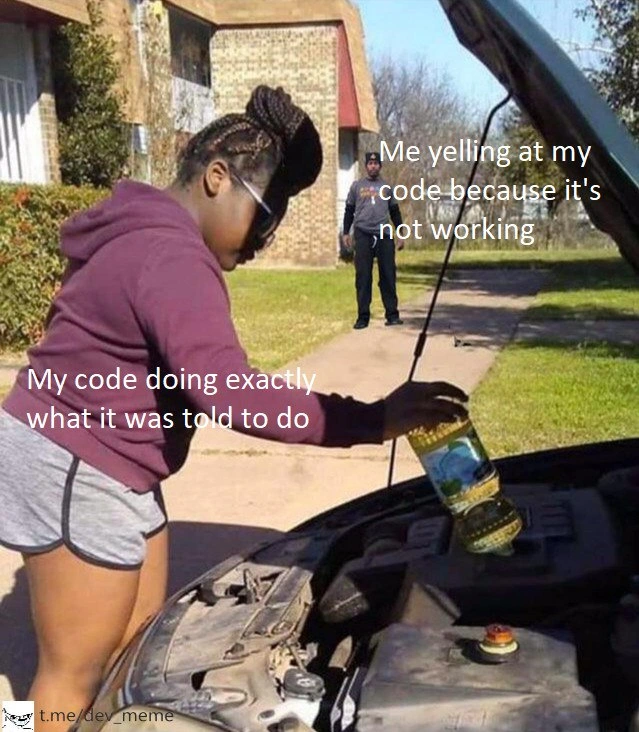
This meme perfectly captures a classic programmer paradox: the code is doing exactly what it was told to do, yet the result is all wrong. In the image, a woman pours cooking oil into a car’s engine, labeled “My code doing exactly what it was told to do.” In the background, a man (the developer) stands aghast with the caption “Me yelling at my code because it’s not working.” It’s a hilarious analogy for those SoftwareBugs where the program faithfully follows the given instructions (the specifications), but those instructions themselves turn out to be flawed. The code obeyed the “letter of the law” — just like pouring oil because someone said “add oil to the engine” — but not the intent (we meant engine oil, not salad oil!).

Experienced developers know this pain all too well. We’ve all been that person debugging late at night, yelling at a program in frustration, only to discover the code was innocent: it did exactly what we programmed, and the mistake was in our logic or assumptions. The humor here comes from that shared realization: the code isn’t maliciously misbehaving; it’s literally doing what we told it, and that literal correctness leads to an absurd outcome. It’s like a genie from a coder’s lamp – incredibly literal and without any common sense. You specified a wish (the requirements), and the genie (computer) grants it to the letter, unexpected side effects and all. Implicit requirements or obvious real-world realities (like “use the right type of oil”) mean nothing to a machine unless we explicitly code them. If you don’t tell the program “only use engine oil”, it won’t magically know better; computers have common sense only the rules we give them.

This trope is a well-known DeveloperPainPoint. It pokes fun at the gap between our intentions and what we actually code. In real projects, it’s not uncommon for a feature to meet the written spec but still be considered a bug by users because the spec was incomplete or the developer misunderstood the problem. The meme’s scenario is basically a self-inflicted bug: the developer (like someone who misfilled the engine) has only themselves to blame, yet the immediate reaction is “Ugh, why won’t this stupid code work?!” We personify our code and yell at it, as if it disobeyed, when in truth it unflinchingly obeyed our flawed orders. It’s a comedic reflection on human nature: when faced with an unexpected result, our knee-jerk reaction is to blame the tool (“Bad code! Bad!”) rather than the toolmaker. Only after some investigation do we facepalm and realize the bug vs feature twist here: from the code’s perspective, it wasn’t a bug at all – it was a feature, doing exactly what it was “designed” to do (just unfortunately that design was wrong).

Seasoned devs will also appreciate the deeper truth about deterministic machines: programs don’t have free will. If the output is weird but there’s no crash, you’re likely dealing with a logic error – the program logic is correctly implemented but solving the wrong problem. This could stem from a misunderstanding in requirements or a simple mistake in the coding logic. For example, imagine a configuration file or spec said “use parameter X as threshold” and the code does so, but it turns out X was the wrong parameter to begin with – the code doesn’t know that, it dutifully uses the wrong threshold and causes chaos. We laugh (perhaps a bit sarcastically) at memes like this because we’ve been there: writing code that technically does what we told it, and then getting that sinking feeling (or utter disbelief) when the app behaves like an obedient but over-literal employee, following our bad instructions to the T.

Ultimately, the meme underscores a key engineering lesson wrapped in humor: clear, correct instructions matter. Whether it’s choosing the right oil for a car or the right algorithm for a task, the quality of the result hinges on the quality of the command. The next time you catch yourself yelling “Why is this code not working?!”, remember this meme’s scenario – the code might just be innocently obeying your last order. As the battle-scarred say: “Computers are logical; it’s our logic that’s sometimes illogical.” 😅


Description

A two-part meme featuring a person in a purple hoodie in the foreground pouring a bottle of what appears to be cooking oil into a car's engine. An overlay text on this person reads, 'My code doing exactly what it was told to do'. In the background, a man stands with a frustrated expression, with the overlay text, 'Me yelling at my code because it's not working'. The scene is outdoors in a residential area. A watermark for 't.me/dev_meme' is visible in the bottom-left corner. The meme format uses a visual metaphor to represent a common developer dilemma. The humor stems from the developer's misplaced anger. The code, like the car engine receiving the wrong fluid, is functioning perfectly according to the instructions it was given. The problem isn't the code's execution but the developer's flawed logic or incorrect instructions. This resonates deeply with experienced engineers who understand that the root of most bugs is human error and the first step in debugging is to question one's own assumptions, not the machine's execution
Comments

7
Anonymous ★ Top Pick My code is deterministic, my requirements are not. The real problem is that the 'add_oil' function was implemented with a dependency from the kitchen pantry
  1. Anonymous ★ Top Pick

    My code is deterministic, my requirements are not. The real problem is that the 'add_oil' function was implemented with a dependency from the kitchen pantry

  2. Anonymous

    The compiler won’t stop you from pouring canola into your dependency-injection container - types line up, semantics blow up in prod

  3. Anonymous

    After 20 years in this industry, I've learned that the computer is never wrong - it's just implementing my poorly articulated requirements with ruthless precision, like a genie that grants wishes exactly as stated but never as intended

  4. Anonymous

    This perfectly captures the moment you realize the bug isn't in your code - it's in your brain. The computer is doing exactly what you told it to do, which is precisely the problem. It's the programming equivalent of asking your junior dev to 'just make it work' and then wondering why they hardcoded production credentials. The code isn't broken; your mental model of what you actually implemented versus what you thought you implemented is what's broken. Classic case of PEBKAC: Problem Exists Between Keyboard And Chair

  5. Anonymous

    Yelling at prod while the code obeys the spec: config "oil" was a string, it accepted "canola", and the engine achieved exactly-once execution

  6. Anonymous

    Every RCA like this starts when “oil” is a string - if your domain types can’t distinguish canola from 5W-30, expect a postmortem titled “Works-As-Coded”

  7. Anonymous

    When the ticket says 'make it secure' and it now rejects all logins - specs met, zero-day achieved

Use J and K for navigation