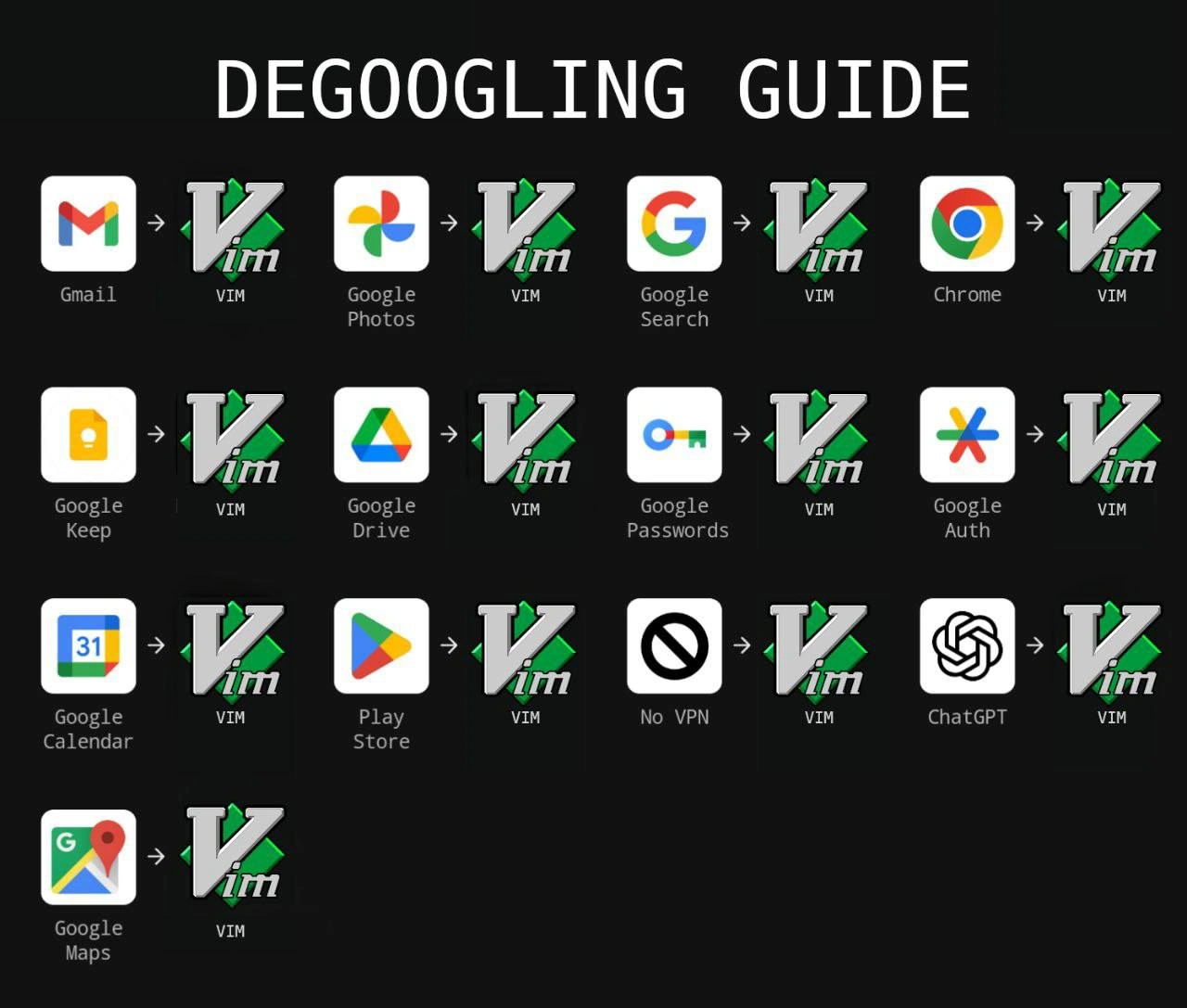
Degoogling Guide: Replace Everything With Vim
Why is this IDEs Editors meme funny?
Level 1: One Tool for Everything
Imagine you have one favorite tool, and you decide to use only that tool for everything in your life. It sounds silly, right? đ€ For example, say you have a special notebook that you love. Now picture yourself refusing to use email, maps, or apps on your phone because youâve decided that notebook will replace all of them. Need to send a message to a friend? You write a letter in your notebook. Want to look at photos from a trip? You sketch them in text form in the notebook. Looking for directions to a new place? You scribble down a list of turns in the notebook. Of course, a single notebook canât truly do all those jobs well â itâs just paper! This meme is joking about a computer version of that idea. Vim, the tool in the joke, is like a very old but loved computer notepad (a text editor). And Googleâs services (like Gmail or Maps) are like all the fancy tools and apps we normally use. The funny image shows someone replacing every fancy Google app with that one plain tool, Vim. The reason itâs humorous is because itâs such an extreme, exaggerated choice â kind of like trying to fix every problem with the same single wrench, even problems a wrench isnât meant for. It makes us laugh because we know nobody would really throw away all their useful apps just to use a simple editor for everything. Itâs poking fun at how sometimes people can be overly loyal to their favorite tool. In simple terms, the meme says: âWho needs all those Google things? Iâll just use my one trusty old program for everything!â Itâs absurd and goofy, which is exactly why itâs funny to developers (or anyone whoâs seen someone really obsessed with one way of doing things).
Level 2: Living in Vim
Letâs break down whatâs going on here in simpler terms. This meme is all about Vim, which is a famous text editor that you run in a terminal window (text-only interface). If youâre a junior developer and havenât used Vim much, picture an old-school editor where you navigate with the keyboard (using h/j/k/l keys instead of arrow keys) and you have to press special keys or commands to do things like saving or quitting. Vim is powerful and lightning-fast for editing code or text once you learn it, but itâs notorious for being hard for beginners â especially the part about quitting it! In Vim, you donât quit by clicking an âXâ â you actually have to type :q and press Enter. (If you didnât know that, now you understand why people joke about getting stuck in Vim!).
Now, the meme references âde-Googling.â Thatâs a term people use when they try to remove Google services from their life. Why do that? Mostly for privacy or control. Googleâs services like Gmail, Google Drive, Maps, etc., are super convenient, but they also collect a lot of data about you. Some developers value DataPrivacy a lot, so they attempt to switch to alternatives that are open-source, self-hosted, or at least not run by Google. For example, instead of Gmail they might use ProtonMail, instead of Google Drive maybe Dropbox or a personal server, instead of Google Calendar perhaps an open-source calendar app, and so on. There are actual guides out there listing replacements for every Google product â often these guides are in forums or blogs and might have titles like âComplete Degoogling Guideâ in big letters. So the meme takes that familiar concept and puts a funny twist: every replacement is just âVIM.â Itâs like saying, âHey, you want to get rid of Google? Easy, just use Vim for EVERYTHING.â Itâs immediately silly, because Vim is a text editor, not an email service or a map or a photo gallery. But thatâs the joke â itâs exaggerating the idea of being an extreme minimalist or a die-hard Vim fan.
For someone newer to development, you should know thereâs a long-running friendly rivalry called the EditorWars. Developers often have strong preferences for their text editors or IDEs (Integrated Development Environments). Vim is one side of that war â itâs beloved by those who love keyboard-driven, efficient editing. On the other side, historically, was Emacs (another very extensible editor), and today youâll also hear about VS Code, Sublime, etc. These debates are usually tongue-in-cheek, but people do poke fun at each otherâs tools. Vim users brag about doing everything without leaving the keyboard or terminal. They even use Vim keybindings in other programs. Emacs users joke that their editor can do anything (it even has a built-in game and email client!). So this meme leans into that culture. It imagines a scenario where a Vim enthusiast uses Vim not just for coding, but as a replacement for literally every Google application or service. Thatâs like an EditorWars fantasy scenario â Vim conquers all. If youâve heard a senior developer say something like âI could exit this GUI and do this faster in Vim,â thatâs the mentality being caricatured.
Letâs go through a few of the icon pairs to clarify. The first one shows the Gmail logo and an arrow pointing to the Vim logo. This implies âReplace Gmail with Vim.â Obviously, Vim by itself doesnât send email. But there are ways a person could manage email in a very old-school way on the command line. For instance, thereâs a program called mutt (a console email client) which many terminal lovers use â it lets you read and write emails in a text interface and you can configure it to use Vim to compose the messages. So a hardcore Vim user might actually handle email without the Gmail web interface at all. The meme is simplifying it to âjust Vim,â but it hints at using plain text email, which some privacy-conscious or geeky users do.
Next, think about Google Maps â Vim. How would someone replace something as visual and interactive as Google Maps with a text editor? They really canât, not in any practical way. At best, one could use a tool that gives driving directions in text form (there are command-line tools that can fetch directions or coordinate info), and then open that text in Vim. Or maybe keep a static map in a text-based format. This is super inconvenient compared to using the Google Maps app with GPS and a visual map! And thatâs exactly why itâs funny â itâs such an impractical substitution that it highlights the absurd commitment of our hypothetical Vim fanatic. Similarly, Google Photos â Vim would mean no photo gallery, just maybe a directory of image filenames you open in Vim as binary (which would look like gibberish), or you convert images to ASCII art to âviewâ them in a text-only way. Itâs ridiculously cumbersome. The meme is basically listing a ton of these examples to drive home the point: this person is replacing very specialized tools (maps, photo storage, web browser, etc.) with one general-purpose tool (a text editor).
Another pair is Chrome (the web browser) â Vim. Chrome is a full-featured graphical web browser. Vim is, again, text-only. So perhaps the idea is using a text-based web browser. There are text-based browsers like Lynx, w3m, or elinks, which let you surf the web in a terminal (everything appears as text, no images or fancy formatting). Some Vim enthusiasts integrate those with Vim or use Vim-like keybindings in their browser. So a privacy-conscious developer might avoid Chrome by using those tools (which donât run any Google scripts or ads). Itâs doable but obviously you lose out on the modern web experience. By pointing everything to Vim, the meme is simplifying the message: âditch the user-friendly app, go back to basics in the terminal.â If youâre new, imagine trading Google Searchâs homepage for typing search queries with a command and getting raw text results â thatâs the vibe.
What about Google Keep â Vim? Google Keep is a notes app for quickly jotting down to-do lists, ideas, etc., often with cloud sync. Replacing that with Vim is actually one of the more plausible ones: you could just have a text file (or a bunch of text files in a folder) for your notes and open them in Vim. Many developers do prefer plain text notes because itâs simple, portable, and not tied to an app. In fact, the idea of using a single text-file (often Markdown format) for notes and tasks is pretty common. So here the meme is funny but also relatable â âha ha, I do actually take notes in Vim instead of using an app.â Itâs poking fun at ourselves a bit.
Then thereâs Google Drive â Vim. Google Drive is cloud storage with document editing (Google Docs, Sheets, etc.). The Vim equivalent would be editing local text files for documents and maybe using something like Git for version control, or not having cloud sync at all. It means you give up the convenience of accessing files from anywhere or collaborating in real-time, in favor of having everything locally in text form. Some devs actually do this for sensitive data (theyâll keep important info in an encrypted text file rather than on Googleâs cloud). But again, doing that for everything is extreme.
One particularly humorous one is Google Passwords â Vim. Google Password Manager stores your site passwords in the cloud and auto-fills them in Chrome. A Vim replacement might be a plain text file containing all your passwords (hopefully encrypted!). Thereâs a command-line password manager called pass which essentially does this: it stores each password in a GPG-encrypted text file and opens Vim for you to edit or view it. So ironically, that replacement isnât as far-fetched in the tech world â many security-minded folks prefer managing passwords themselves rather than trusting Googleâs vault. Of course, the meme doesnât spell all that out, it just shows an arrow to Vim, which in a way assumes the reader knows these command-line alternatives exist or finds the concept amusing regardless.
Now, ChatGPT â Vim stands out because ChatGPT isnât Google (OpenAI made it). But ChatGPT represents the new generation of AI helpers that lots of developers are using (to get code suggestions, troubleshoot, etc.). By including ChatGPT in the âdegooglingâ list, the meme is broadening to âget rid of big cloud-dependent intelligence too.â Replacing ChatGPT with Vim might imply not relying on AI at all. Maybe our Vim guru will just read documentation and think deeply instead of asking an AI. Itâs a humorous commentary on the older-school developers who might say, âI donât need an AI to code, I have 20 years of experience and a good editor.â On a lighter note, it also jests that you could do something like write your own notes or even talk to yourself in a text file rather than using an AI chatbot. Some devs even embed tools into Vim (there are plugins to query AI), but the arrow here suggests not using the AI service at all â just stick to the basics. So itâs both a jab at the AI trend and a continuation of the one-tool-for-everything joke.
The big picture for a junior developer is understanding that this meme exaggerates a real mindset. On one side, itâs about privacy and independence: not relying on big companies like Google for your everyday tasks. Thatâs the degoogle ethos â but usually people who degoogle still use various other apps or services (just more privacy-respecting ones). On the other side, itâs about tool fanaticism: the stereotype of an old-school programmer who loves one tool (like Vim) so much they try to use it for absolutely everything. In reality, Vim can be extended a lot, but there are clear limits to what makes sense. The humor comes from recognizing those limits and seeing someone blatantly ignore them in service of their âVim or nothing!â obsession.
Also, if youâve just started working with experienced programmers, you might have noticed some indeed do as much as possible in terminals and text editors. For instance, many will tell you they prefer editing config files in Vim rather than using graphical editors. Some write documentation in Vim, manage servers through Vim, etc. It can be impressive. This meme dials that habit up to eleven. Itâs like a caricature of the senior developer who hasnât touched a GUI in years. As a junior, you might find Vim tough or archaic, and you might love the convenience of Googleâs apps â so the meme is also kind of humorous from your perspective because the trade-off being suggested (giving up all those nice apps to live in Vim) sounds crazy. Youâre right â it is crazy in a literal sense! The goal is to make you laugh at the extremeness of it, but also maybe nod if youâve met the type of person who would half-seriously advocate this.
One more thing: the text âdegoogling guideâ is written in a monospace font on a black background, which gives it a hacker-ish, command-line aesthetic. Monospace means each letter is the same width, like in code editors or terminal output. So the meme visually looks kind of like someone typed out this list in a terminal or on a hacker forum. Thatâs deliberate styling to appeal to developers. And all the icons (Gmail, Maps, etc.) are brightly colored next to the plain Vim logo, making Vim stand out as this one green solution swallowing up all the multi-colored Google services. Visually, it reinforces the joke: so many different services, one single replacement every time.
In summary, for a junior dev: this meme is joking that an ultra-minimalist, privacy-obsessed programmer would try to replace every modern tool (email, maps, photos, you name it) with the old-school Vim editor. Itâs funny because itâs such an extreme scenario that mixes tech ideals with impracticality. To fully get it, you just need to know that Vim is a text editor known for being powerful (and a bit cult-famous), and that quitting Google is a thing privacy fans talk about. The meme merges those ideas in a humorous way. Once youâve fought with Vim a bit or seen people argue about editors, youâll likely find this even funnier. And hey, after seeing this, you might even be curious to try Vimâs legendary :q quit command yourself â just to make sure you can escape Vim if you ever get stuck! đ
Level 3: Vim All The Things
Seasoned devs recognize this meme as a mashup of privacy zealotry and the eternal EditorWars. It satirizes the degoogle_guide trend â where engineers try to swap out every Google service for a privacy-friendly alternative â by taking it to a ridiculous extreme: replacing them all with Vim. For context, Vim is a venerable text editor living in the terminal (a true CommandLineInterface tool). The joke is that someoneâs de-Google plan basically turned into âinstall Vim and use it for everything.â Itâs a playful nod to full vim_supremacy, poking fun at the idea that a hardcore Unix geekâs answer to everything is vim. This resonates with experienced developers because weâve all met that one colleague who seemingly lives entirely in Vim, writing emails, todo lists, even browsing the web from a black-and-green text screen. The memeâs large monospace âDEGOOGLING GUIDEâ title and its grid of icons mimic a serious checklist â but each entry goes from a major Google product straight to the bright green Vim logo. Itâs absurd in just the right way.
Why is this so funny to a senior developer? First, it riffs on the classic âIf all you have is a hammer, everything looks like a nailâ syndrome. Here, Vim is the hammer and literally everything â email, photos, search, you name it â is being treated like plain text (a nail). This is an obvious privacy_overkill solution. Sure, avoiding Google services is a legit privacy goal (DataPrivacy matters), but replacing Google Maps with a text editor is hilariously impractical. The humor clicks because Vim is powerful, but itâs still just a text editor â imagining it handling something like turn-by-turn navigation or photo galleries is delightfully ludicrous. Itâs like suggesting you could replace an entire cloud ecosystem with a 30-year-old terminal program. The meme is essentially shouting, âWho needs cloud services? Iâve got Vim!â which satirizes both the unix_one_tool_philosophy and the almost religious fervor of some Vim enthusiasts. It targets that kernel of truth: veteran devs often brag about minimalist setups (tmux + Vim for life!) and mistrust bloated web apps. This image pushes that mindset to comical extremes.
Each icon pair in the image hides an in-joke understood by seasoned devs. For example, Gmail â Vim implies using Vim (or a Vim-powered mail client) to read and send emails. In real life, thatâs not far-fetched â many of us have used mutt or similar CLI email clients where Vim is the editor for composing messages. So replacing Gmail with Vim is exaggerated but rooted in something real. Then Google Photos â Vim is much crazier: how on earth do you manage photos in Vim? Maybe by converting images to ASCII art or just maintaining a directory of image files via text descriptions. The sheer impracticality of viewing your vacation pics in a text editor makes it funny. Google Search â Vim hints at doing web searches from the terminal. Again, veteran devs know you can run curl or use text-based browsers like Lynx or w3m right inside Vim with :! commands, but itâs a far cry from the convenience of Googleâs actual search page. The Chrome â Vim swap similarly pokes at those who avoid graphical browsers entirely â âWho needs Chrome, Iâll just browse in Vimâs terminal!â (Perhaps using Vim plugins to fetch web content as text). Itâs a jab at the CommandLineInterface purists.
The second row gets even more niche: Google Keep â Vim suggests keeping notes in plain text files (a very common practice actually â many devs have notes.txt or Markdown docs managed in Vim instead of a cloud notes app). Google Drive â Vim indicates storing documents locally and editing them in Vim, instead of cloud storage â essentially trading Googleâs convenience for your own manual versioning and perhaps using Git or rsync to sync if at all. Google Passwords â Vim alludes to managing passwords in a text file or using a CLI password manager (like the pass utility which edits GPG-encrypted text files in Vim). This one is both humorous and telling: it hints some folks trust a plain text+encryption approach over Googleâs password vault. Google Auth â Vim is particularly tongue-in-cheek â Google Authenticator generates 2FA codes; replacing that with Vim might imply storing backup codes in a text file, or using an OTP generator script in the terminal. Itâs technically possible, but quite contrarian.
The final row goes completely off the rails in a fun way. Google Calendar â Vim evokes someone maintaining their schedule in a text file or using a Vim plugin for calendar (yes, those exist). Itâs a wink to the old-school practice of managing todos or events in plain text (like using org-mode in Emacs or Vim wiki pages). Play Store â Vim is a hilarious stretch: the Play Store is how you get mobile apps. Replacing that with Vim suggests youâre so âde-Googledâ that you wouldnât use app stores at all â maybe youâd write your own tools in Vim or compile programs from source. Itâs a sly nod to open-source purists who avoid app ecosystems. The No VPN â Vim entry might puzzle some: the icon (circle with a slash and âVPNâ) presumably means âI donât even need a VPN, I have Vim.â This jabs at overconfidence â as if editing offline in Vim is a substitute for encrypting your traffic. Itâs absurd: Vim canât give you a secure network tunnel, but the meme plays on the idea that a true Vim devotee doesnât need fancy security tools; their solution to everything is just not to leave Vim! And then thereâs ChatGPT â Vim. This one is especially cheeky because ChatGPT isnât a Google service at all â itâs thrown in to broaden the satire to AI dependence. Swapping ChatGPT with Vim suggests that instead of asking an AI for help, the ĂŒber-geek will just open Vim and RTFM (Read The Fantastic Manual) or maybe write code without AI assistance. Itâs essentially saying âWho needs AI auto-complete or Stack Overflow when you can just use Vim and your brain?â Experienced developers chuckle here because it lampoons both the hype around AI tools and the curmudgeonly old-timer who trusts only local tools. In fact, some Vim users have even made plugins to interface with ChatGPT from Vim, but the meme implies a rejection of such crutches â true Vim masters simply :q the AI as well.
Beyond the individual replacements, thereâs meta-humor regarding Vim itself. Notably, the caption âjust :q into full Vim supremacyâ is pure gold for anyone who knows Vimâs commands. :q is the Vim command to quit. Thereâs a famous running joke that new users canât figure out how to exit Vim (leading to countless memes and even Stack Overflow questions about âHow do I quit Vim?â). Here, that trope is flipped: the solution to quitting Google is literally the Vim quit command. It implies the person has managed to escape Googleâs ecosystem by entering Vim â comically implying they finally learned how to quit something (Google services) by using the one thing others struggle to quit (Vim itself). Itâs an inside joke doing double-duty: referencing Vimâs steep learning curve and the act of âquitting Google.â For a senior developer whoâs helped a newbie stuck in Vim, this reversal is hilarious. Itâs a clever linguistic twist as well â typically degoogling guides talk about exit plans or âescaping the Google ecosystem,â and here we have a literal â:qâ (exit) as the plan. Cue the knowing groans and laughter.
Finally, thereâs a historical undercurrent to this meme that veteran devs appreciate. The idea of one editor or environment doing everything traces back to the old Emacs vs Vim rivalry. Emacs, jokingly called âan operating system masquerading as an editor,â has modes/packages for email, web browsing, calendar, even games â Emacs users have long touted you can stay inside Emacs for days without needing other programs. Vim, on the other hand, is traditionally a more focused editor, prized for its modal editing and efficiency, not for being an all-in-one platform. Thatâs why replacing every tool with Vim is funny â itâs like saying Vim has one-upped Emacs at its own game of being an everything-machine. Itâs an ironic role reversal in the EditorWars. Seasoned devs recall flame wars on forums about which editor is superior; this meme takes a lighthearted stance: the depicted vim_supremacy is so over-the-top it can only be a joke. It also aligns with the Unix philosophy (small tools, plain text) taken to caricature level. The hardcore minimalist approach â no browser, no GUI apps, just Vim and the shell â is something only the most contrarian (or masochistic) engineers actually attempt. That contrast between idealized minimalism and real-world convenience is where the humor lives. In practice, very few would seriously advise âjust use Vimâ for maps or photos â we all use specialized tools for those because theyâre objectively better at it. But we find it funny to imagine a grizzled sysadmin actually doing it, cackling as they check the weather in Vim and send ASCII art postcards. Itâs a form of communal tech sarcasm that both celebrates Vimâs versatility and mocks the boomer energy of shunning modern solutions. In summary, the meme lands so well with experienced devs because it exaggerates a familiar mindset to cartoonish proportions, blending privacy paranoia with terminal fanboy-ism. Itâs a loving roast of our own communityâs quirks â after all, who among us hasnât half-joked âI could totally do that in Vimâ at least once? đ
Description
A satirical 'DEGOOGLING GUIDE' showing a grid of Google services and their suggested replacements. Every single Google service - Gmail, Google Photos, Google Search, Chrome, Google Keep, Google Drive, Google Passwords, Google Auth, Google Calendar, Play Store, No VPN, ChatGPT, and Google Maps - is replaced with VIM. Each row shows the original service icon with an arrow pointing to the Vim editor logo. The joke plays on the vim power user stereotype where Vim enthusiasts believe their editor can do absolutely everything, combined with the degoogling privacy movement
Comments
39Comment deleted
To be fair, once you figure out how to exit Vim, you've already spent enough time that you might as well use it for email, calendar, and navigation too
Sure, ditching Alphabet is easy - until compliance asks why your SSO, map tiles, and AI assistant now live in ~/.vimrc
After 15 years in the industry, I've finally achieved enlightenment: Vim isn't just a text editor, it's a lifestyle choice that replaces your entire tech stack. Who needs Google Maps when you can :!curl wttr.in and navigate by weather patterns?
Finally, a degoogling guide that makes sense: just configure Vim with 47 plugins, 3 custom keybindings per service, and a 2000-line .vimrc. Sure, checking your calendar now requires memorizing :CalendarToggle and navigating with hjkl, but at least you're not being tracked - just perpetually stuck in insert mode trying to exit your email
Degoogling complete: we replaced every service with Vim - hjkl never deprecates, pricing is $0, and vendor lock-in is just :q!
:wq to escape Big Tech - VIM: the only app where your data sovereignty is one ESC away
De-googling complete: consolidated 12 SaaS into one modal monolith - ~/.vimrc - so vendor lockâin is gone, replaced by institutional muscle memory
баŃĐœ ДбŃŃĐžĐč I saw this meme before + not funny Comment deleted
ok but who asked? Comment deleted
Because you cant relate Comment deleted
??? Comment deleted
Omg I forgot that was even a term Comment deleted
Meanwhile NeoVim: đż Comment deleted
Deneoviming with vim guide⏠Comment deleted
But is Vim itself automorphic? đ€ Comment deleted
Anthropomorphic? Comment deleted
No, automorphic: Vim -> Vim Comment deleted
or isomorphic Comment deleted
vi is a symlink to vim Comment deleted
Sometimes vim is a simlink to vi, and you get only one level of undo Comment deleted
What's the explanation? Comment deleted
That if you want to degoogle you need fo build fron source Comment deleted
Thanks Comment deleted
Google map how Comment deleted
Mapscii's pretty cool Comment deleted
coâoâl Comment deleted
MapSCII preview: Comment deleted
But idk if that counts Comment deleted
Same with emacs Comment deleted
We all love vim Comment deleted
Just use evil-mode Comment deleted
Sex with women -> Vim Comment deleted
The first time open vim and don't know how to exit -> getting rape Comment deleted
honey, help, I am stuck in vim Comment deleted
đđđ honey -> step bro Comment deleted
Bro just use !q it works 100% all time Comment deleted
Living happy life full of hopes and dreams -> Vim Comment deleted
(i use nano btw) Comment deleted
what the ... Comment deleted