Skip to content
DevMeme
2517 of 7435
The Origin Story of Every Bad UI
UX UI Post #2791, on Feb 24, 2021 in TG

The Origin Story of Every Bad UI

Why is this UX UI meme funny?

Level 1: Bug Born from a Silly Mistake

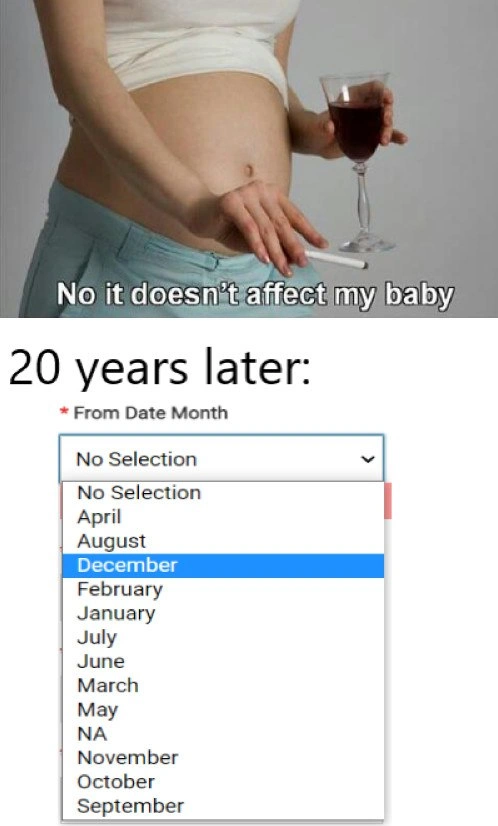
Imagine your teacher is making a list of the months of the year on the board, but instead of January, February, March in the normal order, they write them out alphabetically: April, August, December, February... That’d be pretty confusing, right? You’d learn the year all out of whack! That’s exactly the joke here. In the top picture, a pregnant mom is casually drinking wine and saying, “Don’t worry, this won’t affect my baby.” Cut to 20 years later, and her “baby” is now an adult computer programmer who does something really silly: he makes a drop-down menu for selecting months, but the months are all mixed up and even include an option that doesn’t belong (like "NA" meaning not applicable). The meme is joking that the mom’s bad decision (drinking while pregnant) resulted in the kid making bad decisions in coding. It’s a goofy cause-and-effect joke. The humor comes from how ridiculously the consequence is portrayed: instead of a serious outcome, the result is the grown-up child writing an obviously messed-up piece of software. In simple terms, it’s funny because it’s like saying, “See, Mom? It did affect your baby – now he can’t even put the months in order!”

Level 2: Mixed-Up Months for Beginners

Let’s break down what’s happening in that bottom panel in simpler terms. We have an HTML <select> dropdown list for choosing a month (the label says "From Date Month"). Normally, you’d expect the options to go in order: January, February, March, ... up to December. That’s the natural calendar sequence everyone learns. In a well-made form, if a field is required (marked with that red *), you might see a placeholder like "--Select Month--" or just January through December listed. However, here the months are all jumbled up. They appear in alphabetical order rather than chronological order. So it starts at April (because “April” starts with A), then August (A-U comes after A-P), then December (starts with D), and so on. Basically, the person who coded this probably applied a generic sort without thinking, so the computer ordered the names by the alphabet. This is a dropdown_sorting_bug – a bug where the dropdown items are sorted incorrectly. For a user, this is super confusing: if you want to pick September, you’d expect it near the bottom (as the 9th month out of 12), but in this list “September” actually shows up last, since “S” is near the end of the alphabet. It’s a poor UX (User Experience) choice because users have to hunt for the right month in a seemingly random list.

Now, on top of that, there are two weird options in the list: "No Selection" and "NA". “No Selection” at the top is likely meant as a placeholder prompting the user to pick something (since the field is required, they can’t actually leave it as “No Selection” when submitting the form). But "NA" showing up among the months is very odd. "NA" usually stands for "Not Applicable" or "Not Available." In a date context, you normally shouldn’t have "NA" as a month – if a date isn’t applicable, you’d handle that differently, not by making it one of the selectable months. Including "NA" here is probably a form_validation_oversight or a CodingMistake by the developer. It could be that the code constructing this dropdown blindly took values from some data source that had an "NA" entry, and the developer forgot to filter it out. Or they thought having an "NA" option would cover an “unknown month” case without realizing it just confuses everyone. In any case, it’s a UX failure and a source of FrontendHumor because it’s such a silly lapse in a basic interface element.

For context, the top part of the meme (the pregnant woman with wine saying “No it doesn’t affect my baby”) is a setup for a joke. It implies that something the mother did (drinking alcohol while pregnant) did in fact affect her child in a humorous, non-lethal way: the kid grew up to be a developer who writes buggy code. This is obviously dark humor – in real life, drinking during pregnancy can seriously harm a baby’s development. But here the meme is playing with that concept by pretending the harm showed up as the child’s inability to sort months correctly in a form! It’s an exaggerated, tongue-in-cheek way to blame a programmer’s silly mistake on something that happened 20 years earlier.

So, for a junior developer or someone new to WebDev: what are the takeaways? First, always think about the logical order of things in a user interface. Don’t assume that just because a computer can sort strings alphabetically that it’s the right way to present information. Context matters! Months have a natural order (January–December), days of the week have a natural order (Monday–Sunday), etc. If you sort these alphabetically, you get a weird, counterintuitive result – a glaring UX/UI issue. Second, be careful with placeholder or special values like "NA". If a field is required, a placeholder like "No Selection" is fine to guide the user, but that shouldn’t remain once the user is filling it out. And throwing an actual "NA" option in a date field is almost never a good idea; it likely means the form design or data handling wasn’t fully thought through. Basic form validation and front-end logic should prevent impossible or nonsensical inputs. This meme basically spotlights how a small mistake in coding (like mixing up sort order or not cleaning up the dropdown options) can lead to a hilarious and painful FrontendPainPoints moment. It’s a friendly reminder that even as newbies, we should pay attention to details – and maybe have someone review our code – so that our “baby” (the code we nurture) grows up healthy and bug-free!

Level 3: Chronological Chaos

At first glance, the bottom panel’s form is a front-end UX/UI nightmare that any seasoned web developer can immediately recognize. The dropdown for "From Date Month" is suffering from misordered months – in fact, it looks like someone sorted month names alphabetically instead of in calendar order. The result? April, August, December, February... and so on, a classic dropdown_sorting_bug. This is DeveloperHumor gold because listing months out of sequence is such a BugsInSoftware trope: it’s an obvious mistake no user would miss, yet it somehow slipped through. The meme cheekily blames this blunder on a buggy upbringing: the top panel’s mom-to-be insists her bad decision (drinking wine while pregnant) “won’t affect my baby,” and then 20 years later that baby grows up to be the kind of developer who codes a chaotic month picker. It’s a dark, tongue-in-cheek play on cause-and-effect, equating poor prenatal choices to bad coding habits.

From a senior dev perspective, the humor comes from how front-end pain points often arise from tiny oversights. Here, a few glaring issues are immediately apparent:

  • Alphabetical vs. Logical Ordering: Months have an inherent sequence (January through December). Sorting them alphabetically is a logic bug. It shows a lack of domain understanding – a computer will happily sort strings lexicographically (A–Z) if you ask, but a developer needs to apply the chronological context. An experienced engineer knows to either hard-code month order or use month numbers under the hood. This dropdown’s chronological chaos hints the coder may have just called something like months.sort() blindly, or perhaps retrieved month names from a data source without specifying the correct order.

    const months = ["January", "February", "March", "April", "May", "June", 
                    "July", "August", "September", "October", "November", "December", "NA"];
    months.sort();  // Oops, sorts alphabetically by default!
    console.log(months);
    // Output: ["April", "August", "December", "February", "January", 
    //          "July", "June", "March", "May", "NA", "November", "October", "September"]
    

    In the snippet above, the array of month names (with a stray "NA") gets sorted into exactly the goofy order we see in the meme. A seasoned dev would cringe at this because it’s a well-known CodingMistakes scenario – you have to sort months either by their month number or not sort at all to keep the natural order.

  • The “NA” Option: Seeing an "NA" wedged between actual months is a major UXFailure and points to a form_validation_oversight. Perhaps "NA" was meant as a placeholder for "Not Applicable" or "Not Available." But including it as an actual selectable option in a required date field is just wrong. For one, the field label "From Date Month" with a red asterisk implies a required month must be chosen. Having both "No Selection" and an "NA" option is redundant and confusing. It’s likely the developer didn’t sanitize input values or reused a generic dropdown list that had an NA entry, failing to remove it for a date-specific context. This is the kind of BugsInSoftware detail that better validation or QA should catch. A robust form would either use a blank or “No selection” as a non-value or simply default to a valid month – throwing "NA" in there is basically saying "we didn’t really think this through."

  • Poor UX & select Element Usability: From a UX/UI standpoint, this is a textbook UXFailure. Users expect months either in calendar order (Jan, Feb, Mar...) or at least some logical grouping (perhaps by quarter). Alphabetical months make the user work harder to find, say, September, since they have to scan a seemingly random list. It’s a subtle form of select_element_usability sabotage. Imagine scrolling a dropdown and seeing December highlighted before February – you might question the site’s reliability. In web development, a simple detail like sorting can make the interface feel polished or painfully amateur. Here it’s the latter. This FrontendPainPoints scenario also shows how a small oversight (like a bad sort or an extra option) cascades into a jarring user experience. Seasoned devs have learned (often the hard way) that even tiny errors in form logic can erode user trust or break functionality.

  • Context & Dark Humor: The meme’s dark comedic framing – a mother’s flippant “It won’t affect my baby” leading to a coder with apparently scrambled brain logic – resonates with developers who joke that bad code results from bad influences. It hyperbolically attributes a dropdown_sorting_bug to literal brain damage, which is an edgy way of saying “you’d have to be out of it to ship a bug like this.” Of course, in reality, such CodingMistakes happen not from mothers drinking wine but from rushed deadlines, copy-pasting code, or lack of code reviews. The shared laughter comes from the absurd exaggeration and the kernel of truth: we’ve all seen ridiculous bugs that make us wonder “What was the developer thinking (or drinking)?”

In summary, the top panel sets up a cause (questionable prenatal decision) and the bottom panel delivers the effect (questionable coding decision). The humor lands because a WebDev form bug – something as mundane as a month dropdown – is treated as the long-term consequence of the mom’s denial. It’s an exaggerated cautionary tale: neglect early (whether parenting or input handling) and you get chaos later. As a bonus, it’s a reminder in Frontend development that even seemingly straightforward tasks (like making a month picker) can go hilariously wrong if you’re not paying attention. The veteran dev in us winces, the educator in us wants to fix it, and the dark comic in us can’t help but chuckle.

Description

This is a two-panel meme that humorously links parental choices to future software quality. The top panel features a stock photo of a pregnant woman holding a glass of red wine and a cigarette, with the caption, 'No it doesn't affect my baby'. The bottom panel, labeled '20 years later:', shows a screenshot of a dropdown menu for selecting a month on a web form. The list of months is completely jumbled and not in chronological or alphabetical order (e.g., April, August, December, February). The joke implies that the child grew up to be the developer who implemented this horrifically bad user interface element. For experienced developers, an unsorted list of months is a classic sign of lazy, careless programming and a complete disregard for user experience, making it a perfect punchline for the setup


Comments

27
Anonymous ★ Top Pick You call it a bug, I call it O(1) month selection. The user just has to learn the hash function
  1. Anonymous ★ Top Pick

    You call it a bug, I call it O(1) month selection. The user just has to learn the hash function

  2. Anonymous

    Twenty years later you can spot the kid: they populate the month dropdown with `SELECT DISTINCT name FROM months ORDER BY name` - apparently prenatal Cabernet disables the part of the brain that knows about ENUMs and integer sorting

  3. Anonymous

    This is what happens when you let the intern implement date sorting using a custom comparator function they found on Stack Overflow that was actually for sorting Pokemon by their Pokedex number in a different regional variant

  4. Anonymous

    This is what happens when you sort dates as strings instead of proper date objects - 20 years of technical debt compounding into a dropdown that makes users question their own sanity. The 'NA' option nestled between May and November is the chef's kiss of someone who said 'we'll refactor this later' in 2003. It's the software equivalent of that TODO comment from the original developer who's now a CTO at a different company, blissfully unaware their quick fix is still haunting production forms and making UX designers weep into their Figma files

  5. Anonymous

    You can tell Month is VARCHAR: lexicographic order, ‘NA’ promoted to the 13th month, and the placeholder persisted - turns out calendars are easier than null semantics

  6. Anonymous

    Mom's merlot hardcoded the null month - 20 years later, still failing required field validation

  7. Anonymous

    Nothing says enterprise like a required month field whose domain is ['No Selection', 'NA', 'April'…], sorted by the order tickets were filed

  8. Deleted Account 5y

    how does No Selection get to go at the top???

    1. @Agent1378 5y

      Framework added it😄

  9. @JoseAngelSanchez 5y

    maybe default value?

  10. Deleted Account 5y

    what's wrong with being born in December?

  11. @JoseAngelSanchez 5y

    you are the smaller of your classroom...

    1. @ImJmik 5y

      No, im the oldest one😎

      1. @JoseAngelSanchez 5y

        are you the teacher? 😂 (btw, I wanted to mean that… 🤦‍♂️)

  12. @nuntikov 5y

    This shit gave me a headache

  13. @deerspangle 5y

    Is this better or worse than zero indexing months?

  14. @dosboxd 5y

    Astrology was created for this form

  15. Max Ting 5y

    Aaaa

  16. Max Ting 5y

    Its sorted

    1. @yaviyavi 5y

      the joke just leaves the group

  17. Max Ting 5y

    Got it

    1. Deleted Account 5y

      @devs_chat

  18. Max Ting 5y

    Spasibo brat

    1. Deleted Account 5y

      ?

    2. @iftryalexg 5y

      Zhmu ruku, drugoi brat

  19. Max Ting 5y

    Thank you

  20. @GaraPishun 5y

    The problem is NA and No Selection... Both are same...

Use J and K for navigation