Spot the Buried Lede in the Release Notes
Why is this IDEs Editors meme funny?
Level 1: Trying to Keep Up
Imagine you have a cool new toy, but it’s a bit experimental, so it keeps getting fixes every day. 🧩🔧 One morning you find a wheel is a little wobbly, so the maker sends a quick fix and tightens it (that’s like the “performance improvement” update). The next day, you realize they removed the toy’s on/off button by mistake – oops! They rush to put that button back because you really needed it. Later that day, you discover the toy sometimes makes a funny error noise if you press a certain sequence of buttons after changing its battery – the makers didn’t expect you’d do that, so they patch it and now it works without the weird error. Then you notice a tiny red light on the toy that was supposed to turn off isn’t turning off – kind of like a stubborn red sticker that won’t go away. They fix that too so the toy looks normal again.
By the end of the week, the toy company tells you, “Hey, we’ve also quietly prepared your toy for a big upcoming upgrade – soon it’ll be powered by a much smarter battery called Sonnet MAX!” 🔮 You’re not exactly sure what that means yet, but it sounds exciting (the toy might do new tricks!) and you’re glad your toy is ready for it.
All of this happened in just a short time, with fix after fix, update after update – it’s like trying to plug leaks in a little dam: you plug one hole and then another leak sprouts, so you plug that, and so on. After five quick patches, finally the dam is secure (for now 😋). It’s funny in a way, because the toy was changing so fast that every day there was something new to read or adjust to. You’re happy it’s getting better so quickly, but it’s also a bit silly how many tiny fixes had to happen back-to-back. In simple terms, the meme is joking about how using cutting-edge tech (like an AI coding tool) can feel like this – you’re excited about how advanced it is, but you’re also holding on tight while it gets one rapid fix after another. It’s a little chaotic, kind of like a game of whack-a-mole 🐹🔨 where you smack one mole (bug) and another pops up, yet you can’t help but laugh as you try to keep up with the pace. In the end, all those quick fixes mean the product is improving, and you’re just along for the ride, doing your best to keep up with each new update.
Level 2: Rapid Release Rundown
Let’s unpack this meme in simpler terms. What we’re looking at is basically an in-app changelog for a coding tool called Cursor IDE. An IDE (Integrated Development Environment) is like a programmer’s workshop – it’s software where developers write and manage code (think of Visual Studio Code, IntelliJ, or Eclipse, but in this case with a fancy AI twist). Cursor IDE has an AI assistant built-in, which likely helps you write or improve code using an LLM (Large Language Model). That means the tool can generate or modify code for you, kind of like GitHub Copilot or similar AI coding helpers. Cool, right? But with great power (AI suggestions!) comes… frequent updates. 🌀
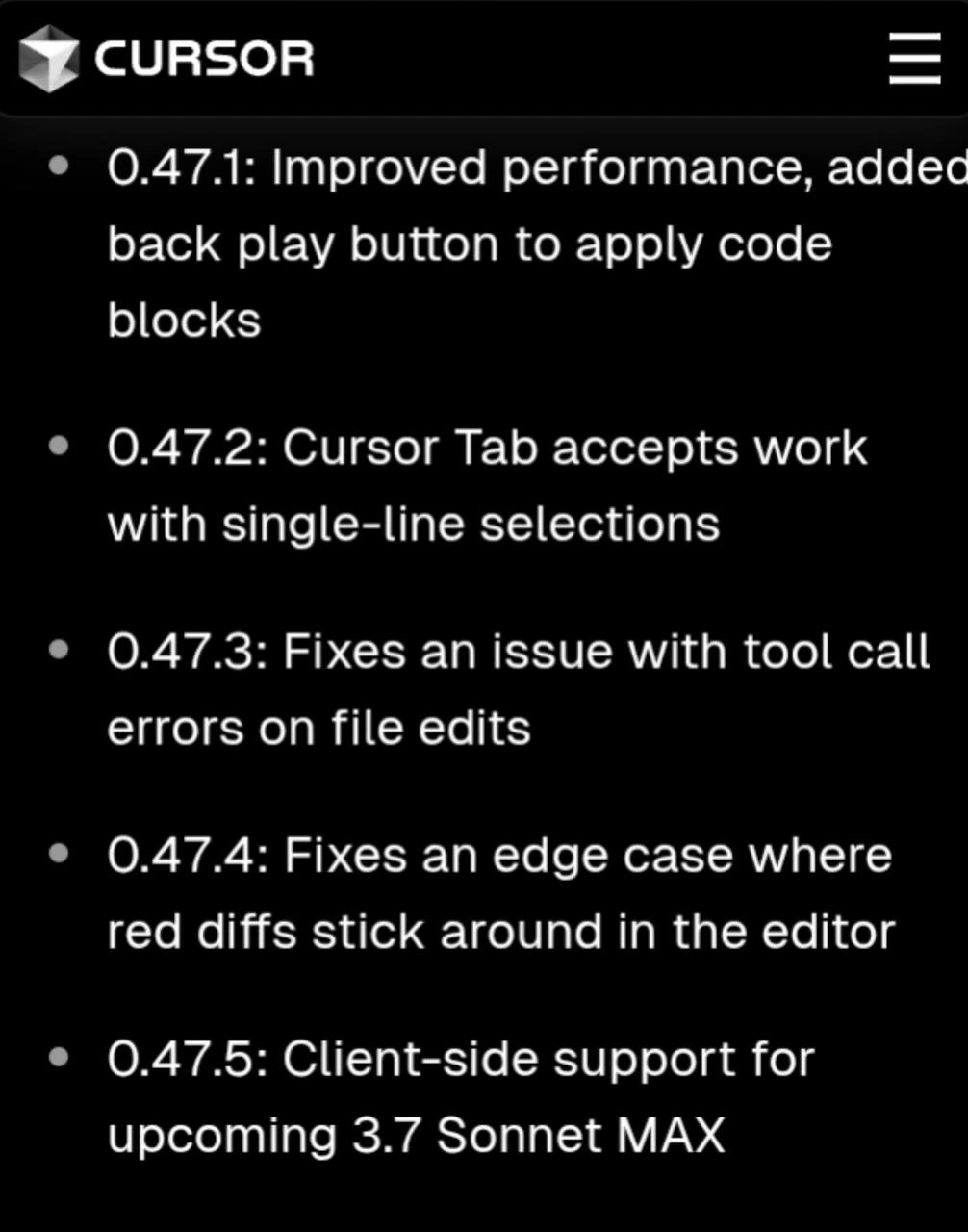
The black panel in the image is showing release notes for versions 0.47.1 through 0.47.5. Release notes are just a list of changes, fixes, or new features that come with a software update. The joke here is that the versions are changing by tiny increments (0.47.1 to 0.47.5) very quickly, implying they released a bunch of updates one after another. It suggests the developers of Cursor IDE were rapidly fixing issues and tweaking things. Modern tools, especially ones involving AI, often update a lot – sometimes even multiple times in a week – because the tech is evolving fast and bugs are being discovered by users in real time. For a developer trying to use the tool, that can be a bit overwhelming to track (hence the good-natured ribbing about “rapid fixes” and a hint of release anxiety).
To make it clearer, let’s go through each bullet point from the changelog and explain what it means:
| Version | What changed | What it means (in plain English) |
|---|---|---|
| 0.47.1 | Improved performance, added back play button to apply code blocks. | The app should run faster and feel smoother now. They also put back the “play” button that lets you apply an AI-suggested code change. (It was removed earlier, and they decided it was a mistake to remove it – users wanted it, so it’s back.) |
| 0.47.2 | Cursor Tab accepts work with single-line selections. | A feature (likely a panel or mode in Cursor IDE, possibly the “Cursor” AI assistant tab) will now work even if you only highlight one line of code. Before, if you selected just one line, the AI feature might not have activated – now it will. This makes the tool more convenient to use on small code snippets. |
| 0.47.3 | Fixed an issue with tool call errors on file edits. | They fixed a bug where if you edited a file and then used a tool (possibly the AI or some editor feature), you would get an error. Now, editing a file won’t cause those tool-call error messages. In short: you can edit and then immediately use the AI helper or other tools without things crashing or complaining. |
| 0.47.4 | Fixed an edge case where red diffs stick around in the editor. | They fixed a rare bug that happened only in special situations (an edge case). This bug made red “diff” highlights stay visible in your code editor even when they should have gone away. Diffs are those colored markings (red/green) that show changes or differences between versions of code. Red usually means removed or changed lines. They were lingering on screen by mistake, which could be confusing. Now that’s sorted out; the diff highlights will disappear when they’re supposed to. |
| 0.47.5 | Client-side support for upcoming 3.7 Sonnet MAX. | They updated the app (the part running on your computer, i.e. the client-side) to be ready for a new AI model called Sonnet MAX 3.7. This likely means a more advanced or updated version of the AI that the tool will use. The new model isn’t active yet, but the IDE now knows how to work with it once it’s released. It’s like a preparatory update so that when the big AI upgrade comes, the IDE won’t need another update right then – it’s already compatible. |
So, in summary, versions 0.47.1 to 0.47.4 were mainly bug fixes and improvements: making the program faster, bringing back a useful button, and fixing a couple of annoying bugs (one with selecting text, one with error messages after edits, and one with leftover red highlight marks). These kinds of issues are common in software development. The term “edge case” in 0.47.4 literally means a scenario that doesn’t happen often – maybe only if you do something very specific – but it still needed fixing. Developers use “edge case” to describe a use case or input that’s unusual and wasn’t initially handled properly.
By 0.47.5, the tone shifts to “new feature coming soon!” Specifically, “client-side support for upcoming 3.7 Sonnet MAX” tells us that something big is around the corner. Sonnet MAX sounds like the name of the AI model (perhaps Cursor’s own AI or a code name for a licensed model). Version 3.7 suggests it’s an iteration or upgrade of that model. “Client-side support” means the Cursor application on your machine has been updated to include code and hooks for that new model. Possibly, Sonnet MAX could have different capabilities or require the app to handle responses differently (for instance, maybe the new model can handle longer code files, so the IDE had to adjust how it sends data). In any case, they’re basically saying: “We’ve prepared the app for the next-generation AI assistant, stay tuned.”
Why release five tiny versions (0.47.1, .2, .3, .4, .5) in such a short span? This often happens when developers deploy an update and then quickly follow up with fixes as issues surface. It’s a hallmark of agile development and continuous deployment – fix fast, release often. Instead of letting users suffer with a bug for weeks, they patch it the same day or next day. For example, if users reported immediately that the missing play button was a big problem, the team might push out 0.47.1 ASAP just to address that. Then someone finds the single-line selection bug, out comes 0.47.2, and so on. It’s like a rapid-fire iteration cycle. This is very common in modern tooling, especially when an app is at version 0.x (which usually indicates it’s still maturing and not a final 1.0 release yet). A 0.x version number telegraphs “hey, we’re still in beta or early phase,” so frequent updates are expected.
For a newer developer (or anyone not used to this), seeing so many updates can be a bit dizzying. You might think, “Did something go wrong? Why so many fixes?” But in contexts like AI assistants in coding, it’s normal because the technology is evolving quickly. Bugs are discovered by actual usage, and developers patch them on the fly. The upside is you get improvements continuously. The downside is you have to update a lot and read all these little notes to see what changed (or risk suddenly noticing the behavior is different and not knowing why). That mix of excitement and slight stress about constant changes is jokingly referred to as “release anxiety.” You’re happy there’s a fix, but also a bit anxious: will this update break anything else? Do I need to adjust my habits again? It’s a relatable feeling in fast-paced software environments.
In this particular case, each bullet point addresses a real Developer Experience pain point:
- The IDE was slow or missing a key button – they fixed that (better DX).
- The AI feature was inflexible about text selection – now it’s more user-friendly.
- Crashes or errors were happening after edits – now resolved, making the tool more reliable.
- Visual clutter from stuck diffs – cleaned up, so the interface is clearer.
- And finally, they’re giving users a heads-up (in a subtle way) that a big AI upgrade is coming, and they’ve laid the groundwork for it.
If you’ve ever seen your phone apps update one after another with messages like “Bug fixes and performance improvements,” this is a similar scenario but in the context of a coding tool with an AI. It means the team is actively improving the product. As a developer, it’s good to keep an eye on such release notes, because they tell you what’s been fixed (maybe a bug that was bothering you is now gone!) and what’s new or coming soon. Here, for instance, if you were annoyed by those red ghost diffs, you’d know 0.47.4 has your back. And seeing mention of Sonnet MAX might get you intrigued to try it once it’s live.
To sum it up, these rapid micro-releases show a development team being very responsive and also gearing up for something new. It’s a snapshot of how cutting-edge developer tools evolve: lots of quick adjustments, listening to user feedback, and preparing for the next big feature (often an updated AI model in this AI/ML era). As a junior dev, you don’t need to memorize all the details – just know that frequent small updates are common in modern tools, especially anything labeled “0.something” version. It’s usually a good sign that the tool is actively maintained (even if it means you see that update notification quite often). And hey, at least they give us the highlights in the release notes so we can catch up with what’s changed in our developer tools. It’s all part of riding the wave of fast-moving technology!
Level 3: Bleeding Edge, Literally
Welcome to the Cursor IDE changelog rollercoaster. The image shows five back-to-back patch notes (versions 0.47.1 through 0.47.5), and any seasoned dev can practically smell the hotfix fumes. This is the kind of rapid release cadence you get on the bleeding edge of developer tools – and in this case, “bleeding” is even color-coded (those red diffs that refused to disappear). Let’s break down why this sequence is equal parts hilarious and painfully relatable:
0.47.1 – Performance boost & the return of the play button: The first note promises “Improved performance” and casually mentions adding back a play button to apply code blocks. Translation: the previous update probably slowed things down or made the IDE chug when the AI assistant was thinking. They scrambled to optimize that, because nobody likes an AI coding partner that lags behind your keystrokes. And that play button? Apparently it went POOF in an earlier version – likely removed or lost in a refactor – and users weren’t having it. Nothing like an outraged beta-tester chorus of “Where’s my run button?!” to send devs rushing to put it back. In a modern AI-powered editor, that ▶️ Play icon is how you apply the fancy code suggestions. Removing it is like
taking the semicolon key off a keyboarddisabling a basic feature. Oops. At least they fixed it fast, a textbook example of agile Developer Experience (DX) repair.0.47.2 – Single-line selections now accepted: “Cursor Tab accepts work with single-line selections.” Sounds innocuous, but imagine the annoyance: you try to use the AI assistant on one line of code (maybe to explain or improve it) and it wouldn’t run because you didn’t highlight multiple lines. 🤦 This patch saves you from that silly extra step. Even junior devs select just one line all the time, so the AI assistant tool should cope with that. Chalk this up as a classic oversight: the feature probably expected a block of code, and nobody tested the edge case of a single-line highlight. Now they have – it’s fixed – and you can ask the Cursor AI to work on that one pesky line without tricking it by selecting a trailing newline or whatever hack folks did before. In short, the IDE got a bit smarter about IDEs_and_TextEditors usability.
0.47.3 – Tool call errors on file edits fixed: Here we have a straightforward bug squish: “Fixes an issue with tool call errors on file edits.” This suggests that if you edited a file and then triggered some AI-powered tool or action, you’d hit an error. Perhaps the state change confused the poor tool (maybe the AI lost sync with the file version, leading to a failure). It’s the kind of glitch that screams race condition or “didn’t anticipate users would do X then Y so quickly.” In practice, a dev might edit code and immediately ask the AI to refactor it – and the app threw a hissy fit because the file wasn’t in the state the tool expected. With 0.47.3, those mysterious error pop-ups should vanish. You can almost hear the dev team muttering “our bad, that shouldn’t have happened” as they push this fix. For anyone who’s dealt with finicky plugins, this is both a relief and a facepalm moment.
0.47.4 – Banishing ghost diffs: “Fixes an edge case where red diffs stick around in the editor.” Ah, the spooky sight of ghost diffs! 🤖💻 You know those red highlights that show removed or changed lines? They were lingering like unwanted guests. This is a pure UI bug: after the AI made changes or you applied a suggestion, the editor sometimes forgot to clean up the diff markers. The result: your code looked perpetually bloody, as if changes were still pending or something broke, even though everything was saved. An edge case means it only happened under special conditions (maybe only on certain file types or after using the play button twice in a row). Edge-case bugs are the ones that slip past initial testing – until a user inevitably stumbles on it and goes “Uh, why is my code editor bleeding red?” Fixing it in 0.47.4 is the devs basically saying “No more haunted editor; the exorcism is complete.” Seasoned devs chuckle here because we’ve all seen silly UI glitches that aren’t critical but drive us crazy until they’re fixed. And of course it had to be red, the color of both diffs and danger – hence bleeding edge, literally.
0.47.5 – Bracing for Sonnet MAX: Finally, “Client-side support for upcoming 3.7 Sonnet MAX.” This is a teaser wrapped in a patch note. It tells the savvy reader that a new AI model (likely a more powerful Large Language Model) is on the horizon. “Sonnet MAX 3.7” sounds like the next big thing – maybe Cursor’s equivalent of GPT-3.7 – and they’re prepping the client-side code to handle it. In plain terms, the IDE app you run had to be updated so that when the server-side brains (the AI) get upgraded to Sonnet MAX, everything will mesh smoothly. Think of it like updating your phone’s software today so it can use a new 5G tower that goes live tomorrow. This line is equal parts exciting and ominous for users: exciting because “Woo, a smarter AI assistant is coming!” and ominous because “Oh boy, big changes usually mean new bugs… brace yourselves.” The meme’s author calls out this “upgrade prep” specifically – a nod to how AI tools often foreshadow their next trick via these cryptic notes. A cynical old-timer might joke that client-side support basically means **“we changed a bunch of stuff under the hood for this new model, hopefully without breaking anything (knock on wood)”*.
Now, why is all this funny (especially to developers)? Because it’s so real. This rapid-fire sequence of minor version bumps is the hallmark of a fast-moving, slightly chaotic project. Modern developer tools – especially ones infused with AI/ML magic – tend to iterate like this. They fix one thing, then discover another quirk, all while racing to integrate the Next Big Feature (in this case, a fancy LLM upgrade). It’s a patch parade that any dev who’s lived on the cutting edge recognizes. We’ve got ReleaseAnxiety tagged here for a reason: keeping up with five updates in a row can make you anxious! One moment you’re celebrating that the play button is back, next moment you’re reading about Sonnet MAX and wondering, “Is my workflow about to change again tomorrow?” 😅
There’s an undercurrent of shared AI humor too – using an AI-powered IDE means sometimes the tool itself is learning and changing almost as fast as you are. It’s like having a junior pair-programmer who’s super smart but occasionally breaks the build, then immediately pushes a fix. You’re impressed by how quickly things improve, but you’re also nervously laughing at how frequently you see that little update popup: “Update 0.47.4 is ready to install… Update 0.47.5 is ready…” etc. Everyone in the community jokes about it: “I blinked, and three new versions rolled out!”
From a senior perspective, this meme shines light on the reality of Continuous Delivery in 2025: instead of big, infrequent releases, teams deliver a flurry of tiny improvements. It’s great for fast progress – you get that edge-case fix now, not weeks later – but it also means living in a constant stream of change. We’ve gone from versioning strategies where a point release might come once in a blue moon to a world where .1, .2, .3 come out before you finish your morning coffee. The IDEs_Editors game has changed; even our coding environments behave more like web apps, updating themselves constantly. It’s both impressive and comedic. Impressive, because hey, the dev team is responding rapidly to issues (listening to user feedback – “Give us back our play button!” – and squashing bugs). Comedic, because as users we end up reading these micro-release notes and nodding like, “Yup, that bug annoyed me yesterday… glad it’s fixed. Oh, another one… wow, how many were there?!” It’s a bit like watching a high-speed montage of someone putting out little fires one after the other. 🔥🔥🔥
In summary, the meme is poking fun at the breakneck pace of improvements (and fixes) in an AI-driven developer tool. It highlights how Developer Experience (DX) can be a wild ride when your editor is getting smarter every week – sometimes the ride’s bumpy (bugs, missing buttons), but at least they’re handing out seatbelts (patches) just as fast. And looming in the background is that “upcoming Sonnet MAX” – the next twist in the plot. The senior dev inside us chuckles and perhaps winces sympathetically: been there, debugged that. This is life on the bleeding edge of AI coding assistants: exhilarating, a tad chaotic, but never boring. 🚀
Description
This image is a screenshot of a software changelog, displayed in white text on a black background. At the top, the logo for 'CURSOR' is visible next to its name, with a hamburger menu icon on the far right. The main content is a bulleted list of release notes for versions 0.47.1 through 0.47.5. The notes are: '0.47.1: Improved performance, added back play button to apply code blocks', '0.47.2: Cursor Tab accepts work with single-line selections', '0.47.3: Fixes an issue with tool call errors on file edits', '0.47.4: Fixes an edge case where red diffs stick around in the editor', and '0.47.5: Client-side support for upcoming 3.7 Sonnet MAX'. For the tech-savvy audience, the humor is in the understated final point. While the first four notes are standard, minor bug fixes and improvements for the Cursor IDE, the last one casually drops a major, highly anticipated (though likely fictional) AI model upgrade, '3.7 Sonnet MAX'. This reflects the culture of constant, rapid AI advancements, where a groundbreaking model update might be nonchalantly listed next to mundane fixes. The original post's caption '🌚max' adds to the subtle, insider-joke nature of the announcement

Comments
13Comment deleted
Our changelog strategy: bury the revolutionary AI model announcement after a bunch of minor bug fixes. Gotta make sure the real ones read the whole thing
Cursor’s patch cadence is so aggressive that by the time you read 0.47.5, 0.47.9 is shipping - complete with an AI model that apologizes for the phantom diffs it introduced three bullets ago
Five patches in what looks like a single sprint? Either they're pioneering 'Continuous Disappointment' or someone discovered that shipping a bug fix for your bug fix's bug fix is the new way to juice deployment frequency metrics. At least they're honest about 'red diffs stick around' - that's not a bug, it's a persistent reminder of your architectural decisions
When your IDE ships five patch versions in rapid succession, you know someone's having a 'fix one bug, create three more' kind of week. The progression from 'improved performance' to 'fixes edge case where red diffs stick around' is the software equivalent of watching a Jenga tower slowly collapse - each fix carefully placed, each one making the next inevitable. At least they're honest about it in the release notes instead of bundling it all into '0.47.1: Various bug fixes and improvements.'
Cursor's 0.47.x barrage: fixing AI edge cases faster than legacy monoliths accrue them
Nothing screams enterprise maturity like five patch releases so the LLM-powered editor stops implementing eventual consistency for diffs while shipping a client-side flag for a model version that isn’t in prod yet
Fixing “red diffs stick around” means our editor finally stopped implementing eventual consistency for shame; and “client‑side support for Sonnet MAX” is PM-speak for “UI shipped, procurement pending.”
explain Comment deleted
you can check it online: https://search.brave.com/search?q=claude+3.7+sonnet+max Comment deleted
“Fix crashes in Claude 8 Max” 🤡 Comment deleted
made the "learn it yourself" message more convincing Comment deleted
Semantic versioning at its best. 🥲 Comment deleted
0.47.5 had to be 0.48 I suppose Comment deleted