
Skip to content
DevMeme
4566 of 7435
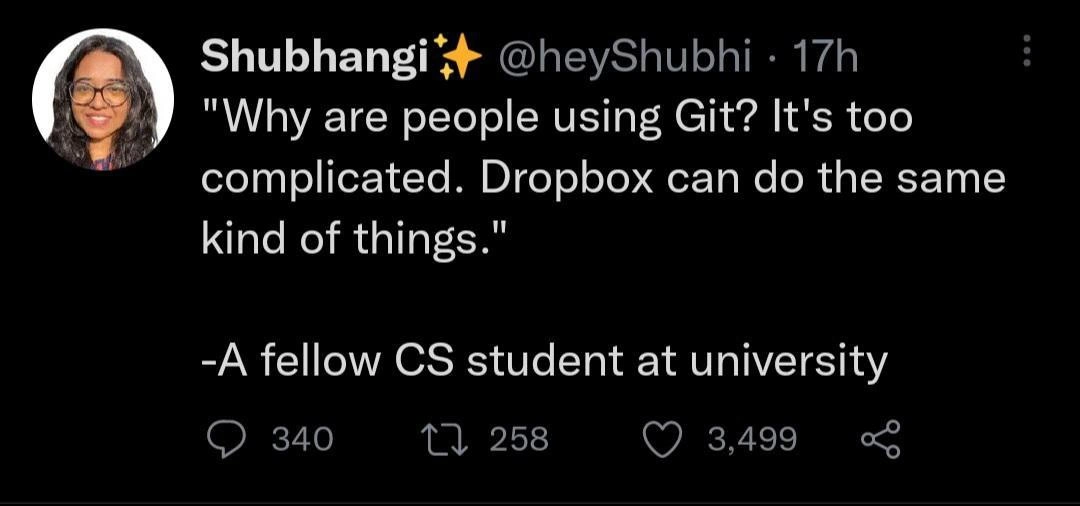
CS student suggests Dropbox over Git, triggering version control collective eye roll
VersionControl Post #5008, on Nov 19, 2022 in TG

CS student suggests Dropbox over Git, triggering version control collective eye roll

Why is this VersionControl meme funny?

Level 1: A Box vs a Time Machine

Think of it like this: Dropbox is like a magic box where you put your homework, and whenever you make a change, the box updates so everyone sees the newest version. It’s simple: one box, always the latest stuff. Now, Git is like a time-traveling notebook. Every time you change your homework or write a new chapter of a story, you take a snapshot of that page in your time notebook. You can go back in time and see old versions of your story, or even make a copy of your story at page 5 and let it go in a different direction (like an alternate ending!). Later, you can decide to merge the two story versions together, keeping the best parts of both. The magic notebook keeps track of all the different branches of your tale and who wrote what.

The funny part of the meme is a student saying, “Why learn to use the time machine notebook if my magic box can do the same thing?” Those who know just shake their heads and smile. It’s cute because the student doesn’t see the big difference: the magic box (Dropbox) only ever shows the latest story – if two friends write at the same time, the last one to drop their paper in the box wins and the other’s work might disappear. 😬 But the time machine notebook (Git) keeps every version from each friend, and can smartly put them together so no work is lost. In simple terms, the student thinks a basic tool is just as good as a special tool meant for big, complicated projects. Grown-up developers chuckle because they remember being new and not knowing the difference, kind of like thinking a toy car could do everything a real car can. It’s a little naïve, a little adorable, and that’s why it’s funny.

Level 2: File Sync vs Version Control

Let’s break down why Dropbox and Git are not the same, in simpler terms. Dropbox is a cloud file-sync service – basically a folder on the internet that keeps files updated across multiple devices. If you put your code files in Dropbox, it will make sure you and your friend both see the latest saved file. Sounds handy, right? And Dropbox even has a basic “version history” for files (so you can restore an older copy if you really need to). This is probably why our confused student thought “Dropbox can do the same kind of things” as Git. On the surface, both Git and Dropbox deal with saving versions of your stuff and sharing them. But here’s the catch: what they do and how they do it are completely different.

  • Dropbox (File Sync): Imagine you’re writing an essay and saving it in a Dropbox folder. Every time you hit save, Dropbox updates the cloud copy. If you or a friend make a change, Dropbox will update that too. But Dropbox doesn't understand how the file changed – it only cares that there is a new copy of essay.docx to sync. If two people change the file at the same time, Dropbox might end up with two separate copies (one of them marked as a conflicted copy) because it doesn't merge the content; it just notices, "Oh, two different versions appeared." The result? You have to manually figure out what changed in each and combine them yourself. Dropbox keeps one main timeline per file (the latest version and maybe some backups), but it doesn’t handle branching or merging of content.

  • Git (Version Control): Now, picture you’re writing code for a project. With Git, every time you reach a milestone or make some progress, you commit your changes. A commit in Git is like taking a snapshot of your entire project at that moment, along with a message you write (e.g., “Added feature X” or “Fixed bug Y”). All these commits form a history – you can go back to any snapshot whenever you want. But Git goes further: it lets you create branches, which are like parallel storylines for your project. You can have a branch where you try a new feature without disturbing the main code. Your friend can work on a different branch for another feature. Each branch has its own series of commits (its own timeline). When features are ready, Git can merge these branches together, intelligently combining the changes. If both you and your friend edited the same part of a file in different ways, Git will point out a merge conflict at the exact lines that clash, and ask you to decide which change to keep or how to blend them. Git is basically built to track content changes, line by line and file by file, across many contributors. It’s a true version control system, meaning it controls multiple versions and histories of your project in a structured way.

For a newcomer (a junior in the programming world), all these Git concepts – commits, branches, merging, pushing, pulling – can indeed feel complicated. It’s a bit overwhelming at first, which is why someone might say, “Why are people using Git? It’s too complicated!” This reaction is totally understandable. When you’re just starting out, you might only be coding alone or on small assignments. In those cases, using Dropbox or Google Drive to keep your code files might seem to work fine. There’s no obvious need for branching or fancy version history when it’s just you and maybe one other person, and you’re not changing the same file simultaneously.

However, as soon as you scale up to a larger project or a bigger team, the shortcomings of a simple sync tool become painfully clear. Let’s say you have five team members working on a software project with dozens of files:

  • With Git, each of you can work on different features at the same time on different branches. The system will help prevent you from stepping on each other’s toes. You can integrate everyone’s work systematically, and you have a detailed log of who changed what, when, and why. If a new bug appears, you can trace it back through the commit history and even revert (go back) to a previous version if needed. This is invaluable in debugging and maintaining software.
  • With Dropbox, if all five of you edit files in one shared folder, it becomes chaotic. Perhaps Alice and Bob both edit main.py. The last person to hit “save” wins, and the other person’s work might be hidden in that conflicted copy file. There’s no built-in concept of preserving both sets of changes in one file; you’re basically stuck doing copy-paste surgery to merge everyone’s contributions manually. There’s also no easy way to know who wrote a certain line of code or why it was changed a week later – Dropbox doesn’t keep a narrative of changes beyond basic file versions like “File updated at 5:00 PM”.

Another angle is history visibility. In Git, you use commands like git log to see a list of all commits, i.e., the entire history of the project’s development. Each commit is like a saved checkpoint with a message:

$ git log --oneline
c4f7321 (HEAD -> main) Fix calculation error in payment module
a9d1e50 (feature/login) Add user login feature
f21c3f8 Initial commit - project setup

Even this simple log shows a timeline: the initial commit (project setup), then perhaps a feature branch added a login feature, then the main branch got a bug fix. If needed, you could switch (git checkout) to that feature/login branch’s commit to see the project at that point in time, or revert the Fix calculation error commit if it introduced a new issue. With Dropbox, you cannot easily step through changes like this or maintain multiple parallel versions; you’d at best have a few dated file snapshots to restore from, but no context as to what the state of the entire project was at that time or why changes were made.

The phrase “same kind of things” hugely undersells what Git does, and that’s the joke. Sure, both Git and Dropbox store data remotely and retain versions to an extent, but using Dropbox as version control is like using a wrench as a hammer – you might get a nail in the wood eventually, but it’s the wrong tool for the job and you’ll likely hurt your hand. The VersionControlHumor on display is extra funny to developers because it echoes a familiar learning curve moment. We’ve all had that phase where we thought we found a shortcut around a complex tool, only to discover why the complexity exists.

Importantly, this isn’t to dunk on Dropbox; it’s great at what it’s designed for (simple file backup & sharing). But version control systems like Git are a different category altogether, created to handle collaborative development’s specific challenges. The meme resonates especially with the JuniorVsSenior theme: the junior (student) doesn’t yet grasp those challenges, while the seniors chuckle because they’ve been through the wars of messy code collaboration. In a way, the tweet and its popularity serve as a gentle reminder in the dev community: we all start somewhere, and it’s okay to not know things – but also, please don’t try to ship a production app by “just using Dropbox,” for everyone’s sanity!

Level 3: Confusing Commits with Copies

In this meme, a CS student boldly claims that Dropbox can do the same kind of things as Git, triggering a collective eye roll from seasoned developers. The humor lands because it highlights a classic freshman misconception: conflating a simple file sync tool with a powerful distributed version control system. To an experienced engineer, this sounds as off-base as saying "Why use a scalpel? My butter knife works just fine!" – it immediately flags a lack of understanding of what Git really does.

Git isn’t just a fancy cloud folder; it’s a complex VersionControl system designed for collaborative coding. When multiple developers work on the same codebase, Git handles branching, merging, and maintaining a history of every change. It’s like a multi-dimensional timeline for your project, where parallel universes of code (branches) can evolve simultaneously and later merge together. Dropbox, on the other hand, is a straightforward file synchronization service – great for keeping your files in sync across devices, but not equipped to handle the nuanced merge conflicts and branching that occur in serious software development.

Consider the scenario: Developer Alice and Developer Bob both edit the same file at once.

  • In Git, Alice and Bob each commit their changes to separate branches. When they’re ready, they merge their branches. Git is smart enough to auto-merge non-conflicting changes and flag up any overlapping edits for human resolution. The result is a coherent combination of both sets of changes, with full context of who changed what and why (thanks to commit messages and diff history).
  • In Dropbox, Alice’s edit and Bob’s edit are just two versions of app.py flying around. If Bob saves his file a few seconds after Alice, Dropbox might silently overwrite Alice’s work with Bob’s version, or generate a dreaded "conflicted copy" file. There’s no built-in concept of merging the content; you’ve essentially got two divergent files and a manual reconciliation headache.

Think of Git’s repository as a directed acyclic graph (DAG) of commits: each commit has a parent link (or two, in the case of merges) forming a tree-like history (Merkle tree structure under the hood). This design is what allows Git to track content movement and detect merges systematically. Dropbox operates at an entirely different level – it looks at files as blobs of data to sync, not as collections of lines of code with independent histories. It lacks awareness of code-level context, so it can’t intelligently combine changes line-by-line. In practical terms, using Dropbox for collaboration on code would be courting disaster: one person’s changes could clobber the other’s with no easy way to roll back or integrate.

The tweet screenshot format underscores how relatable this experience is in tech circles. The poster, Shubhangi, quotes her fellow student’s naive question. The retweets, likes, and replies counts (340 replies! 3,499 likes!) show thousands of developers reacting — likely half amused, half horrified. It’s a moment of "Oh no, they didn’t!" for anyone who’s suffered through real version control pitfalls. Many senior devs remember encountering classmates or coworkers who said "Git is too complicated" and tried to manage code with zip files, shared drives, or tools like Dropbox. It never ends well: teams end up with confusing file suffixes like final_version2_REALLYFINAL.py or lost progress because someone’s copy was out of date. In fact, before modern version control, it was common to see folders littered with files like:

project_draft_v1.py  
project_draft_final.py  
project_draft_final_REALLY.py  
project_FINAL_final_USE_THIS_ONE.py  

These improvised "version control" hacks are exactly what Git was created to eliminate. Linus Torvalds designed Git to handle contributions from potentially thousands of collaborators without everyone stepping on each other’s toes. It’s distributed – every developer has a full copy of the repository’s history, enabling offline work and fearless experimentation. With Git, you can create a branch, try a crazy idea, and if it fails, simply switch back to the main branch as if that alternate timeline never happened. No cloud drive syncing tool offers that level of controlled experimentation and rollback.

Now, why do newcomers sometimes think something like Dropbox is equivalent? For one, Git’s learning curve is steep. Terms like stash, rebase, HEAD, detached HEAD can feel like arcane magic. Early on, a student working solo might only see the basics: “Git lets me save code online and go back if I mess up… well, Dropbox also saves files online and can recover old versions, right?” On the surface, it’s a tool choice confusion born of seeing overlapping features but missing the crucial differences. It’s a bit like noticing that both bicycles and cars have wheels, then claiming a bike can do everything a car does — seasoned drivers (developers) will smirk because they know about the horsepower and complexity under the hood that truly set a car apart.

From a senior perspective, the tweet is equal parts funny and concerning. Funny, because it’s a quintessential junior moment: we’ve all been that student at one point, unaware of the dragons that live in real-world software projects. (Some veteran devs might even recall a time they naively zipped up code or emailed files around, before learning why proper version control matters — followed by the inevitable “Ah, now I get Git” epiphany when a crisis hit.) But it’s also a tiny bit concerning because it hints that version control concepts aren’t being taught or understood early enough in some CS curricula. Version control is a fundamental skill in software development, not an optional add-on. Hearing a budding developer suggest a cloud drive as an alternative raises the question: Have they never worked on a team project larger than a single file?

Ultimately, the humor comes from contrast and context that every developer can relate to. It’s the junior vs senior worldview gap writ large in one quote. Seniors aren’t laughing at the student (okay, maybe a little eye-roll), but more so laughing at the absurdity of the idea and remembering the time before they ‘git gud’ with Git. The VersionControlHumor here is almost a rite-of-passage joke. Once you’ve experienced the chaos of code collaboration without proper tooling, you appreciate why “just use Dropbox” is a recipe for chaos. As the saying in dev teams goes, “Save a file to Dropbox, lose your weekend to merge hell.” You won’t find that embroidered on a pillow, but it’s wisdom earned the hard way.

Description

Screenshot of a dark-theme tweet UI. At top left is a blurred profile photo followed by the name “Shubhangi✨” in bold white text and the handle “@heyShubhi · 17h” in gray. The tweet body, in white sans-serif font, reads: “"Why are people using Git? It's too complicated. Dropbox can do the same kind of things." - A fellow CS student at university”. Below, standard Twitter interaction icons show 340 replies, 258 retweets, 3,499 likes, and a share symbol. The humor comes from a computer-science student conflating Git’s distributed version-control features (branching, merges, history) with basic file-sync tools like Dropbox, highlighting common beginner misconceptions and the steep learning curve of proper version control in professional software engineering


Comments

17
Anonymous ★ Top Pick “Dropbox can replace Git” - perfect, if your branching strategy is “new folder,” your merge algorithm is “overwrite whatever’s there,” and “git rebase --interactive” is renamed to “v2-final-FINAL-no-seriously.zip.”
  1. Anonymous ★ Top Pick

    “Dropbox can replace Git” - perfect, if your branching strategy is “new folder,” your merge algorithm is “overwrite whatever’s there,” and “git rebase --interactive” is renamed to “v2-final-FINAL-no-seriously.zip.”

  2. Anonymous

    Wait until they discover you can resolve merge conflicts by just keeping both versions and naming them final_final_v2_ACTUALLY_FINAL_USE_THIS_ONE.docx

  3. Anonymous

    Ah yes, Dropbox - the perfect tool for when you want to experience merge conflicts without any of the tools to resolve them, lose your entire commit history, and turn 'git blame' into a literal treasure hunt through 47 versions of 'final_FINAL_v2_actually_final.py'. Nothing says 'enterprise-ready collaborative development' quite like racing your teammates to see who can overwrite whose changes first

  4. Anonymous

    Dropbox branching strategy: folders named 'final_v2' and 'johns_final' - merge conflicts via folder roulette

  5. Anonymous

    Dropbox can replace Git - if your branching model is “Project copy (3)”, your merge strategy is last-writer-wins, and your rollback procedure is Slack archaeology

  6. Anonymous

    Using Dropbox as Git is like using S3 as a queue - fine until your branching strategy devolves to last‑writer‑wins and your audit log is the recycle bin

  7. @paul_thunder 3y

    Not hired - Not fired.

  8. @beenotung 3y

    Similar for micro-frontend, depends on team size Complex tool is only beneficial for complex use case

    1. @dsmagikswsa 3y

      I think those microFE or microService is solving collaboration problem more than technical problem.

  9. @ZgGPuo8dZef58K6hxxGVj3Z2 3y

    She got me in the first part. But when she said “it can do the same things” I laughed

    1. @pixelsex 3y

      my mouth did the "haha" thingie

      1. @ZgGPuo8dZef58K6hxxGVj3Z2 3y

        😂😂💀

  10. @deerspangle 3y

    A new challenger enters the ring: https://engineering.fb.com/2022/11/15/open-source/sapling-source-control-scalable/

  11. @deerspangle 3y

    (to clarify, I'm not sure I'm a fan of sapling. Seems odd)

  12. @deerspangle 3y

    It does a lot of different stuff, like the history of each commit is an interesting one. The different log view and the undo both seem like they could be slapped atop git, but each commit having its own history is weird

  13. @deerspangle 3y

    And the scalability ofc

  14. @FunnyGuyU 3y

    You simply mail project_source_final_final02.zip to yourself.

Use J and K for navigation
