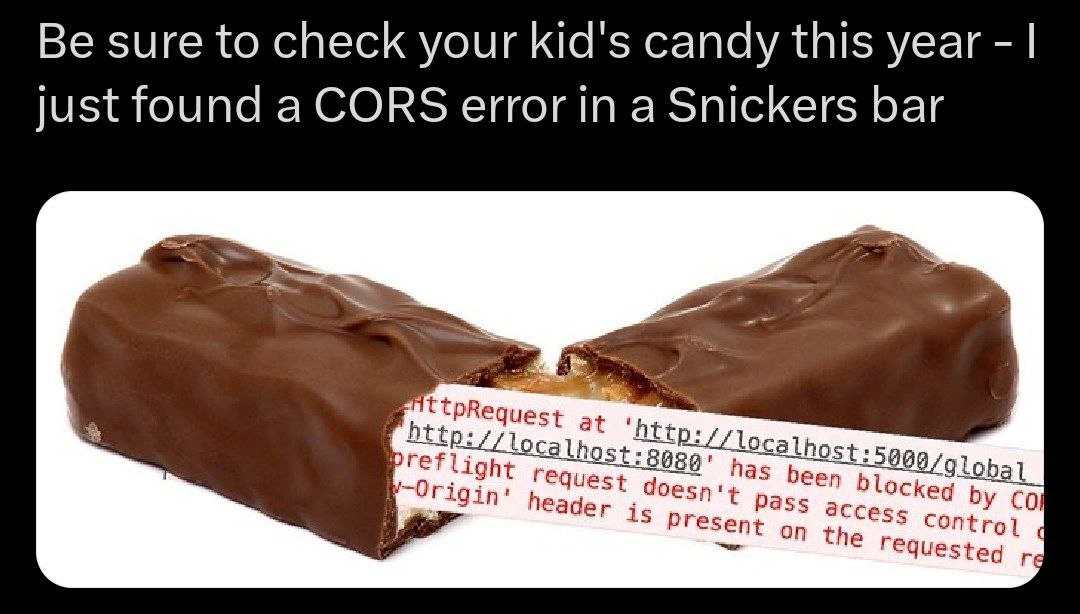
Developer vs CORS Policy: Browser Console Declares It Impossible to Solve
Why is this WebDev meme funny?
Level 1: No Ticket, No Entry
Think of it like trying to visit a friend in a gated community. You (the web page) live in House A, and your friend (the data you want) lives in House B across town. You walk over to B’s gate and ask to come in, but the security guard (the browser) stops you. “Do you have a guest pass or an invitation from House B?” the guard asks. If you don’t have that special permission slip (the magic “Access-Control-Allow-Origin” note), the guard just shakes his head: “Sorry, you can’t enter.” It doesn’t matter that your friend was expecting you or that you only want a quick cup of sugar – no pass, no entry. You end up trudging back home empty-handed and frustrated. In this meme, the developer’s page kept knocking on other houses’ doors without a proper invite, and the browser (like a strict guard) kept saying “Nope!” over and over. It’s funny in a way because the computer is being uber-strict – like a rule-following parent or guard – and the poor developer is left feeling like “Why won’t you just let me in?!”. The joke is that something so small (not having the right “ticket”) causes such a big fuss, making the developer feel like this simple trip has become an impossible mission.
Level 2: No Access-Control-Allow-Origin, No Service
Let’s break down what’s happening in simpler terms. CORS stands for Cross-Origin Resource Sharing. It’s a security feature built into web browsers. By default, a web page can only request data from the same origin (the same domain/host) that the page came from – this is called the Same-Origin Policy. For example, if your HTML and JavaScript are served from https://platform.openai.com, they are generally not allowed to fetch data from a different domain like https://openaiapi-site.azureedge.net or https://auth0.openai.com unless special permission is given. This rule exists to protect you: it stops malicious sites from secretly reading sensitive data from other sites you might be logged into.
CORS is the mechanism that allows that rule to be relaxed in controlled ways. How does it work? Through HTTP headers. When a server is okay with your web page accessing its resources, it sends back a specific header in its response: Access-Control-Allow-Origin. That header basically lists which origins (websites) are allowed. For instance, if the OpenAI API server included Access-Control-Allow-Origin: https://platform.openai.com in its response, it’s like saying, “I know you’re from platform.openai.com – that’s fine, you can use this data.” The browser sees that and then permits your front-end code to actually use the response. If that header is missing, or if it doesn’t match the website that’s requesting, the browser will block the response to protect you.
In the meme’s console log, the errors are all saying essentially: “I blocked this request because the server didn’t say it was okay to share.” The message “No 'Access-Control-Allow-Origin' header is present on the requested resource” literally means the browser expected a permission header and didn’t find it. Another line says “Response to preflight request doesn’t pass access control check.” A preflight request is a small safety step: before doing a real request that might have side-effects (like a POST, or any request with custom headers), the browser sends an OPTIONS request to ask the server, “Hey, are you okay with me coming from this domain?” If the server’s reply doesn’t explicitly green-light that with the correct headers (like including the right Access-Control-Allow-Origin and maybe other CORS headers), the browser won’t proceed with the actual request. So, “doesn’t pass access control check” is the browser saying the server’s answer didn’t have the proper hall pass.
All those errors in red are being shown in the BrowserDevTools console, which is where developers see logs and issues when a page is running. We can piece together what likely happened: the OpenAI web app (running on platform.openai.com) tried to do two things – load a manifest.json file from an Azure CDN, and contact an Auth0 service for login tokens. Because those are different domains, the browser treated them as cross-origin requests. The Azure CDN and the Auth0 service didn’t respond with Access-Control-Allow-Origin: https://platform.openai.com (maybe they weren’t configured for it), so the browser immediately blocked those responses. The lines Failed to load resource: net::ERR_FAILED and the mention of a ProgressEvent are generic ways the browser logs a failure – basically “this network request was terminated.” We also see a 429 status code at one point, which means “Too Many Requests”. That might have happened because the page kept trying to request or maybe a script was retrying over and over, and the server said “slow down”. But the key issue remains: the browser will not let the front-end have those resources due to missing CORS permission.
For a newer developer, this can be confusing. Your code might be correct, the server is up, you’re getting a response (you can even see it if you inspect the network), but the browser simply refuses to deliver it to your web app. The console’s angry red text is your only clue. The solution isn’t in the JavaScript code at all – it’s on the server side or the API configuration. You would need to make sure the server knows about your page and allows it. That usually means enabling CORS on the server: for example, sending the header Access-Control-Allow-Origin: https://platform.openai.com with its responses (or * to allow any site, depending on security needs). Developers often handle this by adjusting server settings or using middleware (for instance, in an Express.js server you might use a CORS library or set headers manually). If it’s a third-party service (like Auth0 in this case), you might have to whitelist your domain in their settings. Until that’s done, no matter how many times you refresh, the browser will block those calls.
This is a very common Debugging scenario in web development. Pretty much every frontend engineer and API developer runs into it. You might open your app for the first time and see nothing working, then open the dev console and find a wall of “blocked by CORS policy” errors. It’s frustrating because it feels like an invisible wall. But it’s actually the browser protecting users. Once you understand that, the error messages start to make sense: they’re telling you exactly what’s wrong – the other server didn’t give permission. Then you know to go and fix the server or adjust your request approach. In short, you can think of the browser as a strict doorman: if the server doesn’t hand your page a proper “Access card” (the allow-origin header), you’re not getting in. The meme is exaggerating how developers feel when they hit that wall: it can seem impossible until you figure out the trick, and then it’s “ugh, of course, it was CORS.”
Level 3: Cross-Origin Crisis
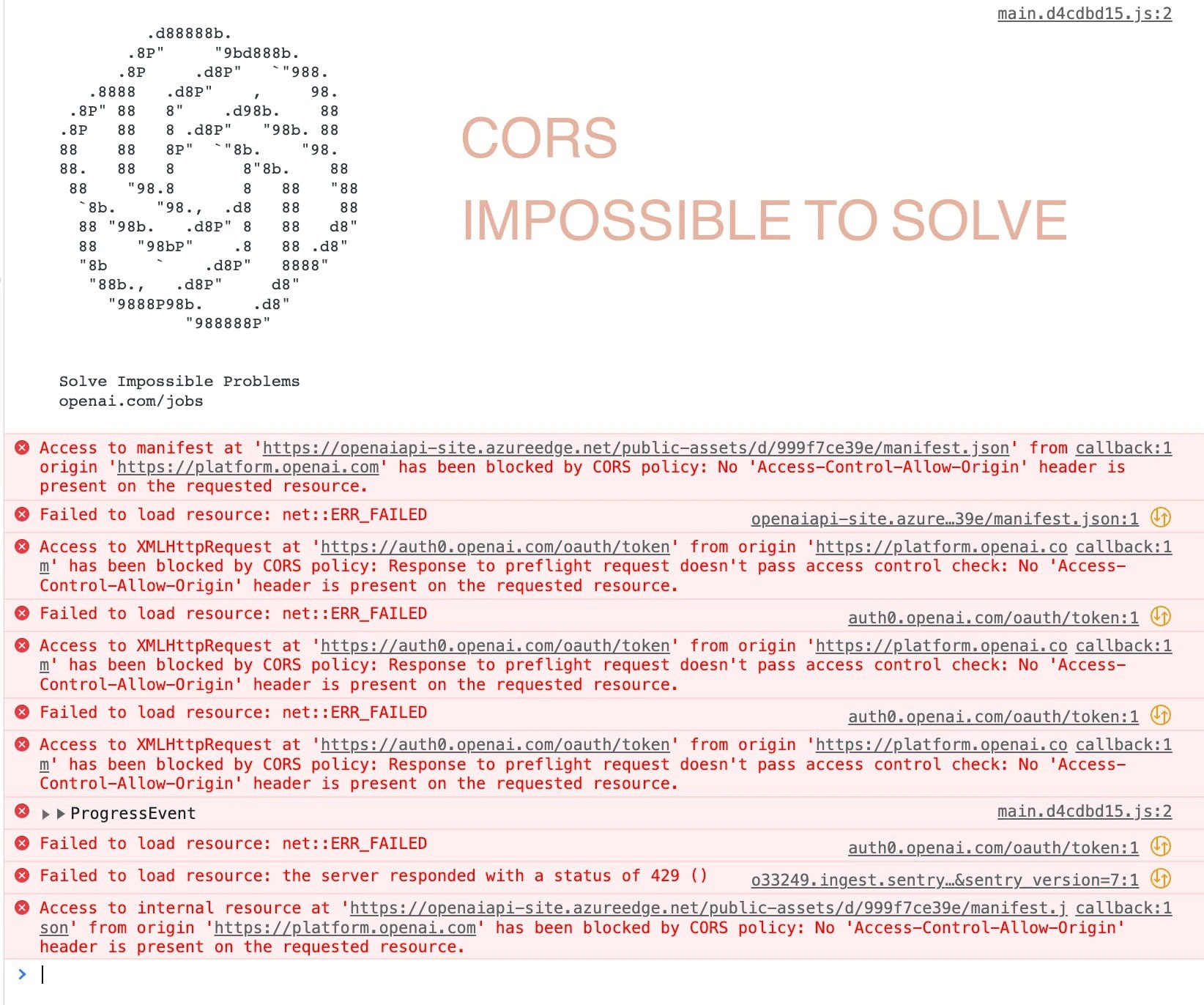
The meme shows a developer’s browser console ablaze with CORS errors, and an ironic banner declaring “CORS IMPOSSIBLE TO SOLVE” next to an ASCII OpenAI logo and the motto “Solve Impossible Problems”. This clever juxtaposition instantly resonates with experienced web developers. It’s poking fun at how a seemingly trivial web headache – a CORS policy error – can stall even the most advanced applications. Here, the browser console is practically screaming in red: “No 'Access-Control-Allow-Origin' header is present on the requested resource.” In other words, the browser’s strict same-origin rules are blocking every attempt by the OpenAI web app (https://platform.openai.com) to talk to different servers (like an Azure CDN or Auth0). The humor comes from the browser acting like an unyielding gatekeeper, flat-out refusing these cross-origin requests and making the situation feel like an impossible mission. Even an AI powerhouse advertising its ability to “solve impossible problems” gets humbled by the reality of cross-origin restrictions – that contrast is comedy gold for tech folks.
Under the hood, this is a classic web Debugging_Troubleshooting saga. Modern WebDev practices often split front-end and back-end into separate services (think single-page apps calling REST APIs). As a result, developers constantly deal with BrowserSecurity features like the Same-Origin Policy. By default, a web page can only freely request resources from the same origin that served it. If code from platform.openai.com tries to fetch data from openaiapi-site.azureedge.net or auth0.openai.com (different domains), the browser intervenes. Every red log line in that console is essentially the browser saying, “🚫 Nope, that other domain didn’t tell me I could share this with you.” The console mentions a missing Access-Control-Allow-Origin header – that’s the key piece of the HTTP response that was absent. Without it, the browser refuses to deliver the response to the front-end. The meme exaggerates this common agony: so many errors cascading that it feels impossible to fix, even though the root cause is one tiny header misconfiguration. Seasoned developers chuckle because we’ve all been there – spending hours scratching our heads over why an API call fails, only to realize we forgot to set a CORS header on the server.
Look closer and you can deduce the timeline of this developer frustration. The app attempted to load a manifest.json from an Azure Edge URL and got blocked by CORS, likely breaking some UI functionality. It then tried an OAuth token exchange with Auth0 (for user login) and every one of those requests was blocked too, with the console noting “Response to preflight request doesn’t pass access control check.” This indicates the browser sent a quiet preflight (OPTIONS request) to ask the Auth0 domain for permission and didn’t get the right answer. The situation was so bad we even see a 429 error (Too Many Requests), which probably means the script kept retrying or multiple resources failed at once, triggering rate limits. It’s a cascade of failure: nothing can load because the browser is in full lockdown mode due to missing CORS approvals. For a senior developer, each of these messages is a familiar story:
- The manifest.json load was blocked because the CDN didn’t set an
Access-Control-Allow-Originheader. Result: the app can’t get its config or assets. - The Auth0 OAuth token call was blocked since the identity service didn’t allow that cross-site request. The error explicitly mentions the preflight (an initial permission check) failing. Result: login/authentication flow breaks.
- The console’s
net::ERR_FAILEDand collapsed▶ ProgressEventhints at how the browser internally just gives up on those calls. And the429suggests the app’s error-handling or monitoring tried so often that it got throttled. Result: an absolute mess in the logs.
From an architectural perspective, this meme highlights a common APIDevelopmentAndWebServices oversight: front-end and back-end integration must include CORS configuration, but it’s easy to forget in the rush. The collective groan (and laugh) from experienced devs is because we know exactly how this goes. The developer probably tested the API endpoints in isolation (maybe with Postman or curl, which don’t enforce CORS) and everything looked fine. But once the browser came into play, its BrowserSecurity model said “I don’t care if the server responded – I’m not letting your web page see that response, because it could be unsafe.” It’s a bit like building a rocket (an AI app) and then tripping over a doormat (a missing header). The WebSecurity mechanisms are absolutely necessary, but when they kick in unexpectedly, it’s always at the worst time – often right before a demo or during a deployment.
What makes this meme extra amusing is the OpenAI recruitment banner framing the chaos. “Solve Impossible Problems”, it proclaims – probably meant to inspire tackling grand challenges like AGI or climate modeling. Yet front and center, the real “impossible problem” is a mundane CORS error that any junior web dev might encounter on day one. It’s a tongue-in-cheek reminder that no matter how advanced our software (AI included), we still have to deal with these very human configuration hiccups. In a way, the browser console is snarkily challenging the dev: “If you think you can solve AI, try solving CORS first.” The senior-perspective humor lies in that contrast and in shared pain: we laugh because we’ve survived similar Debugging nightmares. It’s the kind of laugh that comes after you’ve finally fixed the issue at 3 AM – equal parts relief and “I can’t believe that was the issue.” In summary, CORS errors are the great equalizer among developers: frustrating, notoriously common, and somehow darkly comic when highlighted like this. The meme nails that sentiment by turning a screen of scary red text into a relatable joke about the one bug that can make even seasoned devs feel like beginners.
Description
The image is a screenshot of a browser console dominated by red error entries and a recruitment-style banner. Centered near the top in large light-orange text it says “CORS IMPOSSIBLE TO SOLVE”; to its left is an ASCII-art spiral logo made of dots, 8s, b’s and d’s, followed by the lines “Solve Impossible Problems” and “openai.com/jobs”. In the upper-right corner the file reference “main.d4cdbd15.js:2” is shown. Every console line complains about CORS, including: “Access to manifest at 'https://openaiapi-site.azureedge.net/public_assets/d/999f7ce39e/manifest.json' from origin 'https://platform.openai.com' has been blocked by CORS policy: No 'Access-Control-Allow-Origin' header is present on the requested resource.”, “Failed to load resource: net::ERR_FAILED”, “Access to XMLHttpRequest at 'https://auth0.openai.com/oauth/token' from origin 'https://platform.openai.com' has been blocked by CORS policy: Response to preflight request doesn't pass access control check: No 'Access-Control-Allow-Origin' header is present on the requested resource.”, a collapsed “▶ ProgressEvent”, and a final repeat of the manifest error. The meme humorously captures the perennial pain of frontend and API developers wrestling with cross-origin restrictions despite seemingly simple requests
Comments
57Comment deleted
We containerized the monolith, routed it through Istio, stapled on OIDC, and piped everything to CloudFront - browser still crosses its arms and asks, “Cool story, but where’s my Access-Control-Allow-Origin header?”
CORS: the only security feature where fixing it properly means explaining to your PM why the browser isn't broken, the server isn't broken, but somehow everything is still broken because Tim from 2015 hardcoded localhost:3000 in the API gateway config
CORS errors: where your frontend and backend are technically on speaking terms, but your browser plays overprotective parent and blocks all communication anyway. The real 'impossible problem' isn't the CORS configuration - it's explaining to stakeholders why a missing HTTP header can bring down your entire OAuth flow, especially when it worked perfectly fine on localhost five minutes ago
CORS: Where your localhost backend ghosts the frontend harder than a bad Tinder match, forcing a dev proxy shotgun wedding
CORS: the incident where everything works except the one header you don’t own - and the browser refuses to board without an OPTIONS preflight
Every CORS outage is a distributed-systems lesson: the browser enforces your security model, the CDN caches your mistakes, Auth0 rejects the preflight, and Sentry rate-limits the postmortem
FUCKING FEELS MATE Comment deleted
@yuki_the_girl what about warn for not english? Comment deleted
bruh Comment deleted
lmao having a real life rn) Comment deleted
"rn" bruh Comment deleted
playing board games with tgen Comment deleted
Real life @ Board games Oukeeeey… Comment deleted
compared to "not talking with anyone" about two years ago it's real Comment deleted
And will be banned, LoL Comment deleted
looks like he won't care xD Comment deleted
.she Comment deleted
Dmytro is she? Comment deleted
ah yes lmao Comment deleted
i thought i was supposed to reply with this pic Comment deleted
please use english in this chat tr: i dont give a fuck Comment deleted
what's the point? Comment deleted
chat rules Comment deleted
so that we know you don't give a fuck Comment deleted
learn Ukrainian language, dude. Comment deleted
settle down todd Comment deleted
Are the gayuropeans get cocky, or is it just me? Comment deleted
guess Comment deleted
WhatEver Comment deleted
No English is an international language and Ukrainian isn't. Comment deleted
no necrobumping please Comment deleted
:^) Comment deleted
? Comment deleted
Why have a comment section if you're not allowed to comment on it tbh Comment deleted
comment on things that aren't resolved arguments Comment deleted
Where can I see the rules Comment deleted
that's not in the rules, that's just common sense Comment deleted
I don't think you can just call it common sense, I never got the whole "don't comment on old posts" thing. And I'm not the only one Comment deleted
there you go telegram isn't a forum, but it still applies Comment deleted
Why does it still apply? Comment deleted
because I don't like seeing old fucking arguments brought up again Comment deleted
Okay But Why Should We All Do What You Like? Comment deleted
because I'm a moderator and I ban people who bring down the mood of the chat so the rest of us can enjoy the memes in peace, unlike you Comment deleted
I like the memes though Comment deleted
there is a read only mode xd Comment deleted
Fair enough Comment deleted
good good then stop arguing and certainly don't butt in to old arguments or any arguments at all tbh Comment deleted
Okay lame, but sure Comment deleted
I had to resolve the argument once, I don't want to do it another time Comment deleted
ffs just shut up and enjoy the memes in peace Comment deleted
Dude calm down lmao Comment deleted
rules say orherwise Comment deleted
Ukrainians rulez Comment deleted
this chat rules -> https://t.me/dev_meme/3667 Comment deleted
guess gotta change text on the gif Comment deleted
Based Comment deleted
tr: "I don't fucking care." Please use English in this chat Comment deleted