Access to Heaven Blocked by CORS Policy
Why is this WebDev meme funny?
Level 1: No Invitation, No Entry
Imagine you walk up to an exclusive playground that isn’t your own. You really want to get in and play. But there’s a fence and a guard at the gate. The guard checks and says, “Sorry, I don’t have any note or invitation saying you’re allowed to come in here.” You have to turn away, even though the playground (just like Heaven in the joke) is right there and looks super fun. In this meme, going to heaven is like trying to enter that private playground without permission. The “permission slip” you needed is like a special OK from the Heaven side (the other website) saying it’s fine for you to come in. God is basically the guard at Heaven’s gate saying with a smirk, “No entry, you’re not on the list.” It’s funny because it takes a serious, otherworldly idea (getting into Heaven) and makes it work just like a strict playground rule. Everyone knows the feeling of being told “no” when you were all excited to go somewhere – it’s a bit disappointing in real life, but here we laugh because the meme shows even Heaven has a “no outsiders without permission” rule, just like a website does!
Level 2: CORS Crash Course
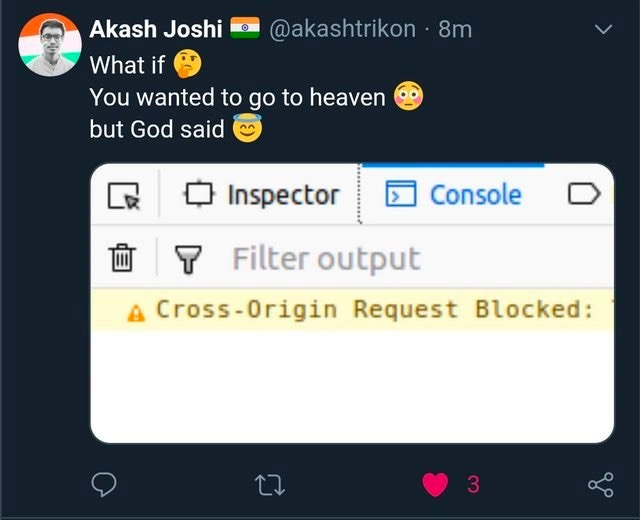
Let’s break down the joke for a newer developer (or the curious onlooker). The meme is styled as a Twitter post where someone wrote:
“What if 🤔 You wanted to go to heaven 😳 but God said 😏”
This text sets up a scenario like a mini-story: You want something really good (going to heaven), but an authority figure (God) responds with something unexpected. In the image, that “something” is shown as a screenshot of a web browser’s Console (the developer log). The console message reads: “Cross-Origin Request Blocked: …” – which is the start of a warning you get in web development when a CORS error happens. In simpler terms, it’s the browser saying “I blocked that request you just tried to make to another site.” The little yellow triangle ⚠️ indicates a warning/error in the console, and it’s very recognizable to anyone who does front-end web development.
Now, what is CORS? It stands for Cross-Origin Resource Sharing. It’s all about the browser’s security rules. Web browsers are built with something called the same-origin policy, meaning a web page can usually only talk freely to the server it came from (the same origin). If that page wants to request data from a different website (a different origin), the browser steps in to protect you. It says, “Hey, I’m not going to let that happen unless the other site explicitly says it’s okay.” This is done to protect users – for example, to stop a malicious website from fetching your bank details from your bank’s site in the background. CORS is the mechanism by which a server can say “It’s okay, you have my permission to bypass the same-origin rule for this request.” The permission is given through special HTTP headers in the server’s response, like Access-Control-Allow-Origin. If those aren’t present (with the correct values), the browser blocks the call.
So in the meme’s analogy:
- “Heaven” represents some other website or API server (a different origin than where you currently are).
- “You wanted to go to heaven” means your web page (or script) is trying to send a request (think of an HTTP GET call) to that heaven server.
- “God said 😏” followed by a Cross-Origin Request Blocked error means the server (controlled by “God”) did not grant permission for that request. The browser therefore stops you, effectively God replying with a “403 Forbidden” status. In web terms, a 403 response is the server’s way of saying “You can’t access this.”
To visualize the parts of this scenario, consider this mapping between the meme and reality:
| Meme Element | WebDev Meaning | Real-Life Analogy |
|---|---|---|
| Going to Heaven | Accessing another site’s API (cross-origin request) | Visiting an exclusive place you’re not from |
| God (as gatekeeper) | The other site’s server & its rules | The authority/guard at that place |
| CORS block message | Browser blocked the call (no permission) | Guard saying “I can’t let you in” |
| 403 Forbidden response | Server’s refusal code (access denied) | A clear “No entry” sign or message |
In a typical frontend situation, you might run into this when doing something like calling a web service from your JavaScript code in the browser. For example, imagine you have a page on http://mywebsite.com, and you want to fetch data from http://coolthirdparty.com/api/data. If coolthirdparty.com hasn’t been set up to allow requests from mywebsite.com, your browser will refuse to give your code the response, even if the server actually sent it. You’ll see exactly the warning shown in the meme’s console screenshot. It’s the browser’s way of saying: “Hmm, that response came from a different place, and I don’t see the proper Access-Control-Allow-Origin permission. I’ll just block it to be safe.”
Now, 403 Forbidden is one of those HTTP status codes (like 404 Not Found or 200 OK) that indicates the outcome of a web request. 403 specifically means the server understood the request but refuses to authorize it – essentially “I hear you, but NO.” The meme uses 403 in the caption (“heaven returns 403”) to strengthen the idea that God is outright denying entry (since in a religious sense being forbidden from heaven is a pretty big deal, and 403 carries that Forbidden label perfectly). It’s a clever mix of a Security error and a cosmic metaphor.
If you’re new to this, you might wonder how one would normally fix a CORS block. The answer: by configuring the server to send the right headers. For instance, if God wanted to allow this “cross-origin” request from Earth, the Heaven server’s HTTP response would include an Access-Control-Allow-Origin: https://earth.com (assuming Earth is the origin). That header is basically a permission slip saying “I, the server, allow requests from that origin.” Without it, the browser just won’t deliver the message to the frontend code. In development, a common workaround is running a proxy or adjusting server settings to include such headers. The meme doesn’t go into that, of course – the humor comes from simply recognizing the problem.
The tweet format and emojis are there to add a dramatic, humorous tone. The little thinking face (🤔) and shocked face (😳) set up the “What if... but then...” scenario, and the smirking face (😏) next to “God said” makes it feel like God (the server) is slyly sticking to his policy. In plain terms, this meme squashes a tech error and a well-known meme setup together: cross_origin_policy_joke meets “you shall not pass”. If you’ve ever been a developer scratching your head over a CORS error, it’s easy to imagine that moment as wanting something dearly (like entry to Heaven) and getting a big fat “NO” from on high. It’s both frustrating and funny – frustrating in real life, funny when turned into a meme we can all nod and laugh at.
Level 3: Pearly Gates Policy
For seasoned developers, this meme hits a heavenly chord by mixing web dev frustration with divine comedy. In the land of Frontend development, seeing “⚠️ Cross-Origin Request Blocked” in the BrowserDevTools console is a familiar rite of passage (or should we say a roadblock). Here, that everyday WebDev headache is whimsically magnified: going to Heaven is equated to an HTTP GET request, and God acts like the all-powerful server that hasn’t enabled the right CORS headers. It’s the ultimate access denied joke: you do everything (morally or code-wise) to “go to heaven,” but the final authority (the server at heaven.com) responds with a HTTP 403 Forbidden. In web terms, a 403 means “I see your request, but you are explicitly forbidden from proceeding.” In life terms, well... “Sorry, not on the guest list.”
What makes this hilarious to experienced devs is the layering of references. The tweet uses the popular meme format “What if you wanted to go to heaven 😳 but God said 😏 …” and completes it with a screenshot of a developer’s console error message. The classic yellow triangle warning – “Cross-Origin Request Blocked” – is something we’ve all groaned at during cross-domain AJAX calls. It’s practically the front-end equivalent of being stopped at the pearly gates. By choosing 403 Forbidden (instead of, say, a 404 Not Found), the meme gets extra kudos from the initiated: a 403 implies “the resource exists, but you don’t have access.” That’s a perfect parallel to the idea of Heaven existing but God disallowing entry. (After all, Heaven didn’t return a 404 – it’s there, you’re just not allowed in!) The smirking 😏 emoji next to “God said” adds a cheeky tone, as if the Almighty server finds it amusing to enforce the rules strictly. It’s like the meme is saying: Even God runs a tight ship with his APIs.
Every senior dev has a war story about chasing down a CORS issue at 2 AM, so the scenario strikes a chord. You deploy a microservice or call a third-party API and suddenly your perfectly good code hits a wall of “Cross-Origin Request Blocked”. It’s infuriating and comical all at once – exactly the emotional mix the meme plays on. The phrase “celestial GET” in the title is itself a witty nod: GET is an HTTP method for retrieving data, and here it’s as if we’re trying to retrieve entry into the afterlife. The Security policy (CORS) steps in like an archangel bouncer: “Hold on, that’s a cross-origin soul trying to enter – not allowed!” Seasoned developers appreciate how accurate this framing is. The rules that govern our browsers are so strict that even a heaven_api_call wouldn’t succeed unless configured properly. We laugh because we’ve been there – not at Heaven’s gate, perhaps, but staring at that cryptic error wondering why our perfectly logical request was rejected. The humor also pokes at the idea that God’s “server configuration” didn’t include Earth in its Access-Control-Allow-Origin list. How many times have we forgotten to update a whitelist or misconfigure a header, only to have some client cry foul? This is that situation blown up to biblical proportions.
In a real dev scenario, the fix for such a blockade is straightforward once identified: enable CORS on the server. You might imagine an experienced dev joking, “Time to send a PR to God’s API repo to add Access-Control-Allow-Origin: * so anyone can GET in.” Of course, in real life you can’t just patch Heaven’s firewall 😅. That irony is part of the fun – it underscores the powerlessness a developer feels when confronted with an external service that says “No.” The meme encapsulates a shared understanding: network security rules can be both life-savers and dream-killers. Much like a bouncer who doesn’t care how badly you want in, the browser will not let your script touch that heavenly resource unless all the paperwork (headers) is in order. And honestly, the idea that even God returns 403 on unauthorized requests is geek humor gold. It’s a comforting thought for devs in a way – if even divine endpoints have CORS issues, maybe our bugs aren’t so sinful after all!
Level 4: Same Origin Sin
Even at a cosmic scale, the Same-Origin Policy (SOP) holds its ground. This fundamental browser security rule, rooted deep in web architecture, dictates that a web page can only access data from the same origin (same domain, protocol, and port) unless explicit permission is given. In other words, a script running on earth.com can't just freely fetch data from heaven.com without Heaven’s server saying it’s okay. This policy was established to prevent malicious scripts on one site from silently stealing data or performing actions on another site – it’s like a built-in firewall in the browser. The meme imagines this principle extending to the afterlife: even a celestial GET request (an HTTP GET aimed at a heavenly domain) would be stopped cold by SOP if no permission is set.
Under the hood, CORS (Cross-Origin Resource Sharing) is the mechanism that allows servers to punch holes in that same-origin wall – but only if they explicitly opt-in via response headers. The fact that “God said 😏” no (by not providing the proper header) highlights just how absolute this rule is: not even a divine endpoint bypasses the browser’s enforcement. Browsers like Chrome and Firefox implement SOP as a core security feature; they physically block responses from different origins unless the response includes an Access-Control-Allow-Origin header (among others) that matches the requesting domain (or a wildcard *). It’s a strict contract – no header, no data – and it’s orchestrated entirely on the client side. The server (God, in this tall tale) might actually respond with something, maybe even a 403 Forbidden, but the browser will still snatch that response away from the frontend code as if saying, “Thou shalt not peek at that cross-origin resource.”
Historically, web developers have grappled with this constraint for ages. Before CORS was standardized, some clever devs used hacks like JSONP or proxy servers to safely retrieve cross-domain data without violating SOP. These workarounds existed because SOP is non-negotiable – a sine qua non of web security. By framing a trip to heaven as a blocked HTTP request, the meme nods to this inviolability: even salvation has to abide by the W3C spec 🤓. It’s a tongue-in-cheek reminder that the laws of computer science (and web security) are so fundamental that they’d apply universally – from Earth to Heaven. If you don’t configure your server to allow cross-origin calls, the browser’s Security model responds with divine intransigence. In practical terms, the same principles that keep your banking info safe in your browser are at play here. The WebDev world might be full of trendy frameworks and fancy APIs, but this meme gets a senior dev smirking because it references one of those eternal (pun intended) underlying rules of the web: thou shalt honor the Same-Origin Policy or face a 403 fate.
Description
A screenshot of a tweet from user Akash Joshi (@akashtrikon). The tweet poses a hypothetical question: 'What if 🤔 You wanted to go to heaven 😳 but God said 😇'. Below this text, an image displays a snippet of a web browser's developer console. The console window shows a prominent warning message highlighted in yellow, which reads: 'Cross-Origin Request Blocked:'. This meme uses a common developer frustration - Cross-Origin Resource Sharing (CORS) errors - as a metaphor for an insurmountable, bureaucratic obstacle preventing access to something desirable, in this case, heaven. The joke is highly relatable to web developers who frequently grapple with these security-related request failures when building applications that interact with APIs on different domains
Comments
7Comment deleted
I guess heaven's API is missing 'Access-Control-Allow-Origin: *'. Or maybe it's just a very strict allowlist and my domain isn't on it. Time to check the preflight OPTIONS request
Looks like the Pearly Gates run on a same-origin policy - better send a preflight prayer with the right headers next time
After 20 years in tech, you finally understand CORS perfectly - it's just God's way of telling you that your soul.origin doesn't match the afterlife's Access-Control-Allow-Origin header, and no amount of proxy servers will fix your architectural decisions
Ah yes, the classic 'Access-Control-Allow-Origin: *' prayer that never gets answered. Turns out the pearly gates implement strict CORS policies - no credentials, no preflight OPTIONS, just eternal 403s. Should've read the divine API documentation before trying to fetch salvation from a different origin. At least now we know heaven runs on a zero-trust security model
Heaven’s API works in curl, but the browser’s preflight 302 to SSO drops Access-Control-Allow-Origin - salvation returns 200 while CORS keeps you mortal
Heaven’s API passes curl, but the browser’s same-origin policy says nope - turns out the final gatekeeper isn’t auth, it’s your CORS headers
God's backend forgot the CORS middleware - now even prayers from localhost:3000 get 403'd at the pearly gates