Copilot in Excel Confidently Returns Wrong Sum as Global Crisis Looms
Why is this AI ML meme funny?
Level 1: The Confidently Wrong Calculator
Imagine you have 3 apples and you ask a friend to count them: 1, 2, 3... how many in total? Now imagine your friend is distracted and confidently says, “15 apples!” You’d probably laugh and know that’s not right at all – the correct answer is 6 apples, of course. This meme is joking about a similar situation, but with Excel (a spreadsheet program) and its new smart helper. Excel’s AI was asked to add 1 + 2 + 3, and it boldly replied with 15. It’s like using a calculator that sometimes just makes up a silly answer. It’s funny to see such an obvious mistake, but it also shows why you shouldn’t blindly trust a “smart” helper. Even a high-tech assistant can act goofy and get basic things wrong. So if an answer seems odd, it’s always a good idea to double-check it – especially when you’re counting something important!
Level 2: When 1+2+3 = 15
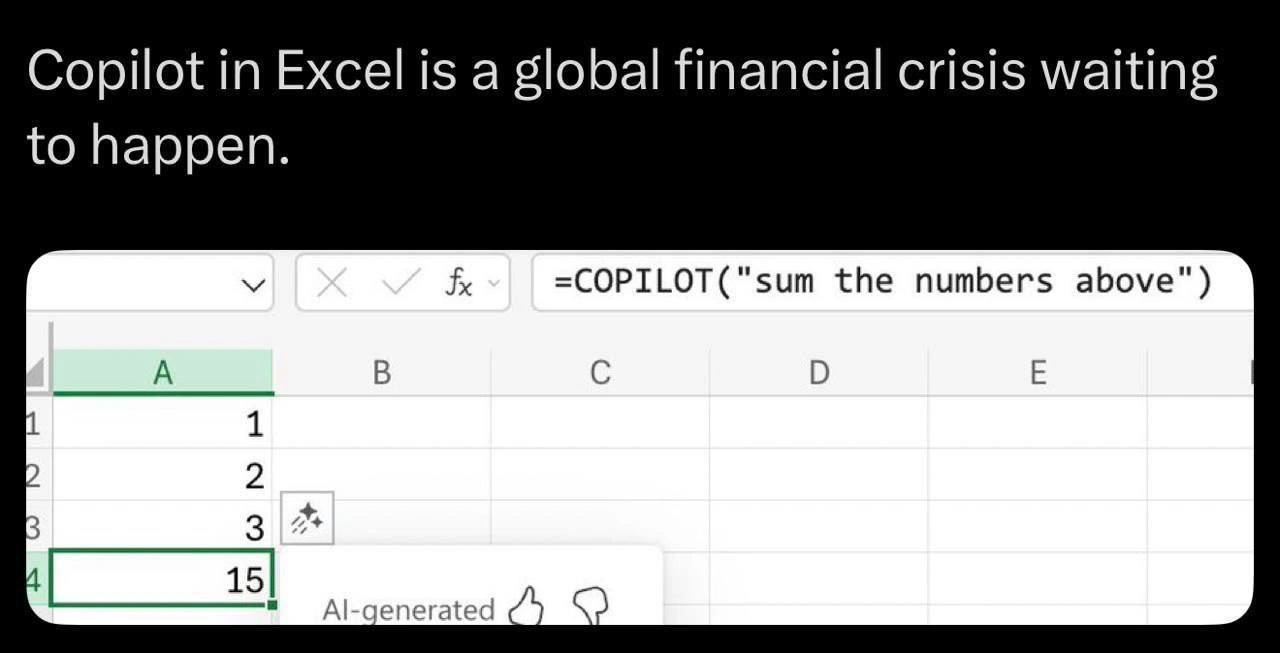
Let’s break down the joke in simpler terms. The Excel snippet in the meme has a column of numbers:
- Cell A1: 1
- Cell A2: 2
- Cell A3: 3
- Cell A4:
=COPILOT("sum the numbers above")→ Excel Copilot’s answer comes out as 15
Normally, if you wanted to add up 1, 2, and 3 in Excel, you would use a formula like =SUM(A1:A3) and get 6 as the result. That’s basic arithmetic: 1 + 2 + 3 = 6. Here, instead of using the regular sum formula, someone used Excel Copilot, which is an AI helper built into Excel that lets you describe what you want in plain English. So the user literally told Copilot: "sum the numbers above."
The funny (and scary) part is that Copilot got it wrong – it returned 15 instead of 6. In AI lingo, this kind of made-up incorrect answer is called a hallucination. The AI hallucinated a result that’s not based on the actual data. It’s as if the AI started guessing or daydreaming, rather than doing the real math. Copilot is powered by a large language model, which means it generates answers based on patterns it learned from lots of text. It doesn’t actually understand numbers the way a calculator or a normal Excel formula does. So while it should have simply added 1+2+3, it instead confidently gave a wrong number as if it were correct.
Now, why does the caption joke about a “global financial crisis”? That’s an exaggeration for effect, but it points to a real concern. Excel is used everywhere in the finance world – companies rely on it to prepare P&L (Profit and Loss) statements, budgets, invoices, you name it. A Profit and Loss statement is basically a report that adds up all of a company’s income and expenses to show how much money was made or lost. You can imagine that those totals must be accurate. If an AI like Copilot were to hallucinate in a financial spreadsheet – say, mess up a sum in a budget or report – it could lead to very bad decisions or huge reporting errors. Auditors (the people who check the financial records to make sure everything adds up correctly) would panic if they saw numbers that don’t make sense. The meme quips that they’d be “reaching for antacids,” meaning they’d be so stressed by seeing inexplicable wrong totals that they’d feel sick to their stomachs (and need medicine for heartburn).
For someone new to this, the big lesson is: AI can make mistakes, even on simple tasks. This whole scenario is a case of AI hype vs. reality. The hype is that AI assistants like Copilot will make our work easier and faster (why bother writing a formula when you can just ask Excel to do it?). The reality is that these AIs have limitations and can produce errors that no human would normally make. In plain terms, a glitch like “1+2+3 = 15” is basically a software bug in your spreadsheet – but one coming from the AI’s logic, which makes it harder to predict or debug. So, you should always double-check AI-generated results, especially for important things like financial numbers. Just because the computer confidently says “15” doesn’t mean it’s right!
Level 3: Formula for Disaster
"Copilot in Excel is a global financial crisis waiting to happen," jokes the meme, and every battle-scarred engineer or financial analyst who has survived a spreadsheet fiasco nervously chuckles. The humor lands because it’s barely an exaggeration. Seasoned professionals have seen how a tiny error in an Excel formula can snowball into multi-million-dollar mistakes. (There are legendary tales of rogue cells and mis-summed columns tanking budgets and portfolios.) Now imagine adding an AI assistant into the mix – one that cheerfully outputs numbers with supreme confidence but no guarantee of accuracy. It’s the perfect recipe for a formula for disaster.
Experienced devs and analysts immediately recognize the scenario: a tool like Excel Copilot tries to infer what you want (summing a column) and does so incorrectly, turning a simple 1+2+3 into 15. The absurdity is funny but also chilling. In enterprise environments, Excel sheets are often the backbone of financial models, inventory tracking, even entire P&L (Profit & Loss) statements. A senior engineer reading this knows that data quality issues in these sheets can halt product launches or trigger all-hands fire-drills to fix reports. We’ve spent careers building checks, balances, and approval workflows around critical spreadsheets precisely because a single wrong number can wreak havoc. In an era of AI hype, Microsoft is now baking Copilot into Excel and touting it as the next productivity revolution. But this example lays bare the AI limitations beneath those glossy demos. The assistant might let you generate a formula by simply typing a request in English, yet if it gets the answer wrong, that's a whole new kind of bug—one we never had with a trusty SUM() function. It’s essentially like handing a loaded spreadsheet to an intern who occasionally just makes things up, and then letting that intern’s work directly influence financial reports. Talk about living dangerously!
The meme also nods at the plight of auditors (the poor folks who have to verify all those numbers). Picture an auditor expecting to find a neat formula trail for a total, only to discover =COPILOT("sum the numbers above") in a cell with an obviously wrong result. How do you even begin to audit that? There's no traceable logic, just an opaque AI output. Auditors live for traceability and correctness, so an AI-generated total that defies basic math is a financial audit nightmare. Cue the antacids: their stress levels would spike knowing a critical figure might literally be made up. The phrase "global financial crisis waiting to happen" is tongue-in-cheek, but it captures a real fear—imagine dozens of balance sheets or pricing models subtly off because AI Autopilot mis-summed here and there. A veteran developer can easily envision being paged at 3 AM because some Excel report is off by millions and nobody can explain why. This meme perfectly voices that collective anxiety and irony. It's a warning wrapped in a joke: trust these AI assistants in mission-critical spreadsheets at your peril (unless you enjoy debugging phantom calculations in the wee hours).
Level 4: Hallucinatory Arithmetic
Excel's traditional formulas operate on deterministic logic – you input =SUM(A1:A3) and the engine performs exact arithmetic to reliably return 6 every single time. By contrast, the =COPILOT("sum the numbers above") call hands off this task to a large language model (LLM), essentially asking an AI assistant to figure out the sum via natural language understanding. Under the hood, such an AI isn't running a straightforward addition algorithm; it's generating an answer based on patterns it learned from data. This fundamental difference – symbolic calculation vs. probabilistic generation – is why we see a bizarre result like 15 pop out of cell A4. The AI is effectively hallucinating, producing a confidently stated number that has no grounding in the actual data in cells A1 through A3.
In a language model, numbers like "1", "2", "3" are just tokens in its vocabulary, not quantitative entities with guaranteed arithmetic behavior. When the prompt says "sum the numbers above", the model tries to infer what the correct response should look like, but it has no built-in guarantee of correctness. Without an explicit calculation mechanism, the model might draw on whatever related patterns it has seen during training. Perhaps it encountered many examples of summation in text, but if it misinterprets context or hasn't been fine-tuned to handle arithmetic perfectly, it can output a plausible-looking yet incorrect total. The appearance of 15 is a classic AI hallucination in a spreadsheet context: the model confidently outputs a number as if it's the sum, but it's really a shot in the dark. It's akin to predictive text guessing an answer rather than computing it.
This exposes a core limitation of current AI/ML approaches when applied naively to tasks requiring exactness. Traditional spreadsheet software and programming languages guarantee data integrity for arithmetic – 1+2+3 will never suddenly become 15 because code follows strict rules. But an AI assistant working through natural language operates on probabilistic principles and can yield non-deterministic results. If the AI is not specifically constrained or augmented with a real calculation engine, each time you recalc it might even propose a different sum (imagine one recalc giving 15, another giving 6, depending on random chance or subtle prompt changes). This lack of reproducibility and formal correctness is terrifying from a reliability standpoint. In software terms, it's as if our summation function has an undetected bug that sometimes returns wildly wrong values – except here the "bug" is the AI's inherent uncertainty.
Deep learning researchers are actively exploring ways to address such issues, from fine-tuning models on arithmetic tasks to hybrid systems that delegate math to actual calculators. The meme highlights what happens without those safeguards: AI-generated outputs in a domain that demands precision lead to absurd errors. Essentially, Excel's new AI feature turned a simple addition problem into a question of natural language inference, which is like using a random number generator to do your accounting. It’s a collision of two worlds – the predictable realm of spreadsheet formulas and the imprecise realm of language model generation. The result is this hallucinatory arithmetic that senior engineers and data scientists recognize as a fundamental limitation: you can't blindly trust a neural network to do a spreadsheet's job without verifying its work.
Description
A screenshot of Microsoft Excel with the formula bar showing '=COPILOT("sum the numbers above")'. Column A contains the values 1, 2, and 3 in rows 1-3. The AI-generated result in row 4 is 15, which is wildly incorrect (the correct sum is 6). The header text reads 'Copilot in Excel is a global financial crisis waiting to happen.' An 'AI-generated' label with thumbs up/down feedback icons appears below the result, highlighting the dangerous unreliability of AI-assisted spreadsheet calculations
Comments
22Comment deleted
When your AI can't =SUM(A1:A3) but it's confidently managing Fortune 500 financial forecasts. Copilot: because who needs correct arithmetic when you have a thumbs-up button?
It's not a bug, it's just using venture capital math where the sum is whatever number gets you the next round of funding
Proof that generative AI plus 20 years of hidden VLOOKUP debt is the real systemic risk - forget subprime mortgages
Remember when the scariest thing in Excel was someone accidentally deleting a critical formula? Now we've automated the ability to confidently generate wrong answers at enterprise scale - and unlike VLOOKUP errors, this one comes with a thumbs up button for plausible deniability
When your AI assistant confidently tells you that 1+2+3=15, you realize we're not replacing senior engineers anytime soon - we're just automating the creation of P0 incidents. At least when humans make arithmetic errors in production, they have the decency to look embarrassed about it. Copilot just adds a thumbs-up button and calls it 'AI-generated.'
Copilot in Excel: Where LLMs treat arithmetic as a prompt-engineering exercise, not a hard constraint - ideal for that next earnings pivot
Nothing says control like replacing =SUM(A1:A3) with a language‑model UDF - plausible numbers, zero lineage, and auditors filing a Sev-1
Replacing SUM() with an LLM turns your spreadsheet from pure functions into a nondeterministic RPC; try telling the auditors the variance is “due to sampling.”
first operation comes up in js, second one goes in normal language Comment deleted
"1"+"2"+3 Comment deleted
exactly! Comment deleted
but isn't "12"+3="123"? Comment deleted
As the matther of the truth that i am doing JS for years , I dont know! Comment deleted
you need to do subtraction from a string of numbers to convert it to number Comment deleted
else string dominates Comment deleted
bc string+number is string Comment deleted
Like which "normal language" can sum string with number without explicit type conversion? Comment deleted
Why not just convert? The legendary try/catch pyramid of doom only makes it better, right? Comment deleted
Copilot in Texas Instrument calculators when Comment deleted
hello dude (fury) Comment deleted
Also, I hope Copilot should answer like this inside the cell: __ / / / /_ | '_ \ | (_) | \___/ Comment deleted
A is also a (hex) number, 10. But then it makes 10+1+2+3=16, not 15. But the prompt did not ask to write the sum in the cell, also... Comment deleted