Skip to content
DevMeme
616 of 7435
The inescapable offer of website cookies
WebDev Post #704, on Sep 25, 2019 in TG

The inescapable offer of website cookies

Why is this WebDev meme funny?

Level 1: I Said No Cookies

Imagine you go to your friend’s house and they offer you a cookie from a cookie jar. You say, “No thank you,” because you’re not hungry. Now, a second later, your friend pops up again with the cookie jar, asking “Cookie?” You politely say “No” again. But every few moments, the friend keeps asking, “Are you sure you don’t want a cookie?” over and over. You’d probably start to get annoyed or think it’s a little funny-weird, right?

In this cartoon, the computer is like that overeager friend, and the bunny is like you. The bunny already said they don’t want a cookie, but the computer keeps offering one immediately anyway. It’s funny because the computer is super persistent – it just won’t take “no” for an answer, which is a very silly way for a friend (or a website) to behave. We laugh at the comic because we’ve all felt that annoyance when someone (or a site) keeps nagging us after we’ve said no. The humor is really about how absurd and irritating it is when you have made your choice clear, but you keep getting asked the same question.

So, even if you don’t know about websites or data, you can understand the feeling: the bunny is tired of being asked if they want a cookie. The computer’s big smile and immediate “Woops! Cookie?” make it a goofy scene. It’s like a kids’ cartoon showing an overly pushy host. We find it funny because it’s an exaggeration of real life – sometimes websites keep bugging you to agree to things (like saving data, which they call “cookies”), and it feels just as silly as this comic. In real life you might think, “I said no already!” The cartoon brings that feeling to life with a cute bunny and a cookie-offering computer, making us chuckle at a situation we all find frustrating when it actually happens.

Level 2: Web Cookies vs Real Cookies

Let’s break down the joke for a newer developer or someone not deeply into web jargon. The comic is using a play on the word “cookie.” In everyday life, a cookie is a yummy snack. On the web, a cookie is a small piece of data that a website stores in your browser. Despite sharing a name, they’re very different things:

Edible Cookie 🍪 Browser Cookie 💾
A sweet treat you can eat. A tiny text file stored on your computer.
Given by a host or friend as a snack. Sent by a website to remember you or track info.
Contains sugar, chocolate, etc. Contains data: often an ID or preferences.
Makes guests feel welcome (hospitality). Helps websites give a “personalized” experience (or show targeted ads).
You can say “No thanks” if you don’t want one. You can decline it to protect your privacy.

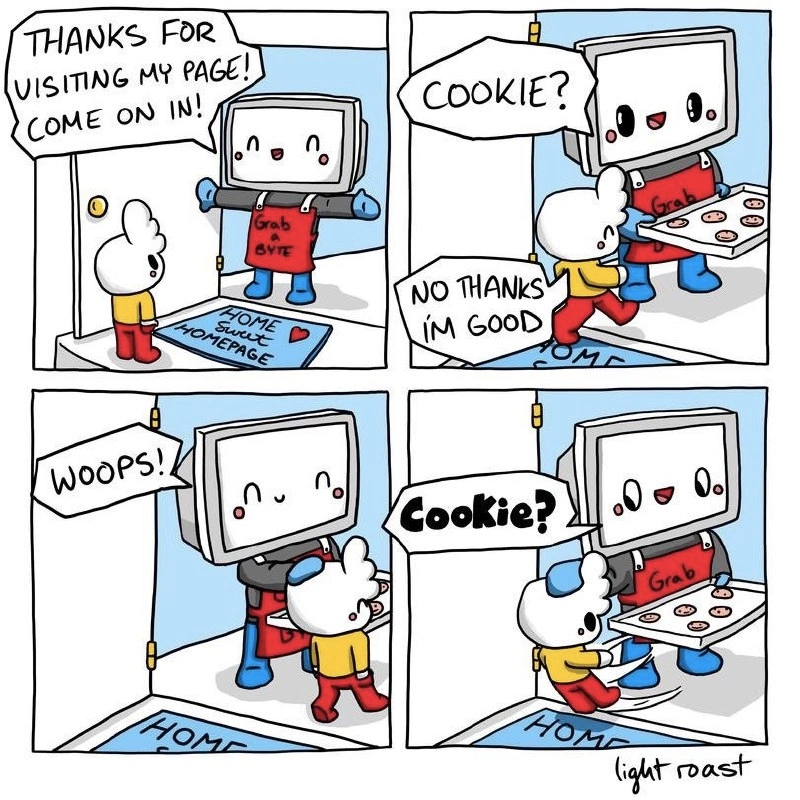
In the cartoon, the computer monitor character represents a website (with the whole house as the website’s domain/homepage). The white bunny is like an ordinary user visiting the site. The scene is drawn as if the user came to the website’s “home” and got a warm welcome – a bit of cute literal interpretation of a homepage welcome. The monitor is wearing an apron with “Grab a BYTE”, which is a pun: normally a host might say “grab a bite” (have some food) and offer you a cookie to eat. Here it says BYTE (8 bits of data) to hint this is all about computers and data. The doormat saying “Home Sweet Homepage” reinforces that we’re talking about a website’s home.

Now, when the site offers a “Cookie?”, in technical terms that’s like the site showing a cookie consent banner. Websites do this because of privacy laws like GDPR (General Data Protection Regulation in the EU). GDPR requires websites to ask for your permission before using cookies that aren’t strictly necessary. Necessary cookies might be things like keeping you logged in or remembering what’s in your shopping cart — things that the site can’t function without. But cookies for tracking what you do, for analytics or ads, must have your consent under these rules.

So, practically, when you visit a modern website, often you’ll see a little pop-up or banner that says something like: “We use cookies to improve your experience. Do you accept?” with buttons for Accept or Decline (or sometimes “Manage preferences”). That pop-up is the site offering you the “cookie”. It’s not a real cookie to eat, but a metaphor for “Can we store some data on your device?”

In the comic, the bunny says “No thanks I’m good.” That’s equivalent to clicking “No” or “Decline” on a cookie consent form. It means the user doesn’t want to be tracked or doesn’t want unnecessary data stored. A well-designed site will respect this choice and maybe not set any tracking cookies, and ideally remember that decision for the future. Many sites will then not show the cookie prompt again for some time (often they remember your choice by setting a small cookie or using local storage purely to save the fact that you declined — which is usually allowed as it’s considered a necessary action to honor your preference).

However, the joke here is that the site immediately asks again — “Woops!... Cookie?” This suggests the site either forgot the user’s answer or is choosing to ignore it quickly. This is a big UX design no-no. It’s like if you tell someone “I don’t want this,” and they literally turn around and ask you the same thing again a second later. Unfortunately, on some poorly designed websites (or overly aggressive ones), you might see the consent prompt reappear frequently. This could happen if:

  • The site didn’t save the user’s “no” choice (so it keeps thinking it must ask every time).
  • The site is coded to show the prompt on every visit until you finally say yes (which some consider an annoying tactic to get you to consent).
  • Or a bug resets the preference (say, the decline only lasted for the single page and wasn’t remembered on the next page load).

For a junior developer, it’s useful to know why this is bad UX. UX stands for User Experience, basically how a user feels when interacting with your product or site. A key principle in good UX is to reduce friction – don’t annoy the user or make them do unnecessary work. A UX failure is when a design causes frustration or confusion. In this case, repeatedly nagging someone with the same question definitely creates frustration. It’s also somewhat disrespectful of the user’s input. If they clicked “No” once, asking them again (especially immediately) can feel like the site is saying “Are you sure? Really sure? Come on, have a cookie!” – which is humorous in a cartoon but irritating in reality.

The tags mention repetitive_popups and privacy_compliance_annoyance – that’s exactly what this is. The site is trying to comply with privacy laws (good intention) but doing it in a way that annoys the user (bad execution). It’s a classic case of following the rules to the letter but not the spirit. The spirit would be: ask politely, and if the user declines, respect that and don’t bother them again for a while.

To put it simply: the meme is teaching that when designing a website under data privacy rules, you should implement the cookie consent in a user-friendly way. Don’t be like this silly computer host who keeps offering a cookie after the guest said no. Instead, remember the user’s choice (e.g., by setting a small “decline” cookie or a setting in local storage) so that you don’t pester them on every page. It’s both polite and likely required by law to honor a user’s decision. If you forget to do that, your site ends up like a looping cartoon gag – funny as a joke, but not for a real user who just wants to browse your page without constant interruptions.

This meme captures a painfully familiar WebDev scenario: the endless cookie consent nagging. In the cartoon, a friendly computer monitor (the website) greets a bunny (the user) at the “door” of its homepage. The website host is even wearing a red apron with the punny slogan “Grab a BYTE” (a nerdy play on “grab a bite,” swapping in byte – a unit of digital data – for an edible bite). The doormat reads “Home Sweet Homepage,” another cheeky nod to classic homepages. Everything seems welcoming in a goofy, literal way.

But then comes the infamous offer: > “COOKIE?” – proffering a tray of actual cookies. This is a direct metaphor for those cookie consent banners that pop up on modern websites. The bunny says “No thanks I’m good,” effectively clicking “Decline” on the cookie prompt. So far, so good – the user opted out of tracking or unnecessary cookies. In a perfect world, the site would graciously remember that choice and not ask again for a while.

Instead, panel 3 shows the door momentarily closing with a polite “Woops!” – and then bang! The site’s smiling monitor is back immediately in panel 4 asking “Cookie?” yet again. 😅 This is the exact frustration developers and users know too well: sites that keep asking for cookie consent even after you’ve declined. The humor hits home because it exaggerates a real UX failure – it’s like the site literally can’t take “no” for an answer.

Why does this happen? Often it’s due to how cookie consent is implemented under GDPR and other DataPrivacy laws. GDPR (the EU’s General Data Protection Regulation) requires websites to obtain explicit user consent before using non-essential cookies (like those used for analytics or advertising). The intention is good – give users control over their data – but the implementation on many sites became a UX nightmare. Developers rushed to comply by throwing up prompts: “This site uses cookies, allow or deny?”

A well-behaved site should remember the user’s choice (usually by storing a record of consent). Ironically, to remember a “no cookies” preference, the site often has to set a cookie! This special cookie (sometimes called a consent cookie) simply records that you declined. If the site doesn’t set anything (maybe out of an overly strict interpretation of “no cookies at all” or just poor coding), it has no idea you already said “no” on your next visit or page load. The result? Repetitive popups asking for consent every single time – just like the cartoon’s door reopening instantly with another cookie offer. It’s a comedic illustration of a real technical quirk: the consent paradox of needing to drop a cookie to respect “no cookies.”

In code, it might look like this:

function onCookieChoice(choice) {
    if (choice === "accept") {
        // User accepted cookies: store consent for future visits
        document.cookie = "consent=yes; expires=Fri, 31 Dec 9999 23:59:59 GMT";
    } 
    // If choice is "decline", do nothing.
    // Without storing a "no" decision, we'll ask again next time. Woops!
}

The meme’s persistent cookie offer also hints at something more cynical in UX design: some websites deliberately make “Decline” hard or temporary, nudging users to eventually hit “Accept”. This borders on dark patterns in UXDesign – tricks that undermine user choice. The cartoon’s immediate second offer (“Cookie?” said with a cheerful smile) feels a lot like a pushy waiter who, after being told “no dessert, thanks,” swings back a minute later with the dessert tray again. It’s funny in the comic, but in practice it’s a frustrating privacy_compliance_annoyance.

Seasoned developers chuckle (or groan) at this comic because we’ve lived through the GDPR rush. Around 2018, every web team scrambled to add these banners to avoid legal penalties. Often it was a last-minute task (“We need a cookie consent popup on the site by tomorrow!”) slapped onto websites without much thought for elegance. The result was a patchwork of clunky popups and modals, frequently implemented with third-party scripts or libraries. Many sites showed the banner on first load but failed to remember the answer properly (especially if “no” was given), leading to the repetitive_popups depicted here. Even today, it’s not uncommon to click “decline” and still get prompted again later — as if the site is thinking, “Maybe the answer will be yes if I ask one more time.”

From a senior dev perspective, this meme also highlights the tension between DataPrivacy and UX/UI. We want to respect users’ privacy preferences, but we also hate ruining the User Experience (UX) with annoying dialogs. Balancing compliance and convenience is hard. The apron’s joke “Grab a BYTE” and the homey welcome mat show how we wish to warmly welcome users, yet the first thing we do is often hit them with a privacy notice. It’s a bit of tragic irony: the law mandates we offer cookies (data trackers) politely, but by doing so in a ham-fisted way, we’ve made websites less hospitable.

In summary, experienced devs recognize the comic’s scenario as a too-real satire of modern web UXFailures. The site keeps offering the same “cookie” over and over, making us laugh and cringe at how true it is. It’s a gentle reminder to developers: if you must have a cookie consent, implement it in a user-friendly way – respect “no” answers, maybe give it a long memory – otherwise your site becomes that over-eager host who keeps shoving the cookie tray at guests who already declined. The meme takes a mundane coding/legal problem and turns it into a relatable joke, complete with cute characters and tech puns, which is why it resonates in the WebDevelopment community so much.

Description

A four-panel comic strip by 'light roast' depicts a friendly, anthropomorphic computer character with a CRT monitor head, welcoming a small, white, fluffy character into its home. In the first panel, the computer says, "THANKS FOR VISITING MY PAGE! COME ON IN!" above a doormat that reads "HOME Sweet HOMEPAGE ❤️". The computer wears a red apron saying "Grab a BYTE". In the second panel, the computer offers a tray of baked goods, asking, "COOKIE?". The visitor politely declines, "NO THANKS I'M GOOD". In the third panel, as the visitor tries to pass, the computer blocks the way, saying "WOOPS!". In the final panel, the computer persistently offers the tray again, repeating, "Cookie?". The comic is a literal and humorous take on how websites aggressively push browser cookies for tracking, making it difficult for users to opt out. The joke resonates with anyone who has navigated the modern web, highlighting the often frustrating user experience of dealing with persistent cookie consent pop-ups

Comments

7
Anonymous ★ Top Pick This is the 'essential cookie' that breaks the site if you decline. Funny how the back button, a fundamental browser feature, suddenly becomes a premium, opt-in feature on so many sites
  1. Anonymous ★ Top Pick

    This is the 'essential cookie' that breaks the site if you decline. Funny how the back button, a fundamental browser feature, suddenly becomes a premium, opt-in feature on so many sites

  2. Anonymous

    On that site, “Reject All” routes to /dev/null - classic micro-front-end: thirty frameworks, zero state persistence, and a PM convinced GDPR compliance is just another modal in the backlog

  3. Anonymous

    We spent years building sophisticated recommendation engines and ML pipelines to understand user intent, then GDPR made us implement cookie banners that trained users to blindly click 'Accept All' just to make the pain stop

  4. Anonymous

    The modern web experience: where 'No thanks' is just a suggestion and GDPR compliance means asking the same question in increasingly creative ways. We've gone from 'move fast and break things' to 'move slowly and ask permission repeatedly' - because nothing says user-centric design like making the exit door contingent on accepting third-party tracking cookies

  5. Anonymous

    That cookie banner implements at-least-once delivery with no idempotency key - every 'reject all' triggers retries until an 'accept' returns 200

  6. Anonymous

    Cookie consent UX: 'Decline' just flips the SPA to its cookie-less fallback - a.k.a. the loading spinner of eternal regret

  7. Anonymous

    Classic CMP anti-pattern: consent in localStorage, analytics boot before hydration, subdomain mismatch plus ITP cleanup - so every route re-prompts; stateless privacy at its finest

Use J and K for navigation