Skip to content
DevMeme
2433 of 7435
The Cookie-less Catch-22 of User Experience
UX UI Post #2704, on Jan 29, 2021 in TG

The Cookie-less Catch-22 of User Experience

Why is this UX UI meme funny?

Level 1: Goldfish Memory

Imagine you have a friend who insists on never writing anything down to remember it (because they want to prove they have a great memory or they just don’t like keeping notes). One day, you tell this friend, “Hey, please don’t ask me about that thing again, I’ve already taken care of it.” Your friend smiles and says, “Got it!” But the very next day, guess what? They ask you the exact same question again, as if you never told them not to. They completely forgot because they refused to make a note or keep any record of your request.

It’s a little frustrating, right? You might even find it ironically funny after the third or fourth time – you say “Don’t ask me again,” they agree, and then poof, that promise disappears from their mind. This meme is joking about the same kind of situation, but with a website. The website proudly says it won’t remember things about you (to respect your privacy), but that means when you click “don’t show again,” it forgets that you clicked it almost immediately. So the next time you visit, it’s like a friend with a goldfish’s memory – it pops up and asks the same thing all over again. The humor comes from that silly contradiction: the site is trying to be polite and not “track” you at all, but by doing so it ends up being so forgetful that it keeps annoying you with the very message you wanted to get rid of.

Level 2: Memory 404 Not Found

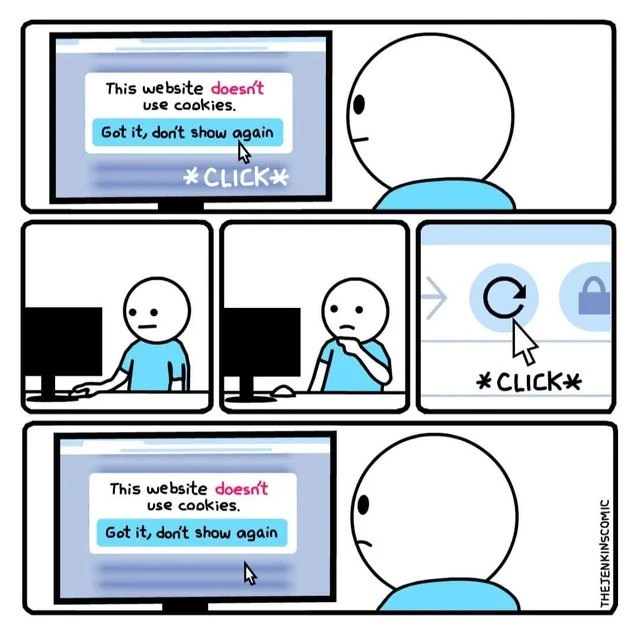
Now, let’s break it down in simpler terms. The comic shows a user encountering a pop-up banner that says “This website doesn’t use cookies” with a button labeled “Got it, don’t show again.” In a normal WebDevelopment scenario, clicking that button should make the banner go away and stay gone on future visits. How would a site usually do that? By remembering your choice. Typically, the website would set a little cookie or use something like the browser’s localStorage to save a flag that says “User clicked the don’t-show-again button.”

  • Cookies in web development are small pieces of data that a site stores in your browser. For example, a site might store a cookie to keep you logged in, or to remember that you closed a tutorial.
  • localStorage is a built-in storage space in your browser (introduced with HTML5) that lets a site save data on your machine (but not send it to the server automatically). It’s often used for storing user preferences as well.

Both cookies and localStorage let the website persist state — meaning the site can recall some information from one page load to the next, improving your experience. This is crucial because, by default, when you refresh a page, the website has no memory of what you did before the refresh (web pages are usually “stateless” unless extra steps are taken).

In the scenario from the meme, the website proudly doesn’t use any cookies and presumably doesn’t even use localStorage. That’s great for privacy, but it means there’s no place to save the “don’t show again” preference. When our stick-figure friend clicks the dismissal button, the site might hide the banner for that moment. However, because nothing was saved in the browser, as soon as he clicks the refresh button (the circular arrow icon in panel 4), the page loads fresh. The site has forgotten that the banner was ever dismissed. So the banner appears again as if it were the first time. The user is understandably baffled in panel 5, seeing the same message reappear. Essentially, the preference to hide the banner wasn’t recorded anywhere permanent, so it’s as if the user never clicked "Got it". Every reload is a clean slate.

Here’s a quick illustration of how it should work in a typical front-end code:

// When the page loads, check if the banner was dismissed before
if (!localStorage.getItem('hideBanner')) {
    showCookieBanner();
    // (No record found, so show the banner this time)
}

// When the user clicks "Got it, don't show again":
button.onclick = () => {
    localStorage.setItem('hideBanner', 'true');
    hideCookieBanner();
    // (Save a flag so next time the banner won't show)
};

In this code, localStorage.getItem('hideBanner') looks for a saved key. The first time, nothing is there, so showCookieBanner() runs and the banner appears. When the user clicks the button, localStorage.setItem('hideBanner', 'true') stores a value in the browser so that on the next page load, getItem('hideBanner') will find it and know not to show the banner again.

Now, imagine if we remove the storage part (because the site “doesn’t use cookies” and also avoids local storage). The code would always find nothing and always display the banner. No matter how many times you click the button, the instruction to not show again is never saved anywhere. The outcome? A perpetual loop: you dismiss the banner, refresh, and it comes right back like nothing happened. It’s like the site has amnesia. This is both a FrontendHumor moment and a lesson: even a simple UX feature like “don’t show this again” relies on some form of memory. Without any storage mechanism, the site acts brand new each time. The poor user in the comic is stuck in that refresh-and-forget cycle, which is the joke here. They click “Got it” expecting the site to remember, but on the next reload the site’s memory is null (empty), so it cheerfully shows the same message again. Oops!

This meme highlights a classic state-management paradox in web development. The website proudly declares “This website doesn’t use cookies” (a nod to strict DataPrivacy principles), yet it offers a Got it, don’t show again button on a cookie notice. Seasoned developers immediately smirk at this combination: how can a “don’t show again” preference stick if the site truly uses no cookies or storage? It’s a case of the site being completely stateless on the client side, creating an ironic loop. The user in the comic clicks the dismissal button and then hits refresh, only to see the same consent dialog pop right back up. The code basically forgets the user’s choice every time because there’s nowhere to save that choice. This turns into a refresh loop of frustration, perfectly capturing some dark humor in WebDev: the site respects your privacy so much that it literally forgets you immediately!

From a senior dev perspective, the problem is obvious. Web browsers are stateless by default – each page load has no memory of previous actions unless you explicitly store something on the client (like setting cookies, using localStorage, or similar). Here, the site’s boast of using no cookies means it also gave up the usual mechanism to remember user preferences. No cookies, no memory. Typically, a “don’t show again” banner would set a small token (often an innocuous cookie or a localStorage flag) to remember the user has dismissed it. Without any persistent flag, the page always thinks this is the “first visit” and dutifully shows the banner every single time. It’s a frontend Catch-22: the very feature meant to improve UX (hiding a repeated nag) fails because the app is too strict about not retaining data.

This scenario is actually familiar to developers who’ve dealt with cookie consent requirements. Often, sites set one tiny cookie just to record that you consented or closed the banner – a paradoxical but necessary step so they don’t keep asking you. It’s the one cookie whose sole job is to say “no more cookies, please” 🙂. If a site refuses to even set that, the cookie banner inevitably pops up on every visit like clockwork. In fact, users who browse in privacy modes or with all cookies blocked will recognize this pain: every page feels like a brand new encounter with all the same pop-ups. The meme exaggerates this to comic effect, showing how ultra-pure privacy can backfire into a bad UX.

In summary, this comic pokes fun at the tension between data privacy zeal and practical UX/UI needs. The dev team likely had two clashing requirements:

  • “No client storage at all” (to boast privacy compliance, meaning no cookies, no localStorage_missing, truly stateless)
  • “Provide a ‘don’t show again’ option” (to avoid annoying users with the same banner repeatedly)

When you put these together, you get a stateless_preference contradiction: if you honor the first rule, you can’t fulfill the second. The result is the unintentionally hilarious situation shown: a privacy-first site stuck showing a privacy notice over and over. It’s a bit of DeveloperHumor about how even well-intended policies can create absurd UX paradoxes. The experienced folks reading this have probably encountered something similar and are nodding (or facepalming) at this “we need to set a cookie to remember that you didn’t want cookies” scenario.

Description

A three-panel comic strip by 'THEJENKINSCOMIC' depicting a user's frustrating interaction with a website. In the first panel, a user is shown a banner that reads, 'This website doesn't use cookies.' and clicks the button 'Got it, don't show again.' The second panel shows the user looking thoughtful, then clicking the browser's refresh button. In the final panel, the exact same banner reappears, much to the user's dismay. The humor is rooted in a technical irony: the website can't remember the user's preference to hide the banner precisely because it doesn't use cookies or any local storage mechanism. For experienced developers, this is a perfect illustration of a UX paradox where a well-intentioned privacy feature creates a frustrating, repetitive user experience
Comments

13
Anonymous ★ Top Pick This is what happens when a product manager says 'make it stateless' and a junior dev takes it literally
  1. Anonymous ★ Top Pick

    This is what happens when a product manager says 'make it stateless' and a junior dev takes it literally

  2. Anonymous

    We hit full RESTful statelessness: no cookies, no localStorage - just an infinite “don’t show again” loop where the user’s rising blood pressure is our only persistent state

  3. Anonymous

    The ultimate paradox: a website that doesn't use cookies but also can't remember you clicked 'don't show again' - proving that sometimes the best way to avoid cookie compliance issues is to implement them so poorly that you technically need cookies just to remember you don't use cookies

  4. Anonymous

    Ah yes, the classic 'This website doesn't use cookies' banner that requires cookies to remember you dismissed it. It's the web development equivalent of 'I never make mistakes' said while actively making one. Senior engineers know this happens when the product manager insists on a cookie banner for legal compliance, but the implementation team either: (a) ironically stores the dismissal preference in localStorage instead of a cookie, then clears it on every session, (b) checks the preference before the script loads that sets it, or (c) my personal favorite - implements it as a stateless component that re-renders on every navigation. The real kicker? The banner claims no cookies while probably dropping analytics, session tokens, and third-party tracking pixels faster than a microservices architecture spawns containers. This is what happens when compliance becomes a checkbox exercise rather than an architectural consideration - you get theater, not functionality

  5. Anonymous

    Remembering “don’t show again” without cookies is the CAP theorem of consent - pick two: compliant, stateless, or not-annoying

  6. Anonymous

    When your cookie banner claims no cookies but sets a 'no_cookies_please' cookie to enforce 'don't show again' - peak GDPR irony

  7. Anonymous

    “We don’t use cookies.” Click “Don’t show again,” refresh - banner returns. Congrats on the stateless architecture: every page view is a cold start, including my patience

  8. @aso1datov 5y

    Use localStorage instead

    1. @bashiordache 5y

      Bingo

    2. @energizer91 5y

      +

  9. @cheburgenashka 5y

    Flash LSO and evercookie shit

  10. @NiKryukov 5y

    But it uses biscuits

  11. @Araalith 5y

    Worker, local or session storage, img caching, browser fingerprint + IP, query string, options cache etc.

Use J and K for navigation